

15 best B2B data vendors and providers for 2026

The criteria for picking a B2B data vendor have changed in the last two years. Where coverage and contact volume used to carry most of the weight, buyers now also weigh signal freshness, intent depth, AI agent compatibility, and how cleanly the data flows into the rest of the stack.
The cost of getting it wrong has gone up too. Gartner puts the average annual loss from poor data quality at $12.9 million, and AI agents acting on stale records compound the damage faster than a human rep ever could.
The right fit depends on what a team plans to do with the data and how much of the GTM motion runs through AI. The comparison below ranks the leading B2B data vendors across the criteria buyers weigh most in 2026, with a breakdown of each platform’s strengths, trade-offs, and best-fit GTM teams.
| Platform | Best for | Key differentiator | Pricing |
|---|---|---|---|
| Demandbase | Teams that want account ID, intent, technographics, firmographics, and verified contacts in one AI GTM platform | Self-reinforcing data flywheel that links account ID, the native B2B DSP, and intent scoring | Custom |
| 6sense | Operationally mature teams that act on intent signals consistently | Proprietary intent gathered through its own publisher co-op and web tracking | Custom (free tier available) |
| ZoomInfo | Enterprise teams that need the widest contact and company footprint | 500M+ contacts connected by the GTM Context Graph | Custom |
| Cognism | Cold-call-heavy teams selling into Europe | Human-verified mobile numbers and deep EMEA compliance coverage | Custom |
| HubSpot Breeze Intelligence | HubSpot customers who want enrichment with no extra integration | Clearbit data wired straight into the Smart CRM | Add-on to HubSpot (Professional from ~$800/mo) |
| Lusha | Individual reps who prospect inside LinkedIn | Chrome-extension workflow with published, low-entry pricing | Free to $70/user/mo, Scale custom |
| Apollo.io | Teams that want data, sequencing, and dialing under one subscription | Large open database paired with built-in GTM execution | Free to $119/seat/mo |
| UserGems | Teams that sell through warm relationships and past champions | Job-change tracking scored against 600+ ICP criteria | $2,750 to $10,000/mo, Enterprise custom |
| Bombora | Marketers who need clean, consent-based account intent | Data Co-Op of 5,000+ publishers with mostly exclusive signal | Custom |
| RocketReach | Small teams and recruiters on a tight budget | 700M+ company profiles reachable through transparent per-seat plans | $27 to $142/mo |
| LinkedIn Sales Navigator | Sellers who want the freshest professional graph | Self-maintained member profiles that refresh within a day or two | $119.99 to $159.99/mo, Advanced Plus custom |
| UpLead | Mid-market teams that want an accuracy guarantee | 95% accuracy commitment with credit refunds on bounces | Free trial to $199/mo, Professional custom |
| Leadfeeder | European teams that want to accurately identify anonymous web traffic | EU-native infrastructure with a GDPR-first build | Free to ~$430/mo |
| LeadHQ | Teams that want prospecting handled for them | Fully managed service that delivers verified leads, no tool to operate | From ~€2,940/mo |
| Seamless.ai | Reps who want fresh data pulled at search time | AI that crawls and verifies contacts live at the moment of search | Custom (free plan available) |
1. Demandbase
Demandbase is a pipeline AI platform that pulls firmographics, contact data, intent signals, and technographics into one account view that powers the rest of your B2B GTM stack.
The Demandbase data product is built around a flywheel. Account identification (running on 3.7B+ IPs) sharpens ad targeting on the native B2B DSP, the DSP generates intent signals at scale, intent data feeds back into account scoring, and account scoring drives the next round of targeting.
Around that loop, you’ve got 47K+ technographies, 100M+ company records, 176M+ verified contacts, and a new MCP for AI agents. That self-reinforcing loop is what other vendors in this list haven’t built.
Key features
- Account Identification: Demandbase’s account ID model runs on 3.7B+ IP addresses and a model trained on billions of B2B signals, which is how it hits the highest match rates in the category. Most of your website traffic is anonymous, and Demandbase tells you which companies are behind it.
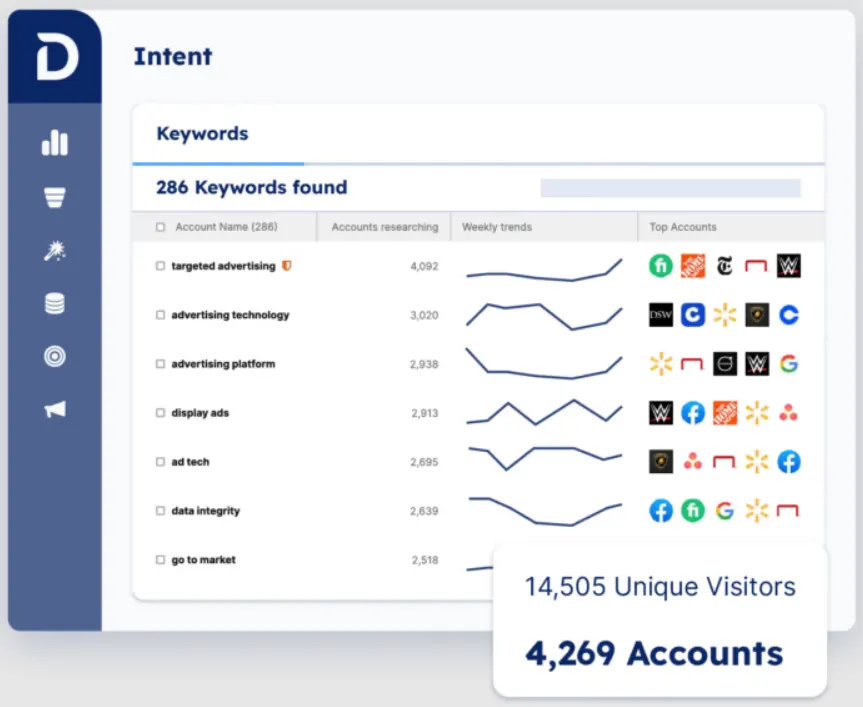
- Proprietary intent data: The platform tracks intent across 810K+ keywords and combines bidstream breadth with the relevance of curated content. The model picks up buying signals long before a prospect fills out a form, which gives your team a head start on accounts that haven’t shown obvious interest yet.
- Contact data with real-time verification: The contact dataset spans 176M+ B2B decision-makers and runs every email through real-time verification before it makes its way into your reps’ hands. Continuous refresh keeps records accurate as people change jobs, which keeps your outreach from going to dead inboxes.
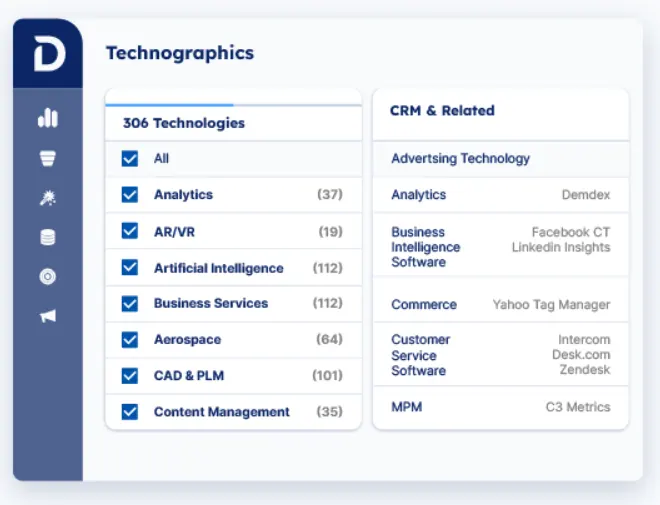
- Technographics tracking: The technographic data covers 47K+ technologies and reaches into software hidden behind firewalls that most providers miss entirely. Teams running stack-based ICP filters or competitive displacement plays use this to sharpen outreach lists past what generic firmographics give you.
- Real-time sales trigger alerts: The trigger feed tracks 137M+ social profiles and alerts your team on company expansions, leadership changes, acquisitions, and funding rounds as they happen. These are the moments when buying conversations open up, and seeing them in real time beats checking a news feed once a day.
- Demandbase MCP for AI agents: The newly launched Demandbase MCP gives AI agents (Claude, ChatGPT, VS Code, and others) natural language access to both Demandbase data and third-party B2B intelligence. As GTM workflows move toward agentic AI, this puts the data where the agents already work, so your team isn’t building custom integrations to catch up.
Advantages of using Demandbase
Demandbase covers the parts of B2B GTM that other vendors split across five subscriptions. Account identification, proprietary intent data, technographics, firmographics, verified B2B contacts, the only native B2B DSP in the category, and (newer this year) MCP access for AI agents.
The same dataset powers every motion the platform supports, which is what makes the math work for revenue teams that need ABM, advertising, sales intelligence, and personalization running off one source.
One G2 user describes how Demandbase combines account data, Salesforce contact history (leads and opportunities), and engagement-level interactions into a single view. They say this moves ABM decisions out of opinion territory and into something teams can back with evidence. [Read Full G2 Review]
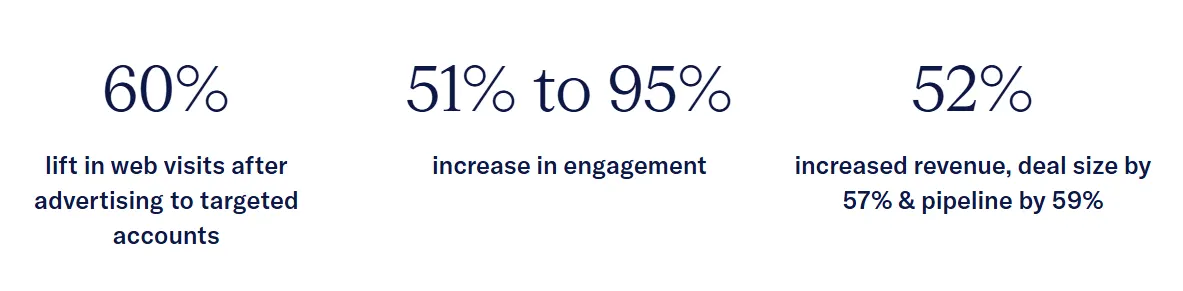
SAP Concur is one of the clearer examples of what that consolidation pays back. The team brought Demandbase in to pull account insights together across Salesforce, Marketo, and Adobe Analytics, then added intent signals and Account Intelligence on top. After a few months running account-based marketing strategies on a prioritized account list, they reported a 52% increase in closed-won revenue, 57% larger deal sizes, and 59% more pipeline. [Read Case Study]
The same consolidated data does double duty on the sales side. According to one user on G2, the unified view of intent, firmographics, and engagement makes account prioritization a faster call for reps, and it keeps marketing and sales running off the same signals without the usual disagreements. [Read Full G2 Review]
Pricing
Pricing is custom and built through the sales process. Quotes scale based on team size, target account count, and the modules a team needs.
2. 6sense
6sense is an AI-based revenue intelligence platform whose B2B data product combines proprietary intent signals, firmographic and technographic records, and verified contacts into a single account-level feed.
Where most B2B data vendors win with the contact database size, 6sense leads with signal coverage and the proprietary intent data it collects across its own publisher network and web tracking infrastructure.
Key features
- Proprietary intent data network: 6sense operates its own intent data collection across a B2B publisher co-op and web traffic infrastructure. It captures keyword research, content engagement, and anonymous account-level browsing behavior.
- Account and contact database: The platform provides verified contact records with emails, direct dials, job titles, and firmographic context for accounts that the intent engine picks up. Database depth is strongest in North American tech, SaaS, and enterprise verticals.
- In-house technographics: 6sense maintains technographic data on 30K+ technologies across 148+ industries, collected through its own crawlers and refreshed on a rolling basis. Teams that filter ICPs by tech stack or trigger outreach off specific tooling usually lean on this data more than the contact records.
Pros
- Live read on account-level research activity: The platform’s clearest strength on G2 is the visibility it gives sellers into which accounts are researching, when, and how deep into the buying cycle. Teams use that view to focus outreach on accounts already in motion. [Read Full G2 Review]
- Higher-signal target lists: The intent data helps reps focus on prospects most likely to convert, and several users say their outreach became more relevant and timely once they switched to working from 6sense’s prioritized accounts. [Read Full G2 Review]
- Salesforce and CRM workflow fit: Sellers using Salesforce alongside 6sense say the workflow holds together cleanly. Account intelligence appears next to CRM data, so the signal-to-outreach loop runs inside the tool reps already work in. [Read Full G2 Review]
Cons
- Power tool with a setup tax: 6sense rewards teams that invest in running it well. Without someone owning keywords, segments, and ongoing configuration, the platform underdelivers, and reviews mention this as the most common cause of slow time-to-value. [Read Full G2 Review]
- False positives in the intent feed: The intent feed isn’t always clean. Some reps report false positives on signals and outdated contact information on individual records, which means a verification step often slots in before outreach. [Read Full G2 Review]
- Pays off most for operationally mature teams: The volume of intent data can feel overwhelming, and the consensus on G2 is that 6sense pays off most for teams with the operational discipline to act on the signals consistently. Lean teams often struggle to convert the signal volume into prioritized action. [Read Full G2 Review]
Pricing
Pricing depends on which product a team is evaluating. Sales Intelligence has a free tier and three paid tiers built around data credit volume and Predictive AI access, all listed on the site.
The full intent data platform is custom-quoted through a demo cycle, and third-party reports place enterprise contracts in the $60,000 to $120,000+ per year range.
Related reading → 15 Best 6sense Competitors & Alternatives Right Now
3. ZoomInfo
ZoomInfo is a B2B GTM intelligence platform whose data foundation covers 500M+ verified contacts and 100M+ companies, gathered through a multi-source collection and validation model.
Few competitors match the data footprint. ZoomInfo combines contact, intent, technographic, and engagement data under one roof, with the GTM Context Graph stitching the signals together for downstream automation and AI.
Key features
- Contact and company database scale: ZoomInfo’s database spans 500M+ verified contacts and 100M+ companies, which makes it the broadest first-party contact graph in the category.
- Multi-source collection and verification: The platform pulls data from public sources, a contributory network, machine learning models, and a team of human researchers, with records re-verified on a rolling basis.
- Technographic data: ZoomInfo tracks technology adoption across tens of thousands of products and integrates the data into account records, so teams can filter ICPs by tech stack or trigger outreach based on specific tool usage.
Pros
- Built-in engagement and buying-group signals: Sellers point to features like “likely to engage” scores, verified email addresses, and mapped buying groups as useful signals on top of the contact data, especially when prioritizing outreach across complex accounts. [Read Full G2 Review]
- Large database with deep filtering: The database size is the most common pro in reviews, but what makes it usable is the filter set. Teams can narrow by job title, location, tech stack, and other attributes, and then export matched contacts in bulk with the full record attached. [Read Full G2 Review]
- Active-cycle signal with technographic context: Teams report that the combination of intent signals and technographic data gives a working view of which B2B companies are in an active buying cycle. This makes outreach timing easier to call without bouncing across separate tools. [Read Full G2 Review]
Cons
- Steep pricing for SMB and growing teams: The pricing structure favors enterprise buyers. Smaller teams, startups, and individual buyers find the pricing structure hard to justify, and reviews ask for more flexible plans built for growing businesses. [Read Full G2 Review]
- Direct-dial accuracy isn’t always direct: The direct dial field doesn’t always lead to the contact. Users mention numbers that route to department lines instead of the prospect, and the workflow for submitting corrections is harder than it should be. [Read Full G2 Review]
- Account matching errors with similar-named companies: Account matching can break down when company names overlap. Financial services users in particular mention contacts getting tagged to the wrong institution, which then creates duplicate accounts in the CRM and forces RevOps to clean them up. [Read Full G2 Review]
Pricing
Pricing is custom and demo-gated. The final quote depends on which tier a team picks, the number of seats, and which add-ons are bundled in.
Related reading → 16 Best ZoomInfo Alternatives & Competitors in 2026
4. Cognism
Cognism is a B2B sales intelligence platform built on a GDPR-compliant contact database that pairs firmographic and contact records with manually phone-verified mobile numbers, intent signals, and Do-Not-Call screening across multiple regions.
Cognism competes on verification and compliance, with manually phone-verified mobile numbers and every record run through GDPR, CCPA, and DNC screening before it goes into the database.
Key features
- Diamond Data and human-verified mobiles: This is the feature Cognism is best known for. Each mobile number in the dataset gets manually called and verified by a human, which puts connect rates well above what algorithm-only databases deliver and explains why cold-call-heavy teams keep paying the premium.
- EMEA contact database depth: Cognism’s 200M+ contact database goes deepest in the UK, Germany, and France, where most US-first vendors hit coverage gaps. Teams selling into Europe shortlist Cognism for that reason alone.
- GDPR, CCPA, and DNC compliance: Records pass through DNC screening across multiple regions before they reach the database, and the platform’s data sourcing follows a consent-based model aligned with GDPR and CCPA.
Pros
- Phone accuracy that holds up in daily use: The mobiles are human-verified, so a higher percentage of dials connect to a real person, which most algorithm-only databases can’t match consistently. [Read Full G2 Review]
- Clean, low-learning-curve interface: Cognism doesn’t ask much of new users. The interface is intuitive enough that most reps work it confidently within hours, which lowers the operational cost of onboarding new seats. [Read Full G2 Review]
- Granular filtering on geography and revenue: Users talk about the ability to narrow by country, revenue band, and individual role inside the account as the combination that makes targeted list pulls fast. [Read Full G2 Review]
Cons
- Stale employment records: G2 users mention that the platform doesn’t always catch when a contact leaves a company. Some records lag by months or longer, which becomes a problem when reps build sequences on the assumption that the role-and-company pairing is still accurate. [Read Full G2 Review]
- Limited data on Middle Eastern accounts: The Middle East dataset is one of the weaker parts of the platform. Reviews from sellers in the region describe fragmented coverage and frequent missing contact details on government accounts, which forces them to supplement with other tools. [Read Full G2 Review]
- No private contact lists at the user level: There’s no native way to keep a saved list private. Other users on the same account can see contact lists by default, which reviewers point to as a problem for reps who build their own outbound lists and want to keep them off shared visibility. [Read Full G2 Review]
Pricing
Cognism doesn’t publish pricing on the website.
Plans are quote-based and start around $15,000 per year, scaling up based on team size, data volume, and which add-ons (like Diamond Data or intent) get included.
5. HubSpot Breeze Intelligence
HubSpot’s native enrichment and intent product is called Breeze Intelligence. It uses the Clearbit dataset HubSpot acquired to complete company and contact records in your CRM and show which accounts are researching you on the web.
No other tool on this list is integrated this tightly into the CRM. Breeze brings data enrichment, buyer intent, and form shortening into HubSpot’s Smart CRM, with the same Clearbit data feeding records, workflows, and Breeze AI for downstream automation.
Key features
- Form shortening: When a visitor’s details already exist in the data, Breeze hides those form fields and asks only for what’s missing. The form gets shorter, conversion goes up, and the record still fills in from the database behind it.
- Continuous enrichment tools: Breeze re-checks records on a schedule and updates the ones that have gone stale, so a company that moved or grew shows accurate detail without anyone touching it.
- Native HubSpot integration: The enriched data flows straight onto your records and into lists, workflows, and Breeze AI, with no API to configure. A team segments, scores, and automates off data that’s already in the CRM.
Pros
- Accurate, up-to-date profiles: The company and contact profiling holds up well, with business background, employee count, and location almost always current. A rep can trust the firmographics without double-checking. [Read Full G2 Review]
- Easy HubSpot integration: One user found the HubSpot integration simple enough that moving over from another platform (in this case, Leadfeeder) was painless. [Read Full G2 Review]
- Slack alerts for site visitors: Users like that the Slack integration makes it easy to set a trigger and get pinged when identified traffic hits the site. [Read Full G2 Review]
Disclaimer → Reviews below come from the G2 page for Clearbit, which HubSpot acquired and rebranded as Breeze Intelligence. The capabilities described still apply.
Cons
- Recent UX changes: A run of recent interface changes hasn’t all been for the better. The newest visitor report in particular is harder to read and work with than the old one. [Read Full G2 Review]
- Weak on consumer email domains: Breeze leans on a valid business email to do its job, so it struggles to enrich records tied to personal domains like Gmail or Yahoo. Teams chasing SMB or sole-trader contacts will see worse results. [Read Full G2 Review]
- Best inside the US: The firmographic data is strong, but it mostly covers US companies. For a team selling mostly into Europe or APAC, the records won’t be as deep. [Read Full G2 Review]
Pricing
Breeze Intelligence isn’t sold on its own. It runs on a paid HubSpot subscription plus HubSpot Credits, where enrichment doesn’t spend credits but buyer intent and the AI features do. The features worth having need HubSpot Professional, which starts around $800 a month.
So the real cost comes from the HubSpot plan more than the data itself.
Related read → How to Use Demandbase and HubSpot to Unify and Scale Your ABM Efforts
6. Lusha
Lusha is a self-serve B2B contact data platform whose Chrome extension exposes verified phone numbers and emails from a B2B database of 280M+ contacts and 30M+ companies inside LinkedIn, Sales Navigator, and CRM views.
Accessibility is the platform’s selling point, with published pricing, a generous free plan, and a Chrome-extension-first workflow built for individual contributors more than RevOps teams.
Key features
- 280M+ contacts, North America-strongest: The database covers 280M+ contacts, 152M+ emails, 280M+ direct dials, and 30M+ companies. Coverage is strongest for North American records, and international depth depends heavily on which region a team is selling into.
- Job change alerts and technographics: Records include job change tracking and technographic data on the tools accounts use, with alerts when key contacts move to new companies.
- Chrome extension built into the sales prospecting flow: The Chrome extension is where most Lusha users spend their time. It reveals verified phone numbers and emails inline on LinkedIn, Sales Navigator, company websites, and inside the CRM, so reps don’t switch tabs to enrich a record they’re already looking at.
Pros
- Contact data inside the LinkedIn workflow: Teams describe Lusha as the closest thing to one-tab prospecting. Verified emails and direct dials appear on the LinkedIn profile a rep is already on, so the path from finding a contact to contacting them runs through a single screen. [Read Full G2 Review]
- Easier to learn than the heavier platforms: Compared to platforms like Apollo and ZoomInfo, Lusha feels lighter and more intuitive, and new reps usually get the workflow on day one without formal training. [Read Full G2 Review]
- No IT involvement to get running: Deployment is one of the lightest in the category. The Chrome extension installs in minutes, reps are usable inside their first hour, and users note they didn’t need help from IT or a customer success manager to get going. [Read Full G2 Review]
Cons
- Limits on filtering depth and international coverage: Teams ask for filters that go deeper than the current set, and broader contact and company coverage outside North America. The combination matters most for teams running outbound across multiple regions, where Lusha typically ends up as a secondary tool. [Read Full G2 Review]
- Not a single source of truth for outbound: Lusha handles contact data, but the rest of the outbound stack runs elsewhere. G2 users mention needing separate tools for sequencing, dialing, and engagement, which means the all-in cost lands well above the Lusha subscription itself. [Read Full G2 Review]
- Light on AI-driven intent and targeting depth: The intent and AI features are present but light. G2 users running enterprise sales motions consistently mention wanting richer signal data and smarter prioritization, and they typically supplement Lusha with a dedicated intent vendor for the deeper picture. [Read Full G2 Review]
Pricing
Lusha lists four tiers, all priced on a credit-based model, and the configurator on its pricing page handles the seat-and-credit math:
- Free: $0, capped at 40 credits a month, with the Chrome extension and standard CRM integrations.
- Pro: $29 per user per month (annual), about 250 credits, plus list management.
- Premium: $70 per user per month (annual), more credits, with added team management features.
- Scale: Custom-quoted for 6+ seats, with assigned credit limits per user and onboarding handled by Lusha sales.
Monthly subscribers can carry unused credits forward, up to 2x the plan cap.
7. Apollo.io
Apollo.io is a B2B data and GTM execution platform that wraps a 275M+ contact and 73M+ company database together with sequencing, AI agents, parallel dialing, and a built-in CRM under a single subscription.
Apollo’s positioning runs on consolidation. Data, sequencing, dialing, AI, and a light CRM all run from one product at a price point that most enterprise platforms can’t match.
Key features
- One of the largest open B2B datasets: The database holds 275M+ contacts and 73M+ companies, placing Apollo among the broadest open B2B datasets in the category. North American tech and SaaS verticals see the deepest coverage, with reliable depth across seniority levels and company sizes.
- Contributor network plus real-time verification: Apollo pulls data from a contributor network of 2M+ users, public crawlers, third-party providers, and signals from its own engagement tools, with real-time verification on emails and direct dials.
- Filter depth across 65+ dimensions: The platform offers 65+ filter dimensions across firmographic, technographic, demographic, and intent attributes, so teams can narrow lists by job title, seniority, company size, funding stage, tech stack, and dozens of other variables.
Pros
- Deep database filters that get specific: Reps point to the database’s depth as the platform’s best aspect. The filters are specific enough to narrow a list by exact job role and company size. [Read Full G2 Review]
- Strong integrations, particularly around Salesforce: The integrations work smoothly, and the Salesforce connection is the one many users single out. Records sync between the two automatically, so the CRM stays current without manual upkeep on the rep’s side. [Read Full G2 Review]
- Intent and AI signals that improve over time: Teams report that Apollo’s intent data and AI recommendations have sharpened with each release. The platform points reps to the right accounts at the right moment. [Read Full G2 Review]
Cons
- US-first database, weaker abroad: Coverage leans heavily toward US records. Outside that core, and especially in APAC and the Middle East, contacts turn up with no mobile number or a title that no longer matches the role. [Read Full G2 Review]
- Cluttered company-and-people view: The interface can muddle things, particularly on the screen that pairs a company with its employee list. Users say that they constantly need to double-check the record. [Read Full G2 Review]
- Shallow in specialized verticals: The data covers mainstream B2B well, but loses depth in niche industries. Teams with highly technical filtering needs report missing the granular, sector-specific labels their work depends on [Read Full G2 Review]
Pricing
Apollo has four tiers, all priced per seat with a yearly credit allotment, where credits unlock emails, phone numbers, and enrichment:
- Free: $0, with 900 credits per seat a year (granted monthly), the AI Assistant on a 5-chat limit, two sequences, the Gmail and Salesforce extensions, and basic filters.
- Basic: $49 per seat per month (annual), 30,000 credits a year, plus unlimited sequences, advanced filters, CRM integrations, waterfall enrichment, and six intent topics.
- Professional: $79 per seat per month (annual), 48,000 credits, plus automated workflows, call recordings with AI insights (4,000 mins), analytics and pre-built reports, and unlimited mailboxes.
- Organization: $119 per seat per month (annual, three-seat minimum), 72,000 credits, with SSO, advanced security configurations, customizable dashboards, your own LLM API key, and call recordings bumped to 8,000 mins.
8. UserGems
UserGems is an AI-powered GTM signal platform whose data product unifies 21+ first-party and external signals into account and contact-level scores that weigh every record against 600+ ICP criteria to find who’s most likely to buy.
UserGems is built around contact movement rather than database size. The platform watches your team’s known contacts for job changes, such as a former buyer who takes a role at a target account, and scores that signal against your ICP.
Key features
- Job-change detection and CRM alerts: UserGems watches the contacts a team already knows for job changes. The moment a past champion or customer goes somewhere new, the warm lead drops into the CRM, and the outreach workflow starts.
- 21+ native signal library. Apart from job changes, the platform tracks contact-level intent, website visits, hiring trends, M&A activity, funding announcements, tech stack shifts, and closed-lost context across more than 21 native signals. The signal library is the closest thing to a one-stop signal feed in B2B.
- Transparent AI scores, refreshed weekly: An AI engine weighs 600+ signals and ICP criteria to score every contact and account, with the numbers updated weekly so priority lists stay current.
Pros
- Proactive outreach from the AI: The AI reads the signals and points reps to the next move before the window closes. Teams report sharper conversations and faster deal flow as a result. [Read Full G2 Review]
- Hands-on CSM guidance: The CSMs get good scores for support that continues well past setup. They walk teams through how to get the most out of the instance, so you get value from it quickly. [Read Full G2 Review]
- Solid data and a cleaner interface with each update: The job-change data holds up where it counts, and users trust the accuracy. Every UI refresh makes the key company information easier to read. [Read Full G2 Review]
Cons
- Niche CRMs slow the setup: Salesforce and HubSpot connect cleanly. Custom or in-house CRMs are another story, and users say that those systems take real technical resources to onboard. [Read Full G2 Review]
- Alerts arrive late sometimes: The job-change signal can show up a few days late against LinkedIn. [Read Full G2 Review]
- More data than the filters can sort: With this much data, the view gets noisy fast. Users want finer control over search and filters, the ability to slice leads by very specific criteria. [Read Full G2 Review]
Pricing
UserGems has four different pricing tiers.
- Core: $2,750 a month ($33k a year)
- Advanced: $5,750 a month ($69k a year)
- Elite: $10,000 a month ($120k a year)
- Enterprise: Custom pricing on request
All plans come with a money-back guarantee tied to closed-won revenue, and there’s an optional $3,000 one-time add-on for retroactive job change leads on existing CRM contacts.
Episode to listen → Revenue Alignment at UserGems
9. Bombora
Bombora is a B2B intent data provider built on a consent-based Data Co-Op of 5,000+ publisher websites that tracks topic-level research activity across nearly 5M unique domains.
The Data Co-Op is Bombora’s defining advantage. The 5,000+ publisher network gathers consent-based behavioral data that’s 86% exclusive to Bombora, giving the platform a signal source no other intent vendor can replicate.
Key features
- Company Surge intent scores: Bombora’s core product detects when an account’s content consumption on a given topic spikes above its historical baseline, which the system reads as active research and likely buying interest.
- Topic taxonomy at scale: The platform covers 20,000+ topics and refreshes them as new categories show up in B2B research. Niche markets and specialized buyer personas get cleaner signal coverage than they would from bidstream-only intent feeds.
- Consent-based data collection: Every signal comes from publishers that agreed to share anonymized behavioral data, which keeps Bombora GDPR and CCPA compliant by design. That matters most for healthcare, financial services, and EU teams, where privacy rules keep tightening.
Pros
- Bombora is the “original” account-level intent vendor: Bombora gets the credit as the first to treat company research as a buying signal that teams could act on. Much of how marketers run account-based programs today started with Company Surge. [Read Full G2 Review]
- Broad topic coverage, publisher-grade accuracy: Bombora tracks a wide range of topics, so a team can find a signal for almost any subject it sells into. Most of that intent comes straight from the publisher network, which keeps the accuracy high. [Read Full G2 Review]
- Data that flows into your stack: Users like how the intent connects with the systems and servers a company already runs. The data flows into where teams work, so they act and follow up on inquiries faster. [Read Full G2 Review]
Cons
- No view below the company level: The drill-downs don’t narrow far enough, and teams find the results ambiguous at times. Everything is reported at the company level, so a user who needs specific people inside an account runs out of room. [Read Full G2 Review]
- No automatic LinkedIn updates: Each Bombora audience moves into LinkedIn through a download, a filter, and a re-upload, repeated every cycle. Users want the audience to update on their own. [Read Full G2 Review]
- Costly, and customer support could be better: Bombora costs more than most tools on this list, and the support often takes a long time to reply. [Read Full G2 Review]
Pricing
Bombora gates pricing behind a demo and sells annual contracts only, with no self-serve trial. Quotes scale with the number of topics, domains, and seats a team tracks.
Related reading → How to set up Engagement Points for Bombora intent in Demandbase
10. RocketReach
RocketReach is primarily a B2B contact-finding platform. Its 700M+ professional database returns verified emails, direct dials, and social profiles through a search portal and a Chrome extension that works directly on a LinkedIn profile.
Affordability and transparency are the primary angles. The profile database holds its own against ZoomInfo and Apollo, and published per-user plans from around $33 a month make that data reachable for small teams and recruiters who don’t have an enterprise budget.
Key features
- Broad contact coverage: RocketReach indexes 700M+ professionals and 35M+ companies. Verified emails, direct phone numbers, and social profile links can all be attached to one record, so a rep has more than one way to reach a contact.
- Advanced search with 100+ filters: The search portal narrows the database by title, company, location, industry, seniority, and revenue, with 100+ filters in all. A sales professional can build a tight, targeted prospect list of exactly the people who fit the ICP.
- Email finder and verification: RocketReach finds business emails at scale and verifies them before they reach a list. The platform claims 85 to 98% deliverability on verified addresses, which keeps more outreach out of the bounce pile.
Pros
- Simple list and export tools: RocketReach keeps the feature set tight. Export and list tools work without any slowdowns, which keeps the platform faster to navigate than heavier tools. [Read Full G2 Review]
- Quick in-and-out lookups: The tool suits quick lookups. A rep can pull a contact in seconds and close the tab, which keeps the rest of the day moving. [Read Full G2 Review]
- LinkedIn-side verification: Users like that RocketReach links straight to LinkedIn. They cross-check a contact on the profile to confirm it’s real and current, so fewer bad leads slip into a sequence. [Read Full G2 Review]
Cons
- CRM sync can sometimes create duplicates: The CRM integration doesn’t check for duplicates. G2 users report that it overwrites an existing account’s company name and leaves duplicate records behind. [Read Full G2 Review]
- There’s a 500-a-day email cap: The sequence sender tops out at 500 emails a day. Teams that run several sequences at once hit that ceiling fast and want the limit raised. [Read Full G2 Review]
- Search doesn’t function well: The on-site search box underperforms. Several users say they find a contact faster by typing the name and RocketReach into Google and clicking the result than by using the platform’s own search. [Read Full G2 Review]
Pricing
RocketReach lists three per-seat tiers on its site, all priced on annual billing, with a small discount for each extra seat.
- Essentials: $27 a month ($329 a year), email only, with unlimited emails, 1,200 exports a year, and a 500-a-day send cap.
- Pro: $69 a month ($829 a year), email and phone, with unlimited mobile and direct dials, 3,600 exports a year, technographics, org charts, and Salesforce, HubSpot, Outreach, Salesloft, and Bullhorn integrations.
- Ultimate: $142 a month ($1,699 a year), email and phone, with 20,000 exports a year, Autopilot for 25 active jobs, Salesforce custom mapping, intent data, and healthcare data.
11. LinkedIn Sales Navigator
Sales Navigator is LinkedIn’s premium prospecting product, sold on top of the 900M+ member graph. Sellers use 50+ filters and AI-assisted queries to find decision-makers at target accounts, track them, and reach out.
The data source itself is what makes Sales Navigator hard to copy. Members maintain their own profiles, which keeps the professional graph fresher than any scraped or purchased database.
Key features
- Self-maintained profile data: The data underneath Sales Navigator updates the moment a user changes their LinkedIn profile. Job titles, role changes, and company moves refresh in 24-48 hours, not the 30-90 days that third-party databases typically lag by.
- Advanced search filters: Sales Navigator gives users 40+ filter dimensions across company size, industry, role, seniority, geography, growth signals, and dozens of other attributes.
- AI-assisted search and account intelligence: A rep can query the graph in plain language, and Sales Navigator picks the filters on its own. Account IQ then combines LinkedIn’s first-party data with outside sources into a one-click company snapshot.
Pros
- Accurate, current data for prospecting: SDRs identify high-fit leads and accounts fast and hit their call and lead-gen targets without the drag of stale records. [Read Full G2 Review]
- Makes it easy to filter the whole network by industry: Your sales rep can search the entire LinkedIn base by industry and find the right people, even without a single name to start from. [Read Full G2 Review]
- InMail has great response rates: InMail reaches people straight inside LinkedIn, in the inbox they check daily. Users report a higher response rate than cold email. [Read Full G2 Review]
Cons
- Priced high against cheaper alternatives: Sales Navigator costs a lot, and a wave of cheaper options like Lusha and Clay can now do parts of the job. Users who once saw it as a must for B2B selling no longer feel locked in. [Read Full G2 Review]
- Slow to narrow to real buyers: The platform doesn’t point a rep to the product-specific decision-makers inside an account on its own. The right targets take stacked filters and a lot of sifting, which is more legwork than reps expect. [Read Full G2 Review]
- A walled garden with no easy export: LinkedIn makes it hard to move data off the platform, and that’s the headache teams flag most. There’s no simple export-to-CSV button. [Read Full G2 Review]
Pricing
LinkedIn Sales Navigator runs three per-seat tiers, with annual billing knocking about 25% off and a 30-day trial on the lower two.
- Core: $119.99 a month, or $1,079.88 a year, with advanced search, real-time alerts, lead and account lists, and 50 InMail credits a month.
- Advanced: $159.99 a month, or $1,799.88 a year, with TeamLink, Smart Links, and the AI features like Account IQ and Lead IQ.
- Advanced Plus: custom-quoted, around $1,600 a seat each year, with CRM sync, data validation, and enterprise integrations.
12. UpLead
UpLead is a B2B contact database with 155M+ verified contacts across 16M+ companies, real-time email verification at the point of download, and a 95% data accuracy guarantee that refunds credits on any bounced contact.
That accuracy guarantee is what defines UpLead. Every email gets re-verified the moment you unlock the contact, credits get refunded on any bounce, and the 95% accuracy commitment is written into the contract.
Key features
- Verified database at mid-market scale: The database holds 155M+ B2B contacts and 16M+ companies globally, each record carrying verified emails, direct dials, and firmographic context. North America gets the deepest coverage, and the dataset leans toward mid-market and SMB accounts that match UpLead’s pricing tier.
- Filter set for targeted list-building: 0+ filters across job title, seniority, industry, company size, location, revenue, and tech stack, with bulk export built in. The depth fits mid-market ICP work cleanly, though it ranks a step below the deeper filter sets in ZoomInfo and Apollo.
- 95% accuracy guarantee with real-time verification: Every contact in UpLead gets re-verified the moment you unlock it, with a 95% accuracy commitment and credit refunds on any email that bounces.
Pros
- Verified emails out of the box: Every contact runs through a re-check at unlock, which means a list comes out of UpLead ready for outreach without a separate validation step. [Read Full G2 Review]
- Exclusion file keeps the CRM clean: The exclusion-file feature blocks duplicate purchases by checking new contacts against the ones a team already owns. It keeps the CRM free of repeats and saves the credits a rep would waste re-buying the same record. [Read Full G2 Review]
- Support teams answer fast: UpLead’s reps reply quickly, work through data questions without long back-and-forth, and stay reachable during onboarding, which keeps a rollout on schedule. [Read Full G2 Review]
Cons
- Higher cost than common alternatives: Price is the sticking point. UpLead runs meaningfully above tools like Apollo or Lusha on a per-credit basis, which slows the buying decision for teams comparing on cost. [Read Full G2 Review]
- No bulk list enrichment: UpLead has no large-list import, so a team running enrichment across several existing lists can’t push them through in one batch. The workflow forces smaller uploads and slows down anyone working with bigger files. [Read Full G2 Review]
- Multi-step export flow: The download path takes more clicks than it should. Pulling a finished list out of UpLead runs through several steps that wear on a rep who exports lists often. [Read Full G2 Review]
Pricing
UpLead uses a credit-based model with four tiers. The paid plans run month to month, and Professional is annual only:
- Free Trial: $0 for 7 days and 5 credits, with verified emails, mobile phones, and the Chrome extension.
- Essentials: $99 a month for 170 credits, plus CRM integration.
- Plus: $199 a month for 400 credits, plus data enrichment, technographics, advanced filters, and suppression-list uploads.
- Professional: custom-quoted, annual only, with buyer intent data, full API access, bi-directional CRM sync, and a dedicated success manager.
13. Leadfeeder
Leadfeeder, part of Dealfront since the 2022 merger, identifies the companies behind anonymous web traffic through IP resolution and enriches each visit with firmographic data and behavioral signals.
The differentiator is where the data comes from. Leadfeeder’s EU-native infrastructure gives it deeper European company coverage and a GDPR-first compliance posture, which most US-built visitor ID tools have to patch in after the fact.
Key features
- Website visitor identification: A tracking script on your site reads the IP address of every business visitor and matches it against a 60M+ company database. Leadfeeder then shows the company name behind each anonymous visit, along with the pages they viewed and how long they stayed.
- Behavior-based lead scoring: Leadfeeder watches how each company moves through your site, the pages they read, the return visits, the time they spend, and converts that behavior into a lead score.
- CRM sync and lead routing: The platform also pushes identified companies and their behavior straight into Salesforce, HubSpot, Pipedrive, and Google Ads. Routing rules send each lead to the right rep or list, so a hot visitor reaches a seller the same day.
Pros
- Strong coverage where western tools thin out: Users say that Leadfeeder identifies companies in Hong Kong and the wider APAC region where a lot of western tools come up short. [Read Full G2 Review]
- Retarget visitors with built-in ads: Marketers love the Promote feature (now called Campaigns) that can smoothly convert the list of identified visitors into a programmatic ad audience in a few clicks. [Read Full G2 Review]
- Compliant, clean data sourcing: Leadfeeder builds its data on a GDPR-first, consent-based model with EU hosting. Users at European companies value that compliance and trust it over the dubious sourcing some cheaper providers run on. [Read Full G2 Review]
Cons
- Tracking data doesn’t always match the CRM: The visitor tracking can be inconsistent. Teams find the numbers in Leadfeeder don’t line up with what they see in HubSpot, which makes the data harder to trust. [Read Full G2 Review]
- Patchy data on small companies: The records thin out for smaller firms, where details can come up missing or stale. Plenty of visits never amount to a usable lead, so a rep still works the feed to find the ones worth a call. [Read Full G2 Review]
- Reliant on company-network IPs: Identification depends on the visitor’s IP address, so a clean match needs them on a company network. Remote workers on home or public wifi go unnamed, and that’s a growing share of buyers in 2026. [Read Full G2 Review]
Pricing
Leadfeeder has three tiers, and annual billing saves 30%. The site lists in euros, so the dollar figures below are approximate.
- Lite: Free forever, with up to 100 companies revealed a month, basic company details, 20 contacts, and the browser extension.
- Website Visitor Identification: From about $150 a month (€141), priced by how many companies you identify, with unlimited company reveals, lead scoring, CRM and Slack sync, B2B display ads, and intent alerts.
- Platform: From about $430 a month (€399), annual only, plus a global database of 60M companies and 400M contacts, 100+ filters, AI enrichment, and embedded CRM profiles.
14. LeadHQ
LeadHQ is a managed B2B prospecting service that operates as a fractional sales operations team that handles list building, contact verification, signal tracking, and multi-channel outreach.
This is the only vendor in this list that delivers B2B data as a service, not as software. Where other tools require your team to learn, configure, and operate them, LeadHQ takes over the operational work (tool selection, integration, deliverability, list maintenance) and ships verified prospects ready for outreach.
Key features
- ICP targeting from buying triggers: The team builds each list around your ideal customer profile and the signals that show a company is in-market, like funding, hiring, or a tech change. Reps get prospects matched on both fit and timing.
- A managed multi-source data stack: LeadHQ runs tools like Apollo, ZoomInfo, and LinkedIn, and picks, configures, and keeps each one current. The data behind your lists comes from several sources at once, which widens coverage and cross-checks accuracy.
- Weekly delivery with KPI reviews: Lists land on a regular weekly cadence, set against the KPIs agreed at the start. Weekly reviews catch what’s working and adjust the targeting, so the data sharpens as the engagement runs.
Pros & Cons
LeadHQ doesn’t carry the public review history that the SaaS vendors in this article have, which isn’t unusual for managed services.
G2, Capterra, and TrustRadius are built around software trials and seat-based subscriptions, neither of which fits LeadHQ’s model. The reviews that do exist (mostly short Google entries) are positive, but the sample is too small to read patterns from.
Pricing
LeadHQ prices by the hour on a 60-hour monthly minimum, and the rate drops the longer you commit.
Month-to-month runs €59 an hour (from €3,540 a month), a three-month commitment €54 an hour (from €3,240), and a six-month commitment €49 an hour (from €2,940).
Every plan comes with a dedicated Quality Manager and a 7-day guarantee, and US native speakers add €10 an hour.
15. Seamless.ai
Seamless is a real-time B2B search engine for contact data that uses AI to research and verify emails and direct dials at the moment of search, with 1.7B+ contacts and 150M+ companies behind it.
This is the only tool here that doesn’t work off a pre-built database. Seamless’s AI crawls the open web the moment a rep searches, finds the email and direct dial, and verifies both before they’re delivered.
Key features
- 1.7B+ contacts and 150M+ companies: The platform researches against one of the largest data pools in the category with 1.7B+ contacts and 150M+ companies.
- Real-time data enrichment: You can feed Seamless a list of emails, domains, or phone numbers, and it fills each one out into a complete profile. The same engine refreshes a CRM in place and updates stale records.
- Chrome extension on LinkedIn: The extension works on a LinkedIn or Sales Navigator profile and shows the verified email and dial inline. A rep captures the contact and sends it to the CRM in one click without leaving the page.
Pros
- Grab contacts without leaving LinkedIn: Users like that the extension hands over verified contact data while they research a company on LinkedIn, no detour to another tool. It keeps prospecting in the flow of the work they’re already doing. [Read Full G2 Review]
- Automation that pushes data for you: The API moves contact data into a team’s own systems automatically, which has taken real weight off the manual side of the job. [Read Full G2 Review]
- Quality prospects over raw volume: Real-time lead generation and intent-based insights have gotten better, so a rep can spot high-quality prospects faster. [Read Full G2 Review]
Cons
- Slows down on big datasets: Performance holds up most of the time, but it can lag when a user runs larger datasets. The dips are occasional, though they show up right when the volume is heaviest. [Read Full G2 Review]
- Opaque credit system: Seamless charges a credit whether the contact data turns out usable or not. While there is a way to pin bad data, users say it isn’t as smooth as it should be. [Read Full G2 Review]
- Unresponsive support: Repeated requests to amend a contract after a systems change went unanswered, even though the ask was reasonable. Emails and help-desk tickets both got silence. [Read Full G2 Review]
Pricing
Seamless.ai keeps its prices off the main website. You can start on a free plan to try it, but Pro and Enterprise both go through sales, and the concrete price depends on your team size, how many credits you go through, and the add-ons you need.
How to choose the right B2B data vendors for your needs
There’s no best B2B data vendor, only the best one for what your team is trying to do. The breakdown below maps the 16 above to the buying needs they fit best, from intent-led ABM to fast contact lookups to fully managed prospecting:
- For teams that want their B2B data and GTM motion on one AI platform, Demandbase is in a category of its own. It runs ABM, advertising, and sales intelligence off one account graph, and the new MCP puts that data directly inside Claude, ChatGPT, and other agents so your stack acts on it without custom integration work.
- For teams whose GTM motion leads with intent, 6sense and Bombora are the picks. 6sense pairs proprietary intent data with predictive scoring for operationally mature teams, and Bombora brings the widest topic-level intent through its consent-based publisher co-op.
- For enterprises that want the broadest contact and company coverage, ZoomInfo is the go-to. Its 500M+ contacts and deep filtering suit large teams with the budget to match.
- For teams selling into Europe or working under strict privacy rules, Cognism and Leadfeeder fit best. Cognism brings human-verified EMEA mobiles and GDPR-first sourcing, and Leadfeeder adds EU-native visitor identification with strong APAC coverage.
- For HubSpot teams that want enrichment without another integration to manage, Breeze Intelligence does the job. The Clearbit dataset fills records, shortens forms, and feeds Breeze AI from inside the CRM, with no API to wire up.
- For reps who prospect directly inside LinkedIn, Lusha, RocketReach, Seamless.ai, and Sales Navigator all deliver. The first three reveal verified emails and dials inline through a Chrome extension, and Sales Navigator works off self-maintained profiles that stay fresher than any third-party database.
- For teams that want data, sequencing, dialing, and value databases under one roof, Apollo.io, UpLead, and Lead411 cover the most ground for the price. Apollo bundles the full execution stack into a single subscription, while UpLead backs its data with a 95% accuracy guarantee, and Lead411 frees teams from credit rationing with unlimited exports.
- For teams that want the prospecting work done for them, UserGems and LeadHQ take the manual load off. UserGems watches known contacts for job changes and drops warm leads into the CRM on its own, and LeadHQ runs the whole motion as a managed service that ships ready-to-contact prospects every week.
Questions to ask any B2B data vendor 💡 →
- What sources build the database, and what’s the split between first-party, contributory, crawled, and licensed data?
- How often do records get re-verified, and what happens to a contact’s data when they switch jobs?
- Which regions and verticals run deepest, and where does coverage thin out for the target markets you sell into?
- Do emails and direct dials get checked before delivery, or does your team carry the verification step?
- Can the platform map a signal to the right person in the buying group, or does it stop at the company?
- What ships as a native connector to your CRM, marketing automation, and ad tools, and can a rep act on a record without exporting it first?
- Is there an MCP or open API for AI agents, so your stack works the data without a custom build?
Turn Signals into Revenue with Demandbase
There’s a temptation when comparing B2B data vendors to focus on database size. Whose dataset is biggest, whose verification is freshest, whose pricing scales best. Fair questions, but they cover one piece of what a B2B data tool needs to do in 2026.
The other half is whether the data works cleanly with your ABM stack, ads, sales intelligence, and AI agents on the same platform, or whether you end up paying for five subscriptions to cover the same ground.
Demandbase is the rare all-in-one vendor that handles both halves. The data product holds its own against contact-database specialists, and the platform extends the same data into the rest of the GTM stack without forcing custom integrations to make it work. That breadth is the part most B2B data vendors haven’t built yet.
What Demandbase brings to the table:
- Account identification tells you which companies visit your website, with the most accurate match rate in the category and a model trained on billions of B2B signals.
- Proprietary intent data catches accounts researching your category before they fill out a form, with wider coverage than vendors running on bidstream alone.
- Person-based intent uses patented identity tech to map intent signals to specific people inside an account, so reps know who to call first instead of just which company is interested.
- Verified contact and firmographic data keeps your team in touch with key decision-makers globally, with continuous refresh that protects against the job-change decay quietly breaking outreach across the industry.
- Technographics let teams filter ICPs and trigger outreach by tech stack, including software running behind the firewall that other data providers can’t pick up.
- The Demandbase MCP feeds your account graph directly into Claude, ChatGPT, and other AI agents, so the rest of your stack can act on Demandbase data without custom integration work.
Book a meeting, and we’ll walk through what the platform looks like working with your ICP and target accounts.
FAQs
How do B2B data vendors collect and compile data?
Most B2B data vendors combine four sources to build their databases:
- Public sources: Company websites, SEC filings, press releases, job boards, and news feeds form the foundation of firmographic and contact data.
- Contributory networks: Users connect their inboxes, calendars, or CRM in exchange for free credits, which feeds real-time email and contact signals back to the vendor.
- Web crawling and machine learning: Automated systems pull firmographic, technographic, and contact data at scale, with ML models cleaning and structuring the records.
- Licensed third-party data: Publishers, ISPs, and partner co-ops fill in coverage gaps, especially for intent signals and international markets.
The records then run through verification (real-time or batch) to confirm emails, phones, and job titles are current before they reach the platform.
What regulations govern the use and processing of personal data from B2B vendors?
GDPR covers EU and UK records, CCPA and CPRA cover California residents, and CAN-SPAM sets the rules for commercial email in the US.
Most other regions have their own version (PIPEDA in Canada, LGPD in Brazil, PDPA in Singapore), and regulated sectors add layers like HIPAA for healthcare or GLBA for financial services.
Enterprise B2B data providers usually carry SOC 2, ISO 27701, and GDPR documentation, plus Do-Not-Call screening across regions, but the responsibility for using the data legally still falls on the buyer.
What types of data do B2B data vendors typically provide?
The B2B data category covers six main data types, with each vendor going deeper in some than others.
- Contact data: Verified emails, direct dials, mobile numbers, and job titles for B2B decision-makers.
- Firmographic data: Company-level attributes like industry, revenue, employee count, location, and account hierarchies.
- Technographic data: The technologies, software, and tools each company uses across its stack.
- Intent data: Signals showing which companies are researching topics or products in your category.
- Engagement data: Website visits, content downloads, and ad interactions tied to specific accounts.
- Trigger and signal data: Real-time events like job changes, funding rounds, M&A activity, and hiring shifts that flag buying readiness.
Can I use multiple data providers at once?
Yes, and many B2B teams do.
The common setup is waterfall enrichment, where records get queried across multiple vendors and the system takes the first verified result for each field. It balances out the regional and vertical gaps any single provider carries.
The trade-off is cost and complexity, which is why some teams consolidate around a platform like Demandbase that combines account identification, intent, technographics, firmographics, and verified contacts in one data product.




We have updated our Privacy Notice. Please click here for details.