

B2B sales intelligence: what it is and how sales teams use it

Most B2B sales teams pull account data from a CRM, an intent provider, website analytics, and an enrichment tool, and that’s before counting the tools marketing and customer success use. Each holds a different piece, like a pricing page visit, a research spike, or a new VP of Sales.
Deciding which account to call first and what to say is left to the rep, who pieces it together across tabs. Gartner found that half of B2B sellers feel overwhelmed by the amount of technology their job requires, and sellers who feel overwhelmed are 45% less likely to hit quota.
B2B sales intelligence pulls those signals into one account view in the CRM, prioritizes accounts based on fit and buying activity, and gives reps context for the next conversation. This guide covers what it is, how it works, and five ways to use it.
What is B2B sales intelligence?
B2B sales intelligence is the account data, buying signals, and context sales teams use to decide who to contact, when, and with what message. It combines firmographic, technographic, intent, engagement, and other account-level signals to rank accounts based on fit and current buying activity.
A common mix-up is between sales intelligence and a contact database. A contact database is a list of people at a company, with titles, emails, and phone numbers. It has no view of which accounts are researching a purchase, or when to reach out, and sales intelligence covers that part.
Example → A contact database shows 40 people at a mid-size logistics company, with names and titles. Sales intelligence shows that four of them, including a newly hired VP of Sales, researched sales engagement tools this week and that two visited your pricing page. The rep now knows the account is worth a call this week and has a clear reason to reach out.
More contacts with no signals attached don’t help a rep decide where to start. Andrei Greska, Marketing Data Analyst at Wolters Kluwer, sees data without context as a burden for sellers:
“Data might actually be a hindrance. You give them something, and if they don’t have the contextual ability or the background to put that into a larger framework of what they do day to day…”
Sales intelligence provides that framework by attaching the signals behind each account’s score, so the rep knows why an account is on the list and what to open with.
That combination of data and context is also what sets sales intelligence apart from related terms like data enrichment, account intelligence, market intelligence, and revenue intelligence. Vendors often use these terms interchangeably, and each one covers a different part of the picture.
| Term | What it covers | How it relates to sales intelligence |
|---|---|---|
| Contact data | Names, titles, and contact details for people at a company | One input, with no view of timing |
| Data enrichment | Missing fields added to CRM records | Keeps account data accurate for scoring |
| Market intelligence | Trends across a market or competitor set | Informs strategy, while sales intelligence works one account at a time |
| Account intelligence | Everything known about a single account | Closely related, with sales intelligence focused on the seller’s next step |
| Revenue intelligence | Calls, emails, and pipeline data from open deals | Covers deals in progress, while sales intelligence also covers accounts with no open deal |
Each of these terms describes a piece of the same system, and sales intelligence connects them to a seller’s next step. The next section breaks down the data behind it.
What data makes up B2B sales intelligence
B2B sales intelligence platforms typically pull from six types of data. Some show whether an account fits your ideal customer profile, and others show whether it’s active right now.
| Data type | What it shows | Example signal |
|---|---|---|
| Firmographic | Whether the account fits who you sell to | 1,500 employees, healthcare, headquartered in Germany |
| Technographic | The tools the account already uses | Uses HubSpot and Outreach, started using Snowflake last quarter |
| Intent | Topics the account researches on third-party sites | Rising research on “account-based marketing platforms” |
| Engagement | How the account interacts with your company | Four pricing page visits and a webinar sign-up in two weeks |
| Buying group | Who at the account is involved in the purchase | VP of Marketing, a RevOps manager, and two demand gen managers active this month |
| News and triggers | Recent changes at the company | New CMO hired, Series C funding announced |
Firmographic and technographic data describe fit. They change slowly and help decide which accounts belong in a territory. Intent, engagement, buying group, and trigger data describe activity, and they change week to week, which makes them the main source of timing.
How the types combine → An account that matches your ICP with no recent activity can wait. The same account with a research spike, two pricing page visits, and a new CRO moves to the top of the rep’s list.
And keep in mind that both groups need upkeep. Data enrichment keeps firmographic and technographic fields current in the CRM as people change jobs and companies grow or restructure.
On the activity side, engagement data is first-party and comes from your website, emails, ads, and events. Intent data is third-party and shows what an account researches elsewhere. Each has limits on its own, so the strongest signals are the ones where both sources agree, such as a research spike from an account that is also visiting your pricing page.
How does sales intelligence work for B2B?
B2B sales intelligence software works as a loop with four stages. It collects signals from first-party activity, third-party intent, and account data, matches those signals to accounts and buying group members, scores each account, and routes the highest-priority accounts to reps. New activity keeps coming in, so scores and priorities update over time.
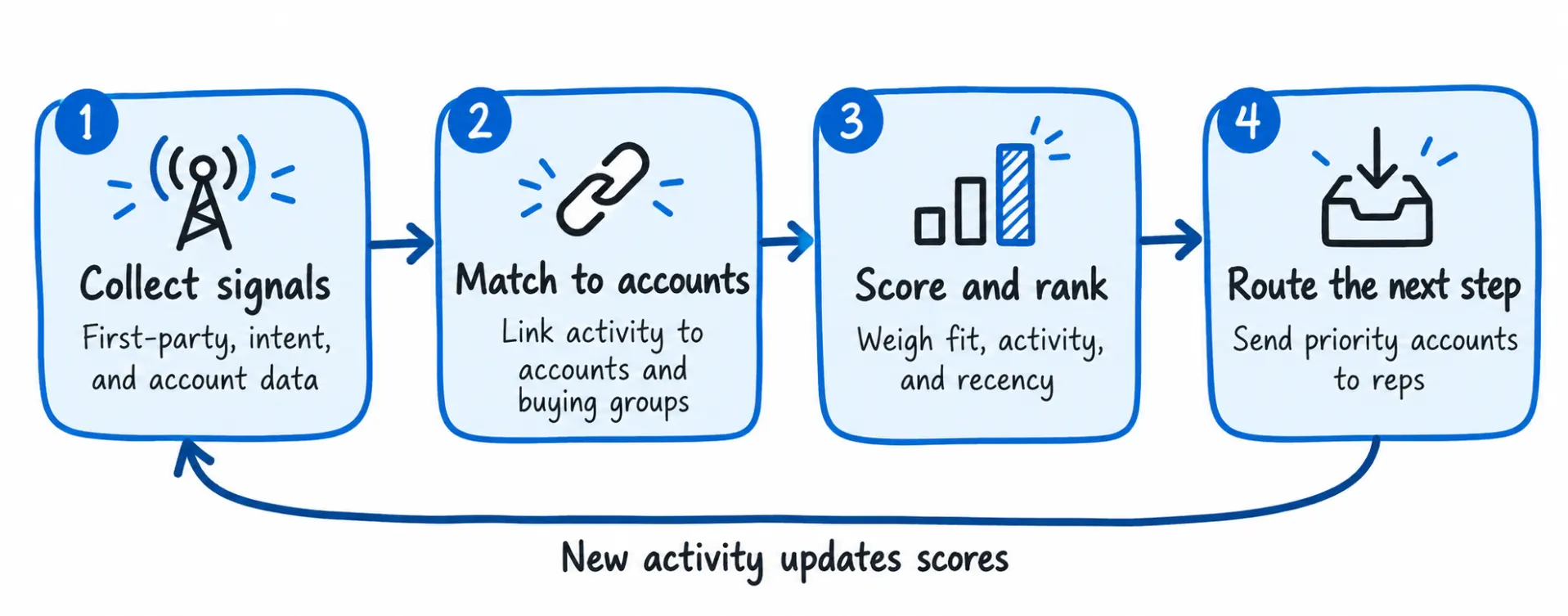 The four stages of B2B sales intelligence, with new activity feeding back into the first stage.
Each stage depends on the one before it. A signal matched to the wrong account throws off the score, and a score that never reaches the rep has no effect on who they call that day.
Here’s a more detailed breakdown of what happens at each step:
- The platform first collects signals from your website, emails, ads, and events, along with third-party intent from research across the web and account data such as firmographics and technographics. A lot of this activity comes in anonymously, like a pricing page visit from someone who never filled in a form.
- Next, it matches each signal to a company, and where possible to a specific person in the buying group. Without this step, three visits from three people at the same company look like three unrelated events.
- Scoring models then combine fit with activity and give each account a priority score. Many models weight recency heavily, so last week’s research counts for more than last quarter’s, and reps get a ranked list to work from.
- Finally, the top accounts go to reps in the tools they already use, such as the CRM, email, or Slack, with the signals behind each score attached. Newer platforms may also use AI to summarize recent account activity and suggest a next step, like a contact to call or a topic to open with.
What a rep sees → An account record in the CRM shows a priority score, the signals behind it (a research spike on data security, two pricing page visits, a new CISO), and a recommended contact. The rep can decide whether to call without opening another tool.
The score in that record depends on how well the platform checks its signals. Intent data without behavioral data behind it is a common reason teams lose confidence in the ranked list. Radoj Glisik, SVP of Digital Strategy & Design at Altudo, explains why:
“They’re essentially saying the intent signals are not really working. Well, that’s because their intent signals are in midair and not grounded against actual behavior… we need a data lake of some kind to align the intent, the behavioral, and the first-party data from the CRM, so that we can vet intent with behavior and vice versa.”
Intent data shows what an account is researching, and first-party behavior shows whether that research connects to your company. Without both, a score can rank accounts that look active on paper and have no plans to buy.
The mistakes usually come from how teams read the signals:
- Research from three weeks ago may describe a decision the account has already made, so recency needs to count in the score.
- A single analyst reading about a category can look like company-wide interest, while activity from several people in the buying group is a stronger sign.
- Broad topics like “CRM” say little about a purchase, and narrow, product-level topics point to active evaluation.
- An account with no first-party activity may be early in its process, even with strong research signals, and outreach at that stage can arrive too soon.
A score that accounts for these patterns is harder to fool. When intent, engagement, and buying group activity all point to the same account in the same window, reps can work the list with confidence.
How to use sales intelligence B2B
To use B2B sales intelligence, sales teams prioritize accounts that show buying activity, involve the full buying group, and time and tailor outreach to each account’s signals.
The Ehrenberg-Bass Institute estimates that only about 5% of B2B buyers are in the market at any given time, so teams that find that group early get the first conversations.
The five plays that follow each tie a specific signal to a clear action for the rep.
1. Work in-market accounts first
Fit criteria like company size, industry, and region decide which accounts go into a territory. But they don’t show which of those accounts are researching a purchase right now, so reps often divide their time across the whole list.
Trigger: A strong-fit account shows recent research and site activity. The combination carries more weight than either signal on its own, because it points to a company researching the category and paying attention to you.
What to do: Rank the territory by buying activity and work the active accounts first. Sales intelligence combines intent data, first-party engagement, and other account signals, which makes it easy to split a territory into three groups.
- Strong fit with recent activity goes to the rep this week for direct outreach.
- Strong fit with no activity stays with marketing, which keeps the account warm with ads and content until signals pick up.
- Weak fit with high activity gets a quick qualification check before a rep spends time on it.
Example: A rep covers 300 healthcare accounts. This week, 14 show research on topics tied to your product, and six of those also visited your site. The rep starts with those six, moves on to the other eight, and leaves the rest to marketing for now.
Next step: Review the signals behind the score and pick the contact closest to the research topic. Reach out within a few days, while the research is still current.
What to watch: Compare meetings and opportunities from the active group with the rest of the territory over a full quarter. If the active group converts at a higher rate, the scoring is working, and if it doesn’t, the signal weights need a closer look.
2. Map and multi-thread the buying group
One engaged contact rarely speaks for the whole account, since B2B purchases need sign-off from several people across different teams. A deal that depends on one champion can slow down or stop if that person changes roles, loses an internal debate, or can’t secure budget.
Trigger: Multiple people from the same account research the same topic or visit your site within a short period. Activity from different roles, such as a VP, a team manager, and someone in IT or finance, points to a group preparing a decision.
What to do: Map the roles around your existing contact, including who controls budget, who evaluates the product, and who will use it day to day, then spread outreach across the group. Early contact counts here, since a buying group can settle on a preferred vendor before it ever requests a demo. Jon Miller, co-founder of Marketo, shares how often that happens:
“81% of the time, by the time a buyer reaches out and says, ‘I’d like a demo,’ they already have established their shortlist with a preferred vendor, and 90-plus percent of the time, that vendor wins the deal. This means that where buying is happening is among the six to 16 members of the buying committee, most of whom are not in your database.”
Sales intelligence helps find the rest of the committee in a few ways:
- Account-level activity shows research and site visits from the company, even when the individuals behind them stay anonymous.
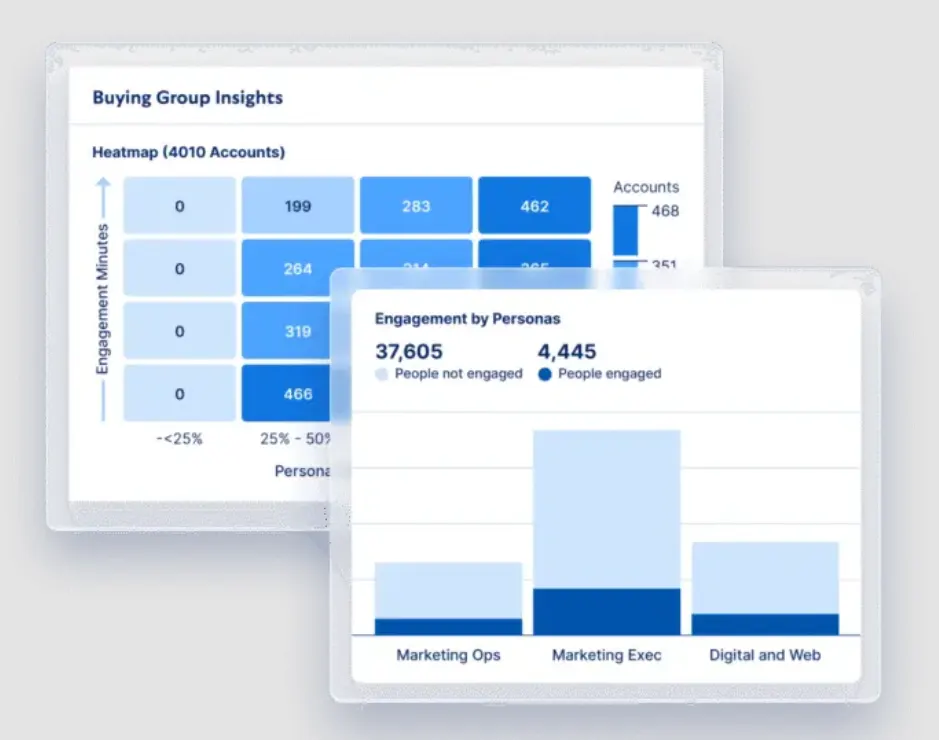
- Role matching compares active contacts with the roles your deals need and shows which ones are still missing.
- Engagement across channels, including ad clicks, email opens, and event attendance, connects known contacts to the account over time.
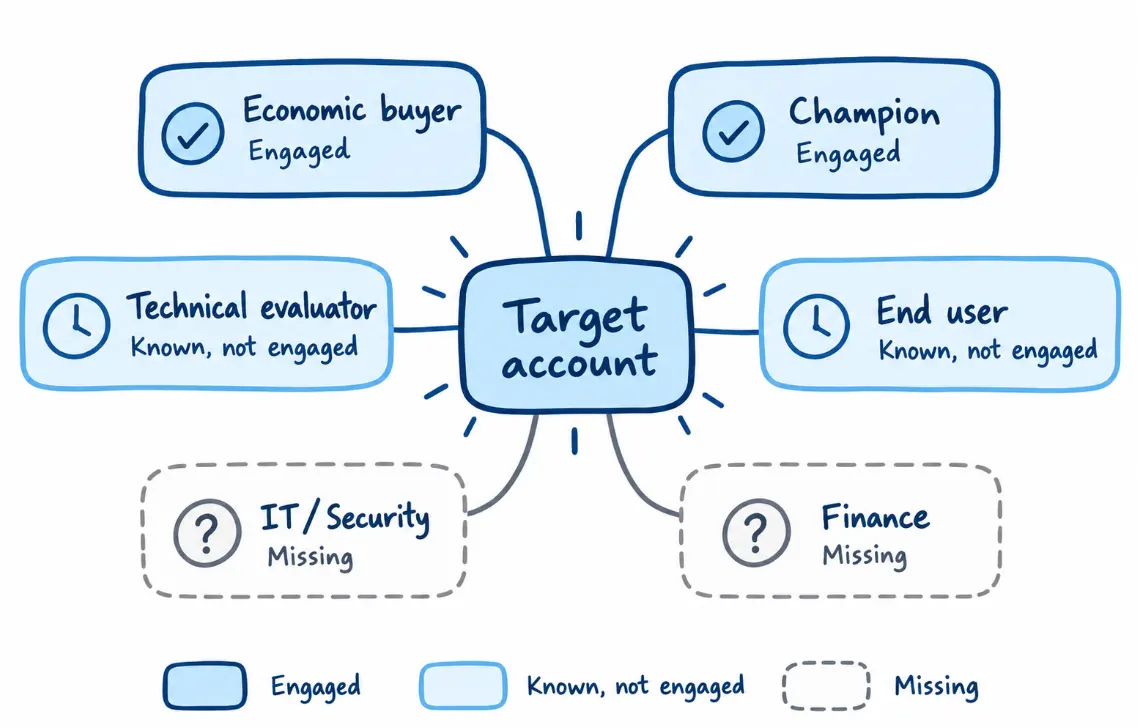 Role coverage across a target account, from engaged stakeholders to roles with no contact yet.
How to reach anonymous stakeholders: Target the account as a whole with ads and content matched to the topics it’s researching, so the rest of the group sees relevant messages before anyone contacts them. In parallel, ask your known contacts who else weighs in on the decision, and connect each new name to the account record.
Next step: List the roles your deals usually need and mark which ones you already have a relationship with. Reach out to at least one uncovered role this week, with a message tied to that person’s part in the decision.
What to watch: Track the number of engaged contacts per open opportunity and compare win rates between single-threaded and multi-threaded deals. If multi-threaded deals close at a higher rate, make coverage of key roles a standard requirement at an early pipeline stage.
3. Time outreach to buying signals
A good account can still be a bad prospect if the timing is wrong. Sales intelligence points reps to the moments when an account is more likely to respond, like a pricing page visit or a new executive, so outreach follows a signal the buyer will recognize.
Trigger: A known contact spends time on a high-intent page, such as pricing or a product comparison, and doesn’t take the next step. The visit shows interest in a specific topic, and since no form was filled in, the follow-up is up to sales.
What to do: Tie outreach to the signal and follow up while it’s recent. Sales intelligence sends these moments to reps as they come in, through CRM alerts, Slack notifications, or a weekly digest, so each message goes out with a reason the buyer will recognize. Casey Patterson, Director of North America ABM at Snowflake, describes how the Snowflake team does this with visitors who engage deeply and don’t convert:
“We will see contacts who come to our landing pages and have a deep scroll depth, deep time on page, and then don’t do whatever the next step is… So we will give those incomplete loops to SDRs through the Demandbase weekly emails, and have them call back as an outbound motion. We see a really high return on those personalized touches.”
Other signals that justify a timely follow-up include:
- A spike in product-level research from several people at the same account.
- A new executive in a role that owns your category.
- Return visits from a closed-lost account, which can mean a reopened evaluation.
Next step: Follow up soon, while the interest is recent, with a message tied to the topic the contact explored. Offer something that fits their stage, like a relevant case study or a short call with a specialist, and keep the focus on their problem without mentioning the site visit.
What to watch: Compare reply and meeting rates on signal-based outreach with standard cadence steps. A clear difference supports moving more of the team’s outbound effort to signal-based plays.
4. Personalize with account context
Good personalization starts with the buyer’s current situation. 84% of business buyers are more likely to buy from a company that shows it understands their business goals, according to Salesforce. Sales intelligence helps reps understand what an account is researching, what has changed inside the business, and which problems are becoming a priority.
Trigger: The account record shows a recent change or research topic tied to a problem your product solves. That could be a hiring push in a specific team, a change in tech stack, an expansion into a new region, or research on a particular use case.
What to do: Build the first line of the message around that context and connect it to one outcome the account would care about. Sales intelligence pulls the context into the account record, so reps can write a relevant message without researching each company by hand. When our sales team used account context to personalize outreach, open rates rose from 29% to 53% and reply rates from 4.5% to 10%.
Each type of context points to a different opening:
| Account context | What it can point to | Possible opening |
|---|---|---|
| Several open SDR roles | A growing outbound team | How similar teams ramp new reps |
| New data warehouse in the tech stack | A data consolidation project | How the change affects their reporting or targeting |
| Research on account-based marketing | An early ABM evaluation | A short planning guide or a peer example |
| Expansion into a new region | New market, new team | What other companies learned entering that region |
Next step: Choose the one piece of context most closely tied to your product and open the message with it. Link it to one outcome the account would care about, and keep the message short enough to read on a phone.
What to watch: Compare open and reply rates on context-based messages with your standard templates. If context-based messages keep performing better as volume grows, make account context a standard part of every template.
5. Watch customers for expansion and risk
The signals that help find new accounts also apply to accounts you’ve already closed. Customers research new categories, grow new teams, lose champions, and pull back on engagement, and sales intelligence tracks those changes the same way it does for prospects.
Trigger: A customer account shows research in a category you sell into, new activity from a team you don’t work with yet, or a drop in engagement ahead of renewal. A key contact leaving the company also counts, since it affects both the relationship and the renewal.
What to do: Send customer signals to the account owner or customer success manager with the same priority as new-business signals. Sorting them into two groups makes the right response clearer.
- Expansion signals include research on an adjacent product, activity from a new business unit, and a hiring push in the team that uses your product.
- Risk signals include falling product or email engagement, research on competitors, and a champion or executive sponsor changing jobs.
Example: A marketing ops manager who championed your product moves to a new company. Sales intelligence picks up the job change, so the account owner can introduce themselves to the replacement contact early, and the rep covering the new company can reach out to the former champion, who already knows the product.
Next step: Review customer accounts for new signals each week alongside the prospect list. Contact any new team with a use case from their department, and schedule a check-in with the main sponsor on any account showing risk before renewal talks begin.
What to watch: Compare expansion revenue and renewal rates for accounts where the team acted on signals with accounts managed on a fixed check-in schedule. Fewer renewal surprises late in the cycle is another sign the play is working.
Running these plays manually works for a handful of accounts, and it gets harder across a full territory. Demandbase Sales handles the prioritization, buying group mapping, and signal routing behind each play, so reps can spend their time on the outreach itself.
What sales intelligence changes for sales, RevOps, and marketing
Sales reps, sales leaders, RevOps, and marketing each use account data for a different part of the process. Here’s how the work changes for each team:
| Team | Without sales intelligence | With sales intelligence |
|---|---|---|
| Sales reps | Research accounts manually across the CRM, LinkedIn, and news sites | Work from a prioritized account list that includes signals and relevant contacts |
| Sales leaders | Assign territories mainly by region, industry, or company size | Factor account activity into territory and capacity planning |
| RevOps | Reconcile records and fields across several disconnected tools | Maintain a more consistent account record that connected systems can share |
| Marketing | Hand off leads with limited information on account activity | Hand off accounts with the research topics and engaged contacts behind them |
What connects these changes is shared data. When these teams work from the same account record, they agree on which accounts are active and what each one needs, which makes B2B sales and marketing alignment easier to keep in place.
Tina Katic-Michalos, Sr. Director of Demand Generation at TaskUs, sees that shared view as the starting point:
“If marketing and sales and customer service aren’t looking at the same data together, then they’re always gonna be thinking about the strategy differently… really aligning on the data is key.”
Over time, that alignment makes it easier to see which accounts are moving, which ones need attention, and which team should act next.
What is the best B2B sales intelligence software?
Before comparing vendors, figure out which part of the process is holding your team back. B2B sales intelligence software covers three areas, and platforms vary in which ones they handle well:
- Data coverage is about having accurate firmographic and contact data for the accounts you sell to. Our comparison of B2B data vendors covers the main providers.
- Signal quality comes from intent and engagement data that reliably show which accounts are active.
- The ability to act depends on scoring, routing, and workflows that put those signals in front of reps in the tools they already use.
The best B2B sales intelligence tools for one team can be a poor fit for another, so compare B2B sales intelligence platforms against the area your team needs most.
ZoomInfo is a common reference point in this category, and our guide to ZoomInfo competitors and alternatives compares it with other sales intelligence platforms worth exploring. Before you sign with a provider, work through these 15 questions to ask when buying a sales intelligence tool.
How to get started with B2B sales intelligence
A first project with sales intelligence can be small, and it can start with the data already coming into your CRM and website. These four steps cover the setup decisions to make first:
- Agree on what counts as a target account. Sales, marketing, and RevOps should settle on fit criteria and the signals that move an account into the active group before any scoring begins.
- Connect the data you already have. Your CRM, website analytics, and marketing automation hold first-party signals. Connect those first, then judge whether you need more intent or contact data.
- Set a baseline for two or three metrics. Meetings per target account, pipeline from active accounts, and win rates on multi-threaded deals are good places to start. Record them before launch, so you have something to compare against.
- Start with one play. Pick the play that fits your team’s most pressing need, test it for a quarter, and move to the next one once the first shows results.
Example → A team starting with the in-market accounts play might connect its CRM and website data, agree that an active account needs both research and site activity, and track meetings from the active group for one quarter. If that group produces more meetings than the rest of the territory, the team moves on to multi-threading.
Put B2B sales intelligence to work with Demandbase
The four-stage loop covered earlier, from collecting signals to routing the next step, only works when each stage feeds the next. When data, scoring, and seller workflows are handled in different tools, the loop breaks at the handoffs. One platform that covers all four stages keeps it moving.
Demandbase Sales is a B2B sales intelligence platform that brings those stages together. It collects intent and engagement data, connects it to accounts and buying groups, prioritizes accounts by fit, activity, and pipeline potential, and brings the next best action into the CRM and sales engagement tools reps already use.
Here’s how each part supports the plays in this guide:
- In-market account prioritization: Demandbase identifies accounts in market based on engagement and intent, and then prioritizes them by fit, activity, and pipeline potential. Reps start from a ranked view of the accounts showing buying activity, which is the basis of the in-market accounts play.
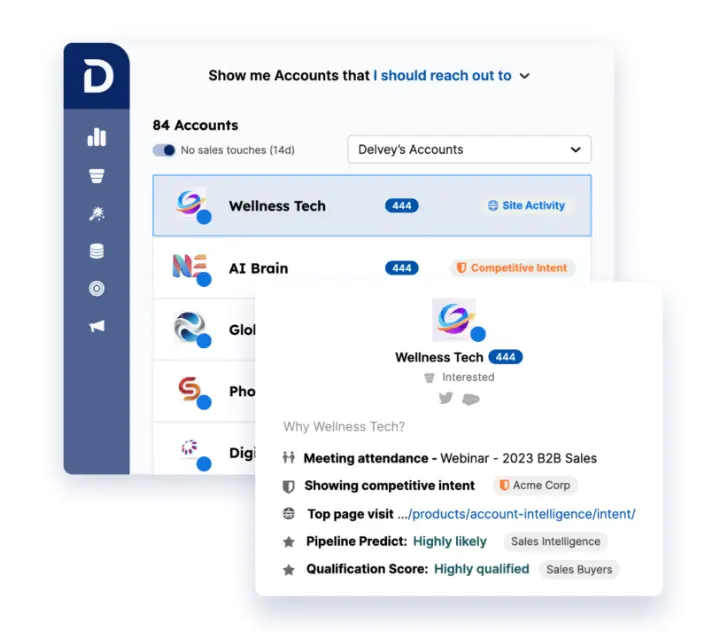
- Buying group intelligence: The platform maps people to buying-group roles, highlights missing stakeholders, and shows which members actively engage. Its AI can also recommend contacts based on their role in the buying group, which helps reps build relationships across the account and reduce their reliance on a single champion.
- Unified account and intent data: Demandbase Data brings firmographic, technographic, buyer, and intent data into one account view and keeps it current with ongoing enrichment. It also detects job moves, tech changes, and intent spikes, and identifies which companies are visiting your website.
- Signals inside seller workflows: Account insights, enriched contact data, and next best actions go into CRM and sales engagement tools, so reps spend less time switching between systems. They can act on a signal from the same screen where they plan outreach.
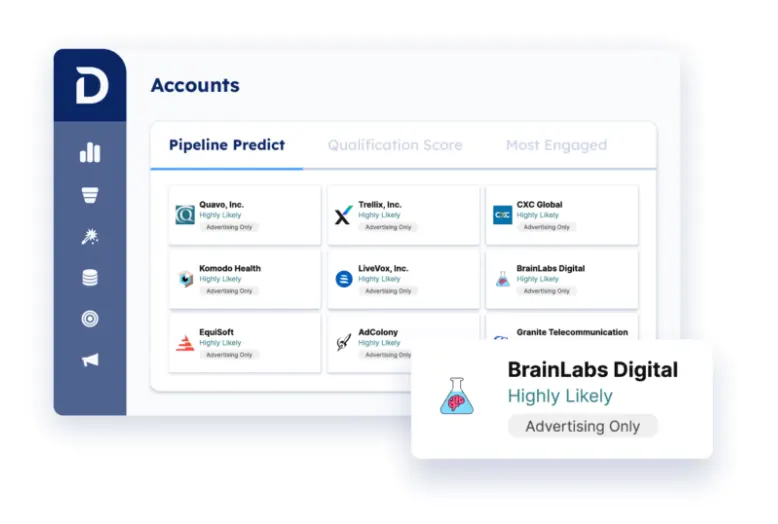
- Demandbase AI: Demandbase AI analyzes signals and buying group activity against your pipeline goals to recommend where to focus and what to do next. With AI Chat, teams can ask direct questions about their accounts, such as which ones show increasing buying intent.
- Expansion and retention signals: The same intent signals apply to existing customers. Account teams can see when customers research other products you sell, show interest in new use cases, or look at competitors, which supports the expansion and risk play.
Sales, marketing, and advertising all work from the same account intelligence in Demandbase, so the alignment covered earlier is part of how the platform is set up.
Take the Demandbase Sales product tour to see how it prioritizes accounts and buying groups, or book a meeting to walk through how it would fit your team.
Related content


We have updated our Privacy Notice. Please click here for details.