

How to create an AI GTM strategy from scratch

AI has found its way into almost every part of B2B go-to-market at this point, but in most companies, it arrived one tool at a time. Sales got a prospecting tool, marketing picked up a content generator, and maybe ops started running a scoring model.
Each one solved a narrow problem and created its own little world of data that the rest of the stack can’t access. AI ends up technically everywhere but strategically nowhere, because your tools have no shared understanding of what’s happening across your funnel.
So, when a company starts showing buying intent, the signal gets fragmented across three or four tools, and the response is either late, generic, or both.
An AI GTM strategy brings all of that onto the same track. Your data flows into one place, your buying signals kick off coordinated actions, and your revenue team works from a shared view of every account. This guide shows you how to build that kind of system from scratch.
What is an AI-driven go-to-market strategy?
An AI GTM strategy is a plan for how AI supports your entire go-to-market motion. It covers everything from how you find and prioritize target accounts to how you reach and convert them.
That sounds straightforward, but the keyword is “entire.” Most companies today use AI somewhere in their go-to-market. Maybe they started with a scoring model, picked up a prospecting tool, and then someone on the marketing team brought in an AI writing assistant for outbound.
They’re fine at the one thing they do, but that’s where it ends. None of them share data, none of them share logic, and none of them give your team a unified picture of how an account is moving through your pipeline.
At a high level, an AI GTM strategy has three pillars:
- Your data foundation — how your GTM data comes together in one place so every tool and team works from the same source
- Your signal model — how you turn that data into buying signals and prioritize the right accounts at the right time
- Your execution model — how your sales, marketing, and ops teams act on those signals together
The primary difference between having AI tools and having an AI GTM strategy comes down to how these pillars connect.
Example → In a traditional GTM setup, your team works off a static ICP list and maybe some basic lead scores. With an AI GTM strategy, account prioritization becomes dynamic. Your system reads intent signals, tracks engagement across channels, and shows your team which accounts have multiple stakeholders active on your site right now. As new data comes in, the priority list updates automatically, and both sales and marketing see the same one.
That dynamic applies to more than just prioritization. It runs through your segmentation, outreach, routing, and reporting. Here’s how the two approaches compare across the board:
| AI tools, no strategy | AI GTM strategy in place | |
|---|---|---|
| Data | Each tool pulls from its own source | Shared data layer that every tool and team can access |
| Signals | Detected in silos, often ignored | Scored, routed, and acted on automatically |
| Prioritization | Static ICP lists and manual lead scores | Dynamic, real-time ranking based on live signals |
| Coordination | Slow handoffs, fragmented responses | Same accounts, same context, same timing |
| Tools | Bought individually, work side by side | Selected to plug into a shared foundation |
Most B2B companies today sit on the left side of this table. A mature AI GTM strategy moves you to the right, where your tools, your data, and your teams operate as one connected system.
Related read → What B2B leaders are really saying about AI in GTM
How AI changes each part of your go-to-market strategy
AI has a footprint in almost every B2B go-to-market function at this point. 95% of B2B marketers use AI-powered tools in some capacity. But most of that usage is still basic and comes down to drafting emails, generating content, and scoring leads the same way they always have, just slightly faster.
A Google Cloud survey of 400 customers found that only 5% of AI use cases qualify as ‘transformational.’ The other 95% sit somewhere between experimental and moderately useful.
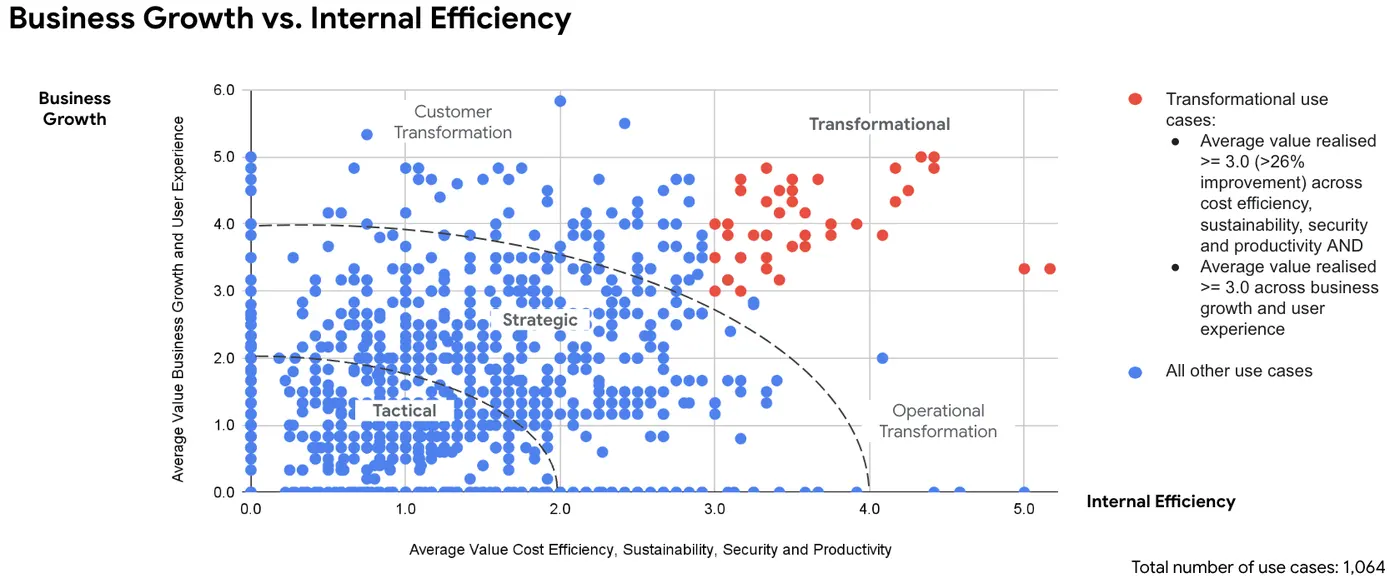 (Source: Google Cloud)
That gap is what this section is about. Below, we’ll walk through the core GTM functions where AI plays a role and show what each one looks like across three stages:
Account selection and prioritization
Manual → Your team builds a target account list once a quarter based on firmographic filters like company size, industry, and revenue. The list stays static until someone manually updates it, and by then, half the accounts on it have either gone cold or moved to a competitor.
AI-assisted → A scoring model ranks your accounts based on fit and maybe some basic engagement data. Better than a static list, but the scores update slowly, and sales still has to interpret what they mean on their own.
AI-native → Account rankings change in real-time as new signals come in. A company that wasn’t on your radar last week jumps to the top because three people from their team hit your site and your intent provider picked up a research spike.
Buying group mapping and contact strategy
Manual → A rep finds one contact at a target account and works that single thread until the deal stalls or closes. If they’re thorough, they might manually research the org chart and add a few more names to the CRM.
AI-assisted → An enrichment tool pulls in additional contacts at target accounts and maps them to likely roles. Your team has a more complete picture, but the outreach strategy for each contact is still manual (and mostly guesswork).
AI-native → AI maps the full buying committee automatically, tracks which members are engaging with your content, and recommends a contact strategy based on role, seniority, and engagement level. Your team knows who to reach, what to say to each of them, and when to say it.
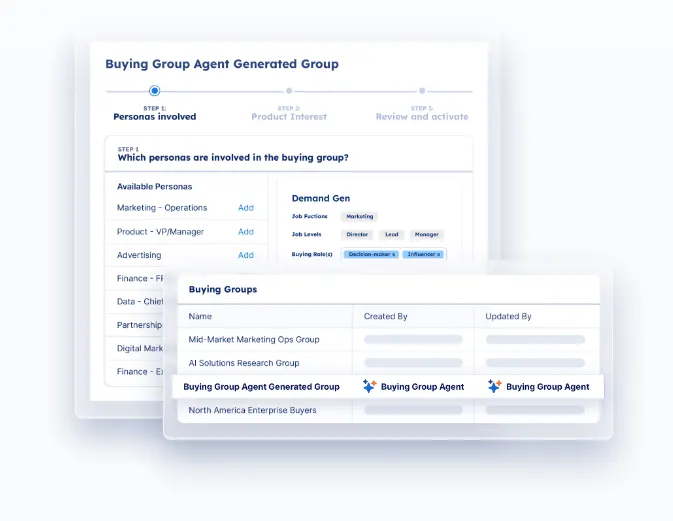
PRO TIP 💡: Demandbase’s Buying Group Setup Agent builds your buying groups automatically using your historical deal data. It generates personas, identifies likely decision-makers, and points out gaps in your coverage so your reps know exactly who they’re missing at every target account.
Multi-channel orchestration
Manual → Marketing runs ads on its own schedule. Sales sends outbound on a separate cadence. There’s no coordination between the two, so a target account might see a brand awareness ad the same week a rep sends a hard close email.
AI-assisted → A basic integration syncs some data between your ad platform and your CRM, so sales can see which accounts have been served ads. The coordination is loose though, and there’s no real-time action.
AI-native → AI orchestrates the full sequence across channels. When an account reaches a defined signal threshold, the system launches a targeted ad campaign, queues a personalized email sequence, and alerts the assigned rep with context on the account’s activity. All channels move together based on the same data and timing.
Pipeline forecasting and deal scoring
Manual → Your forecast is a spreadsheet built on self-reported numbers from reps who update it when they remember to. Deal scores are educated guesses at best. Leadership makes hiring and budget decisions based on data that was already stale when it was entered.
AI-assisted → A predictive model crunches your CRM data and gives you better close-rate estimates. A real step up, but the model can only work with what’s in the system. If reps log activity inconsistently, the forecast inherits those blind spots.
AI-native → AI looks at every signal around a deal. Email replies, meeting cadence, how many stakeholders are involved, what content they’ve viewed, and whether response times are speeding up or slowing down. Deal scores update automatically as new activity comes in, so your forecast is only as old as the last signal, not the last time a rep opened the CRM.
PRO TIP 💡: Demandbase’s Pipeline Predict matches current account behavior against your historical win patterns. That means your forecast is based on what accounts are doing today, not on self-reported updates that were already stale when they were entered.
Personalization at scale (web, email, ads)
Manual → Your marketing team builds a few target audience segments and writes different messaging for each one. A mid-market fintech company and an enterprise healthcare company might receive the same case-study email because no one had time to create more variants.
AI-assisted → A personalization tool swaps in dynamic content based on basic attributes like industry or company size. Better than one-size-fits-all, but the personalization is still very basic.
AI-native → AI tailors the full experience based on what each account has done, not just what category they fall into. A visitor from an account that’s been reading your security content sees security-focused messaging on your site, receives a compliance case study in their inbox, and sees an ad that speaks to the same theme.
Related read → 4 Best Practices for Dynamic Personalization in B2B Advertising
Competitive intelligence and market monitoring
Manual → Someone on your team reads competitor blogs, checks G2 reviews every few weeks, and puts together a battlecard that’s outdated within a month. Your reps go into competitive deals with stale talking points and hope for the best.
AI-assisted → A monitoring tool tracks competitor mentions, pricing changes, and review activity, and sends your team periodic alerts. Helpful, but someone still has to read through everything, figure out what matters, and manually update your sales materials.
AI-native → AI monitors competitor activity across review sites, job postings, product updates, social channels, and customer forums in real-time. When something meaningful changes (a competitor raises prices, drops a feature, or gets a wave of negative reviews), your battlecards update automatically and your reps get briefed before their next call.
The real-world benefits of an AI GTM strategy
An AI GTM strategy touches a lot of moving parts, so the benefits show up in a lot of different places. Here are the ones worth paying attention to:
- Faster, more accurate pipeline forecasting: AI-assisted forecasting delivers a 15-25% improvement in accuracy over manual methods. That means fewer surprises at the end of the quarter and better decisions about where to put your budget and your people.
- Higher revenue growth and profitability: Companies running advanced AI GTM strategies report 5x revenue growth and 89% higher profits. The gains compound because every part of the go-to-market is working from the same data and the same playbook.
- Lower customer acquisition costs. According to HubSpot’s study, more than a third of venture-backed startups (37%) report that AI has lowered their customer acquisition costs, largely through better targeting and outreach.
- Shorter sales cycles: Teams using AI at least once per week reported shorter deal cycles across the board. When reps walk into every call with the proper context and the right content, deals don’t stall as often.
- Deeper personalization without more headcount: McKinsey’s research found that personalization drives a 5-15% revenue lift on average. An AI GTM strategy makes that kind of personalization possible at scale because your ads, emails, and site content all pull from the same account-level data.
- Better cross-sell and expansion revenue: 72% of startups say AI has improved their ability to upsell and cross-sell existing customers. The system tracks customer behavior and engagement signals post-sale, the same way it does pre-sale, so your customer experience and account management teams can spot expansion opportunities before the customer even asks.
A year ago, companies with and without AI GTM strategies were competing on roughly a similar footing. That window is closing. The companies building this infrastructure now are pulling ahead in ways that will be very hard to catch up to.
How to implement AI in GTM strategy
Most implementation guides start with ‘define your objectives’ and end with ‘optimize over time.’ That’s not helpful. Below is a three-phase roadmap that builds in a specific order, where each phase sets up the next one.
The timeline assumes a mid-market B2B team with a RevOps function in place. Smaller teams may need longer, while larger teams can move faster:
Phase 1 — Build your data foundation (weeks 1-4)
Goal → Get all your GTM data into one place so every tool and every team works from the same source of truth.
Everything else in your AI GTM strategy depends on this step. If your data is fragmented across tools that don’t share information, every AI model you build on top inherits that fragmentation. Bad data in, bad decisions out.
And right now, most B2B companies spread their GTM data across five or six systems – CRM, marketing automation, intent providers, website analytics, ad platforms, and usually a spreadsheet or two that someone on ops maintains manually.
The goal of this phase is to connect all of that into a shared data pillar that every downstream tool and team can access.
Here’s how to do it →
Go through every system in your GTM stack and document what data it holds, how accurate and complete that data is, how it’s structured, and who on your team owns it.
You’re looking for gaps, inconsistencies, and decay. CRM contact data alone decays at roughly 2-3% per month, so a database that nobody has cleaned in six months already has serious problems.
The systems you’ll want to audit first:
- Your CRM (deal data, contact records, account information)
- Your marketing automation platform (engagement and campaign data)
- Your intent data provider (third-party buying signals)
- Your website analytics (behavioral data, page visits, content consumption)
- Your ad platforms (campaign performance, audience data)
This sounds tedious. It is. But skipping it is one of the most common reasons AI GTM implementations fail. You can’t build a signal model on top of data you don’t understand.
Once your audit is done, you need to pick a home for your unified data layer. Here are the most common options:
| Option | Best for | Trade-off |
|---|---|---|
| CDP (Segment, mParticle, Tealium) | Unifying behavioral data across channels, quick setup | Less flexible with non-marketing data |
| Data warehouse (Snowflake, BigQuery, Redshift) | Central home for all GTM data, including finance, product usage, and custom sources | Needs engineering resources to set up and maintain |
| Reverse ETL (Census, Hightouch) | Pushing clean warehouse data back into operational tools like your CRM and ad platforms | Only useful if you already have a warehouse |
| CRM as hub (HubSpot Ops Hub, Salesforce Data Cloud) | Smaller teams without a budget for a full warehouse setup | Works for now, hits limitations at scale |
The right choice depends on your team size, budget, and technical resources. What matters is that you end up with a single shared layer that every tool in your stack can pull from and push to.
Once you’ve picked your approach, there are four things to get right before moving on:
- Connect your core systems first: At minimum, your CRM, marketing automation, intent provider, and website analytics should all feed into your shared layer. If you’re running a conversational intelligence tool like Gong or Chorus, connect that too.
- De-duplicate and standardize: Merge duplicate contacts and accounts, standardize company names, fill gaps like missing job titles, and set up matching logic so new records get mapped to the proper account automatically.
- Set up automated enrichment: Your data layer should enrich new accounts and contacts with firmographic, technographic, and intent data automatically as they enter the system. Don’t wait for a rep to manually research a company before a call.
- Define governance rules: Who can create records, how your team handles duplicates, how often you refresh data, and what fields a contact or account needs to count as complete. Write it down and assign someone in ops to apply it.
Phase 2 — Build your signal model (weeks 5-8)
Goal → Build a system that reads buying behavior across your accounts and tells your team where to focus.
The difference between a good quarter and a bad one often comes down to which accounts your team chose to focus on. A signal model takes that choice out of the gut-feel category and into the data category. It tells your team which accounts to work on today based on how those accounts are behaving right now.
Here’s how to do it →
First, define what counts as a signal for your business. A pricing page visit means something different than a blog bounce. B2B companies organize their signals into three buckets:
| Signal type | Examples | What it tells you |
|---|---|---|
| Intent signals | Third-party keyword research, G2 category visits, review site activity | The account is actively researching a problem you solve |
| Engagement signals | Pricing page visits, content downloads, email opens, webinar attendance, ad clicks | The account is engaging with your brand directly |
| Firmographic/technographic changes | New funding round, leadership change, job postings, tech stack additions | Something changed at the account that creates an opening |
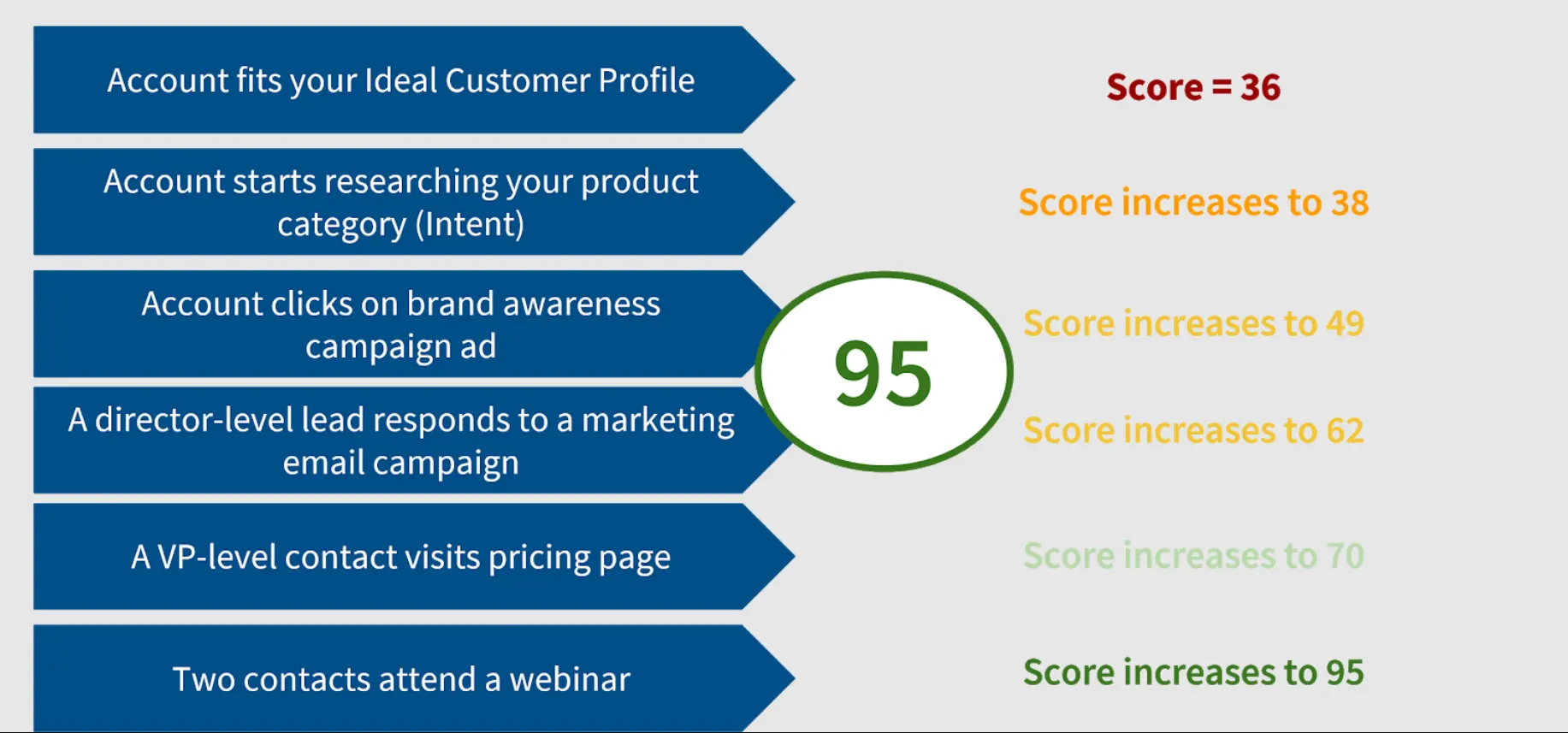
No single signal tells you much on its own. A pricing page visit from one person is interesting. A pricing page visit plus a G2 comparison plus three new contacts from the same account engaging with your content in the same week is a pattern that deserves immediate attention.
Build your scoring logic → Assign weights to each signal based on how strongly it correlates with closed-won deals. Pull your last 50-100 closed deals and work backward. Look at which signals showed up before those deals entered the pipeline, how many contacts were active, and what content they engaged with.
This doesn’t have to be complicated to start. A simple tiered approach works fine:
- High-weight signals (strong intent) — pricing page visits, demo requests, G2 comparison page views, multiple stakeholders active in the same week
- Medium-weight signals (growing interest) — blog content downloads, webinar attendance, repeat site visits, email engagement from new contacts at the account
- Low-weight signals (early awareness) — single ad click, one-time site visit, social media engagement, single email open
Your first version won’t be perfect. Run it for two to four weeks and compare the accounts it points to as high priority against the ones your sales team is working on and closing.
If the model keeps flagging accounts that go nowhere, your weights are off. If reps are closing deals, the model scored low, you’re missing signals. Adjust and repeat.
Related read → Warm outbound: A guide to signal-based GTM
Phase 3 — Build your execution model (weeks 9-12+)
Goal → Define exactly what happens when an account shows buying intent – who does what, in what order, and how fast.
This phase maps every signal tier to a specific set of initiatives, so your team responds to buying behavior consistently, quickly, and without anyone having to ask “what do I do with this?”
Example of what a full execution workflow looks like for a high-intent account →
An account crosses your high-priority threshold. Three stakeholders visited your pricing page this week, someone downloaded a competitive comparison guide, and your intent provider picked up a surge in category keyword research.
Here’s what should happen, in order:
- Your system flags the account and assigns it to the relevant rep based on territory or segment.
- The rep gets an alert with full context. Who’s been active on the account, what content they’ve viewed, how the account scores, and which contacts to reach first.
- Marketing launches targeted ads to the account’s buying committee around the use case their behavior suggests they care about.
- An automated email sequence goes out to the engaged contacts, personalized to match the content they’ve already consumed.
- The rep sends a direct message to the most senior engaged contact. It references their specific activity and offers a clear next step, like a custom demo or relevant case study.
- The account enters a coordinated cadence. Sales outreach, marketing emails, and ads all reinforce the same message over the next two to three weeks.
That whole sequence should fire within hours of the account crossing the threshold. An account that’s actively researching your category today might already be in a competitor’s pipeline by Friday.
Now scale that logic across all your signal tiers →
| Signal tier | Sales action | Marketing action | Automation |
|---|---|---|---|
| High (strong buying signals, multiple stakeholders active) | Rep gets alerted, reaches out within 24 hours | Targeted ads and personalized email sequence launch to the buying committee | Account flagged, rep assigned, sequences triggered automatically |
| Medium (growing interest, early engagement from one or two contacts) | Rep adds account to watch list, sends a light touch if timing feels right | Nurture campaigns ramp up, retargeting ads turn on for the account | Account added to watch list, engagement tracked, rep notified if score rises |
| Low (minimal activity, single touchpoint) | No sales action yet | Stays in general nurture and awareness campaigns | Score monitored, rep notified only if behavior changes |
The key here is that every tier has a defined response. Your team should never look at a flagged account and wonder what the next step is.
Where AI tools plug in → By this point, your GTM workflow will make it obvious where you need help. Pick tools that fill those specific holes.
Three capabilities to prioritize:
- Orchestration — can it trigger coordinated actions across ads, email, and sales alerts from a single signal?
- Personalization — can it tailor content based on real account activity, not just firmographic fields?
- Learning — does it adjust over time based on what’s producing results in your pipeline?
The bar is simple. If it can’t read from your data layer and act on your signal model, it doesn’t belong in your stack.
5 common use cases: what AI GTM looks like in practice
Each scenario below walks through a specific GTM moment, what happens without an AI GTM strategy, and what happens with one:
Account shows intent but hasn’t visited your site yet
Forrester’s market research found that 92% of B2B buyers start their journey with at least one vendor already in mind. By the time they reach out to sales, the shortlist is mostly set. If your team can’t see accounts during that early research phase, the deal is over before you even knew it existed.
Without an AI GTM strategy → You never see this account. They do all their research, build a shortlist, and either pick a competitor or reach out to you on their own timeline. By the time they show up in your funnel, they’ve already formed opinions, and you’re playing catch-up.
With an AI GTM strategy → Your intent provider picks up the activity and feeds it into your data layer. Your signal model scores the account, and if it crosses your threshold, the workflow fires:
- Rep gets alerted with company context, intent topics, key contacts, and a recommended outreach angle
- Marketing launches targeted ads to the account’s buying committee across LinkedIn and the web
- A personalized email sequence goes out to the most relevant contacts
- All before the account ever visits your site or talks to anyone on your team
Example → A 500-person fintech company starts researching “account-based marketing platforms” on G2 and reading comparison articles across three different review sites. Your intent provider flags the surge, the system matches them to your ICP, and within hours, your rep has a full brief on the account while marketing is already running ads to their VP of Marketing and Director of Demand Gen on LinkedIn.
Multiple stakeholders from the same account engage in the same week
89% of B2B purchases involve two or more departments, according to Forrester. When multiple people from the same company start showing up across your site, your content, and your ads in the same week, something is happening at that account. Most teams just have no way to see it as one pattern.
Without an AI GTM strategy → Three people from the same account engage in the same week. One downloads a guide, one hits your pricing page, one signs up for a webinar. Each event gets recorded in a different tool. Nobody on your team realizes they’re all from the same company.
With an AI GTM strategy → All three touchpoints get tied to the same account automatically. Your signal model sees the cluster and flags the account as high priority. From there:
- The rep sees a forming buying group with names, titles, and a breakdown of each person’s activity
- Marketing creates a targeted campaign matched to the use case the account seems to be exploring
- Every touchpoint from that point forward is tailored to the individual contact’s role and interests
Example → On Monday, a Director of RevOps downloads your guide on sales and marketing alignment. On Wednesday, their VP of Marketing watches a webinar on account-based advertising. On Thursday, someone from IT visits your integrations page twice. Your system connects all three, scores the account as high priority, and by Friday morning, your SDR has a brief on the buying group and a plan for how to approach each one.
Related read → How to identify accounts for ABM: A step-by-step guide for B2B marketing teams
A closed-lost account starts showing new buying signals
Closed-lost doesn’t mean closed forever. People change roles, budgets reset, priorities change, and competitors disappoint. An account that said no six months ago might be back in the market right now, and your team would never know unless someone remembered to check.
Without an AI GTM strategy → The account is in your CRM with a closed-lost tag, and nobody looks at it again. Maybe a rep sets a reminder to follow up in six months. Maybe they don’t. Either way, if the account starts researching your category again, your team misses it completely.
With an AI GTM strategy → The system keeps monitoring closed-lost accounts the same way it monitors everything else. When one of them starts showing new activity, your signal model catches it:
- A few employees visit your site again after months of silence
- Third-party intent data shows a spike in category research
- A new stakeholder at the account downloads a piece of content
Your system scores the new activity, points out the account, and routes it back to the original rep with context. What happened last time, why the deal was lost, what’s changed since then, and who’s engaging now. The rep re-opens the conversation with a warm angle instead of a cold restart.
Example → You lost a deal to a competitor eight months ago. The champion who chose them just left the company, and two new directors at the account started reading your comparison pages and pricing docs this week. The system picks up the signal, alerts the rep, and finds the full deal history so they know exactly where to pick up.
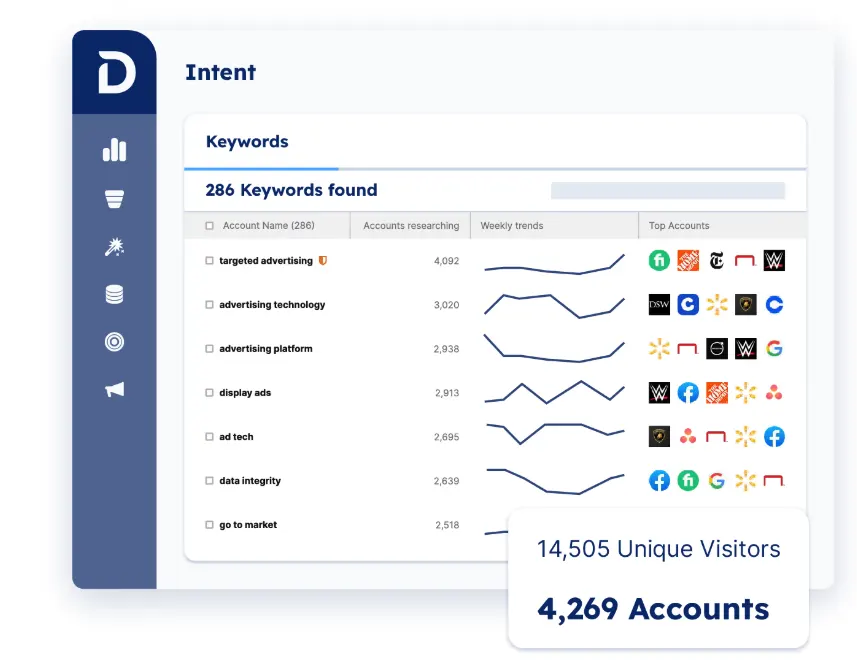
PRO TIP 💡: Demandbase keeps tracking intent signals on closed-lost accounts the same way it tracks everything else. When one of those accounts starts researching your category again, your signal model picks it up and routes it back to the original rep with data on what changed.
A deal stalls and engagement drops off mid-pipeline
Deals go quiet mid-pipeline all the time. The rep sends a follow-up, then another, then lets it sit. The problem is that silence can mean ten different things, and most teams have no way to tell the difference between a dead deal and one that’s stuck in internal approvals.
Without an AI GTM strategy → A deal goes quiet for two weeks. The rep sends a follow-up email, then another one. No response. They mention it in the pipeline review, the manager says “keep working it,” and the deal sits there taking up space in the forecast until someone finally moves it to closed-lost three months later.
With an AI GTM strategy → The system tracks engagement across every contact at the account, so a quiet champion doesn’t leave your rep in the dark:
- No activity anywhere at the account for two weeks straight – that’s your signal to deprioritize and stop wasting follow-ups on a dead deal
- Champion ghosted, but two other stakeholders are actively browsing your site – the deal hit a wall internally, and your rep should try reaching someone else
- Brand new contacts from the account start consuming your content – the decision team shifted, and your rep needs to rebuild their stakeholder map
A net-new account lands on your site and matches your ICP
So many B2B websites get plenty of traffic from companies that would be a great fit. But the vast majority of them never fill out a form or talk to sales.
They browse, read a few pages, and leave. Your analytics show the traffic, but without knowing which companies are behind those visits, the opportunity disappears.
Without an AI GTM strategy → An anonymous visitor spends 15 minutes on your site, reads three pages, and leaves. Your analytics logs the session. Nobody on your team knows it was a 400-person SaaS company that matches your ICP perfectly. A week later, they signed with a competitor who got to them first.
With an AI GTM strategy → The system de-anonymizes the visit and matches the account against your ICP criteria automatically. If the fit is strong and the behavior shows interest, your workflow kicks in:
- The account gets created in your CRM, enriched with firmographic and technographic data, and scored based on the visit behavior
- Your rep gets alerted with full context on the company, what pages they viewed, how long they spent, and who the likely contacts are
- Marketing adds the account to a targeted ad campaign and a personalized email sequence before they ever come back to your site
Example → A mid-market healthcare company with 600 employees lands on your site on a Tuesday. They read your product overview, visit your integrations page, and spend four minutes on a case study from their industry. Your system identifies the company, matches it against your ICP, enriches the account, and by Wednesday morning, your rep has a brief and marketing is running ads to three contacts in their revenue team.
Common mistakes that kill AI GTM strategies (and how to fix them)
Here are the mistakes that derail AI GTM strategies most often, and what to do about each one:
Building the strategy around tools instead of workflows
Many teams start by picking tools and then try to build a strategy around them. It works the other way. The tool should serve the workflow, not the other way around.
You’re making this mistake if…
- You bought an AI tool and then tried to find a use case for it
- Your sales and marketing teams use different AI tools that do overlapping things
- Nobody can explain how a specific tool connects to your pipeline or revenue numbers
- You picked tools based on feature lists or demos instead of gaps in a defined workflow
What to do instead → Reverse the order. Workflow first, tools second. Trace how an account moves through your GTM from first signal to closed deal, find the spots where things break down, and only then look for tools that solve those specific problems.
Over-automating before you’ve validated the playbook manually
Speed is the whole point of AI, so it’s natural to want to automate right away. But automating a workflow before anyone has tested it manually means you’re scaling assumptions, not proven plays.
You’re making this mistake if…
- You automated your outreach sequences before a rep ever ran the play manually and closed a deal with it
- Your workflows fire automatically, but nobody has checked whether the accounts they flag actually convert
- You’re generating a high volume of activity, but pipeline and revenue haven’t moved
- Your team can’t explain the logic behind what gets automated and why
What to do instead → Run every new workflow manually for at least two to four weeks before you automate it. Let your SDRs work the signals by hand, test the messaging, see what resonates, and close a few deals with the playbook first. Once you know the workflow produces revenue, then automate it.
PRO TIP 💡: Demandbase’s Agentbase agents are built to scale with your confidence. Start with the Account Engagement Agent to give reps better context on each account, run the play by hand for a few weeks, and then use the Action Agent to automate the steps that are producing pipeline.
Buying an all-in-one platform expecting it to replace strategy
An all-in-one platform can be a strong foundation. But they still need someone to define which accounts to go after, which signals matter, and how the team should respond. That’s the strategy part, and the platform can’t do it for you.
You’re making this mistake if…
- You picked a platform based on how many features it has rather than how well it fits your specific GTM motion
- Your reps still run their own spreadsheets because the platform doesn’t match their workflow
- The platform generates a lot of reports, but hasn’t changed how your team sells or markets
- Your GTM process looks more like the vendor’s template than your own strategy
What to do instead → Use your strategy as the configuration guide. Every feature you turn on should map to a specific part of how your team sells and markets. If it doesn’t, leave it off. Start with the two or three things that matter most to your pipeline and expand only when those are working well.
Copying another company’s AI GTM stack without adapting it to your sales motion
A company in your space publishes its AI GTM stack, and it looks great. So your team buys the same tools and sets them up the same way.
The problem is that their sales motion, deal size, buying committee, and sales cycle are probably different from yours. What works for a PLG company selling to SMBs will not work for an enterprise team running six-month deal cycles.
You’re making this mistake if…
- You picked your tools because a company you admire uses them
- Your setup mirrors someone else’s stack, but your conversion rates haven’t improved
- Your workflows were modeled after a blog post or conference talk instead of your own sales data
- Your team can’t explain why you use a specific tool other than “Company X uses it”
What to do instead → Other companies’ stacks are interesting to look at. But their choices were shaped by their market, their deal size, their team structure, and their sales motion. Start from your own revenue data and work outward. The right stack for your team probably looks nothing like theirs.
How Demandbase brings your AI GTM strategy together
Most teams that try to build an AI GTM strategy end up stitching together five or six tools and hoping the data flows between them. It rarely does.
Demandbase gives you the full stack in one platform. It puts your data layer, your signal engine, and your execution workflows on the same platform. Your GTM team stops context-switching and starts working from one shared account view.
Here’s what that looks like under the hood:
- Proprietary intent data: Demandbase collects intent signals through direct access to the bidstream via its own B2B DSP, covering over one million web publishers. Your team sees which accounts are researching your category, your competitors, or specific topics before those accounts ever visit your site.
- Account identification and scoring: Patented IP-matching technology de-anonymizes website visitors and maps them to specific companies in near real time. A scoring engine that connects ICP fit, engagement, and intent data keeps your priority list dynamic and shared across sales and marketing.
- AI-powered buying group mapping: Demandbase’s Buying Group Setup Agent uses your historical deal data to generate personas, find likely decision-makers, and score buying group completeness automatically. Your team knows who to reach, who’s missing, and where engagement gaps are across every target account.
- B2B advertising with a native DSP: The platform runs its own demand-side platform built for B2B, with targeting down to specific accounts, personas, and buying committee members. AI optimizes bidding based on account-level intent signals in real-time.
- Website personalization: Demandbase lets you customize your site experience for each account or segment based on intent data, customer journey stage, and engagement history. A visitor from a high-intent account sees messaging tailored to the use case they’ve been researching instead of a generic homepage.
- Cross-channel orchestration: The platform coordinates your ads, email sequences, sales alerts, and web personalization from a single set of signals. When an account crosses a threshold, Demandbase can launch targeted ads, trigger personalized outreach, and alert the assigned rep with full context on recent activity.
- Agentbase AI agents: This is a connected system of AI agents that handle operational GTM work, from optimizing ad campaigns to summarizing account activity to triggering workflows through natural language. Every agent runs on the same unified data set, so they reinforce each other instead of creating new silos.
- Data integrity and enrichment: Demandbase automatically enriches new accounts and contacts with firmographic, technographic, and intent data as they enter your system. The platform handles de-duplication, standardization, and ongoing data hygiene and syncs natively with Salesforce, HubSpot, and Marketo.
The gap between teams that have an AI GTM strategy and teams that have a few AI tools is widening fast. Demandbase lets you close that gap with one platform instead of a patchwork stack.
Book a meeting and walk through how it fits your specific sales motion.
FAQs
How do generative AI and AI sales agents fit into an AI GTM strategy?
Generative AI handles the content side of your GTM motion. It can produce on-demand assets for sales enablement, tailor your value proposition to specific accounts, and draft personalized outreach at scale.
AI sales agents pick up the operational side by qualifying leads automatically, routing high-value accounts to the proper rep, and handling early-stage conversations that would otherwise sit in a queue.
How does an AI GTM strategy support customer success and customer support?
The same signal model that powers your pre-sale motion works post-sale, too. Customer success teams can track product usage, engagement drops, and renewal timing to flag at-risk accounts before they churn.
Customer support teams can use AI to streamline ticket routing, find relevant context from account history, and point out patterns that point to upsell opportunities.
When your marketing strategy and post-sale workflows run on the same data, expansion revenue becomes a natural part of your GTM motion instead of an afterthought.
What metrics should GTM leaders track to measure their AI GTM strategy?
GTM leaders should track the metrics tied closest to pipeline and revenue. Account-to-opportunity conversion rate, average sales cycle length, win rate on signal-flagged accounts, and pipeline velocity will tell you whether your signal model and execution workflows are producing results.
Iterate on your signal weights and playbooks every two to four weeks based on what the data shows. The most useful takeaways come from comparing the accounts your model scored as high priority against the deals that closed, and the actionable insights that come out of that comparison should feed directly into decision-making around where your team spends its time.



We have updated our Privacy Notice. Please click here for details.