

6sense Features Teardown: Advantages & Disadvantages

6sense is one of the most talked-about platforms in the B2B go-to-market space, and for good reason. The feature list is impressive, the data is deep, and the platform spans everything from intent and scoring to ads and orchestration.
But across hundreds of reviews, the same pain points keep showing up:
- Contact-level data looks solid at the account level, but gets unreliable once reps try to use it for direct outreach
- The native ad module has weak CTRs and questionable inventory that pushes most revenue teams toward external platforms
- The workflow builder is powerful on paper, but complex enough to stall adoption across teams that don’t have dedicated ops resources
- The UX hasn’t kept pace with the depth of the platform, which makes even routine tasks feel heavier than they should
- Intent signals feel opaque – users can see that an account is outlined as in-market, but can’t always understand what triggered it
- Predictive scoring is powerful but closed off, and there’s no easy way to see what drove a score
- Reporting does the job for high-level funnel metrics but falls short everywhere else. Custom views are hard to build, drill-downs are shallow, and flexibility is limited
This teardown goes feature by feature, pairs each one with user feedback from G2, and shows where a stronger alternative exists.
6sense most popular features
6sense covers a lot of ground. Intent data, predictive analytics, audience building, integrations – the platform bills itself as a full-stack revenue AI intelligence solution, and the feature count backs that up.
But a packed feature set only gets you so far. What matters more is how each of those features performs when your team is relying on them week after week.
Below, we go through each major feature individually, explain what it does, and bring in recent user reviews to show you how it holds up in practice.
Predictive analytics and account scoring
Under the hood, 6sense’s predictive analytics run on a data layer called the Signalverse, which the company says processes over a trillion B2B signals per day.
The AI takes all of that and scores accounts across several dimensions, including ICP fit, buying stage, persona engagement, and revenue potential.
From there, each account is mapped to a stage in the buying journey, so marketing and sales teams can prioritize whom to pursue and when. The whole point is to point out in-market accounts before they self-identify through a form fill or a demo booking.
Advantages
- The scoring model connects several signal types into one account-level view, which paints a fuller picture of readiness than a basic lead score ever could.
- When set up properly, it helps sales and marketing zero in on accounts with conversion potential instead of spreading time and budget across a broad, unqualified list.
The biggest payoff, according to users, is how much earlier teams can spot demand. Most B2B buyers spend months researching before they ever fill out a form or pick up the phone, and the forecasting model picks up on that activity while it’s still anonymous. As one G2 reviewer described it:
“Its biggest strength lies in predictive insights — using AI and intent data to surface prospects who are actively researching solutions, even before they reach out.”</p>
Disadvantages
- Predictive accuracy depends heavily on data quality and proper implementation. Teams that cut corners on implementation or skip training tend to lose trust in the scores early on.
- The models are largely black-box. Users don’t get much visibility into why a specific account scored the way it did, which makes it harder to get buy-in from reps who want to understand the logic behind the recommendations.
That lack of transparency ties into a broader onboarding challenge. The platform gives you a lot of predictive power, but learning how to read and apply those insights takes real time and hands-on training. Here’s how one G2 user explained it:
“While the intent signals and predictive insights are powerful, it requires time and proper training to fully understand how to prioritize and interpret the information effectively.”
Signalverse intent data and web de-anonymization
We covered the Signalverse at a high level in the previous section, but it helps to understand what the data layer is made of. It breaks down into four areas:
- Intent data (500B+ signals processed monthly from B2B publisher content and partnerships with G2, TrustRadius, Bombora, PeerSpot, and Gartner)
- Company data (25B+ signals tied to 1.1B unique company records, covering firmographics, technographics, IP addresses, and cookies)
- Contact data (481M+ published B2B customer profiles)
- Web de-anonymization (matches anonymous website visitors to real accounts through CRM, MAP, and real-time web activity)
The de-anonymization piece is what connects it all. 6sense unifies historical CRM data, MAP records, and live engagement signals from your site to build a full picture of which high-value accounts visit your pages, even when those visitors haven’t identified themselves.
Advantages
- The breadth of signal sources is hard to match. Between first-party web activity, third-party publisher intent, and review site partnerships, the platform pulls from a wide range of inputs to build its picture of account-level demand.
- Web de-anonymization opens up a part of the pipeline that most tools can’t touch. Accounts that would normally stay invisible until they fill out a form or book a demo become targetable much earlier in the sales cycle.
For a lot of users, this is the feature that justifies the platform. Sales and marketing teams lose visibility into a huge chunk of the buying journey simply because prospects don’t identify themselves early on. The de-anonymization layer is 6sense’s answer to that blind spot. One G2 user put it this way:
“The most compelling aspect of 6sense is its ability to de-anonymize the ‘Dark Funnel.’ By capturing early-stage research and keyword-level intent, it allows us to identify and engage with accounts long before they ever fill out a form on our site.”
Disadvantages
- The intent signals can feel vague at the account level. Users don’t always get a clear explanation of what triggered an in-market score, which makes it harder to act on the data with confidence.
- Contact-level accuracy is a recurring pain point. The account-level insights may be strong, but when teams try to take that data into day-to-day outreach, the contact details don’t always hold up. That’s part of why many teams still fall back on tools like ZoomInfo for direct outreach, even when 6sense is their primary ABM platform.
This gap between account-level intelligence and contact-level reliability comes up often in reviews. The platform is strong at telling you which companies are in-market, but the picture gets blurrier once you zoom in. As one user wrote on G2:
“What I dislike about 6sense revenue Intelligence is that some of the intent signals can feel a bit opaque, so it’s not always clear why an account is flagged as in-market. Occasionally, data accuracy at the contact level could be stronger to better support day-to-day outreach.”
Checklist: Evaluating intent data quality → Not all intent data is created equal. Before you sign with any vendor, run through these questions:
- Does the vendor disclose exactly where its intent signals come from, or is it a black box?
- Can you drill into a specific account and see which keywords or topics triggered the in-market score?
- What’s the mix of first-party and third-party data? How much comes from your own site vs. external publisher networks and review platforms?
- How frequently does the data update? Stale signals lead to stale targeting.
- Can you backtest the data against your own pipeline? Do accounts that scored high actually convert at a higher rate?
- Is there a way to see how an account’s intent has changed over time, or do you only get a point-in-time snapshot?
Audience builder and segmentation
6sense’s Audience Builder gives marketing teams a way to create targeted account lists using over 80 segmentation filters. You can slice audiences by intent signals, buying stage, profile fit, web activity, keyword research, campaign interaction, and CRM or MAP data.
Segments are dynamic, meaning contacts move in and out automatically as their behavior and account details change. And once a segment is built, you can sync it straight to ad platforms like Meta, LinkedIn, and Google Ads.
Advantages
- The filter library is deep. With 80+ options across intent, firmographic, technographic, and engagement data, teams can get very specific about who they want to target and why.
- Segments update on their own as account behavior changes, which keeps your lists fresh and removes the need to manually rebuild audiences every time you launch a campaign.
Once teams get comfortable with the tool, the depth of control tends to win people over. The platform puts a lot of targeting power in one place, and users who invest the time to learn it report strong results. One G2 user shared:
“I like how powerful 6sense Revenue Marketing is for building highly targeted audience segments and executing campaigns all in one place. It really enables more strategic, data-driven marketing touchpoints.”
Disadvantages
- The interface can be hard to navigate, especially when you need to drill into specific accounts within a segment. Users report that understanding who is in a segment and why needs extra clicks and workarounds.
- The connection between contact-level data and account-level segments isn’t always clean. Teams that need to act on individual contacts often find that the platform is built with accounts in mind first, and contacts second.
That account-first design shows up as a pain point in reviews. The platform is strong at the segment level, but once you need to understand the people inside those segments, the experience gets clunky. One user explained it on G2 this way:
“Matching contacts to account-level data can be challenging. It could be easier to navigate segments based on all accounts, as currently there’s a dependency on going into account-level info to understand current audience members.”
Intelligent workflows for sales and marketing
6sense splits its Intelligent Workflows engine into two products, one for marketing and one for sales. Both use the same visual drag-and-drop canvas, and both pull from Signalverse data.
On the marketing side, the tool lets teams build multi-path campaigns that adapt based on buyer behavior. You start with your ICP, layer in audience segments from intent and engagement data, set conditions based on buying stage or account activity, and let the workflow run across ads, email, and web.
On the sales side, the focus is on data enrichment and contact acquisition. Sales teams can set up workflows that enrich CRM and MAP records in real time, pull in new contacts for in-market accounts, and keep firmographic and technographic data up-to-date across connected systems.
Advantages
- The drag-and-drop canvas gives teams a single view of the entire workflow. Every branch, condition, and action is visible, which makes it easier to build and troubleshoot multi-step plays.
- Once a workflow is up and running, there’s no babysitting involved. Enrichment, audience updates, campaign routing, and contact acquisition all happen automatically in the background.
For teams that manage a lot of moving parts across sales and marketing, this is where the time savings add up. You invest the effort once to build the workflow, and the platform handles the execution from there. One G2 user made the point clearly:
“I love the Workflow capabilities that make it easy to take action and design complicated procedures that they can ‘set and forget.'”
Disadvantages
- The workflow builder has a lot of depth, but that depth takes time to learn. Teams need to understand how segments, signals, and conditions work together before they can build anything useful.
- The visual canvas works well for simple flows, but it starts to break down as complexity grows. Multi-branch, multi-channel plays can turn the UI into a maze.
Of course, all of that flexibility comes with a steeper ramp-up. And this isn’t unique to workflows – it applies to the platform as a whole. Even with support from the 6sense team, the onboarding process can feel heavy. One G2 user shared their experience:
“I find that using 6sense Revenue Marketing requires a significant amount of learning beforehand, which can be quite daunting. Although the 6sense team offers assistance with setup, the initial process was still difficult and not as straightforward as I would have liked.”
Related read → 6Sense reviews: Is 6Sense really worth it? (based on 100+ user reviews)
Digital advertising
6sense includes an ad platform that supports display, connected TV, paid search, social, and video campaigns. Teams can take the dynamic segments they’ve built in the Audience Builder and activate them directly through 6sense’s native DSP, or sync them to LinkedIn, Meta, and Google Ads for broader reach.
On the optimization side, 6AI handles bid management and budget allocation. It pulls back on low-viewability inventory, keeps CPM bids in check, and spreads budget across targeted accounts evenly. The goal is to put ad spend behind accounts that match your ICP and show buying signals.
Advantages
- The tight connection between audience segments and ad campaigns makes activation simple. Once your segments and buying groups are set up, launching a campaign is a short step, not a separate workflow.
- Ad dollars go toward actively in-market accounts, which cuts down on the wasted spend that plagues most broad B2B campaigns.
6sense points to results from customers like SAP, who targeted 2.5x more accounts on the same spend while cutting ad costs by 60%, and RepTrak, who saw 3x ROI on LinkedIn spend and a 96% decrease in ad costs.
Those are vendor-provided numbers, so take them with a grain of salt, but users do support the sentiment that the ad module is easy to use once the groundwork is done:
“The advertising capabilities also make creating ads easy once all your segments and groups are set up.”
Disadvantages
- The native DSP is convenient, but it’s still a DSP built into an ABM platform. Teams used to the targeting precision and inventory quality of standalone ad tools will likely notice the gap.
- Inventory quality is hard to evaluate from inside the platform. Without strong visibility into where ads are placed, it’s tough to tell whether impressions are reaching real decision-makers or getting lost on low-quality sites.
This is where the trade-off between convenience and performance shows up. Having your intent data, audience segments, and ad campaigns in one place saves time and reduces handoffs. But a native DSP bolted onto an account-based marketing platform is unlikely to match the depth of a standalone ad tool. One G2 user hit on this directly:
“Their programmatic advertising is pretty weak. The click-through rate, quality, and engagement for the clicks from their ads aren’t as high. We do have a lot of filtered out clicks from 6sense Revenue Marketing, so maybe improving where the ads are showing.”
AI agents and Sales Copilot
Sales Copilot is 6sense’s AI prospecting tool for reps. It connects to the Signalverse and brings account-level insights into the seller’s day-to-day workflow. Reps get three core capabilities:
- Account identification and prioritization based on buying signals
- AI-generated account summaries that include key stakeholders and engagement history
- Personalized email drafts built from intent, technographic, psychographic, and web activity data
On top of that, 6sense offers AI email agents that take over routine outreach tasks. They send follow-ups, handle replies, and schedule meetings without rep involvement.
The AI Writer, still in beta, writes outreach emails that reference buyer behavior. This includes things like specific pages visited, keywords researched, or events attended.
Advantages
- Account prioritization gives reps a clear starting point every day. They can see which accounts are in-market, who the key contacts are, and what those contacts have been doing, all without jumping between tools.
- The AI email agents free up hours that reps would normally lose to repetitive outreach. That time goes back into live conversations, pipeline building, and the high-value work that automation can’t replace.
The value is most obvious on teams where reps manage dozens or hundreds of accounts at once. When the research, prioritization, and initial outreach are handled by AI, reps can redirect that time toward building pipeline. One user described it on G2:
“AI-powered outreach is a huge plus. Automated email agents personalize communication, respond intelligently, and even book meetings.”
Disadvantages
- Experienced reps may feel sidelined. When AI handles prioritization, messaging, and even replies, the instincts and relationship knowledge that top sellers rely on can get pushed to the background.
- Automation at scale is only useful if the output is good enough. If reps start sending AI-drafted emails without reviewing or editing them, the outreach starts to feel generic, and prospects pick up on that fast.
The broader concern here is what happens when automation replaces too much of the human element. Sales is still a relationship game, and leaning too hard on AI can erode the personalization and nuance that close deals. One user raised this point recently:
“It may devalue experienced salespeople’s intuition in favor of AI-driven decisions. There’s also the risk of over-dependence on automation at the expense of relationship building.”
Reporting and analytics
The reporting side of 6sense covers the usual ABM metrics out of the box. You get buying stage reports, funnel reports that track accounts from ICP fit all the way through to closed deals, and campaign breakdowns by industry and engagement.
There’s also a high-level dashboard that tracks total accounts, active accounts, and stage-by-stage progression. It all integrates with your CRM and MAP, so the data comes together in one place.
Advantages
- The pre-built reports give teams a quick read on funnel health. You can track which accounts are moving forward, where they stall out, and which campaigns contribute the most to revenue pipeline.
- The reporting layer pulls from CRM, MAP, and 6sense data at the same time, so teams get a unified view without having to export data from three different tools and piece it together manually.
The biggest win here is visibility without extra tooling. Teams that don’t have a dedicated BI stack or a full-time analyst can still get a clear picture of how their ABM programs are performing. A G2 user made a similar point:
“I like the reporting features that 6sense Revenue Marketing offers. They help me by showing the number of accounts reached from our SAM list, which really assists in understanding our advertising efforts and audience targeting.”
Disadvantages
- Customization is limited. The pre-built reports work well for standard ABM metrics, but teams that need to cut data in specific ways or build custom views often hit a wall.
- For anyone who has worked with a dedicated BI tool, the reporting experience in 6sense can feel restrictive. The flexibility to drill into specific data points or reshape a report on the fly isn’t really there.
This is one of the most talked-about frustrations on G2, and it makes sense. 6sense sits on top of a massive data set, but the reporting tools haven’t caught up to the depth of the data underneath them:
“Reporting in 6sense can feel rigid compared to native CRM tools like Salesforce. Customizing dashboards or drilling into specific data points is not always intuitive. This can make it harder to extract the exact insights teams need on demand.”
Smart form fill and enrichment
6sense’s Smart Form Fill sits on top of your existing forms in Marketo, HubSpot, Pardot, or Eloqua. When a visitor submits a form, the tool enriches the submission in real-time with account and contact data from the Signalverse.
That means you can shorten your forms down to just an email field and still get full details like name, job title, company, division, city, LinkedIn profile, and employee count through hidden fields.
The tool also acts as a filter for junk data. Incomplete or unreliable submissions get filled in before they ever hit your CRM, which keeps records clean and saves ops teams from constant manual cleanup.
Advantages
- Fewer fields mean more completions, which is a direct win for lead generation. Visitors see a single email field, the enrichment module does the heavy lifting behind the scenes, and conversion rates go up as a result.
- CRM hygiene improves without anyone having to touch a spreadsheet. Incomplete submissions, bad data, and user errors all get caught and corrected before they reach your system.
For demand gen teams, this solves a problem that’s been around forever. Long forms kill conversion rates, but short forms produce thin records that sales can’t do much with. Smart Form Fill removes that trade-off and handles both sides at once.
Disadvantages
- Enrichment quality depends entirely on 6sense’s data coverage. For well-known companies and common roles, the hidden fields will populate reliably. For smaller companies, niche industries, or newer contacts, the data may come back patchy, and there’s no obvious warning when that happens.
- The tool needs a clean MAP integration to work properly. Teams that run Marketo, HubSpot, Pardot, or Eloqua in a standard setup should be fine, but custom form implementations or less common configurations can create headaches during setup.
There’s a broader visibility question here, too. Because the enrichment happens behind the scenes, marketing teams don’t always get a clear picture of how a form-filling visitor got there in the first place. The form data is richer, but the journey that led to it can stay murky. A G2 user touched on this:
“I absolutely love the influenced form-fill and view-through metrics, because it shows that our ads are working to drive traffic to our website, but I wish we could have more specific insights into the buyer journey at the account level.”
How to audit your enrichment accuracy → Smart Form Fill works behind the scenes, which means bad data can slip through without anyone noticing. Here’s how to catch it early:
- After your first 30 days, pull a random sample of 50-100 enriched records.
- Compare the hidden field data (job title, company, division, employee count) against LinkedIn profiles and your own CRM records.
- Track job title accuracy, company match rate, and field completeness. How many records came back with all fields filled? How many were right?
- Segment your sample by company size. Enrichment tends to be more reliable for large, well-known companies and less reliable for SMBs, niche verticals, and newer contacts.
- If more than 15-20% of your sample comes back incomplete or inaccurate, flag it with your CSM before you scale the feature across more forms or higher-traffic pages.
This applies to any enrichment tool, not just 6sense. If you can’t verify the data, you can’t trust it.
Where Demandbase outshines 6Sense
To better evaluate whether 6sense is the right fit, you need to see how it stacks up against the alternatives. Demandbase is the most direct competitor in the space, and in several key areas, it offers a stronger product.
The table below offers a high-level comparison across the most important areas for teams evaluating both platforms. We go deeper into several of these in the sections that follow.
| Area | 6sense | Demandbase |
|---|---|---|
| B2B Advertising | Native DSP with limited performance. Users report low CTRs and weak inventory quality. Most teams export segments to LinkedIn or Google Ads. | Purpose-built B2B DSP (Piper) with account-level impression balancing, SmartBid, people-based targeting, and journey-aware creative rotation. |
| Account Intelligence | Strong buyer intent data through the Signalverse. Scoring models are largely black-box with limited visibility into the logic. | 360-degree account view with transparent scoring, patented IP matching, and buying group intelligence powered by Agentbase. |
| AI and Automation | Sales Copilot handles prioritization, email writing, and meeting scheduling. Focused on the sales side. | Agentbase offers six connected AI agents across marketing, sales, and RevOps. They all share the same data foundation. |
| Reporting and Analytics | Pre-built reports cover ABM basics. Customization is limited and a frequent pain point in user reviews. | Customizable drag-and-drop dashboards, role-specific views, Salesforce-native reports, REST APIs, and cross-system identity matching. |
| Buying Groups | Basic persona filters and account-level targeting. No dedicated buying committee data model, no completeness tracking, no programmatic access. | Full buying group support with AI-generated personas, gap detection for missing stakeholders, completeness scoring, and API access for CRM and BI integration. |
| Ease of Use | Steep learning curve across most features. Onboarding is a recurring complaint, even with vendor support. | 2025 UI overhaul, automated user onboarding through Salesforce/Dynamics, and guided Sales Playbooks for reps. |
| Intent Data Sources | 500B+ signals monthly from B2B publisher content and partnerships with G2, TrustRadius, Bombora, PeerSpot, Gartner. | 810K+ intent keywords from proprietary bidstream data and curated B2B content. Also partners with Bombora, G2, and TrustRadius. |
| Data Coverage | 1.1B company records, 481M+ buyer profiles, 4.2B IP addresses tracked. | 100M companies, 176M contacts, 3.7B IP addresses, 47K technologies tracked. |
| CRM Integration | Works best with Salesforce, HubSpot, and Salesloft. Limited API access for teams on other CRMs. | Native two-way sync with Salesforce, HubSpot, and Dynamics. REST APIs for custom integrations and data export. |
| Campaign Orchestration | Intelligent Workflows engine with a visual drag-and-drop canvas. Powerful but complex to set up. | Journey IQ with funnel-aware orchestration and Agentbase automation. Also uses a visual builder but with an AI-assisted setup. |
| Pricing Transparency | Offers a free tier for basic features. Enterprise pricing is custom. | No free tier. Pricing is fully custom and modular. |
A purpose-built B2B advertising engine
6sense’s ad module works fine as a lightweight add-on to the ABM platform, but we already saw the limits, such as low CTRs, questionable inventory, and not enough creative flexibility. Most users with meaningful ad budgets end up pulling their segments out and running campaigns through LinkedIn or Google Ads.
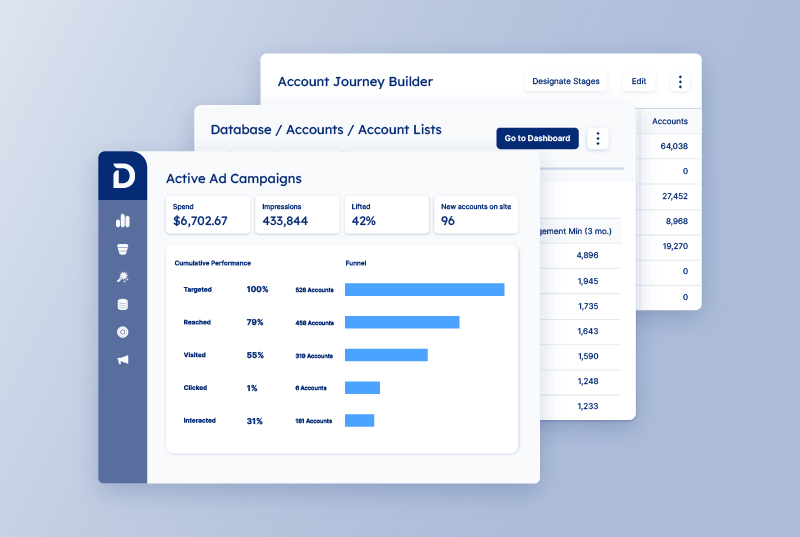
Demandbase treats advertising very differently. Where most ABM platforms partner with consumer-oriented DSPs and lose data fidelity in the handoff, Demandbase controls the full ad stack. Targeting, bidding, delivery, and measurement all run on the same platform, all optimized for account-based outcomes.
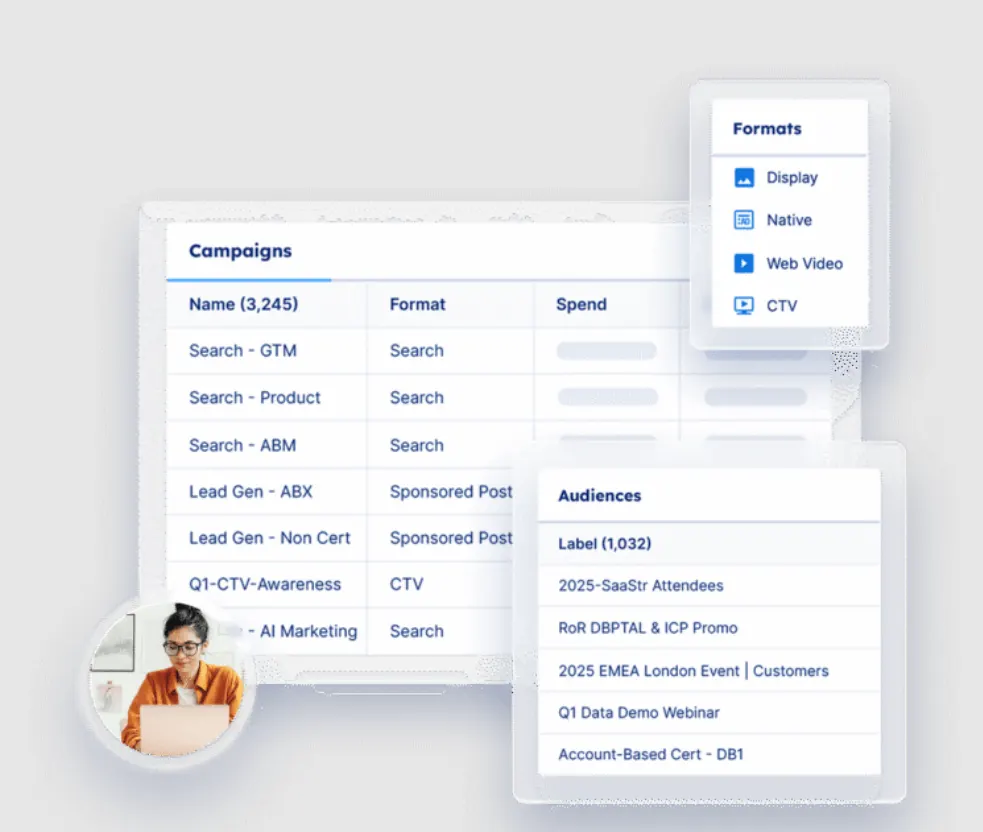
Here’s where the differences between the two ad engines get concrete:
- Impression balancing works at the account level. Budget gets distributed evenly across your target list, so a handful of large accounts don’t absorb all the spend.
- SmartBid, Demandbase’s AI bidding engine, moves spend toward accounts with active buying signals and pulls back where there’s no buying intent.
- People-based targeting lets teams prioritize known contacts, specific job functions, and buying group members within accounts, not just job titles.
- Measurement ties directly to pipeline and revenue at the account level. You see how ads contribute to real business outcomes.
- Creative rotation adapts to the funnel stage. One campaign can serve different creative to accounts in awareness, consideration, and decision, so you don’t need to build separate campaigns for each stage.
The results from Demandbase customers back this up. SAP Concur ran targeted display campaigns through Demandbase’s DSP and saw a 52% increase in closed-won revenue, 57% larger deal sizes, and 59% more pipeline after three to four months of consistent advertising to prioritized accounts.
A clearer view of account intelligence data and scoring
One of the most consistent complaints in the 6sense teardown was the lack of transparency in scoring. Users can see that an account scored high, but they don’t get much visibility into why. The models don’t show their work, and that makes it hard for sales reps to trust the recommendations and for ops teams to troubleshoot when something feels off.
Demandbase pulls your first-party data from CRM, MAP, email, and website activity, combines it with its own third-party B2B data, and uses AI to build a full 360-degree view of each account.
The data set behind it includes 100 million company profiles, 176 million B2B contacts, 810K+ intent keywords, 47K technologies tracked, and 3.7 billion IP addresses. Demandbase validates all of it through machine learning, AI, and human review, sourced from over 40,000 data providers.
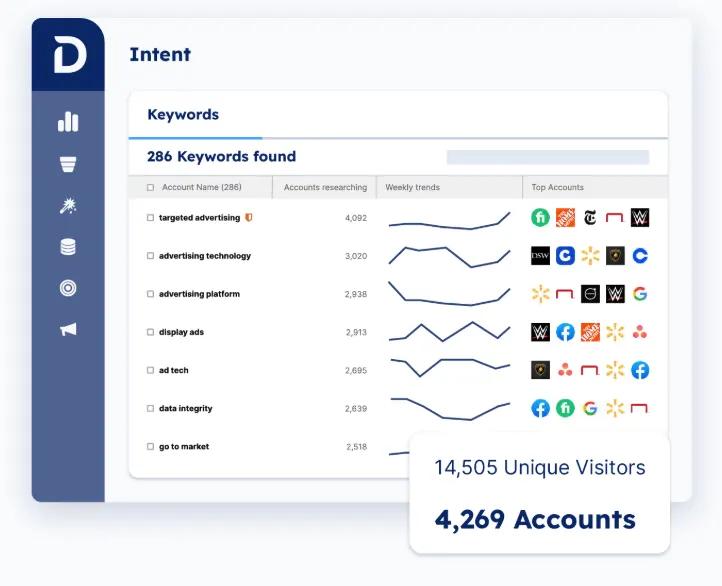
Here’s where the gap between the two platforms is most tangible:
- Lead-to-account mapping connects individual leads to their parent accounts automatically. Marketing and sales work from the same account view, not a pile of disconnected contacts.
- Journey stage mapping is transparent. Teams can see where every account sits in the buying process, understand why it landed there, and adjust the logic if needed.
- Engagement heatmaps highlight where activity is concentrated across your target list, making it easy to spot the hottest accounts and allocate resources accordingly.
- Selectors give teams a flexible way to build and activate targeted segments from a wide range of account-level data points, all within the platform.
- Patented IP matching maps anonymous website visitors to specific companies. Demandbase claims the highest match accuracy in the market, with models trained on hundreds of billions of signals.
Deep Instinct, a cybersecurity company, built its entire ABM program around Demandbase Account Intelligence and saw 900% revenue growth in its first year.
SDR conversion rates jumped over 300%. The sales team uses Demandbase as their single source of truth for account prioritization, competitive signals, and outreach personalization.
AI agents that work across teams, not just sales
6sense’s AI capabilities are mostly on the sales intelligence side. Copilot handles account prioritization, emails, and meeting scheduling for reps, and it does that well. But the AI doesn’t extend deeply into marketing workflows, campaign optimization, or cross-team orchestration. It’s a sales tool with sales use cases.
Demandbase takes a wider approach with Agentbase, a system of connected AI agents that operate across marketing, sales, and RevOps from a single data foundation. They share account intelligence, intent signals, and buying group insights across teams, so a marketing action and a sales action are always informed by the same data.
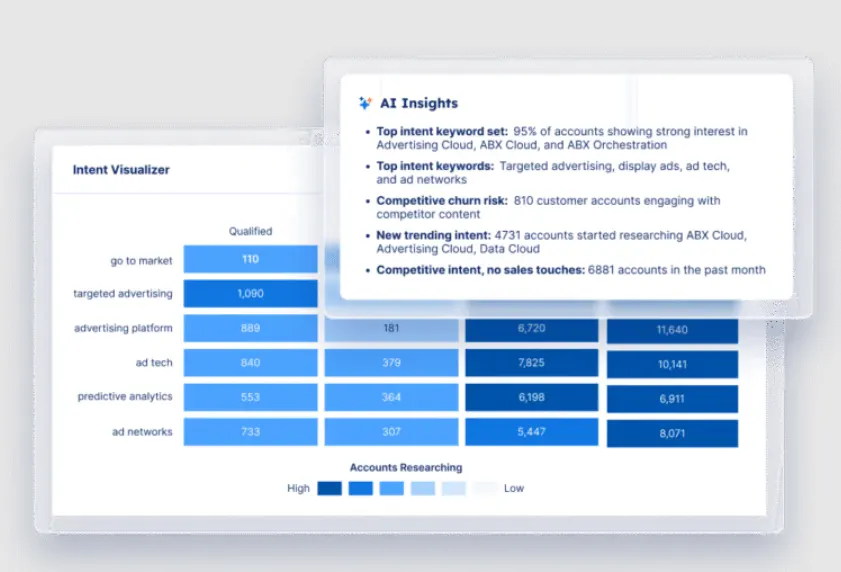
On the advertising side, Demandbase’s Campaign Outcomes Agent optimizes ad impressions and bidding strategy automatically based on your selected campaign goal. Early results showed 40% higher click-through rates and 25% more page views than standard campaigns.
Apart from advertising, Demandbase has seven generative AI agents that span the full GTM workflow:
- Account Engagement Agent summarizes engagement activity and highlights the most relevant signals so sellers can quickly decide on next steps without manual research.
- Buying Group Setup Agent automatically builds buying groups and personas from your CRM data and helps teams assess group completeness.
- Intent Agent summarizes intent signals and keyword trends across accounts, giving marketers a clear read on buyer interest at every funnel stage.
- Filter Agent (built with AWS) turns complex data queries into conversational, natural language interactions so teams can segment and explore data without building manual reports.
- Action Agent recommends high-impact next steps for target accounts through a chat-based workflow, so teams can coordinate actions across marketing and sales.
- Email Agent writes sales emails tailored to each account’s context so reps can move faster on outreach.
- Demandbase AI Chat lets users set up strategies and get recommended next steps through a conversational interface.
The agents also connect to your broader tech stack. They aren’t limited to working inside Demandbase. You can bring in third-party data, intent signals, and actions from tools like Salesforce, HubSpot, Outreach, Salesloft, and Marketo.
And while the agent lineup is still growing, the foundation is already different from what 6sense offers. Demandbase is building AI that works across the full GTM motion. 6sense’s AI is mostly scoped to sales.
Flexible reporting and pipeline attribution
Reporting was the single most talked-about pain point in the 6sense teardown, and it kept showing up across G2 reviews. The out-of-the-box reports do an adequate job with high-level ABM metrics, but teams that need to customize dashboards, explore data at a granular level, or build views for different stakeholders hit limitations fast.
Demandbase gives reporting much more room to breathe. After a major design overhaul in 2025, the analytics experience is noticeably more polished and more adaptable.
Dashboards are customizable with drag-and-drop widgets, and role-specific views mean a demand gen manager, an ABM lead, and an AE can each see the data that matters most to their workflow without building anything from scratch.
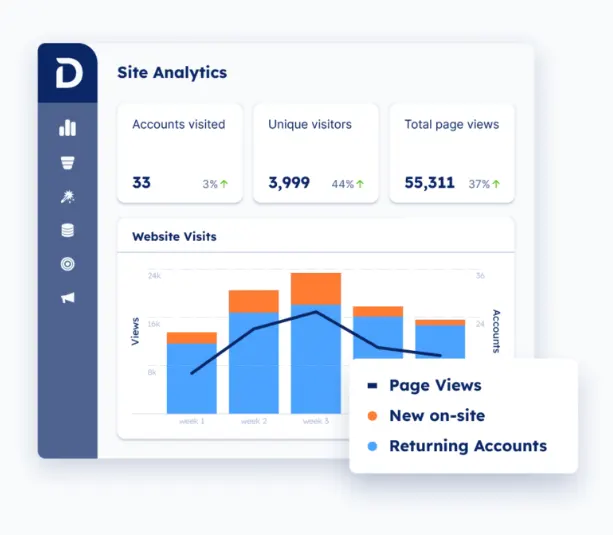
Several capabilities put Demandbase’s reporting ahead of what 6sense offers:
- Reports are embedded directly in Salesforce. Demandbase includes a pre-built dashboard with journey stages, intent data, web visits, engagement, and predictive scores, all accessible without leaving the CRM.
- REST APIs give teams a way out if the built-in views aren’t enough. You can export account data, intent signals, and buying group data into whatever BI tool or data warehouse your team prefers.
- Matched Company ID ties account identity together across web, CRM, MAP, and advertising data. Cross-system reporting works cleanly without manual data matching.
- Custom activity imports accept engagement data from any source via CSV. Teams can define their own activity types and use them in selectors and scoring, which removes the constraint of pre-defined categories.
Hexagon, a global technology company, is a good example of what this kind of reporting flexibility means in practice. Before Demandbase, they had no reliable way to measure ABM success. After implementation, they were able to benchmark goals, prove campaign efficiency, and use reporting data to inform their broader GTM strategy.
Make the switch to Demandbase
6sense packs in a lot of capability, but too much of it is held back by confusing scoring models, reporting that bends in only one direction, and an ad module that most teams outgrow quickly. For teams paying enterprise prices, those aren’t small compromises.
Demandbase is the closest head-to-head 6sense alternative. It’s a pipeline AI platform that brings account intelligence, B2B-native advertising, AI-powered orchestration, buying group tracking, and analytics together in one system.
It competes with 6sense across every major feature category, but the execution differs in a few key areas:
- A B2B DSP built from scratch for account-based ad performance, with SmartBid, account-level pacing, and journey-aware creative
- Account intelligence with scoring you can see, interrogate, and adjust (backed by 100M company profiles and patented IP matching)
- AI agents span the full GTM workflow, from marketing campaign optimization to buying group assembly to account research
- Flexible reporting with customizable dashboards, Salesforce-native views, REST APIs, and cross-system identity matching
- Buying group intelligence that no other platform matches, with AI-generated personas, gap detection, completeness scoring, and structured API access
If you’re hitting the ceiling with 6sense or weighing your options before committing, a side-by-side look is worth your time.
Book a meeting and see how Demandbase fits your workflow.
Related content



We have updated our Privacy Notice. Please click here for details.