

16 worthy Apollo alternatives for 2026 [according to users]

Apollo combines a contact database, data enrichment, and email sequencing in one platform at a price that suits small teams. That bundle explains the popularity.
But user reviews point to some major trade-offs. Data accuracy slips on older records and on contacts outside North America, which is why most teams run lists through a separate verification tool before sending.
The credit model prices every action and sometimes cuts access before the cycle closes. Add slow exports, sequence reporting that stops at the headline numbers, and duplicate records after a CRM sync, and the workarounds start to pile up.
Those limits push plenty of teams to look elsewhere. This article covers 16 Apollo alternatives for 2026, with a mix of data providers, sequencing tools, and full go-to-market platforms. We compared user reviews, key features, and pricing, and noted which type of team each tool serves.
Why look for an alternative to Apollo?
Before you look at alternatives, it helps to know what people are trying to get away from. The complaints below come from G2 reviews and Reddit threads about Apollo. Most of them relate to data accuracy, credit limits, and how the product behaves under heavier use.
- Billing errors block paid credits: Several accounts describe credits becoming unusable before the billing cycle closes. Support responses in these cases have pushed customers toward a renewal or upgrade to restore access. For anyone budgeting credits carefully, the effective allotment can end up smaller than what the plan advertises. [Read Full G2 Review]
- Data coverage gaps outside the US: Contacts in APAC and the Middle East frequently come back missing mobile numbers, and job titles on those records go stale faster than users expect. Credits get spent whether or not the record is complete, so teams selling into those regions pay the same price for less information. Coverage quality tracks with how much of your market is in North America. [Read Full G2 Review]
- Email bounce rates on older records: Teams report scrubbing Apollo lists through an external verification service before sending anything. The reason is bounce volume, driven by roughly 10% to 15% of contacts carrying information that has gone out of date. Skipping that step puts sender reputation at risk. [Read Full G2 Review]
- Low credit allotments on cheaper plans: The lower tiers come with a small enough credit allotment that a proper evaluation is hard to run. New users spend the monthly limit testing search filters and enrichment, which leaves little left for the outreach the credits were meant to support. Understanding whether the platform fits often requires upgrading first. [Read Full G2 Review]
- Large queries take time: Performance degrades when users pull large lists or stack several filters into one query. The delay tends to arrive in the middle of a heavy prospecting session, where the point is to keep moving through records. Smaller pulls work just fine, so the issue shows up mainly at volume. [Read Full G2 Review]
- The UI gets busy with multiple sequences: Users managing multiple sequences and lists at once describe a cluttered interface. Each move between campaigns, contacts, and analytics costs an extra click or two. The cost is small per action and noticeable across a working week. [Read Full G2 Review]
- No per-step drop-off view: Open and reply rates are easy to find. Pinpointing which step in a sequence loses prospects requires exporting the data and analyzing it somewhere else. Teams optimizing multi-touch sequences want per-step drop-off available inside the product. [Read Full G2 Review]
- CRM sync bugs create duplicates: Lists sometimes fail to sync with the connected CRM, and syncs that complete can create duplicate contacts. Sales and RevOps teams then clean up the records by hand, which eats into the time the automation was meant to save. [Read Full G2 Review]
Key features to look for in an Apollo alternative
Apollo alternatives vary widely. Some are pure data providers, some are outbound platforms, and some cover the full go-to-market motion. The features below apply across all three categories and map to the problems teams report most often.
- Real-time verification before export: Ask whether the platform checks an email at the moment you pull it or serves whatever was last stored in the database. The difference decides whether you need a second verification subscription.
- Coverage depth in the regions you sell into: Total database size tells you almost nothing about your specific territory. Mobile fill rate and title recency, broken out by region, tell you what you need to know. Run a sample of 100 accounts from your actual target list during the trial and count what comes back complete.
- Account-level context on contact records: A name and an email tell you who to contact. But intent signals, technographics, funding events, and hiring activity tell you which accounts are worth contacting this week. Platforms that carry account context alongside contact data give sales teams a reason to prioritize one list over another.
- Two-way CRM sync with deduplication rules: Check the field mapping, the ownership logic, and what the system does when a record already exists in your CRM. Ask specifically how the platform handles a match on email against a different account owner.
- Enrichment for the records you already own: Most teams sit on tens of thousands of CRM records that have gone stale since the day they were created. Ask whether the platform refreshes your existing database on a schedule or only sells you new contacts. Acquisition tools and hygiene tools are different products, and plenty of teams need both.
- Account scoring you can inspect and adjust: Every platform ships a fit or intent score. Ask to see the inputs behind it and find out whether you can change the weights against your own closed-won history. Reps learn to ignore any number they cannot explain.
- First-party and third-party signals in one view: Signal coverage varies widely across this category. Some platforms license third-party intent and stop there. Ask what the platform does with your own site traffic, product data, and CRM activity, and whether all of it arrives in one place.
16 Apollo.io alternatives on the market right now
Some of these tools compete with Apollo directly and others cover ground Apollo never attempted. The table sorts that out before we get into the detail on each one.
| Platform | Best for | Key differentiator | Pricing |
|---|---|---|---|
| Demandbase | Any B2B team that has outgrown a contact list | Contact data, self-built intent, buying groups, B2B ads, and attribution on one account record | Custom (platform fee plus flat per user) |
| ZoomInfo | Enterprise orgs treating B2B data as infrastructure | Direct dial coverage, org charts, and RingLead data operations at a scale nobody matches | Custom |
| Lusha | Reps who work LinkedIn and want the mobile number now | Extension-first workflow with strong US and UK cell coverage | Free; $37.45 to $299.95 per user monthly, billed annually; Scale custom |
| HubSpot Breeze Intelligence | HubSpot customers with a CRM hygiene problem | Native enrichment and visitor identification with no second vendor involved | Included with paid HubSpot seats; credit packs extra |
| Cognism | Phone-led outbound into Europe | Mobile numbers confirmed by a human agent, plus DNC screening across a dozen-plus registries | Custom |
| RocketReach | Anyone who needs one person’s details across sales, recruiting, or PR | Profile breadth well past the sales-qualified universe, including personal emails | $19 to $115 per user monthly, billed annually |
| LinkedIn Sales Navigator | Sellers whose deals open through relationships | Profile data the prospects maintain themselves, plus warm paths through TeamLink | Per seat, published; Advanced Plus custom |
| Seamless.AI | US prospectors who want records built at query time | Live assembly on every search, with one credit covering email and phone | Free tier; Pro and Enterprise custom |
| Bombora | Mature ABM teams buying signal as a standalone feed | Intent from its own publisher cooperative, scored against each account’s own baseline | Custom |
| Snov.io | Founders and small teams sending a few hundred emails a month | Follow-ups cost nothing once you have paid for the recipient | Free; from $39 monthly; Custom Ultra quoted |
| Hunter.io | Teams working from an account list who want every address at a domain | Domain-first discovery, with no charge when a search returns nothing | Free; from €49 monthly; Enterprise custom |
| Salesloft | Enterprise revenue teams that own their data already | Cadence, conversation intelligence, deals, and forecasting in one Salesforce-native workspace | Custom |
| Lead411 | US-focused SMB teams that want intent without an enterprise quote | Growth triggers scored by how many company events stack up at once | Free trial; from $49 monthly; Blaze custom |
| LeadIQ | Teams that track past buyers into new roles | Champion movement alerts with fresh details and a suggested angle attached | Free; from $15 monthly; Enterprise custom |
| UpLead | Small teams where a bounce costs something real | Server check at export, with the credit returned when an address fails | $99 to $199 monthly; Professional custom |
| Clay | GTM engineers chaining providers per record | Waterfall enrichment across a 150-plus provider marketplace, plus AI research columns | Free; from $185 monthly; Enterprise custom |
1. Demandbase
Best for: Mid-market to enterprise B2B companies that want the most complete account-based GTM platform available and have the budget to run it properly.
Demandbase is a full-stack AI GTM platform running its own semantic intent engine, buying group mapping, a B2B-native ad platform, and a connected system of AI agents on one unified data set.
Both platforms give you contacts, which is where the similarity ends. Apollo works at the contact level and hands the rest to your stack, so intent comes from a partnership, advertising happens somewhere else, and attribution never really happens.
Demandbase works at the account level with proprietary intent, a B2B-native demand-side platform, website personalization, and Pipeline Influence reporting that shows which plays generate revenue. Every agent and every campaign reads from the same unified account record, which is what makes the outputs consistent across teams.
Key features
- Proprietary semantic intent: Demandbase operates its own semantic intent engine across trillions of behavioral signals, so topics get interpreted in context and not matched as keywords. First-party and third-party signals come together in one account view.
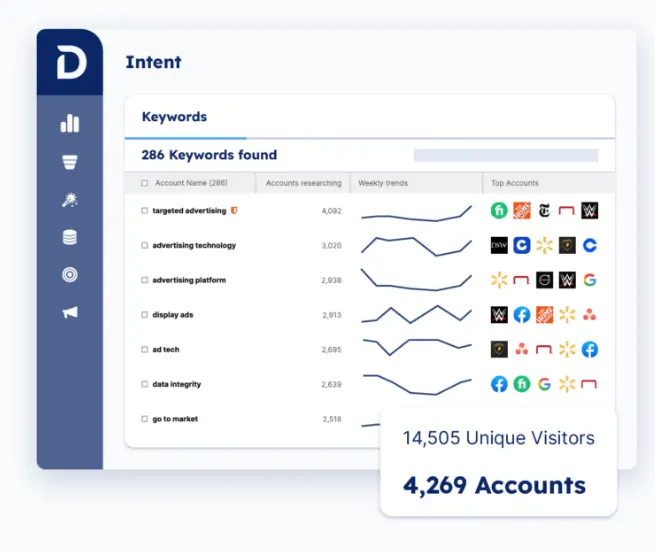
- Account intelligence and ICP scoring: Each account carries a profile built from firmographic, technographic, intent, and CRM data, with a fit score and a stage read attached. Because the inputs are visible and tunable against your win history, the score survives contact even with a skeptical rep, which is more than most black-box models manage.
- Buying group mapping: The platform identifies every member of the buying group at a target account, tracks how each one engaged, and rolls that activity up to the account. Reps see the committee taking shape and work it as a unit, which is how enterprise deals get won.
- B2B-native demand-side platform: Demandbase owns a demand-side platform designed for account-based targeting, which no Apollo.io competitor here can claim. Campaigns run across display, video, native, retargeting, and CTV against your actual account list, and JourneyIQ adjusts the creative and the bid to each buyer’s journey stage in real-time.
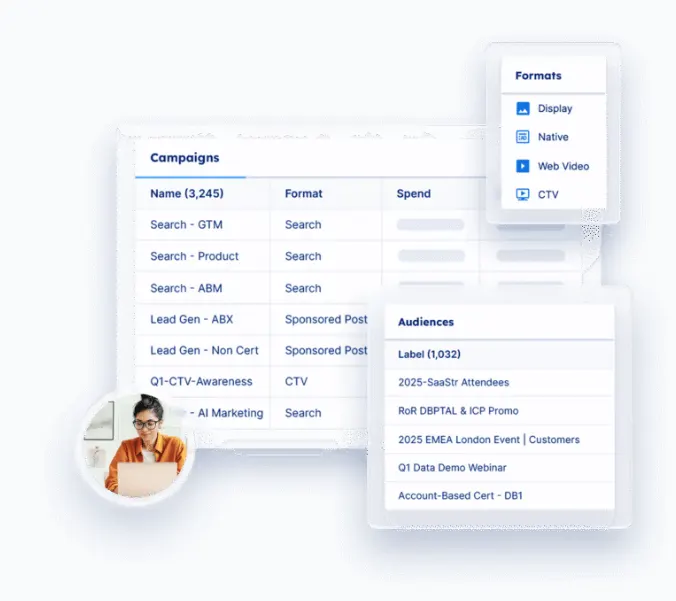
- AI agents across the whole motion: Agentbase is Demandbase’s agent framework, and the agents multiply steadily. The Campaign Outcomes Agent optimizes bidding inside the DSP, the Pipeline Optimization Agent analyzes pipeline and suggests actions, and the Site Customization Agent handles landing pages.
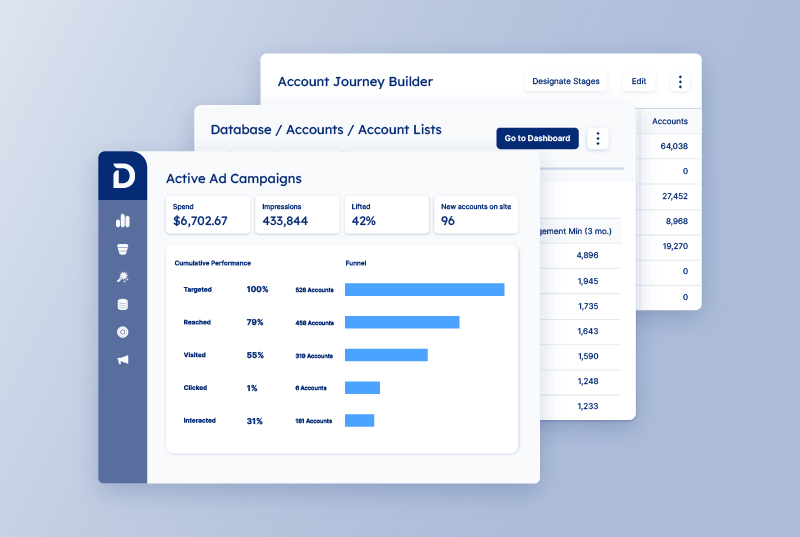
- Pipeline Influence measurement: Demandbase AI Chat answers pipeline questions through prompts and reports how each program contributed. Teams see which plays produced pipeline and scale those, which addresses the reporting gap Apollo users describe when they cannot tell which step lost the deal.
Advantages of using Demandbase
The advantage starts with architecture. One account record feeds the intent engine, the ad platform, the sales workflows, and the reporting, so nothing needs reconciling later. One G2 review says the platform proves itself when account prioritization matters more than raw lead volume, with intent data and account insights carrying the value. [Read Full G2 Review]
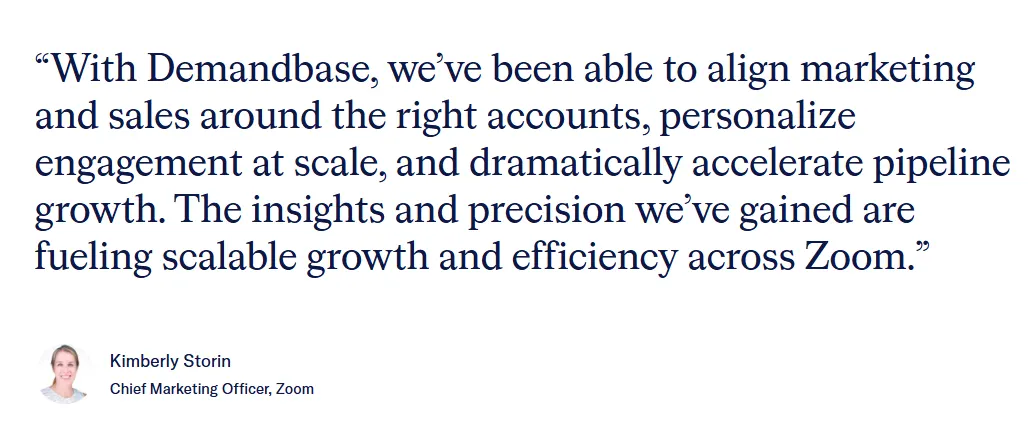
Zoom shows what happens once that context reaches sellers. Demandbase gave reps prioritized lists of high-propensity accounts with intent and engagement history attached, so they reached decision-makers before the RFP. A seller pilot across two product lines lifted conversion from engaged account to opportunity by 36%, and exposed accounts posted more than 300% MRR improvement against a control group. [Read Case Study]
The daily experience matches the results. Another G2 review names consolidation as the main benefit, with the platform pointing teams at accounts showing active interest. Visibility into account activity and campaign performance removes manual work, which is the same work a multi-vendor stack creates by design. [Read Full G2 Review]
Pricing
Demandbase has a clear pricing structure. You pay a platform fee for the core software and services plus a flat rate per user, and that per-user rate stays predictable as the team scales.
Sales and Marketing come in the same plan, so there are no separate products to combine, and the quote gets sized to your go-to-market needs.
2. ZoomInfo
Best for: Enterprise sales teams that need direct dials, org charts, and verified contact data at a depth Apollo does not match, with a budget to fund it.
ZoomInfo is a go-to-market intelligence platform built on a database of roughly 100 million companies and 500 million contacts, with buying intent, technographics, org charts, and workflow automation running on top of it.
Apollo wins on price and self-serve access. ZoomInfo wins on data depth, particularly direct dials, org hierarchies, and coverage outside North America, and it charges accordingly through annual enterprise contracts.
Key features
- Org charts and buying committee mapping: The platform maps reporting structures inside target accounts, so reps can see who a contact reports to and who else sits in the buying group. That matters when a deal needs six or eight people to say yes and you only have one name.
- Buying intent from a first-party research network: ZoomInfo operates its own intent data network and Forrester has named it a Leader in intent data providers. As of mid-2026, person-level intent shows which specific contacts inside an account are researching a topic.
- WebSights visitor identification: The platform matches anonymous website traffic to company records, which turns unidentified sessions into accounts you can work. It connects to the same database that powers search, so a match arrives with the full contact list attached.
Pros
- Search and export take minutes: Users building lists by role report quick turnarounds. Searching for HR managers or IT directors and exporting a few hundred contacts is routine work that takes minutes. Teams running several campaigns at once find that repeatability useful. [Read Full G2 Review]
- Data and AI insights guide where to focus: Many teams credit the mix of company data, contact data, and AI recommendations with helping reps decide where to spend their time. The platform points toward higher-value opportunities, which gives teams a basis for working accounts in a deliberate order. [Read Full G2 Review]
- Company insights explain timing: Intent data and company insights tell reps which accounts might be in the market before anyone reaches out. Users find that context changes how they write outreach and when they send it. Knowing an account is researching your category is a reasonable place to start a conversation. [Read Full G2 Review]
Cons
- Adjacent topics show up in the results: The topic taxonomy is broad, so a signal on one category can pull in adjacent categories that have little to do with your product. Users describe filtering storage intent that arrives from neighboring topics. [Read Full G2 Review]
- Advanced search takes time to learn: The advanced search is capable and it takes practice. Users report that Boolean logic and saved search setup are not intuitive at first, and that the payoff arrives after some time in the tool. Teams should plan for a ramp period when they add seats. [Read Full G2 Review]
- Accuracy issues do sometimes appear in the database: Teams report contacts who left the company months ago and details that no longer match reality, with Canadian records drawing specific complaints about age and validity. Database scale does not exempt any provider from data decay, and users expect tighter vetting at this price point. [Read Full G2 Review]
Pricing
ZoomInfo sells through quotes and annual contracts with no public pricing page. Vendr’s data puts the median contract around $31,875.
Related reading → 16 Best ZoomInfo Alternatives & Competitors in 2026
3. Lusha
Best for: Small sales teams and individual reps who prospect from LinkedIn and want verified phone numbers and emails revealed in the moment, without an annual contract.
Lusha is a B2B contact data platform delivered mainly through a browser extension, with a self-reported database of 280 million contacts and 30 million company profiles, plus a web app, an API, and CRM enrichment.
Both charge per seat at similar entry prices. Apollo bundles generous credits with outbound tooling, while Lusha meters reveals tightly and keeps API access, full CRM sync, and intent data on its top Scale plan.
Key features
- Browser extension across LinkedIn, Sales Navigator, and any website: The extension reveals verified emails and phone numbers on LinkedIn profiles, company sites, CRM records, Gmail, and Google Calendar, and it comes with every plan including the free one.
- CRM and CSV enrichment: The platform fills missing emails and phone numbers on records in Salesforce, HubSpot, and Pipedrive, and it enriches uploaded spreadsheets the same way.
- Lusha Engage and Conversations: Engage handles AI-generated email sequences from inside the same platform that found the contact. Conversations records calls, transcribes them, extracts action items, and syncs to CRM.
Pros
- LinkedIn and CRM enrichment work together: The LinkedIn integration and CRM enrichment cover the two places where prospecting happens, so a contact moves from a profile view into a clean CRM record without a manual step. Teams describe B2B lead management getting easier once both pieces run together. [Read Full G2 Review]
- Simpler than the enterprise alternatives: Users who have worked in Apollo and ZoomInfo describe Lusha as the easier product by a clear margin. The interface stays simple enough that a junior rep in their first week can build a list and start working it, while the enterprise tools take longer to learn. [Read Full G2 Review]
- The vendor invests in onboarding: Support quality comes up as a genuine advantage. Teams get onboarding sessions once licenses are in place, and the vendor uses them to explain how to work the product properly rather than to run through a feature list. [Read Full G2 Review]
Cons
- Records take longer to refresh: Users report that Lusha updates its B2B data more slowly than competing tools, and the gap widens with smaller companies and with contacts who change jobs often. Teams working those segments encounter details that stopped being true a while ago. [Read Full G2 Review]
- Calling requires another tool: The platform gives you the phone number and stops there. Reps open separate software to place the call, which breaks the flow that the extension otherwise handles well. Users running phone-heavy outbound call this the most obvious gap in the product. [Read Full G2 Review]
- It does not replace the rest of the stack: Teams point out that Lusha covers contact data and part of the outreach, and the rest of the work stays in other tools. Anyone hoping to consolidate a stack around one platform will come away disappointed. [Read Full G2 Review]
Pricing
Pricing is credit-based. Emails cost one credit each and phone reveals cost several, which makes the right tier a function of your calling volume.
The free plan includes 40 credits a month, Starter runs $37.45 per user per month billed annually, Pro $52.45, and Premium $299.95, and Scale requires a quote.
4. HubSpot Breeze Intelligence (formerly Clearbit)
Best for: Marketing teams on HubSpot that want shorter forms, better lead scoring inputs, and intent signals attached to the accounts already in their database.
Breeze Intelligence is the data component of HubSpot’s Breeze AI suite, and it handles contact and company enrichment, website visitor identification, and progressive form logic from inside the CRM the records already stay in.
The difference is that Apollo gives you contact acquisition at a low monthly price. Breeze Intelligence gives you CRM hygiene inside a platform you are already paying for, with standard enrichment now included at no extra cost on paid seats.
Key features
- Automatic enrichment on standard fields: Breeze fills in company revenue, industry, employee count, and location on contact and company records as they enter the CRM. As of 2026, HubSpot includes standard field enrichment with paid Core Seats at no extra charge, which removes the main cost objection teams had with the old Clearbit model.
- Smart Properties for custom research: You can define a custom field and have Breeze research it, covering things a standard schema does not hold. These AI-researched fields consume credits, so the free enrichment covers the basics and the interesting questions come with a meter attached.
- Buyer intent from website traffic: Breeze matches anonymous visitors to company records and creates CRM entries for accounts that showed up on your site. The identification works at the company level, so you learn which organizations visited and which pages held their attention.
Pros
- CRM context makes the output relevant: The tight CRM connection removes the usual integration headache. Records get enriched in place, and the context that makes the output useful is already there. [Read Full G2 Review]
- No separate subscription to approve: Teams like that the capability arrives with the HubSpot plan they already pay for. Standard enrichment costs nothing extra on paid seats, and nobody has to leave the platform to use it or take a new line item through procurement. [Read Full G2 Review]
- Implementation is straightforward: Setup comes up repeatedly as a strength as well. Because the tool is native, most of the configuration that external enrichment tools demand simply does not exist here. [Read Full G2 Review]
Cons
- Niche and local businesses come up short: The contact-level data holds up well for big, mainstream companies and falls off for the rest. Teams working in local markets, boutique firms, or recent startups describe records that arrive half-filled. [Read Full G2 Review]
- Limited compared to standalone AI tools: Users find the outputs limited when compared with standalone AI tools that produce documents, presentations, and other formats. HubSpot appears to be adding to this, and today the range covers less ground than teams expect from an AI feature. [Read Full G2 Review]
- No clear path to a dynamic library: The knowledge that feeds the AI has to be maintained manually. Teams want a dynamic source that updates on its own, and the current setup requires someone to keep static documents in HubSpot fresh. [Read Full G2 Review]
Pricing
Pricing works as part of HubSpot, which makes the total harder to pin down.
Expect roughly $75 per month for a Starter seat and a small credit pack, with the number climbing into four figures once you add the Professional subscription that powers intent and the advanced workflows most teams want. Paid seats include standard enrichment at no extra cost, and custom AI-researched fields spend credits.
5. Cognism
Best for: SDR teams that cold call into the UK and Europe and need mobile numbers a human has already dialed and confirmed.
Cognism runs a European-strong contact database with two verification tiers, one confirmed by SMTP check and one confirmed by a person on the phone, plus DNC screening across more than a dozen national registries.
The two split cleanly by geography and motion. Apollo suits US email-first prospecting at volume, and Cognism suits European phone outreach where a wrong number costs a rep an hour.
Key features
- Diamond Data phone verification: A human agent calls each Diamond mobile and confirms the person is at the company before the record enters the verified set. Cognism claims 87% accuracy on this subset with connect rates around three times the industry average, and the coverage runs to roughly 10 million contacts out of the wider database.
- Verification cadence tied to seniority: Cognism re-verifies senior contacts on a schedule, with director-level and above refreshed every 30 days and VP-level and above every 60.
- DNC screening across 13 to 15 registries: Every record gets checked against national Do Not Call and Telephone Preference Service lists in the US, UK, Canada, Australia, France, Germany, and others.
Pros
- The AI keeps records validated: Users describe the contact data across Europe and other international regions as the best part of the product. The AI validation runs continuously against each record, so details stay current in markets where most providers fall behind. [Read Full G2 Review]
- Enrichment covers CRM and event lists: Teams point to the integrations as a time saver they can measure. CRM records and event lists get enriched in place, which cuts out the research and verification work that someone would otherwise do by hand. [Read Full G2 Review]
- Missing mobiles get sourced on request: When a contact has no mobile attached, users flag the record and Cognism’s team finds it. Reps who depend on the phone consider this the feature they would miss most, since it fills the specific gaps that matter to a specific rep. [Read Full G2 Review]
Cons
- Complex European searches feel busy: Building highly specific criteria for European regions means working through a filter set that feels busy. The platform handles the query, and users report that the setup takes more attention than it should. [Read Full G2 Review]
- Large lists take time to export: Large list exports take time to complete. Most users accept the wait because the data that arrives is accurate, and teams working under a deadline still notice the delay. [Read Full G2 Review]
- Company revenue data misses in some markets: Revenue data comes up as a weak point. Teams selling into Italy describe discrepancies wide enough that they stopped trusting the field, which matters if your ICP filters run on company size. [Read Full G2 Review]
Pricing
Every contract is custom and annual, priced against how many users you have, which features you want, and where you sell.
Third-party reports put the entry point near $15,000 a year, with mature deployments passing $50,000 once intent data and heavier Diamond Data usage get added.
6. RocketReach
Best for: Individual users and small teams who need to find one specific person’s email or phone quickly, across sales, recruiting, partnerships, and PR.
RocketReach is a B2B contact database that returns emails, phone numbers, and social profiles on individual lookups, with bulk processing, CSV export, and CRM integrations on the higher tiers.
RocketReach indexes more people and serves more use cases, covering recruiting and partnerships alongside sales. Apollo covers fewer profiles and gives you sequencing, a dialer, and CRM sync in the same subscription.
Key features
- Personal emails and social links: Each profile returns work email, personal email where available, phone numbers, and links to social accounts.
- Profile breadth across functions: The database covers more than 700 million professional profiles, which reaches well past the sales-qualified contacts a B2B database usually holds. Recruiters, partnership teams, and PR people use it for the same reason SDRs do, since the index covers people who would never appear in a sales-focused tool.
- Chrome extension for LinkedIn: The extension pulls contact details onto a LinkedIn profile while the rep is already looking at it. Most day-to-day use runs through this workflow rather than through the web app.
Pros
- Social links open another channel: Each profile returns social accounts alongside the contact details, so a rep can reach someone on LinkedIn or Facebook when email and phone go nowhere. Users describe that as the difference between one channel and three. [Read Full G2 Review]
- Export and list building work simply: The export and list building features are convenient to use, and the product avoids the crowded interface that comes with bigger platforms. [Read Full G2 Review]
- More affordable than many alternatives: The pricing puts it within reach of budgets that would never clear a ZoomInfo quote. Teams also credit the platform for being easy to move around in and for connecting to their CRM without much work. [Read Full G2 Review]
Cons
- Sequences queue behind each other: The built-in sequencer caps sends at 500 emails per day. Teams running several sequences at once hit that ceiling and wait for one to finish before starting the next, which turns a volume problem into a scheduling problem. [Read Full G2 Review]
- Search performance disappoints: The interface does not feel as smooth as it should. The search function in particular responds more slowly than users want, which makes the product feel less polished than the price suggests. [Read Full G2 Review]
- CRM sync overwrites account records: The CRM integration causes problems that support does not resolve. It overwrites company names on accounts already in the system and runs no duplicate check, and users who raised it describe a support experience that ended after the first meeting. [Read Full G2 Review]
Pricing
RocketReach charges per seat and counts exports, not lookups, which makes the export cap the number to check against your volume:
- Essentials costs $19 per month billed annually with 1,200 exports and email only.
- Pro costs $52 and adds unlimited mobile and direct dials, technographic data, and org charts at 3,600 exports.
- Ultimate costs $115 with 20,000 exports plus intent data and Salesforce custom mapping.
Anyone who wants phone numbers starts at Pro.
7. LinkedIn Sales Navigator
Best for: Enterprise sales teams that build account plans, map buying committees, and want that work sitting where their prospects already maintain their own profiles.
Sales Navigator is LinkedIn’s prospecting product, built on more than a billion member profiles, with 50-plus search filters, saved lead and account lists, real-time alerts, and 50 InMail credits a month.
The two solve opposite halves of prospecting. Apollo answers how to reach someone, and Sales Navigator answers who that someone is this week.
Key features
- Search across a self-maintained profile database: More than 50 filters cover title, seniority, function, headcount, geography, tenure, and dozens of other attributes across a billion-plus members. The data stays current because the people in it update their own records when they change jobs.
- Real-time alerts on leads and accounts: Saved leads generate notifications when someone changes roles, posts content, or appears in the news. Those events give reps a documented reason to reach out and a rough sense of timing.
- Account IQ and Lead IQ: Account IQ produces an AI brief on a target company covering financials, headcount trends, strategic priorities, and likely pain points. Lead IQ does the same for an individual, covering their background, interests, and shared connections.
Pros
- Company-first prospecting is easy: The workflow matches how reps approach cold outreach. Start with the company you want, sort by seniority and function, and see who is worth a message. Teams build multiple personas and filter results against each one. [Read Full G2 Review]
- Account IQ links developments to your product: The AI summarizes what a company has been doing recently and connects those developments to how your product fits. Users describe that second part as the reason it beats a generic news roundup, since the output arrives with an angle already attached. [Read Full G2 Review]
- The filters take no training: Users describe the advanced search as easy to work with, including people who avoid new technology. The filter set covers a lot of ground and the interface keeps it manageable, so a rep can build a precise search without learning Boolean syntax. [Read Full G2 Review]
Cons
- The price stretches small budgets: Cost comes up as the main objection from startups and small businesses. The value is clear enough, and the price assumes a deal size that not every team has. [Read Full G2 Review]
- Search results sometimes bury the right people: Search results do not always mirror what the filters should return. Users describe finding relevant contacts by name after those same contacts failed to appear in a filtered search. [Read Full G2 Review]
- The product moves slowly: Teams want the product to keep up with the tools around it, particularly on navigation. The interface works and it shows its age next to newer platforms that ship changes every month. [Read Full G2 Review]
Pricing
Expect roughly $100 to $120 per user per month for Core and $150 to $180 for Advanced, with Advanced Plus quoted per contract at a reported $1,300 to $1,600 per seat annually.
The gap between Core and Advanced decides most purchases, since Account IQ, Lead IQ, TeamLink, and CRM sync all sit on Advanced.
A 30-day trial covers both published tiers if you have not taken a LinkedIn trial in the past year.
8. Seamless.ai
Best for: Teams building lists at volume in North America that can budget separately for intent data and automated list building.
Seamless.AI is a real-time B2B search engine that assembles and verifies contact records when you run a query, pulling from a claimed list of 1.7 billion contacts and 150 million company profiles.
Both bundle data with light outreach tooling. Apollo includes intent and sequencing in the subscription, and Seamless.AI charges separately for buyer intent, enrichment, and Autopilot.
Key features
- One credit covers email and phone: A single credit returns both the email address and the mobile number for a contact, which reads well against tools that meter each one separately. The catch is that credits get consumed on failed lookups too, with no refund for a bounce or a disconnected line.
- Chrome extension for LinkedIn and company sites: Reps pull contact details from a LinkedIn profile, Sales Navigator, or any company website with one click, and then push the record to a CRM.
- Autopilot for automated list building: Set filters for title, industry, and company size, and the system builds and refreshes prospect lists on its own. Autopilot consumes credits quickly, so it makes sense on the higher tiers where the daily allotment supports it.
Pros
- Contact data arrives while you research: The Chrome extension covers the workflow most reps already have. Research a company on LinkedIn, click, and the verified email and phone appear without a detour through another tool. [Read Full G2 Review]
- The API handles data at scale: Teams push data through the API and report a drop in manual work as a result. For anyone running enrichment on a schedule or feeding another system, the automation covers ground that would otherwise need a person. [Read Full G2 Review]
- Records improve over time: Users report improvement in the AI-driven enrichment and automation. Records get found, updated, and verified on an ongoing basis, and the intent signals help teams sort the list by who is worth calling. [Read Full G2 Review]
Cons
- The real-time claim has limits: Users report duplicate entries and incomplete records coming back from searches. They also want a faster refresh cycle, since the real-time positioning sets an expectation that the data does not always meet. [Read Full G2 Review]
- Bounce rates require a second tool: Searches return fast and scroll 100 results at a time, which users describe as painful on a big list. The bigger problem is bounce rate, since teams either run the output through a separate verification tool or pay for the enrichment add-on to keep sends clean. [Read Full G2 Review]
- The product looks basic: The UI works and does not impress. Users want something more modern and more intuitive, which is a fair ask given how much of the day a rep spends inside it. [Read Full G2 Review]
Pricing
The pricing page lists Free, Pro, and Enterprise with no numbers attached to the last two. Free gives one user 50 credits to test the platform.
9. Bombora
Best for: Enterprise marketing and ABM teams that want intent signal straight from the source, with granular topic control and direct API access.
Bombora operates a consent-based Data Cooperative that classifies billions of monthly content consumption events against a taxonomy of tens of thousands of B2B topics, then reports which companies are researching what.
The two products barely overlap. Apollo sells contacts and outreach on a credit card, and Bombora sells a signal feed on a five-figure annual contract with no execution tooling attached.
Key features
- The Data Cooperative: More than 5,000 B2B publishers and brand sites contribute anonymized content consumption data, including Fortune, Bloomberg, Inc, and Fast Company alongside vertical research sites.
- Topic taxonomy with buying stage: The taxonomy covers tens of thousands of topics, from broad categories to specific technologies and competitor names, and Bombora classifies each surge as early, mid, or late-stage research.
- Visitor Insights and Audience Solutions: Visitor Insights runs a JavaScript tag that resolves anonymous website traffic to known accounts and personas in real time. Audience Solutions provides more than 600 pre-built B2B audiences and thousands of attributes for custom audience building on LinkedIn and display.
Pros
- Scores replace hours of research: Users open the tool and see which companies might be working on the problem their product solves, which removes most of the research a rep would otherwise do by hand. People arriving with no prior experience report getting comfortable with it quickly. [Read Full G2 Review]
- The Surge report runs on its own: The automatic Surge report pushes net-new accounts into HubSpot on a schedule, and users call it their favorite part of the product. Teams walk in on Monday to a fresh set of companies shopping for their services, then pull contacts from those accounts to get content in front of them. [Read Full G2 Review]
- Intent-led targeting lifts conversion: The targeting change produces measurable outcomes. Teams stopped chasing organizations at random, and those that did report more sales closing in less time. [Read Full G2 Review]
Cons
- Third-party tools fill the gap: The platform holds no contact information and offers no way to import it. Teams store contacts for their target accounts in a third-party tool, which slows the workflow and adds a step between the signal and the outreach. [Read Full G2 Review]
- Filters do not narrow enough: The filtering could be sharper. Users report drill-downs that stop at a general level, and several would trade some breadth for the ability to target individuals rather than companies. [Read Full G2 Review]
- Audiences move to LinkedIn by hand: The LinkedIn Campaign Manager integration falls short of what users need. Audiences require a manual export and re-upload every time, which defeats much of the point of a signal that changes weekly. [Read Full G2 Review]
Pricing
Bombora publishes no pricing and sells Company Surge on annual contracts only.
Third-party procurement data puts the entry point near $30,000 a year for company-level Surge, with Vendr’s dataset showing a median contract around $24,750.
Contact data is not part of it, so budget separately for a database, and topics outside the base taxonomy cost extra.
10. Snov.io
Best for: Bootstrapped founders and small teams running a few hundred emails a month who want the finder, verifier, sender, and CRM on one subscription.
Snov.io is an all-in-one outbound platform that finds and verifies email addresses, runs conditional email sequences, warms sending domains, and tracks deals in a built-in pipeline.
Both platforms bundle data with outreach. Apollo meters everything through one credit pool and charges per contact, while Snov.io charges once per recipient and makes every follow-up to that person free for the rest of the billing period.
Key features
- Email Finder with pre-verified results: You can search by name and domain, pull every contact at a company, or extract from a LinkedIn profile through the extension.
- Drip campaigns with a recipient-based meter: The visual builder handles multi-step sequences with delays and conditional branches based on opens, clicks, and replies. The pricing mechanic is the part worth noting, since you pay once when you first contact someone and every follow-up to that person costs nothing for the rest of the billing period.
- Seven-tier email verification: The verifier checks syntax, MX records, and SMTP response, and it catches catch-all domains, greylisted servers, and disposable addresses. Bulk uploads handle files up to 100,000 lines.
Pros
- The finder and verifier work as a pair: The email finder handles business contact discovery and the verifier removes invalid addresses before anything goes out. Users credit that combination with better deliverability, since the cleaning step happens without a second subscription. [Read Full G2 Review]
- The extension replaces manual work: The LinkedIn extension removes a large share of the manual work in list building. Users describe the platform replacing several subscriptions and keeping the sales process organized, since the finding, sending, and tracking all happen in one login. [Read Full G2 Review]
- Setup takes very little time: Users describe the setup and onboarding as quick. The product asks for very little before it does something useful, which suits the small teams and founders who make up most of its base. [Read Full G2 Review]
Cons
- Advanced features take time to learn: Feature depth comes with a learning curve. Users get the basics quickly and describe the advanced tools as taking longer to work out, particularly the campaign builder. [Read Full G2 Review]
- Unused credits expire each month: Credits reset monthly and anything left over is gone. Teams with uneven campaign volume pay full price in quiet months and get nothing back for the allowance they never touched. [Read Full G2 Review]
- Lower plans leave out the good parts: A/B testing and several advanced tools require a higher tier, which users would rather see included further down the ladder. The cost adds up quickly once a team needs those features alongside enough credits to work. [Read Full G2 Review]
Pricing
Snov.io publishes its prices and includes unlimited team seats on every plan:
- Starter costs $39 per month with 1,000 credits, 5,000 recipients, and three warm-up slots.
- Pro S costs $99 with 5,000 credits, 25,000 recipients, and unlimited warm-ups, with M, L, and Ultra steps above it.
- Custom Ultra starts at 200,000 credits and is on a quote-only basis.
11. Hunter.io
Best for: Operators who consume contact data through an API and want a well-documented one at a fraction of what a full platform costs.
Hunter.io is an email finding and verification platform built on a domain-based discovery model, with Domain Search, Email Finder, a verifier, a light cold email sender, and an API.
Apollo charges you for a credit whether the lookup works or not. Hunter charges nothing when a search comes back empty, which reads directly against one of the loudest complaints about Apollo’s model.
Key features
- Domain Search: Enter a company domain and the platform returns the email addresses it holds for that organization, with names, job titles, verification status, and the email pattern the company uses.
- Email Finder and Verifier: The Finder takes a name and a domain and returns the address. The Verifier runs SMTP and pattern checks and assigns a deliverability status, and Hunter reports a bounce rate under 1% on results it marks Valid.
- A credit model that charges for results: A credit gets consumed when the platform returns an email. Empty searches cost nothing, repeated lookups count once per calendar month, and bulk domain searches charge one credit for up to ten emails.
Pros
- Domain Search does the heavy lifting: Teams describe Domain Search as the reason they keep the tool. Enter a company domain and the platform returns the people it knows there with decision-makers marked, which covers account research and OSINT work in a single query. [Read Full G2 Review]
- The extension keeps the work moving: The extension makes the platform quick to use. Emails and LinkedIn profiles come back almost immediately, and long-term users report the experience staying consistent over a decade. [Read Full G2 Review]
- The product avoids feature bloat: The product does not overwhelm. Users credit it for being straightforward, with an interface that covers what the job needs and leaves the rest out. [Read Full G2 Review]
Cons
- Audience filters stay too general: The advanced filtering does not go deep enough for detailed market segmentation. Teams working in specific regions and narrow business categories describe the available tags as too broad to build the audience they need. [Read Full G2 Review]
- Formatting the output takes extra work: Exporting large lists works and leaves teams with cleanup. Field selection is limited, and the output formats are few, which adds time to every campaign that starts with a bulk pull. [Read Full G2 Review]
- Cleanup costs the time it was meant to save: Not every experience matches the accuracy reputation. One user bought the platform to save time on sourcing contacts and spent hours correcting spreadsheets, cleaning names, fixing domains, and rerunning lists, with roughly 7% of the results usable at the end. [Read Full G2 Review]
Pricing
Pricing is public and per plan, since seats share one monthly quota. Free gives you enough to test the finder, verifier, and a small campaign.
Starter costs €49 monthly, Growth €149, and Scale €299, with 30% off if you pay yearly. Enterprise requires a conversation.
12. Salesloft
Best for: Mid-market and enterprise sales organizations that already own their contact data and want a serious execution engine around it.
Salesloft combines Cadence for sequencing, Conversations for call recording and analysis, Deals for pipeline management, and Forecast for revenue prediction, all wired into Salesforce through the deepest native sync in the category.
Apollo bundles the database with the outreach, and Salesloft assumes you bought the database somewhere else and want to execute properly against it. The two are not substitutes.
Key features
- Cadence: The sequence engine handles multi-step outreach across email, phone, LinkedIn, and SMS with branching logic based on how prospects respond.
- Rhythm and Conductor AI: Rhythm takes buyer signals from Cadence, Conversations, Deals, and partner tools like G2 and Highspot, and then produces a ranked list of what each rep should do next.
- Deals and Forecast: Deals handles opportunity management and pipeline hygiene. Forecast brings Clari’s revenue prediction work into the same platform, which is the strategic argument for the merged company.
Pros
- Cadences work across a whole team: The platform lets a team run coordinated campaigns rather than a dozen individual ones. Users credit that for consistency in what gets said, since the messaging can carry industry information and reach specific people on dates that make sense for them. [Read Full G2 Review]
- The automation holds the process together: Users also describe the cadence system as the thing that holds a high-volume motion together. Outreach across email, calls, and tasks runs on schedule, and nobody has to remember what they owe which account. [Read Full G2 Review]
- The coaching features help early on: Newer AEs credit the cadence system and the coaching features with helping them find a rhythm for calls and meetings early in the role. The structure keeps reps on track and in flow, and it stops opportunities from going unworked while someone learns the job. [Read Full G2 Review]
Cons
- The tracking data leaves questions: The engagement analytics cover the basics. Teams want to know who opened a message, how long they spent with it, and whether it moved to someone else in the organization, and that level of detail is not there. [Read Full G2 Review]
- Custom workflows meet resistance: Consistency comes at a cost. Users report the platform feels one-size-fits-all, which suits an organization that wants every rep working the same way and frustrates anyone whose motion looks different. [Read Full G2 Review]
- The dialer drops calls: Call stability comes up as the main technical complaint. The platform sometimes disconnects mid-call or when a transfer arrives from another dialer, with no pop-up and no explanation. [Read Full G2 Review]
Pricing
Salesloft publishes nothing and quotes every deal individually.
Third-party sources put list pricing somewhere between $100 and $165 per user per month depending on tier, with negotiated mid-market deals closer to $100 to $130. Expect a minimum seat count of 10 to 15, an annual contract, and a platform fee of $5,000 to $25,000 on top.
13. Lead411
Best for: High-volume list builders who need unlimited exports and would rather pay a flat fee than count credits every month.
Lead411 is a B2B sales intelligence tool that sells contact data, direct dials, and buyer intent in one subscription, with published pricing and a single export covering both the email and the phone number.
Both publish their pricing, which puts them ahead of most of this list. Apollo runs a much larger database with better international reach, and Lead411 counters with growth triggers, unlimited exports on its top tier, and a simpler export meter.
Key features
- Bombora Buyer Intent: Lead411 resells Bombora’s topic intent, with buyers selecting somewhere between 5 and 25 topics covering their category, competitor names, and relevant technologies.
- Reach for email and SMS campaigns: The built-in cadence tool sends email and SMS sequences from inside the platform, handles follow-ups, and creates tasks and meetings. It replaces nothing at enterprise scale and covers a small team that would otherwise pay for a separate sequencer.
- Technographics and the Chrome extension: Lead411 tracks more than 30,000 technologies, which matters if you sell into a specific stack or displace a named competitor. The extension shows contact data, intent scores, and recent company news while a rep browses LinkedIn or a company website, then pushes the record to one of more than 25 supported CRMs.
Pros
- AI search replaces the filter grid: The AI search takes a plain description of what you need and returns the list. Teams who have worked through the filter panels on competing products find this considerably faster. [Read Full G2 Review]
- Real-time alerts improve timing: Real-time alerts and intent signals help reps time their outreach around what is happening at an account. Users get notified when a company hires, raises money, or goes through an acquisition. [Read Full G2 Review]
- The UI keeps things clear: The simple layout makes the platform easy to use, and users report little trouble finding their way around. For a product that competes on price, an interface nobody has to be trained on counts for something. [Read Full G2 Review]
Cons
- Enterprise needs push past the product: The limits show up at scale. Users report that global coverage and account-based workflow depth both fall short of the larger platforms, which matters for anyone selling outside North America or running a mature ABM motion. [Read Full G2 Review]
- Lower tiers cap your exports: Export caps sit on every plan except the top tier. Users on the lower plans run out mid-month and either wait or pay more, so sizing the plan against your real volume matters before you sign. [Read Full G2 Review]
- Integration problems need help to fix: The HubSpot connection needed support intervention to function, and the lack of a global login means each person authenticates on their own. [Read Full G2 Review]
Pricing
Prices are published and start with a free 7-day trial covering 50 exports.
Spark runs $49 monthly for 1,000 exports, though the monthly version excludes direct phone numbers and the AI search assistant. Ignite at $150 monthly includes both plus API access.
Annual billing changes the picture considerably, since Bombora buyer intent and unlimited data only come with an annual commitment. If intent is why you are buying, the annual plan is the only version worth considering.
14. LeadIQ
Best for: Sales teams that care about tracking when past buyers change jobs and want that alerting built into the same tool they use for contact capture.
LeadIQ is a prospecting platform built around a Chrome extension that captures verified contact data from LinkedIn and pushes it to Salesforce, HubSpot, Outreach, and Salesloft in one click.
Apollo suits a team that wants one subscription. LeadIQ suits a team that already built its stack and needs the fastest path from a LinkedIn profile to a CRM record.
Key features
- One-click capture from LinkedIn and Sales Navigator: The extension pulls a verified email, phone number, title, and company details from a profile and pushes the record to Salesforce, HubSpot, Outreach, or Salesloft without a tab change.
- Champion tracking: LeadIQ monitors contacts you have saved and alerts you when one moves to a new company, with updated contact details attached.
- Data Hub and Salesforce deduplication: The platform enriches existing CRM records automatically, through a native managed package for Salesforce and Workato for HubSpot.
Pros
- Thoughtful design throughout: Reps praise how quickly they can move through the product. The layout is intuitive, the prospecting and enrichment steps connect properly, and nothing about the design slows the work down. [Read Full G2 Review]
- CRM and sales engagement tools connect properly: The integrations get named as the biggest strength in review after review. Salesforce, HubSpot, Outreach, and Salesloft all connect properly, which keeps prospect data moving without anyone opening a second window. [Read Full G2 Review]
- Easy to start, easy to get help: Onboarding is straightforward and support delivers when it matters. Customers describe a team that answers quickly and follows through, which counts for a lot when an integration goes sideways. [Read Full G2 Review]
Cons
- Specialist accounts return generic information: Niche and specialist accounts come back with generalized information and little else. The database covers mainstream companies well, and teams working in narrow verticals find the depth missing where they need it most. [Read Full G2 Review]
- Refreshes and restarts happen often: Functionality gets flaky. Reps report the extension falling out of sync, slowing down, and needing a restart to recover, which is frustrating in a tool built around speed. [Read Full G2 Review]
- Lando has not proven itself yet: The Lando AI agent has not impressed everyone. Teams want stronger AI-assisted capture that pulls contact information and pushes it into Salesloft cleanly, and the current version falls short of that. [Read Full G2 Review]
Pricing
Pricing works on Universal Credits. The free plan gives one user 50 credits monthly, Pro starts at $15 per month with one seat and climbs on a slider as credit volume increases, and Enterprise requires a sales conversation and an annual commitment.
15. UpLead
Best for: Teams selling into specific tech stacks who need technographic filtering and clean data on a modest monthly list.
UpLead sells verified B2B contact data with real-time SMTP verification at export, technographic search across 16,000 technologies, and Bombora intent on its top tier.
In comparison, Apollo gives you far more contacts per dollar and the tooling to email them. UpLead gives you fewer contacts, checks each one against the mail server first, and refunds the credit when it fails.
Key features
- Verification at the point of export: UpLead runs an SMTP check against the mail server when you export a contact and confirms deliverability before charging you. An address that fails gets flagged and costs nothing, which is the mechanism behind the 95% guarantee.
- One credit for email and mobile together: A single credit unlocks the contact and returns both the verified email and the mobile direct dial. Teams doing email-only work still spend the full credit, so the model favors anyone who calls as well as emails.
- Technographic filtering across 16,000 technologies: Search for companies running a specific stack, from Shopify to AWS to a named competitor’s product. This is the strongest part of the filtering and the reason teams selling developer tools or displacement plays pick UpLead over a general database.
Pros
- The tutorial covers everything: The initial setup goes quickly, helped by a tutorial video that covers the product properly. Nobody needs an implementation call or a CSM to get running, which fits the self-serve pricing model. [Read Full G2 Review]
- Verified leads come back fast: Accuracy and speed arrive together. Even a brand new account can build a list of verified contacts quickly, and that combination is the main reason people stay past the trial. [Read Full G2 Review]
- Technology and title filters work well: Filtering by technology, industry, title, and other criteria narrows a search to the exact audience a team wants. The technographic filters carry the most weight, since they let you find every company running a specific product. [Read Full G2 Review]
Cons
- The intent minimum casts a wide net: Buyer intent data requires selecting at least five categories, which pulls in more than some teams want to work. The technology filters help narrow the results afterward, and the minimum still forces a wider net than the ICP calls for. [Read Full G2 Review]
- The free version barely lets you test: Five credits leaves too little room to judge the product. Other vendors in the category give four times that, and for a platform selling on accuracy, a stingy trial works against the pitch. [Read Full G2 Review]
- No visibility into recent search activity: The search settings stop short of what some teams need. One request that comes up is visibility into who has recently searched for a given solution, which would make the tool considerably more useful for niche verticals. [Read Full G2 Review]
Pricing
Essentials at $99 monthly gives 170 credits, which works out near $0.58 per contact, and Plus at $199 gives 400 for about $0.50. Annual billing drops those to roughly $0.44 and $0.37.
A 7-day trial with 5 credits lets you check the data first. Professional is annual only with custom seats and credits.
16. Clay
Best for: GTM engineers and RevOps teams that want to chain multiple data providers per record and keep whichever one returns a verified result.
Clay is a spreadsheet-style GTM data platform where each row holds a record and each column calls a data provider, an AI prompt, or an integration.
The difference is that Apollo assumes you want simplicity. Clay assumes you want control and have someone who can handle the complexity that comes with it.
Key features
- Claygent: The AI research agent browses the web, reads company sites, and answers custom questions per row. It fills the fields no database carries, covering things like whether a company runs a partner program or what their pricing page says.
- Table-based workflows: Each column triggers an enrichment, an AI action, or an integration, with formulas, conditionals, and triggers connecting them. The interface looks like a spreadsheet on day one and becomes a maze of conditional logic by day ten.
- Integrations and data destinations: Connections cover CRMs, sequencers, LinkedIn and Meta ad platforms, webhooks, and data warehouses including Snowflake, BigQuery, and Databricks on the Enterprise tier.
Pros
- Research work moves off the team: Multiple data sources and AI steps chain into a single workflow, which removes most of the repetitive research from a prospecting motion. Teams report spending that time on outreach strategy instead, which changes how the whole function operates. [Read Full G2 Review]
- Testing and troubleshooting happen in place: The workflow builder rewards iteration. Changing an enrichment sequence takes minutes, which means teams can test a hypothesis, see the result, and adjust rather than committing to one configuration. [Read Full G2 Review]
- The flexibility compounds with knowledge: Teams that invest in learning the workflows get considerably more than contact data. The platform handles research, enrichment, and the logic connecting them, which covers a job no database on this list attempts. [Read Full G2 Review]
Cons
- Advanced workflows take time to master: There is a learning curve, and it steepens once workflows get advanced. Most people accept it as the price of the flexibility, and a team without someone technical will underuse the product for months. [Read Full G2 Review]
- Credit consumption is hard to predict: Credit burn is the most common complaint after the learning curve. Running too many enrichment steps against a large list empties an allocation in one afternoon, so careful planning becomes part of the job. [Read Full G2 Review]
- Large tables process slowly: Processing thousands of rows at once slows the platform down. The work completes and it takes patience, which is worth knowing if your workflow assumes a fast turnaround on a big list. [Read Full G2 Review]
Pricing
Two things decide your bill – Data Credits pay for marketplace lookups and Actions pay for the platform work around them.
Free covers 100 credits and 500 Actions, Launch starts at $185 monthly for 2,500 and 15,000, and Growth starts at $495 for 6,000 and 40,000. Enterprise is quoted custom on an annual commitment.
How to choose the right platform for your GTM organization
The tools on this list divide fairly cleanly by what they are built to do. Find the group that describes your team and start there.
The overall best pick →
- If account prioritization matters more than lead volume, Demandbase covers the widest ground on this list. It runs contact and company data, proprietary intent, buying group mapping, B2B advertising, and pipeline attribution on one account record. Everything below sorts by a narrower need.
By outbound execution style →
- If you run programmatic outbound at scale, choose Clay. It chains multiple data providers per record through waterfall enrichment and uses AI to build custom research fields no single database carries. Budget for a technical person to own the workflows, because the platform gives very little back in week one.
- If you need multi-channel enterprise execution, choose Salesloft. Apollo’s sequencing works for a team of ten, and Salesloft handles branching cadences, conversation intelligence, deal management, and AI task prioritization across fifty reps. It carries no contact data of its own, so plan on a database alongside it.
- If high-volume cold email is the motion, choose Hunter.io or Snov.io. Both cover finding, verifying, and sending without the weight of a full platform, and both charge a fraction of what Apollo does. Hunter works from company domains and Snov.io bundles a warm-up tool and a free CRM.
By data requirements and geography →
- If you sell into EMEA or need documented compliance, choose Cognism. Apollo’s coverage thins outside North America, and Cognism verifies mobile numbers by human call, screens every record against national DNC registries, and re-verifies senior contacts on a 30 to 60 day cycle.
- If bounce rates are hurting your domain, choose UpLead or Seamless.AI. UpLead runs an SMTP check at the moment of export and refunds the credit when an address fails. Seamless.AI assembles records live at query time, which produces fresher data in North America and more variable results elsewhere.
- If reps prospect from LinkedIn all day, choose Lusha, LeadIQ, or RocketReach. All three run browser extensions that pull contact details onto a profile and push the record to a CRM in one click. Lusha wins on direct dials, LeadIQ wins on champion tracking and Salesforce hygiene, and RocketReach indexes the most profiles including personal emails.
- If relationships open your deals, choose LinkedIn Sales Navigator. No database matches it on data freshness, since members maintain their own profiles, and TeamLink shows you who at your company already knows the prospect. It gives you no emails and no phone numbers, so it works alongside a data tool rather than in place of one.
By budget and existing tech stack →
- If you run everything in HubSpot, choose Breeze Intelligence. It enriches records natively, identifies anonymous website visitors, and costs nothing extra on paid seats for standard fields. There are no phone numbers, so call-based outbound needs a second tool.
- If you want the biggest database in one enterprise system, choose ZoomInfo. Direct dials, org charts, Scoops, and RingLead data operations all run on one platform, with Copilot and MCP access layered on top. Expect a five-figure annual contract and an implementation timeline to match.
- If intent is the piece you are missing, choose Bombora or Lead411. Bombora sells the signal direct from its own publisher cooperative on a five-figure annual contract, with no contact data attached. Lead411 resells the same Bombora intent bundled with contact data and published pricing that starts at $49 a month.
Demandbase — the ideal alternative to Apollo
Most tools on this list cover one part of the motion and integrate for the rest.
Demandbase runs the contact data, the intent engine, the advertising, and the measurement on a single record, which is why it works for teams whose main problem is a stack that does not agree with itself. That scope also replaces three or four subscriptions in the process.
What that means in the product:
- The intent engine is proprietary, which means Demandbase controls the taxonomy and the interpretation while most of this list resells the same third-party feed.
- Every account carries a profile built from firmographics, technographics, intent, and CRM signals, scored against your closed-won history with the inputs visible to anyone who asks.
- Buying group mapping identifies everyone in the committee, tracks engagement across all of them, and reports where the account stands in its journey.
- Demandbase owns the only demand-side platform built for B2B, which puts ads and sales on the same account list without an integration between them.
- Agentbase handles campaign optimization, pipeline analysis, and site customization through connected AI agents that share one data set, so their outputs never disagree.
- A conversational interface covers the whole platform, with Context Intelligence applying your pipeline goals to every signal before anything gets recommended.
- Company, contact, technographic, and intent data reach Claude, ChatGPT, Copilot, and Gemini through Model Context Protocol, which grounds AI workflows in current B2B intelligence.
Contact data is the easy part of go-to-market. Book a meeting to see how Demandbase handles the rest.
FAQs
What's the difference between a sales intelligence platform and a sales engagement platform?
A sales intelligence platform holds the data and it covers contacts, firmographics, technographics, and intent signals.
A sales engagement platform handles the outreach itself through multi-channel sequences across email, phone, and LinkedIn, plus task management and reporting.
Apollo bundles both, which is why teams weighing alternatives often discover they need two products. ZoomInfo, Cognism, and Lead411 are on the intelligence side as a lead database with lead generation filters attached, and Salesloft sits firmly on the engagement side with no contact data of its own.
Some tools even add LinkedIn automation as a separate purchase, so check whether that costs extra before you compare prices.
Do I still need a separate email verifier if my Apollo alternative includes one?
It depends on how the verification runs. UpLead and Hunter both check an address against the mail server at the moment you export it, so a built-in email verifier covers the job and nothing else gets added to the stack.
Databases that serve stored records without a live check leave you exposed, which is why teams running email automation at volume keep a standalone verification tool alongside them.
Deliverability takes more than clean addresses, so plan for email warm-up on any new sending domain, which Snov.io includes and most contact databases do not.
Which Apollo alternatives work best for European data?
Cognism leads on European data coverage, with human-verified mobile numbers, DNC screening across national registries, and the GDPR compliance documentation that European procurement teams ask for.
Lusha holds up well across the UK and thins out across continental Europe, and Apollo, Lead411, and UpLead all skew heavily toward North America.
Anything that involves website visitor tracking deserves a second look with your legal team, since identifying anonymous EU traffic carries obligations that account-level identification in the US does not.



We have updated our Privacy Notice. Please click here for details.