

11 best AI platforms for modern GTM teams

The number of AI platforms built for GTM teams has exploded over the past year or so. It feels like a new one launches every other week, and the established players keep expanding what they can do.
And adoption has kept pace with the supply. HubSpot’s 2025 AI in Startup GTM report found that nearly half of venture-backed startups already commit over a quarter of their tech stack to AI tools.
The money is flowing, and the options are everywhere. That’s the good news. The bad news is that choosing the right platform has become one of the hardest calls in GTM.
In the same study, it’s the number-one challenge seed-stage startups report when implementing AI, and it doesn’t really get simpler as you scale.
This guide is meant to make that decision a little easier. We broke down 11 AI GTM platforms we think are worth evaluating – what they do, how they compare, and which types of teams get the most out of them.
Key features and functionalities to look for in AI platforms for GTM teams
The AI GTM category has gotten broad enough that two platforms can call themselves “AI-powered” and have almost nothing in common under the hood.
Before comparing specific tools, it helps to know which capabilities matter most:
- Intent data and buying signals: Without reliable intent signals, every other feature is working off incomplete information. Multi-source intent that triangulates across thousands of sources tends to be far more accurate than single-source approaches.
- Predictive modeling: Predictive models score accounts by their likelihood to convert, expand, or churn based on historical patterns and live signals. Your team can move from reactive pipeline management to proactive prioritization.
- Account identification and scoring: Scoring pulls together firmographic fit, engagement activity, and intent signals to rank your accounts by priority. The keyword is “real-time” – a score that doesn’t update as accounts move in and out of buying cycles isn’t much better than a spreadsheet.
- Multi-channel orchestration: Orchestration lets you coordinate outreach across ads, email, sales touches, and web personalization from one place. When GTM teams run these channels separately, accounts get hit too many times from different directions. A unified orchestration module keeps your sequencing tight.
- CRM and tech stack integrations: Native integrations with your CRM, marketing automation, and sales engagement tools determine how well the platform fits into your existing workflow.
- Data unification and enrichment: GTM teams pull data from CRMs, MAPs, website analytics, and third-party providers, and it rarely lines up cleanly. A strong platform connects these into a single account view. It also handles de-duplication and enrichment automatically.
- Buying committee mapping: Deals stall when your team is talking to one person while three others are influencing the decision behind the scenes. The platform should outline who’s involved, track each person’s engagement, and point out the contacts you haven’t reached yet.
Top AI-powered GTM platforms on the market right now
The platforms below represent the strongest options across account intelligence, prospecting, enrichment, conversation intelligence, analytics, and outreach.
Some try to cover the full GTM lifecycle under one roof, while others go deep on a single capability.
Here’s how they stack up at a glance:
| Platform | Best For | Key Differentiator | Pricing |
|---|---|---|---|
| Demandbase | Teams that want an all-in-one platform for the full GTM lifecycle | Connected AI agents (Agentbase) that automate campaign optimization, account research, segmentation, and orchestration – all trained on one shared data set | Custom |
| HubSpot (Breeze) | Teams already running HubSpot | AI agents for prospecting, content, and customer service that run directly on your CRM data | Free with paid seats; AI credits from $10/1,000 |
| HockeyStack | Revenue analytics and multi-touch attribution | Two embedded AI agents – Odin for natural-language analytics and Nova for account-level sales intelligence | Custom |
| 11x.ai | Replacing SDR capacity with autonomous outbound | Fully autonomous AI agent that runs the entire outbound cycle – sourcing, research, and meeting booking – without human intervention | Custom |
| Copy.ai | Content production and GTM workflow automation | Model-agnostic AI workflows that chain research, enrichment, and CRM updates into repeatable GTM plays | Starts at $29/month; Enterprise custom |
| Gong | Conversation intelligence and sales coaching | Proprietary AI models trained specifically on revenue conversations, extracting 300+ signals per opportunity to power coaching and forecasting | Custom |
| Clay | Flexible data enrichment and prospecting workflows | AI research agent (Claygent) that interprets unstructured web data to answer custom prospecting questions at scale | Free tier; paid plans from $134/month |
| Mutiny | 1:1 website personalization for target accounts | AI that generates fully personalized microsites per account — adapting copy, images, and CTAs based on industry and intent signals | Custom |
| UserGems | Signal-driven outbound from warm relationships | AI agent (Gem-E) that identifies prospects from buying signals, drafts personalized outreach, and pushes sequences into sales engagement tools | Starts at $2,750/month |
| Clari | Revenue forecasting and pipeline visibility | AI that synthesizes CRM data, rep activity, and deal patterns to generate forecast predictions | Custom |
| Warmly | Capturing and converting anonymous website traffic | AI agents that engage de-anonymized visitors with personalized chat, email, and LinkedIn outreach while they’re still active on your site | Free plan; paid from $15,000/year |
1. Demandbase
Demandbase is a full-stack AI GTM platform that covers account intelligence, B2B advertising, sales enablement, website personalization, and cross-channel orchestration.
It pulls together proprietary intent data, predictive modeling, and first-party CRM signals to give revenue teams full visibility into target accounts – who’s researching, what they care about, and how close they are to a decision.
That unified architecture is what gives Demandbase’s AI layer a structural advantage. Its AI agents (Agentbase) all operate on the same shared data set (the same accounts, signals, and engagement history), regardless of what they’re doing.
When every agent pulls from one source of truth, the outputs are more consistent and more accurate than what you get from AI features patched onto disconnected tools.
Key features
- Agentbase (AI agent system): Agentbase is a connected system of AI agents trained on Demandbase’s unified data to automate GTM tasks. These agents work across the platform and can orchestrate actions in your broader tech stack through integrations with tools like Outreach, Marketo, and Salesforce.
- Account Intelligence: Demandbase pulls first-, second-, and third-party data into a single account view and scores it automatically. The Qualification Score tells you how well an account fits your ICP, while Pipeline Predict flags accounts most likely to convert.
- Intent data and keyword tracking: Demandbase tracks over 810,000 keywords across the web to spot when accounts are actively researching topics relevant to your business. It scores activity by strength, flags trending spikes, and covers 133 languages.
- B2B advertising (proprietary DSP): Demandbase runs the only DSP built from the ground up for B2B, and it brings ads to target accounts and buying committee members across display, native, video, CTV, and LinkedIn. JourneyIQ handles full-funnel campaigns automatically. It rotates creative and reallocates budget as accounts move through buying stages.
- Buying group intelligence: The platform automatically maps buying groups inside target accounts. It tracks who’s involved, what role they play, and how engaged they are. When key personas are missing from your coverage, AI recommends third-party contacts to fill the gaps.
Advantages of using Demandbase
One of the most common praises on G2 is the single-pane view. One user describes how the platform unifies sales, CS, marketing, and revenue operations (RevOps) so teams work from one shared set of strategies. AI-driven account scoring then helps reps prioritize without manual effort. [Read Full G2 Review]
The impact carries over to pipeline metrics. Denodo, a global data management company, reported 80% faster funnel velocity and a 2.42x ROI after building its account-based strategy on Demandbase.
Journey-stage conversion rates improved by up to 60%, and the team attributes this to intent-based targeting that focused spend on accounts already showing buying behavior. [Read Full Case Study]
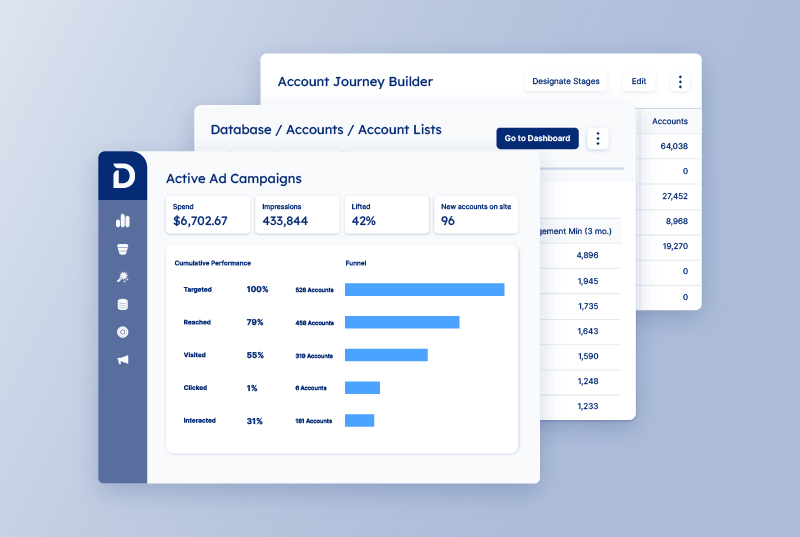
Advertising is where the platform creates the widest gap between itself and alternatives. Demandbase runs the only B2B-native DSP on the market. One G2 user even describes account-level display ad targeting as a capability that would be flat-out impossible without the platform. [Read Full G2 Review]
Teams that have used Demandbase at multiple companies speak to its staying power. One user talks about how the AI-powered insights let them find high-value prospects with accuracy they hadn’t seen elsewhere. Plus, the native CRM integrations make personalized campaigns easy to execute without heavy ops work. [Read Full G2 Review]
Pricing
Demandbase uses custom pricing based on team size, modules, and use case. The model is a platform fee that covers core software and services, plus a flat per-user fee that scales with your team.
All plans require a conversation with sales.
2. HubSpot (Breeze Intelligence)
HubSpot’s Breeze is a CRM-native AI layer that combines data enrichment, buyer intent tracking, AI-powered sales and service agents, and workflow automation across the full GTM stack.
It runs directly on top of your existing HubSpot data, which means every AI feature has full context on the customer journey. You don’t need external integrations to stitch things together.
For teams already running HubSpot, that also means there’s no new platform to onboard. Breeze shows up inside the tools and workflows they already spend their day in.
Key features
- Data enrichment: Breeze automatically enriches contact and company records using a database of over 200 million company profiles. This keeps your CRM clean and current without manual research or third-party enrichment tools.
- Prospecting Agent: There’s also an AI-powered sales agent that researches target accounts, personalizes outreach, and can run semi- or fully-autonomous prospecting sequences. It pulls from CRM history, news, and customer data to customize messaging per contact.
- AI-powered workflow automation: Breeze actions plug directly into HubSpot workflows to analyze, summarize, and categorize records automatically. Teams can run intelligent actions at scale without building custom integrations.
Pros
- The UI doesn’t get in the way: Teams on G2 regularly point to HubSpot’s interface as a reason they chose it over competitors. Onboarding takes less time, and teams don’t need dedicated training sessions to get started. [Read Full G2 Review]
- Every function gets its own view: HubSpot segments its AI-powered dashboards by function. This way, reps aren’t wading through support metrics, and marketers aren’t staring at deal stages. [Read Full G2 Review]
- Content production across formats: Breeze lets teams feed in a single asset and get back email copy, social posts, and ad variations tuned to their brand voice. [Read Full G2 Review]
Cons
- Gets expensive as you scale: The entry point is accessible, but reviewers warn that costs climb quickly once you add premium hubs, extra seats, and AI credits. Credit-based pricing on top of that makes budgeting harder than it should be. [Read Full G2 Review]
- Breeze is still a mixed bag for some users: Some users say the AI features haven’t moved the needle the way they expected, and that the reporting tools need more configuration than the marketing suggests. [Read Full G2 Review]
- The platform reshuffles too often: HubSpot regularly renames features and moves things around in the UI, which frustrates teams that just got comfortable. This is particularly a problem with less technical users who rely on muscle memory to navigate the platform. [Read Full G2 Review]
Pricing
Breeze Intelligence comes bundled with your HubSpot plan, and basic data enrichment is included free with paid seats.
The more advanced functionalities (buyer intent, Prospecting Agent, and Data Agent) run on a credit system. Monthly allocations range from 500 credits on Starter to 5,000 on Enterprise, and you can buy additional packs at $10 per 1,000.
Worth noting: Credits expire monthly, and the default overage setting auto-upgrades you to the next tier. You’d have to keep an eye on usage.
3. HockeyStack
HockeyStack is a B2B AI GTM platform built on a warehouse-native architecture that connects marketing, sales, and product data for attribution, lead scoring, and revenue analytics.
Two embedded AI agents do the heavy lifting – Odin handles analytics and reporting through natural language, while Nova preps sales reps with account intelligence, deal risk analysis, and next-step recommendations.
Key features
- Odin (AI analyst agent): Odin lets teams ask questions in natural language and get back custom reports, performance breakdowns, and channel analysis in minutes. It handles follow-up questions conversationally and can create custom reports.
- Nova (AI sales assistant): Nova gives reps account-level context before every call or meeting – who the key stakeholders are, where deals might be stalling, and what to do next based on patterns from past wins and losses.
- Visual buyer journeys: The platform maps the full account journey from first touch through closed-won, including stakeholder-level engagement and org structure mapping.
Pros
- Every touchpoint can be analyzed in one place: Users say HockeyStack finally gives them the full picture of what’s driving their KPIs. Every interaction is mapped and visible in a single view. [Read Full G2 Review]
- Quick to deploy: Some teams mentionthe implementation speed. You get full integration in under two weeks, which is notably fast given how many data sources the platform connects to. [Read Full G2 Review]
- Complex under the hood, but simple to use: The platform is easier to pick up than its feature set would suggest. And when they do hit a wall, HockeyStack’s team is quick to help them through it. [Read Full G2 Review]
Cons
- Limited chart and visualization options: Some users want more flexibility in how they display data. The current chart types and graph options feel basic relative to the depth of reporting the platform offers. [Read Full G2 Review]
- Still needs a technical owner: The platform is no-code in theory. However, you’ll want someone technically adept to manage the backend and set things up for the rest of the team to get more value from it. [Read Full G2 Review]
- Steep ramp-up for complex use cases: Teams with more advanced data needs report spending a lot of time with support and documentation to build out custom configurations. [Read Full G2 Review]
Pricing
HockeyStack requires a demo for custom quotes. Based on third-party data, expect a starting point around $2,200/month and a median annual contract near $28,000.
Multi-year deals usually come with discounts (20-50%), and the company offers startup-friendly pricing for earlier-stage teams.
4. 11x.ai (Alice)
11x.ai is an AI SDR platform that deploys autonomous “digital workers” to handle end-to-end outbound prospecting, from lead sourcing and research to personalized outreach and meeting booking across email and LinkedIn.
The value prop is replacing the repetitive top-of-funnel work that eats up most of an SDR’s day, running it 24/7 at a scale no human team can match.
What separates it from lighter AI automation tools is the level of autonomy. Alice sources leads, researches prospects, adjusts messaging based on interactions, and books meetings without human intervention.
Key features
- Autonomous lead sourcing: Alice continuously scans the market to find prospects that match your ICP. It uses real-time signals like job changes, website visits, and solution-related search activity.
- Multi-channel outreach: The agent runs coordinated sequences across email and LinkedIn, and adapts tone and messaging to match each prospect’s communication style. Outreach runs around the clock across time zones.
- Autonomous meeting booking: When a prospect is ready to talk, Alice proposes time slots, confirms the meeting, and pushes details to your calendar. The entire loop runs without manual involvement.
Pros
- CRM hygiene on autopilot: One of the most praised features is how Alice updates account information in Salesforce without reps having to touch it. For teams that know how much time manual CRM upkeep costs, this alone moves the needle. [Read Full G2 Review]
- Agents that adapt to your sales motion: Reviewers appreciate the level of control they get over how Alice operates. Plus, the onboarding process is unusually smooth for this category of tool. [Read Full G2 Review]
- Customer success that provides more than just product support: A common theme in reviews is that 11x pairs teams with account managers who take the time to learn the business. [Read Full G2 Review]
Cons
- Credit system creates budget anxiety: Teams worry about burning through their allotment faster than expected. This makes it harder to plan outreach volume with confidence. [Read Full G2 Review]
- Contact data isn’t always fresh. Some users report running into outdated contact information in the platform’s lead database. It’s not a dealbreaker, but it means teams still need to spot-check data quality before relying on it fully. [Read Full G2 Review]
- Messaging can feel robotic out of the box. Alice’s initial output sometimes reads stiff or generic until you invest time refining the prompts. The fix is straightforward, but it takes iteration to get there. [Read Full G2 Review]
Pricing
11x.ai doesn’t publish pricing publicly. You’ll need to book a demo for a custom quote.
Based on third-party estimates, annual contracts typically land in the $50,000–$60,000 range (roughly $5,000/month). Pricing is structured primarily around lead volume.
5. Copy.ai
Copy.ai is a model-agnostic AI GTM platform that unifies content generation, workflow automation, and data enrichment across sales, marketing, and CS.
Teams can codify repeatable go-to-market plays and run them at scale without stitching together multiple point solutions.
It replaces the sprawl of disconnected AI co-pilots and single-purpose tools with one platform that handles everything from prospect research and outbound sequencing to content creation and CRM hygiene.
Key features
- AI Workflows: The platform’s backbone is a no-code workflow builder that lets teams string together multi-step processes (research a company, find contacts, write outreach, etc.) and run them at scale.
- Content Agents: These are generative AI models trained on your own examples and style guides, capable of creating branded content end-to-end. Users can spin up agents for specific use cases like outreach sequences or ABM campaigns and let them run with minimal input.
- Multi-model AI access: Copy.ai is model-agnostic and gives users access to GPT-4o, Claude 3.5 Sonnet, and Gemini within the same interface. Teams can select different models for different tasks depending on what they’re optimizing for.
Pros
- Good starting drafts that save time: The platform generates usable first drafts that teams can refine with their own tone and perspective. It won’t replace the editing pass, but it removes the heaviest lift of going from nothing to something. [Read Full Reddit Review]
- Intuitive enough for non-technical teams: Self-described “non-techy” users say the platform is a breeze to navigate. That low barrier to entry matters when you need adoption across departments. [Read Full TrustPilot Review]
- Ideal for high-volume social content: Users running social channels say Copy.ai is a natural fit for their cadence. Templates, brand voice settings, and workflow automation keep output steady across formats without the usual bottlenecks. [Read Full TrustPilot Review]
Cons
- Quality has slipped after recent updates: Users report that output quality has declined noticeably with newer versions of the platform. Drafts that used to be solid starting points now come back as mediocre or factually incorrect. [Read Full TrustPilot Review]
- Frequent interface changes frustrate long-time users: The platform has a habit of reorganizing its UI in ways that complicate navigation. One user lost access to their account after deleting an automatically created workspace and hasn’t been able to use the service since. [Read Full TrustPilot Review]
- Platform updates have erased saved work: Users report losing all previous content after updates, with no recovery option available. Worse, attempts to get help through the chatbot, community, and support team all went unanswered. [Read Full TrustPilot Review]
Editor’s note: Copy.ai’s G2 review page has been removed. The reviews above are sourced from Trustpilot, where the platform has accumulated a significant number of negative reviews over the past year – primarily around unresponsive support, login issues, and lost data after updates. Prospective buyers should do extra due diligence before committing.
Pricing
Copy.ai offers two tiers:
- The self-serve Chat plan starts at $29/month (20% off if billed annually) and includes 5 seats, unlimited projects, and access to ChatGPT, Anthropic, and Gemini’s LLM models.
- Enterprise pricing is custom and adds guided implementation, SaaS API access, 20+ integrations, customizable workflows, a dedicated account team, and enterprise-grade security.
6. Gong
Gong is a revenue AI platform that automatically captures every customer interaction across calls, emails, and meetings. It then analyzes that data through proprietary AI models trained specifically on revenue contexts.
The 300+ unique signals Gong extracts per opportunity give it a data foundation most competitors can’t touch. And that depth is what powers everything from deal likelihood scoring to AI-driven forecast predictions.
Key features
- Conversation intelligence tools: Gong automatically records, transcribes, and analyzes sales conversations across video calls, phone calls, and email.
- Coaching and enablement: The platform finds top-performer behaviors and builds them into repeatable coaching frameworks. Managers can pinpoint skill gaps, score calls, and give targeted feedback grounded in real data.
- Gong Collective (integrations): Gong connects with 300+ tools, including Salesforce, HubSpot, Microsoft Teams, Slack, and major dialers. The bi-directional CRM sync keeps deal data flowing both ways.
Pros
- Pattern recognition without rewatching calls: You can use AI to find objections, competitor mentions, and next steps from transcripts automatically. Managers and reps get actionable insights without scrubbing through full recordings. [Read Full G2 Review]
- Call libraries feed prospecting strategy: One reviewer uses Gong’s search and project features to aggregate what prospects are experiencing across industries. Then, they customize outbound messaging based on actual buyer language. [Read Full G2 Review]
- User-friendly with strong integrations: The interface is intuitive enough that non-technical users adopt it quickly. The Gong Everywhere extension connects it to the rest of your stack without workflow disruption. [Read Full G2 Review]
Cons
- Setup requires technical chops: The platform is powerful once configured, but mapping CRM stages and custom deal warnings takes more technical effort than most teams expect. [Read Full G2 Review]
- Transcripts aren’t perfect out of the box: Speaker attribution occasionally needs manual fixes, and calls take time to fully process before insights come up. [Read Full G2 Review]
- Too invisible on Zoom calls: Users want a clearer visual indicator when Gong is active in a meeting. The current presence is easy to miss, which can catch some participants off guard. [Read Full G2 Review]
Pricing
Gong doesn’t publish pricing. Everything goes through a demo and a custom quote.
Third-party estimates put per-user costs at roughly $120–$250/month, depending on which modules you bundle. Plus, there’s a mandatory platform fee ranging from $5K–$50K annually.
7. Clay
Clay is an AI-based data enrichment and GTM workflow platform that connects 150+ data providers, AI research agents, and intent signals into a single spreadsheet-style interface.
Instead of paying for multiple data subscriptions and piping them together manually, teams run waterfall enrichment through Clay. It queries providers sequentially, returns the first match, and only charges for successful lookups.
The differentiator is flexibility. Where most AI GTM platforms lock you into rigid sequences and a single data source, Clay functions more like a development environment.
Key features
- Waterfall enrichment: Clay queries multiple data providers sequentially for each record until it finds what you need (emails, phone numbers, firmographics, technographics, etc.), so you’re not dependent on a single database.
- Claygent (AI research agent): Claygent scrapes and interprets unstructured web data to answer custom research questions at scale. Teams use it to automate the kind of deep prospect research that would otherwise take an SDR hours per account.
- Sculptor: Clay’s natural language workflow builder lets teams run analyses and launch GTM workflows by describing what they want in plain English (e.g., “find VPs of Marketing at Series B healthtech companies in the Bay Area”).
Pros
- Massive time savings on prospect research: The aggregated data pulls are a major time saver. Building personalized, targeted prospect lists that used to take hours now happens in a single workflow. [Read Full G2 Review]
- Low barrier to entry with a high ceiling: Getting started is straightforward, and the tool grows with you. Reviewers say they started with basic enrichment and gradually automated tasks their team used to handle manually. [Read Full G2 Review]
- Deeply flexible with very few limits: Between the AI integrations, conditional logic, and native connections to the modern GTM stack, there aren’t many things that you can’t build. [Read Full G2 Review]
Cons
- Google Sheets sync can’t keep up: For teams exporting large datasets, the Sheets integration is frustratingly slow. Clay has added better progress tracking, but the underlying speed issue is still a pain point. [Read Full G2 Review]
- Steep learning curve for non-technical users: The flexibility is the selling point, but it also means features aren’t always intuitive. Reviewers say unlocking Clay’s full value takes time, trial and error, and a willingness to build from scratch. [Read Full G2 Review]
- Credit costs don’t always match the estimates: Reviewers report enrichment operations costing double what Clay’s per-row estimates suggest. This can make budgeting unreliable. [Read Full G2 Review]
Pricing
All plans are billed yearly with credits granted upfront (10% discount on annual billing):
- Free – $0/month, 1,200 credits/year
- Starter – $134/month, 24K credits/year
- Explorer – $314/month, 120K credits/year
- Pro – $720/month, 600K credits/year
- Enterprise – Custom credits, built for large teams with high volume (request a quote)
Credit consumption varies by operation. Basic lookups are cheap, but enrichment-heavy workflows (like contact data pulls) can burn through credits faster than estimates suggest.
8. Mutiny
Mutiny is a no-code AI platform that combines account intelligence, personalized microsite generation, and LinkedIn ad orchestration. It helps B2B marketing teams run account-based campaigns at scale without engineering support.
The main selling point is closing the gap between the 1:1 marketing strategies that convert and the scalable tactics teams default to when they can’t personalize fast enough.
Key features
- AI-powered microsites: Mutiny generates personalized landing pages for individual target accounts using AI. It dynamically adapts copy, images, CTAs, and resources based on each account’s industry and buying stage.
- LinkedIn Ads integration: The platform lets you build personalized LinkedIn ad campaigns for target accounts directly inside Mutiny.
- Sales collaboration tools: Mutiny arms AEs and SDRs with personalized assets and real-time engagement alerts delivered through a Chrome extension integrated into their workflow.
Pros
- Real-time performance signals you can act on: Instead of making teams check dashboards manually, Mutiny pushes results directly. That feedback loop cuts the time between insight and action. [Read Full G2 Review]
- Personalization recommendations before you start building: The platform helps you see which segments are worth personalizing before you invest time creating anything. Once you’ve picked your targets, the editor makes content changes and component testing straightforward. [Read Full G2 Review]
- Customer success that keeps teams ahead of the product: Users mention that reps consistently push them to try new experiments, find underused features, and get them into early betas before general release. [Read Full G2 Review]
Cons
- Not built for lean budgets: Users acknowledge the value but say the cost is a hurdle when budgets are tight. Teams at earlier stages or with limited marketing spend may struggle to make the numbers work, even if the platform fits their use case. [Read Full G2 Review]
- Reporting still feels limited: The analytics side of the platform doesn’t offer the depth that some teams expect, especially compared to dedicated reporting tools. Users have also run into occasional visual bugs – nothing that breaks workflows, but enough to notice. [Read Full G2 Review]
- Visual editor hits a ceiling on complex experiments: Simple copy changes and quick personalization tests work smoothly in the WYSIWYG editor, but more ambitious experiments that involve new modals or heavy branding work can stall. [Read Full G2 Review]
Pricing
Mutiny uses custom pricing, so you’ll need to request a demo to get a quote.
Third-party estimates put the starting point around $1,000–$1,500/month, with costs scaling based on features and the size of your target account list.
The platform often sits alongside tools like Clearbit, Salesforce, or a CDP, so teams should budget for the broader stack cost rather than the Mutiny line item in isolation.
9. UserGems
UserGems is an AI outbound platform that monitors buying signals (like champion job changes, intent spikes, and CRM engagement history) to score accounts, enrich contacts, and deploy personalized outreach at scale through its AI agent (Gem-E).
Where other GTM platforms treat every account as a cold start, UserGems builds on existing relationships and follows them continuously as they move between companies. Your team gets a structural advantage over competitors reaching out blindly.
Key features
- Gem-E AI outbound agent: Gem-E handles the full outbound workflow – from identifying prospects to drafting personalized emails and pushing sequences into Outreach or Salesloft.
- CRM and sales engagement integrations: The platform integrates natively with Salesforce, HubSpot, Outreach, Salesloft, Gong Engage, and LinkedIn Ads. The bi-directional CRM sync keeps records current without manual upkeep.
- Champion and contact job change tracking: UserGems monitors your CRM contacts, including past customers, opportunity contacts, and power users, for job changes. It then automatically creates new enriched records when they move.
Pros
- Data accuracy that keeps your CRM clean: Teams talk about the reliability of UserGems’ contact data, which syncs into CRM records with minimal errors. For teams burned by unreliable enrichment tools, that precision removes a lot of manual cleanup. [Read Full G2 Review]
- Champion tracking that replaces hours of manual research: UserGems automates the work of monitoring when key contacts change jobs. This is something most teams used to handle through LinkedIn and spreadsheets. [Read Full G2 Review]
- Signal-driven outreach that accelerates deal flow: The platform’s AI points out which buyers are worth engaging now, so reps aren’t spreading effort across low-priority accounts. This ties this directly to faster deal cycles and a higher-quality pipeline. [Read Full G2 Review]
Cons
- Job change alerts can lag behind LinkedIn by a few days: Some users notice a slight delay between when a contact updates their LinkedIn profile and when UserGems gives the alert. The gap is small, and the data is reliable when it does arrive, but for time-sensitive signals, even a few days can matter. [Read Full G2 Review]
- Filtering could be more granular: The volume of data is a strength, but it can also feel overwhelming without tighter filtering options. Users want more control over how they slice and sort leads. [Read Full G2 Review]
- CRM data duplication creates reporting headaches: Some teams report duplicate records flowing into their CRM, along with discrepancies between UserGems’ internal reporting and their own numbers. [Read Full G2 Review]
Pricing
UserGems offers three tiers, all billed annually:
- Core – $2,750/month ($33K/year)
- Advanced – $5,750/month ($69K/year)
- Elite – $10,000/month ($120K/year)
It’s worth noting that UserGems backs every plan with a money-back guarantee. If the platform doesn’t generate ROI in closed-won revenue, you get a refund.
10. Clari
Clari is an AI-powered revenue orchestration platform that brings forecasting, pipeline management, deal inspection, conversation intelligence (Copilot), and multi-channel sales engagement (Groove) under one roof.
Where most GTM tools focus on one slice of the revenue process (prospecting, conversation intelligence, or analytics), Clari spans the full lifecycle from pipeline creation through closed-won.
Key features
- AI-powered forecasting: Clari provides roll-up forecasts that pull from CRM data, rep activity, deal progression patterns, and AI-generated opportunity scores to predict outcomes.
- Deal inspection and pipeline management: The Inspect module lets reps and managers drill into any deal to see activity levels, competitive mentions, and progression trends at a glance.
- Clari Copilot (conversation intelligence): Copilot records and transcribes sales calls as they happen. It also pulls up battlecards and objection prompts mid-conversation so reps can respond in the moment.
Pros
- AI call summaries that non-sales teams can use too: Marketers and other cross-functional teammates can pull specific insights from calls, without sitting through full recordings or chasing reps for notes. [Read Full G2 Review]
- Forecasting that simplifies upward reporting: Reps update their weekly forecast in Clari, and managers get a clear, real-time view without needing a separate check-in or slide deck. That handoff saves time on both sides and keeps everyone working from the same numbers. [Read Full G2 Review]
- Fast time-to-value on forecasting, even for less mature orgs: Teams that don’t have a sophisticated forecasting process in place can get to reliable predictions quickly once they connect their systems. [Read Full G2 Review]
Cons
- Call search doesn’t match the intelligence of the summaries: The AI-generated call summaries are strong, but finding specific calls through search feels clunky by comparison. [Read Full G2 Review]
- Some fields still force you back into Salesforce: Not everything can be managed directly inside Clari. Certain fields still require reps to jump into Salesforce to make updates. [Read Full G2 Review]
- Limited visibility into the data behind the analytics: Users who are used to digging into row-level data say Clari doesn’t always make it easy to see what’s driving a particular number or trend. [Read Full G2 Review]
Pricing
There’s no public pricing published on the Clari website. You have to talk to their sales team to get a custom quote.
Estimates from third-party sources put the base forecasting platform at $100–$125 per user/month (annual billing). From there, costs scale with each module you add.
11. Warmly
Warmly is a signal-based revenue orchestration platform that de-anonymizes website visitors at the company and contact level and scores their intent using first-, second-, and third-party data.
From there, AI agents handle engagement and lead generation. They run personalized outreach through chat, email, and social media while prospects are still active on your site.
Key features
- Inbound Agent (AI chatbot and live engagement): The Inbound Agent identifies visitors at the person level and engages them with AI-powered chat that pulls context from your CRM and their browsing behavior.
- TAM Agent (outbound orchestration): TAM Agent builds and maintains dynamic target account lists using AI-powered ICP tiering, buying committee identification, and ML-based intent scoring.
- Orchestration and automated workflows: The platform lets you set rules that trigger specific actions based on visitor behavior and intent level. Old leads get retargeted with ads, warm leads receive automated email sequences, and hot leads get routed to reps via Slack alerts with full context.
Pros
- Signals and alerts that align sales and marketing instantly: Intent signals help teams prioritize high-interest accounts, while integrations with HubSpot and Slack push real-time alerts to reps the moment a warm prospect lands on site. The whole experience feels lightweight and fast. [Read Full G2 Review]
- Visitor insights that replace form fills with real leads: Users say that the individual-level visit data and intent filtering give their sales team a steady stream of new leads they wouldn’t have caught otherwise. [Read Full G2 Review]
- Quick setup with a clean onboarding experience: Sign-up takes minutes, the dashboard is well-organized from day one, and the platform walks you through setup steps immediately. [Read Full G2 Review]
Cons
- Analytics don’t go deep enough for power users: The dashboard covers the basics well, but users who want more granular analytics find it limiting. Customization options for alerts and filters could also use more flexibility as teams try to fine-tune their workflows. [Read Full G2 Review]
- Visitor identification accuracy depends on traffic quality: The platform doesn’t identify every visitor equally well. Plus, accuracy fluctuates depending on the type of traffic hitting your site. [Read Full G2 Review]
- Support hours skew toward US time zones: Teams outside the US, particularly in regions like the Middle East and Asia, report difficulty getting timely support or scheduling demos due to the time difference. [Read Full G2 Review]
Pricing
Warmly offers three plans structured around your GTM motion:
- TAM – starting at $15,000/year, focused on outbound orchestration (ICP tiering, buying committee identification, intent scoring, and audience activation)
- Inbound – starting at $30,000/year, built for capturing and converting website traffic (visitor de-anonymization, AI chatbot, real-time alerts, and lead routing)
- Full GTM – custom pricing, combines both motions into a unified system
All plans require a conversation with sales for final pricing. Warmly also offers a free plan that lets you identify up to 500 monthly visitors with basic ICP filtering and alerts.
How to choose the right AI GTM platform for your needs
These 11 platforms overlap in some areas and differ considerably in others. The quickest way to narrow your shortlist is to start with the capability your team needs most and work outward from there:
- If you want a single platform that covers the full GTM lifecycle, Demandbase brings account intelligence, intent data, B2B advertising, sales enablement, and cross-channel orchestration onto one data foundation — with AI agents that operate across all of it.
- If your team already runs on HubSpot and wants AI without a new platform, Breeze Intelligence layers enrichment, intent, and automation directly into the CRM you’re already using. The trade-off is that you’re limited to what HubSpot’s ecosystem can do natively.
- If you need attribution and revenue analytics to prove what’s working, HockeyStack connects marketing, sales, and product data into one view. It’s strong on measurement, though teams that also need advertising, orchestration, and intent will need to look elsewhere for those pieces.
- If your biggest bottleneck is outbound volume and content production, 11x.ai and Copy.ai both tackle this from different angles. 11x.ai replaces SDR capacity with an autonomous agent that prospects and books meetings end-to-end, while Copy.ai gives teams a model-agnostic workspace for multi-step workflow automation.
- If conversation intelligence and revenue visibility are the gaps in your process, Gong and Clari serve similar buyers but focus on different stages. Gong analyzes every customer interaction to find coaching insights, while Clari consolidates forecasting and deal health into one workspace for revenue leaders.
- If your GTM motion depends on enrichment and signal-driven prospecting, Clay and UserGems both help teams find and prioritize the right contacts, but in different ways. Clay’s waterfall enrichment gives technical teams flexibility across 150+ data providers, while UserGems focuses on tracking champion job changes and scoring relationship-based signals.
- If your website is your primary conversion lever, Mutiny generates personalized microsites and landing pages for target accounts without engineering support, while Warmly de-anonymizes visitors and triggers real-time AI-driven outreach.
Demandbase — the most complete AI GTM platform on the market
The platforms above represent the strongest options across prospecting, enrichment, conversation intelligence, analytics, and outreach. And each handles its piece well.
But Demandbase is where those pieces come together. It brings account intelligence, advertising, sales enablement, personalization, and orchestration onto a single data foundation, so every team and every AI agent pulls from the same source of truth.
Here’s what that looks like in practice:
- A connected system of AI agents that automate campaign optimization, account research, segmentation, and orchestration across Demandbase and your broader tech stack
- The only DSP built specifically for B2B, serving display, native, video, CTV, and LinkedIn ads to buying committee members with automated full-funnel campaign management
- First-, second-, and third-party data centralized into a single account view with automatic scoring for ICP fit and conversion likelihood
- Automatic buying group mapping that tracks stakeholder roles and engagement levels, with AI-recommended contacts to close coverage gaps and one-click CRM export
- Intent tracking across 810,000+ keywords in 133 languages, scored by strength and outlined as trending signals, so teams know when an account enters a buying cycle
If you’re evaluating AI GTM platforms and want to see how this works for your specific motion, book a meeting with our team and walk through the platform first-hand.
FAQs
What are AI GTM tools?
AI GTM tools are software platforms that use artificial intelligence to help sales, marketing, and revenue teams run their go-to-market strategies more efficiently.
They handle things like finding high-intent accounts, scoring leads, personalizing outreach, forecasting revenue, and automating repetitive tasks that would otherwise eat up hours of manual effort.
The category is broad – some platforms focus on one piece of the GTM puzzle (like conversation intelligence or data enrichment), while others try to cover the full lifecycle from pipeline creation to closed-won.
How can AI features in GTM automation tools benefit sales teams?
AI takes the most time-consuming parts of a sales team’s day — research, data entry, lead prioritization, follow-up — and either automates them completely or makes them faster.
A few specific ways AI-powered GTM tools help sales teams:
- Smarter prioritization: AI watches for buying signals across multiple sources and tells reps which accounts deserve their attention today.
- Personalized outreach at scale: Reps can send personalized messages to more prospects without sacrificing quality. AI pulls the relevant context and writes the first draft, while the rep adds the finishing touch.
- Cleaner CRM data: AI logs activity and fills in data gaps automatically, so deal records stay current without reps having to update fields after every touchpoint.
- Faster deal visibility: Managers don’t have to wait for pipeline reviews to spot problems. AI points out at-risk deals and forecast changes as they happen, so the team can course-correct early.
- Shorter ramp time: AI-powered call coaching, real-time battlecards, and post-call summaries help new reps learn faster by giving them patterns from top performers and guidance in the moment.
How can AI streamline GTM strategies?
Here’s where it makes the biggest difference:
- Tighter targeting: AI analyzes your best customers and finds patterns (e.g., firmographics, behaviors, tech stack, and intent signals) to build more precise ICP definitions and account lists.
- Stronger sales and marketing alignment: When both teams work off the same AI-scored accounts, shared intent signals, and unified pipeline data, they stop arguing over lead quality and start coordinating around the same opportunities.
- More accurate forecasting: AI pulls from deal activity, engagement patterns, and historical trends to predict outcomes with more precision than manual roll-ups.
- Better resource allocation: When you can see which channels and segments are driving revenue and which are burning budget, resource decisions get a lot simpler. AI makes that visibility available in real time.
- Faster experimentation: Teams can test dozens of outreach variations, landing pages, or ad creatives simultaneously. AI analyzes what converts and why, so the learning cycle shrinks dramatically.
- Personalization that scales: AI handles the research and content adaptation that personalization needs, so teams can tailor experiences to individual accounts without hiring a dedicated person behind each one.
Experience the future of AI GTM
Related content



We have updated our Privacy Notice. Please click here for details.