
How to use B2B relationship intelligence to close high-value deals
Answered on September 21, 2026
Demandbase’s State of the B2B Buyer research shows that 72% of B2B purchases involve high-complexity buying groups spanning functions such as IT, finance, and operations.
That kind of cross-functional complexity makes every deal harder to hold together. Each new stakeholder brings a different agenda, and without careful coordination, the whole thing can quietly lose momentum.
And most sellers simply don’t have a reliable way to see who all those people are, what they care about, or how they influence each other behind the scenes.
That’s the gap B2B relationship intelligence fills. It lets your sellers see the entire buying committee and understand how those people influence each other. This way, they can reach the right stakeholders while the deal still has momentum.
This guide walks through how to put it to work at every stage of the deal cycle to build consensus and close high-value accounts.
What is B2B relationship intelligence?
B2B sales run on human connections, but most organizations do a terrible job of keeping track of them. Your team has hundreds, sometimes thousands, of relationships across the company. And almost none of that knowledge ends up somewhere where the rest of the team can access it.
It’s locked inside individual inboxes, personal calendars, and the heads of people who don’t even realize their connections are relevant to an open deal.
Relationship intelligence automatically collects and analyzes communication data across your organization to map the relationships between your team and the people at your target accounts.
It scores those relationships based on frequency, recency, and depth of interaction, and makes that information available to every seller on the team.
It pulls from signals like:
- Email exchanges between your team and contacts at target accounts, with send/receive patterns and response times
- Calendar invites and meeting attendance to track who meets with whom and how often
- Communication recency and frequency to determine whether a relationship is active or has gone cold
- CRM activity data like logged calls, notes, and deal history that’s tied to specific contacts
- Reciprocity of engagement to measure whether communication flows both ways or is one-sided
None of this requires manual data entry from your team. It all happens automatically in the background and feeds into a shared view that the whole revenue team can use.
At this point, a fair question is why your CRM or sales intelligence platform can’t do this already. They each handle a piece of it, but they all leave gaps.
Here’s where they fall short and where relationship intelligence picks up:
| Tool | What it tells you | What relationship intelligence adds |
|---|---|---|
| CRM | That an account exists and that someone on your team spoke with them at some point. Depends entirely on reps manually logging activity, so the data is always incomplete and often outdated. | Automatically tracks every customer interaction and scores relationship strength without anyone having to log anything. Your CRM system shows a contact record. RI shows you how connected you are to that person right now. |
| Sales intelligence tools | Who to target based on names, titles, firmographics, and org charts. You get a list of the right people, but no sense of whether your team has any existing connection to them. | Shows you how to reach those people. You might know the CTO’s name from your sales intel tool without realizing your VP of Engineering already has a strong working relationship with them. |
| Who’s connected to whom at a surface level. It shows you mutual connections and shared history, but it can’t tell you how strong or recent any of those relationships are. | Scores every relationship based on actual ongoing communication. You can tell the difference between a genuine working connection and someone who accepted a request three years ago and never spoke to the person again. |
In short, relationship intelligence automates what the best-connected sellers have always done manually. It just does it across your entire org, for every account, at all times.
How B2B relationship intelligence works
Relationship intelligence tools plug directly into the communication channels your team already uses, like email, calendar, and your CRM. From there, the process follows four steps:
- Capture – The system automatically pulls data from emails, calendars, and calls. Your salespeople don’t have to log anything. Every interaction flows into the CRM on its own, which means your data is finally as complete as it should be.
- Enrich – It cleans your contact data on an ongoing basis. It removes duplicates, fills in gaps like job titles and firmographics, and keeps records accurate as people switch roles or leave companies.
- Analyze – AI scores every relationship based on how recently people communicated, how often, and how deep the engagement goes. It also reads email sentiment to assess relationship health
- Action – Those relationship insights show up directly inside Salesforce, HubSpot, or whatever platform your team uses day to day. Sales reps see specific prompts, such as “request a warm intro” or “this contact hasn’t responded in 30 days.”
None of this is a one-time setup. The system keeps running, and the data keeps updating as people communicate, disengage, or move on. Your team sees the current state of every relationship, not a snapshot from three months ago.
Example of what that looks like in practice → Your AE has an open deal but only one contact, and that contact doesn’t hold the budget. The person who does is a VP they’ve never spoken to. What the AE doesn’t know is that your head of CS has been emailing that VP regularly for months on a separate project. Relationship intelligence picks up that activity, scores it as a strong connection, and puts it right on the account record for the AE to see. The AE asks for an intro and books a meeting that cold outreach wouldn’t have gotten.
The benefits of relationship intelligence in B2B
The value of relationship intelligence shows up across the entire revenue cycle. Here are some of the most important ways it moves the needle for B2B sales teams:
- Higher win rates on complex deals: Relationship intelligence makes multi-threading possible at scale by showing sellers who to engage and who on their team has the best path to reach them. Gong’s analysis found that multi-threaded deals see a 130% increase in win rate metrics on deals over $50K.
- More accurate forecasting: Relationship intelligence brings stakeholder engagement data to your forecast, so you can see whether a deal has real buy-in across the committee or just one enthusiastic champion.
- Fewer deals lost to “no decision”: Harvard Business Review research found that 40-60% of B2B deals end in “no decision” because buying committees couldn’t align. Relationship intelligence helps reps spot gaps in stakeholder coverage early enough to act on them.
- Better cross-department engagement: RI maps the full org structure and flags which departments your team hasn’t reached. Outreach data shows that deals where sellers engaged three or more departments had a 44% win rate, a 56% increase over single-department deals.
- Shorter sales cycles: Relationship intelligence reduces time-to-first-meeting by showing reps which team members already have a connection to the account. Deals that start with warm introductions close in roughly half the time than those that begin with cold outreach.
- Reduced risk when champions leave: UserGems data shows that 70% of opportunities only have a single point of contact. If that person leaves, loses interest, or gets reassigned, the deal dies with them. Relationship intelligence pushes sellers toward broader coverage so the deal doesn’t collapse when that one person moves on.
- Faster ramp for new sellers: New reps typically spend months building relationships they need to work accounts. Relationship intelligence gives them instant access to the organization’s full network so they can use existing connections from day one.
Key use cases for B2B revenue teams
Relationship intelligence works differently depending on who’s using it. Here’s how it fits into the daily workflow of each team across the revenue org:
| Role | How they use it | What changes |
|---|---|---|
| AEs / Enterprise Sellers | Before every deal, they pull up the relationship map to see which stakeholders are engaged, where gaps exist in the buying committee, and who on their team has an existing connection they can leverage for an introduction. | They stop relying on a single champion to sell internally and start building multi-threaded deals from the first week of the cycle. |
| SDRs / BDRs | Before prospecting into a new account, they check whether anyone in the organization already has a relationship with a decision-maker there. If a warm path exists, they route the intro through that person instead of sending a cold email. | Outreach gets warmer, response rates go up, and reps stop wasting sequences on accounts the company is already connected to. |
| Sales Leadership / RevOps | During pipeline reviews, they use customer data to pressure-test deals. They can see whether a rep has engaged enough stakeholders, whether those stakeholders are senior enough, and whether engagement is trending up or down. | Forecasts are more accurate because they’re based on real-time stakeholder engagement, not just what the rep entered in the CRM. |
| Customer Success / AMs | They monitor relationship health across their book of business to spot accounts that are going cold before renewal conversations start. They also use it to find expansion opportunities by mapping new stakeholders they haven’t engaged yet. | Fading relationships are caught early, and CSMs enter renewal and expansion conversations already knowing who they need to reach. |
| Marketing / ABM | They use relationship data to see which contacts at target accounts the sales team already has strong connections with, and which ones need to be warmed up through campaigns. | Ad spend and content focus on stakeholders that sales can’t reach organically, instead of blanketing the whole account. |
The table above covers the ideal scenario. But knowing the use cases and recognizing where your team needs them are two different things.
Here are a few signs that relationship intelligence would make a difference in your team:
- Your AEs rely on one champion per deal and lose momentum the moment that person goes quiet
- Your SDRs send cold emails to accounts that someone else on your team already has a relationship with
- Your pipeline reviews are based on what reps say about a deal, not who they’ve engaged
- Your CS team finds out that a key contact left the account after the renewal conversation stalls
- Your marketing team targets entire accounts when sales already has a warm path to half the committee
If you’re seeing yourself in two or three of these, relationship intelligence is worth a closer look.
Industry-specific applications
Relationship intelligence applies across B2B, but the way it creates value depends on how deals move in your industry.
For example, a short sales cycle with two decision-makers is a different problem than a 14-month cycle with a procurement committee, a legal review, and a channel partner in the middle.
Here’s what that looks like across five verticals where complex selling is the norm:
| Industry | What makes deals complex here | How relationship intelligence helps |
|---|---|---|
| SaaS / Technology | Buying committees change fast. Stakeholders change roles frequently, new decision-makers get pulled in mid-cycle, and org restructures can reshuffle the entire committee overnight. | Keeps the relationship map current as people move around. Sellers can see when key contacts leave and quickly find warm paths to their replacements. |
| Financial Services | Procurement, compliance, and legal all have a seat at the table from the start. Deals move slowly through formal approval layers, and access to senior decision-makers is tightly controlled. | Maps the full approval chain early so sellers know who they need to reach and who on their team has an existing connection to get past the gatekeepers. |
| Manufacturing / Industrial | Sales cycles can stretch well beyond a year, often involve channel partners, and depend on deep personal relationships built over time. One wrong handoff and the deal stalls for months. | Tracks long-running relationships across both direct and partner-driven deals, so nothing falls through the cracks when cycles stretch across multiple quarters. |
| Healthcare / Life Sciences | Buying groups include a mix of clinical, technical, and administrative stakeholders who rarely talk to each other. Regulatory requirements make approvals even more complex during decision-making. | Gives sellers insight into both the clinical and business sides of the buying committee so they can build alignment across groups that typically operate in silos. |
| Professional Services | Deals often start through referral networks and personal connections. The strength of the relationship frequently matters more than the pitch itself. | Finds the referral paths and existing connections that your team already has with target accounts. Sellers can lead with warm introductions instead of cold outreach. |
If your industry isn’t on this list, the pattern still applies. Any deal that involves multiple stakeholders, long evaluation cycles, or cross-departmental buy-in has the same core visibility problem these five verticals share.
Worth noting: SaaS and professional services teams see the fastest return because their deals already depend on warm paths and personal connections. Relationship intelligence makes those paths visible across the org instead of being locked in one person’s inbox. For industries with longer cycles like manufacturing and financial services, the impact takes more time to measure but strengthens with every deal that moves through the system.
Implementation strategies for relationship intelligence
The implementation strategies below walk through how to set up your data foundation, connect your systems, and build the habits that make relationship intelligence part of how your team sells every day:
Start with a relationship data audit
Your CRM probably holds about 20-30% of the connections your team has with target accounts. A relationship data audit fills in the rest of the picture and gives you a baseline to build from.
How to execute this:
- Pull a list of your top 50 target accounts and check how many contacts your CRM has for each one. Note how many have only one or two contacts logged.
- Cross-reference CRM records against email and calendar activity to find relationships that exist but were never logged. Your executives and senior leaders are usually the biggest source of untracked connections.
- For each account, map how many departments in the buying committee you have coverage in versus how many you’d need for a typical deal at that account size.
- Find accounts that have gone dark – contacts that haven’t had any email or meeting activity in 90+ days despite an open opportunity.
- Flag accounts where your strongest relationship is with someone who isn’t a decision-maker. These are the ones most at risk of stalling late in the cycle.
Common mistakes to avoid:
- Limiting your audit to sales-sourced contacts and missing the connections your executives and CS team hold with senior buyers (relationships that never show up in rep-logged CRM data).
- Counting total contacts per account without assessing whether those contacts are the right people in the buying committee.
- Assuming that a contact in the CRM means a relationship exists. A name in Salesforce and a genuine working connection are two very different things.
Set up passive data capture from email and calendar
Passive data capture takes them out of the equation by syncing all communication data directly from email and calendar into your CRM and relationship intelligence platform.
How to execute this:
- Connect your relationship intelligence platform to your team’s email and calendar systems (Google Workspace, Microsoft 365, or both).
- Define what gets synced and what doesn’t. Most platforms let you exclude personal emails, internal-only threads, and sensitive communications.
- Validate the data within the first 30 days. Spot-check a sample of accounts to make sure interactions are flowing in correctly and that the system is matching contacts to the right accounts.
- Confirm that the sync runs in both directions. Your relationship intelligence platform should push data into your CRM, and your CRM records should inform the relationship scoring on the other side.
- Set up alerts for sync failures or gaps. If email capture breaks for a team or a region, you want to know immediately.
Common mistakes to avoid:
- Syncing everything on day one without any filtering rules. You’ll flood your CRM and make the data harder to use.
- Skipping the legal review because “it’s just email metadata.” Privacy requirements vary by region. Get sign-off before you go live.
- Only syncing sales team email accounts and leaving out executives, CS, and other customer-facing teams, whose interaction signals your relationship scoring model needs to be accurate.
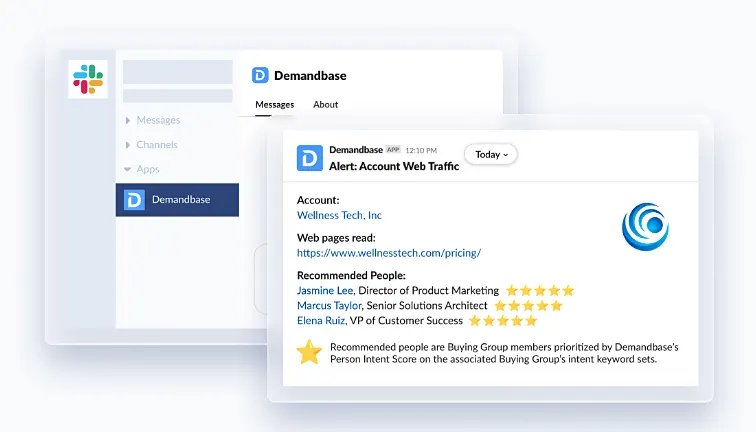
PRO TIP: Demandbase’s sales intelligence tool auto-logs email opens, page visits, and meetings without any manual input from reps. Slack alerts notify your team the moment a target account visitor — known or anonymous — hits your site. Reps can also pull up the full email and meeting history for any account, so they walk into every conversation with complete context.
Connect relationship intelligence to your CRM and sales tools
Make sure relationship data flows into the tools your team already uses. CRM, sales engagement, forecasting dashboards – wherever your reps and managers spend their time, that’s where the data should be.
How to execute this:
- Start with your CRM as the primary integration. Relationship scores, contact maps, and engagement data should all be visible directly on the account and opportunity records your reps already use.
- Connect your sales engagement platform so reps can see warm paths and relationship data when they build outreach sequences. This is where relationship intelligence has the most direct impact on day-to-day workflow.
- Feed relationship data into your pipeline and forecasting dashboards. Leadership needs to see stakeholder engagement and multi-threading coverage alongside the deal stage and close date.
- Integrate with your ABM platform so relationship coverage data feeds directly into your campaign targeting.
- Map fields and data objects before you go live. Decide where relationship scores, contact roles, and engagement history will exist in your CRM schema and make sure nothing conflicts with existing fields.
Common mistakes to avoid:
- Integrating with every tool at once instead of starting with the one or two platforms your team uses most. Phased rollouts are easier to troubleshoot and easier to get right.
- Not involving RevOps in the integration process. They own the CRM architecture and the reporting layer – if they’re not part of the setup, you’ll end up rebuilding it later.
- Treating integration as a technical project only. Your reps need to understand what the new data means and how to use it, not just that it exists somewhere in Salesforce.
Make relationship data accessible across the revenue org
Relationship intelligence loses most of its value if only the sales team can see it. Marketing, customer success, leadership, and RevOps all make decisions that depend on understanding how your organization is connected to target accounts.
How to execute this:
- Give your ABM and demand gen team access so they can build campaigns around the contacts your sales team can’t reach organically.
- Create a shared definition of relationship strength across teams so everyone is working from the same scoring model. “Strong relationship” should mean the same thing to sales, CS, and marketing.
- Make sure customer success can see relationship health across their book of business. A renewal that looks fine on paper might have three key contacts who haven’t responded to an email in 60 days.
- Document who owns what. Decide which team is responsible for acting on specific relationship signals so insights don’t fall through the cracks between departments.
Common mistakes to avoid:
- Giving everyone access without any training on what the data means or how their team should use it. Each function needs onboarding specific to their workflow and their questions.
- Building one generic dashboard for all teams. A marketer and an AE have completely different questions when looking at relationship data.
- Waiting until sales is “fully adopted” before bringing in other teams. Cross-functional value compounds faster when everyone starts together.
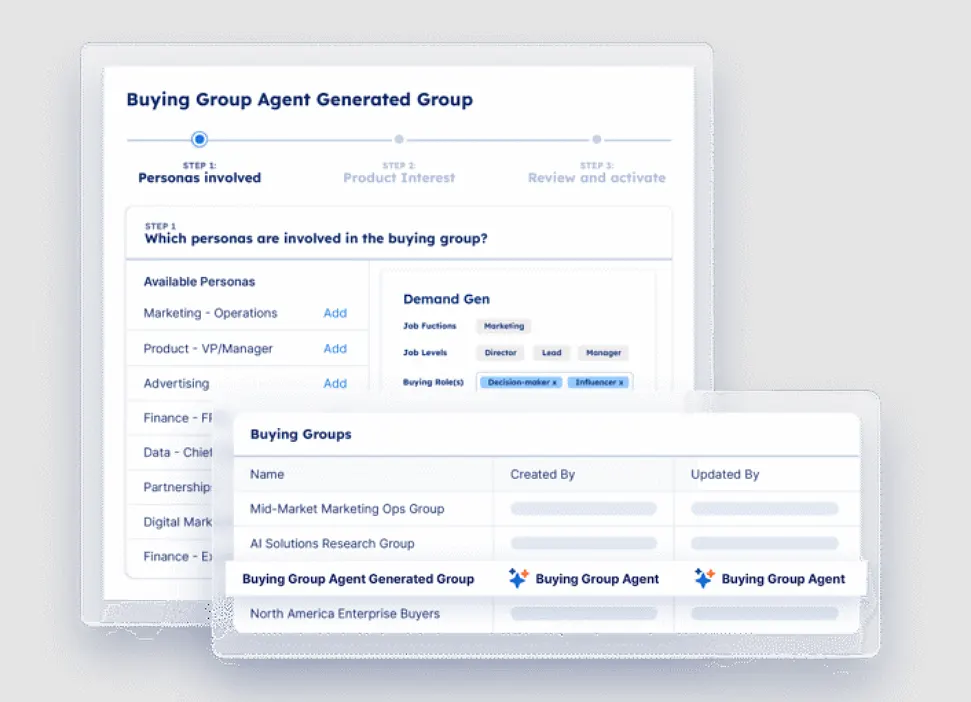
PRO TIP: Demandbase’s AI maps buying groups in seconds. It finds key personas, assigns known contacts to their roles, and pulls from 150M+ contacts to fill the gaps your CRM missed. One dashboard shows who’s engaged, who’s silent, and which roles are still missing, so reps can get a complete committee view before every call.
Train reps on relationship-first selling, not just the software
Your reps need to learn how to read a relationship map, ask for warm intros, and spot buying committee gaps as part of their normal deal prep. That takes structured training and consistent reinforcement from managers.
How to execute this:
- Show reps what a well-mapped account looks like versus a single-threaded one. Use real examples from your own pipeline so the contrast is concrete and specific to your business.
- Make warm introductions a repeatable skill. Role-play the ask, give reps templates for making it easy on the person doing the intro, and track how often it happens.
- Add relationship coverage to your deal review criteria. Before a deal moves past discovery, the rep should know how many stakeholders they’ve engaged, which departments they’re missing, and how they plan to reach them.
- Teach reps how to read a relationship map in three steps – identify where they have strong connections, find the gaps in the buying committee, and check who else on the team has a warm path to fill those gaps.
Common mistakes to avoid:
- Running a one-time product demo and calling it training. Software training and selling behavior change are two different things and need separate sessions.
- Only training new hires and assuming tenured reps will figure it out. Your most experienced sellers have the most relationships to leverage and the most ingrained habits to break.
- Updating the software stack without updating the process. If your pipeline reviews and deal inspections don’t include relationship coverage, the training won’t stick.
Recommended tools and software for B2B relationship intelligence
Relationship intelligence providers range from purpose-built platforms for specific industries to broad GTM solutions that cover the entire revenue cycle.
The right fit depends on your sales motion, deal complexity, and how much of the workflow you want under one roof. Here’s how five leading options stack up:
| Tool | Core use case | Relationship intelligence approach | Best for |
|---|---|---|---|
| Demandbase | Unified GTM platform that connects account intelligence, B2B advertising, and sales intelligence with intent signals for full visibility into accounts and buying groups | AI maps entire buying groups within target accounts, scores them by intent and engagement, and finds those that are in-market AI-powered agents let teams filter, analyze, and act on buying group members directly from the platform | Mid-market and enterprise B2B orgs that need intent data, buying group visibility, and cross-channel orchestration in one place |
| LinkedIn Sales Navigator | Sales prospecting platform built on LinkedIn’s 875M+ professional profiles with advanced search, lead tracking, and warm introduction paths | TeamLink finds colleagues connected to target leads. Relationship Map lets reps build visual org charts of buying committees with job change alerts | B2B sales teams that rely on social selling to find decision-makers and warm paths into accounts |
| ZoomInfo | GTM intelligence platform with verified B2B contact data, intent signals, and sales process automation for buying committee engagement | AI maps buying committees and scores accounts by fit and intent. Continuous enrichment keeps contact records current as people change roles | Outbound-heavy revenue teams where contact data accuracy and buying committee coverage are the main pain points |
| Affinity | Relationship intelligence CRM that passively collects email and calendar data to map a firm’s network and score relationship strength | Scores relationships by recency and frequency, then maps the full network to show who has the strongest path to any target contact | Private capital firms (VC, PE, investment banking) running relationship-driven deal flow |
| Introhive | AI-powered platform that auto-collects contact and activity data, enriches CRM records, and maps who knows who across an organization | Maps and scores relationships firm-wide. Introhive lets users query relationship data in natural language. | Professional services firms (law, accounting, consulting) that need to optimize cross-practice relationship visibility |
Each platform listed above has a clear sweet spot. The question worth asking is whether your current stack covers the full picture or just individual pieces of it.
- Can your team see the entire buying committee?
- Do they know who on your team already has a connection to each stakeholder?
- Do they know which accounts are showing intent?
- Can marketing and sales act on the same data?
If the answer to any of those is no, it’s worth looking at a platform that covers relationship intelligence alongside buying group visibility, intent signals, and cross-channel orchestration in one place.
Demandbase is built for that. It gives revenue teams a shared view of accounts, buying groups, connections, and engagement, so the insights from one team feed directly into the actions of another.
The role of AI in advancing relationship intelligence
The manual side of relationship intelligence is already handled by AI across most of the platforms in this guide. Things like activity logging, contact enrichment, engagement scoring, and CRM hygiene all run automatically in the background now.
What’s changing is how AI is moving from data hygiene into decision support. Here are some examples of what that looks like in practice across the platforms covered in this guide:
- Demandbase’s AI agents auto-generate buying groups, analyze engagement across committee members, and recommend actions like adding gaps in coverage to CRM or ad campaigns. Pipeline Predict scores each account by how likely it is to convert, so sellers can focus on the deals with the most momentum.
- Introhive’s Ask Introhive lets users ask plain-language questions about their accounts and relationships. Things like “who has the strongest connection to the CTO at this account” or “which contacts have gone quiet in the last 90 days.”
- LinkedIn’s Account IQ generates AI-powered account summaries that compress hours of research into a single click. Sellers walk into calls with context they didn’t have to dig for.
The bar for customer relationship intelligence keeps moving. Buying committee visibility that felt like a competitive advantage two years ago is now a baseline expectation.
The competitive gap is moving downstream, toward teams that act on these insights across sales, marketing, and customer experience faster than everyone else.
How Demandbase brings relationship intelligence into your GTM motion
Everything in this guide comes back to one problem – B2B deals involve more stakeholders than ever, and most revenue teams don’t have a reliable way to see who those people are, how engaged they are, or when the account is ready to move.
Most relationship intelligence tools solve one piece of that problem. They map connections and score relationship strength, but they stop there. Your team still has to piece together intent signals, buying group coverage, and cross-channel engagement from other platforms.
Demandbase approaches relationship intelligence as one layer inside a full GTM platform, so every insight connects to an action your team can take right away.
Here’s how the platform maps to the relationship intelligence capabilities covered in this guide:
- AI-powered buying group visibility: AI builds buying groups within your target accounts based on CRM data, engagement signals, and persona definitions. Your team sees which roles are active, which are missing, and can act on gaps directly from the platform
- Auto-logged activity and engagement alerts: Demandbase auto-logs activities like email opens, page visits, and meetings, and pulls up every email and meeting tied to an account for full context.
- Account intelligence: Demandbase pulls together firmographic, technographic, and intent data into a single account view. Sellers see which accounts are in-market, what they’re researching, and where they sit in the buying journey before making a single call.
- Buying group insights: AI automatically builds buying groups within your target accounts and tracks engagement at the persona level. Your team sees which roles are active, which are missing, and can take action on gaps directly from the platform.
- Intent data: Proprietary intent data tracks what your target accounts are researching across the web in real-time. Reps can prioritize accounts that are actively exploring solutions in your category instead of working a static list.
- Pipeline Predict: The AI combines CRM activity, intent data, and technographic signals to score every account by how likely it is to close. Your sales leaders can spot stalling deals earlier and double down on the ones with traction.
- B2B advertising: A built-in B2B DSP delivers display ads to the right people within your target accounts based on what they’re researching right now. Marketing uses it to fill buying committee gaps that outbound alone can’t cover.
- Multi-channel orchestration: Orchestration connects your sales and marketing plays across channels from one platform. You set the rules based on intent and engagement, and Demandbase keeps audiences and actions in sync as accounts progress.
The strategies in this guide work best when your team has full visibility into who’s involved in the deal and how engaged they are. And Demandbase is built to provide that across your entire revenue org.
If you’re ready to put relationship intelligence to work across teams, book a meeting and see what it looks like on your accounts.
We have updated our Privacy Notice. Please click here for details.