
Engagement points for G2 intent

Principal GTM Expert, Marketing Operations
-
Journey Stage
All Stages
-
Team
Marketing, RevOps
-
Expertise Level
Beginner
Contents
Partner with Demandbase Experts
Get tailored strategies and insights to optimize your approach, drive engagement, and unlock new opportunities.
What you’ll learn
This playbook explains how to assign Engagement Minutes to G2 intent signals within Demandbase. You’ll learn:
- The categories of G2 intent signals and what each represents.
- How to prioritize, structure, and score G2 intent data so it’s meaningful for GTM teams.
- When to use global versus regional scoring methodologies.
- Step-by-step configuration of G2 intent in the Engagement Minute Scoring Model.
- Best-practice scoring examples for indirect, direct, and competitive intent signals.
By the end, you’ll have a complete scoring framework for G2 data that aligns with your GTM strategy, surfaces high-value buying signals, and prevents data noise.
Why this is important
G2 intent data gives you a direct view into what accounts are doing when they’re on G2.com, whether they’re viewing your product, exploring competitors, or reading reviews. However, without careful weighting, these high-volume signals can overwhelm your engagement model.
By using Engagement Minutes, you can:
- Highlight the highest-value buying behaviors (like pricing views or product comparisons).
- Prevent inflation of engagement scores by controlling for signal volume.
- Align Marketing and Sales on what “real intent” looks like and which accounts deserve follow-up.
G2 intent is a highly actionable intent data source, this playbook ensures it’s integrated accurately and effectively.
What you need to get started
Before you begin, confirm that your G2 account is connected to Demandbase and that G2 intent data is in the platform. You can follow these step-by-step instructions if the integration is currently not active.
Next make sure you have access to the Engagement Minute Scoring Model, specifically the Intent Activities section.
Meet with your Marketing and Sales teams to decide which G2 signals they find most valuable. We will cover all the different G2 signals in the next section. Customers typically identify signals tied to strong buying intent based on their buyer’s purchasing patterns.
Once aligned, you can set up scoring that reflects true buyer readiness, balancing volume control and signal impact.
Step-by-step playbook
This playbook teaches you how to assign Engagement Minutes to G2 intent signals for smarter scoring, stronger buyer insights, and better alignment between Marketing and Sales.
Part 1 — Understanding G2 intent
Step 1: Learn how G2 intent signals are categorized
G2 sends multiple types of signals to Demandbase, each prefixed with the “G2 Activity:” types, followed by the G2 Activity Description and always ends with a “| G2”
- Structure: “G2 Activity”: “G2 Activity Description” | G2”
- Example: Categories.show: Best Sales Intelligence Software: User Reviews from December 2024 | G2
G2 sends over 10 different prefix based G2 Activity Types. To prioritize all variations, we will group them into high level activity type groups; Indirect Interest, Direct Interest and Competitive Interest.
Indirect interest signals:
- Categories.show – viewing broad category pages (e.g., “2024 Best ABM Platforms”).
- Categories.products – viewing category pages with filters applied (e.g., “highest rated”).
- Licensed.content – viewing licensed G2 content that includes your product.In G2 you can see all your licensed content in the Product Admin section, Marketing Content → Documents
- Reports.preview – previewing G2 reports featuring your product.In G2 you can see all your reports in the Product Admin section, Marketing Content → Report Library
- Ad.category – seeing an advertisement for your product on G2.com.
Direct interest signals:
- Product_reference – viewing your G2 product profile.
- Products.reviews – viewing your reviews section.
- Products.pricing – viewing your pricing section.
- Products.features – viewing your features section.
- Products.video_reviews – watching video reviews for your product.
- Licensed.content – viewing gated or owned content on your G2 profile.
Competitive interest signals:
- Products.competitors – viewing your competitors’ pages.
- Comparisons.show – viewing side-by-side comparison pages that include your product.
Step 2: Understand G2 scoring methodologies
Due to the large volume of G2 data, it’s critical to avoid score inflation. The best approach is to identify which signals Sales and Marketing teams can actually act on.
Two common approaches:
- Competitor interest methodology: Score all G2 signals related to your competitors.
- High-value signal methodology: Only score the G2 signals that represent strong buying intent or a clear follow-up opportunity (e.g., viewing your Pricing section or a product comparison).
This prevents low-impact signals (like ad impressions) from distorting engagement insights.
Part 2 — Adding location-based scoring
Step 1: Choose how to handle location data
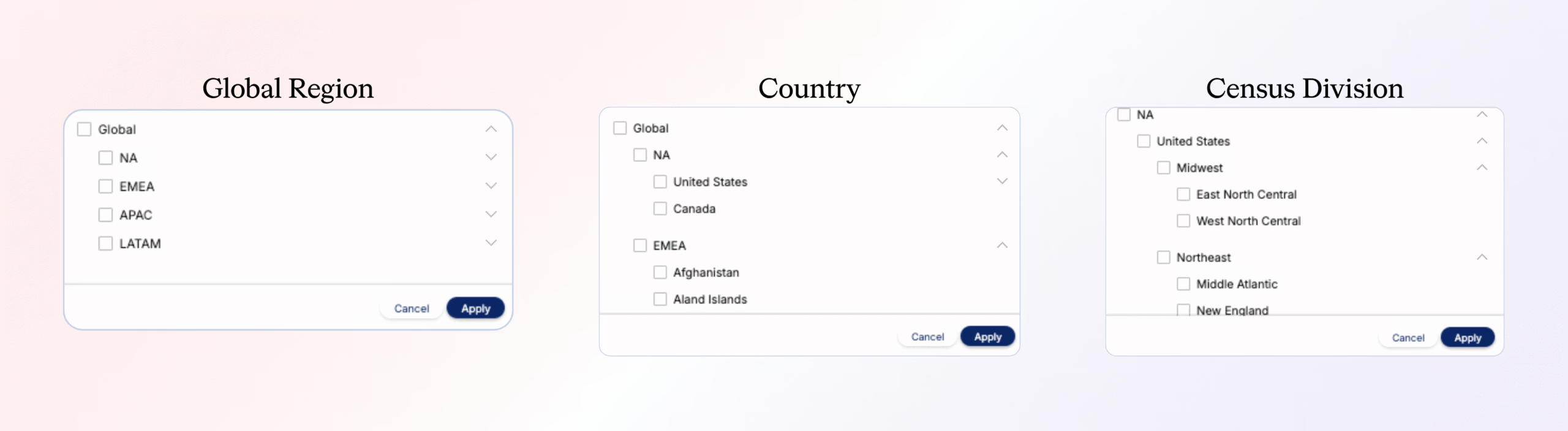
You can optionally score G2 signals based on location if G2 is able to provide that data. There are four tiers of geographic granularity:
- Global Region: Worldwide regions; e.g., NA, EMEA, APAC, LATAM
- Country: e.g., United States, Canada
- Census Division: Only available for the United States (e.g., East North Central, Middle Atlantic)
Step 2: Decide your scoring approach
You can take one of two approaches:
- Score only G2 intent with location data (ignores signals without geo context).
- Score all G2 signals with location emphasis. After scoring all signals you then add slightly higher Engagement Points for the ones that include your target geographies via Global Region, Country and/or Census Division
Regardless of your approach, always score at the signal level (e.g., Products.pricing, Comparisons.show) to maintain simplicity, consistency and avoid duplication.
Part 3 — Scoring methodologies
Step 1: Use best-practice Engagement Minute values
Here are Demandbase’s recommended scoring values for G2 intent signals broken into three types of interest:
Indirect interest
- Categories.show — 0.05
- Categories/products — 0.05
- Reports.preview — 0.10
- Reports.show — 0.25
- Ad.category — 0.05
Direct interest
- Product_reference — 0.50
- Products.reviews — 0.75
- Products.pricing — 1.00
- Products.features — 0.75
- Products.video_reviews — 0.75
- Licensed.content — 1.00
Competitive interest
- Products.competitors — 0.50
- Comparisons.show — 1.00
These values reflect that direct and competitive intent signals carry more weight because they show deeper buying behavior.
Part 4 — Scoring examples and configuration
Step 1: Score all G2 intent signals with no focus on location
Scenario: You want to score all G2 signals using best-practice values, without filtering by location.
- In your Engagement Minute Scoring Model, go to Intent Activities → Third-Party Intent Surge.
- For each G2 signal type (Indirect, Direct, Competitive), use the operator “Contains” and enter the signal names.
- Group signals with the same score into one scoring row (e.g., Categories.show, Categories.products, and Ad.category all receive 0.05).
- Add Engagement Minute values per signal group.
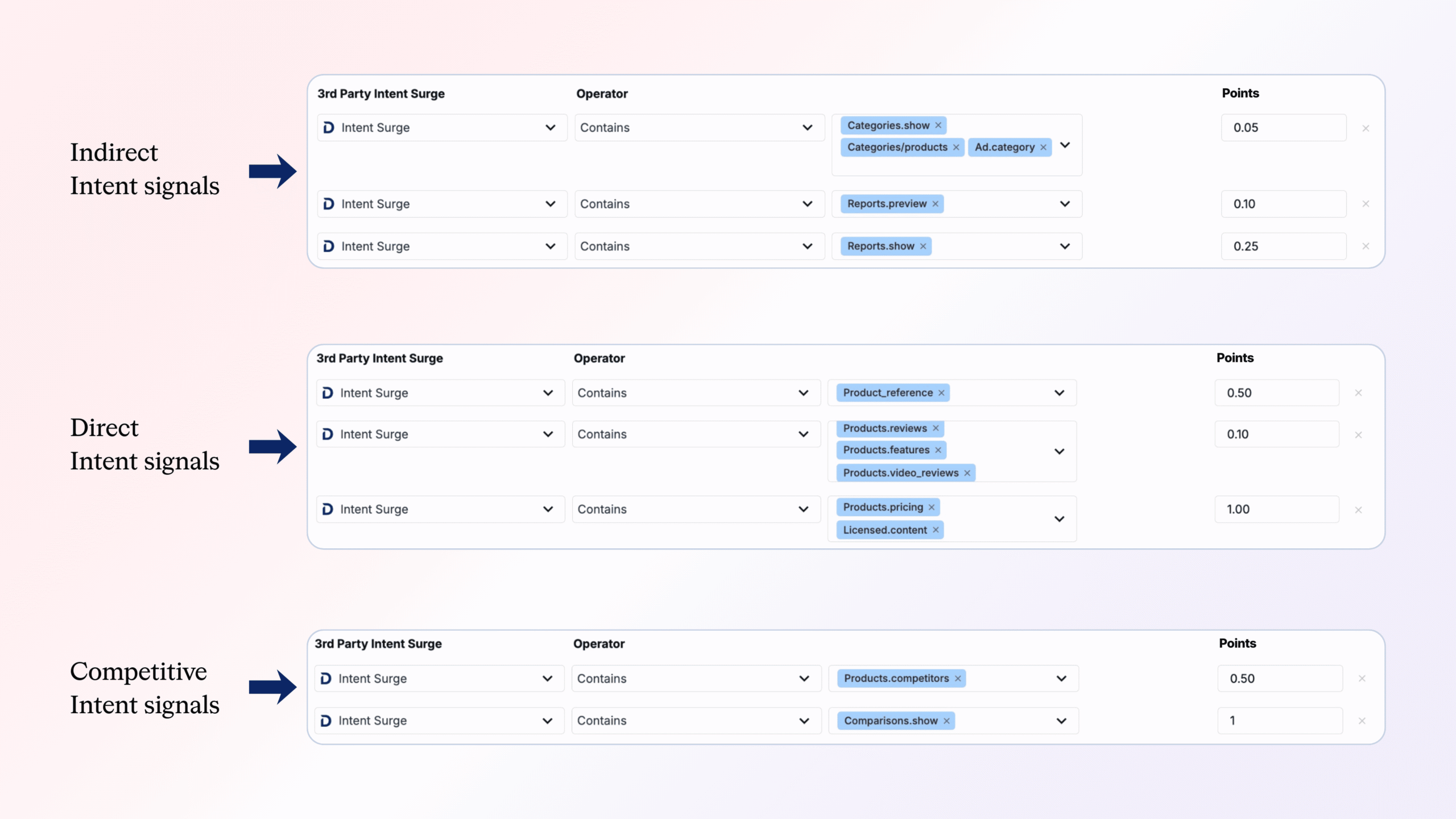
Result: All G2 intent data contributes engagement to your accounts, reflecting both early and high-intent behaviors.
Step 2: Score high-value G2 signals only
Scenario: You want to focus only on the highest-value buying signals.
- Collaborate with Marketing and Sales to define which signals matter most.
- Example: Reports.show, Products.reviews, Products.pricing, Comparisons.show.
- Group signals with similar values.
- In Intent Activities → Third-Party Intent Surge, use “Contains” and add the identifiers.
- Assign Engagement Points:
- Reports.show — 0.25
- Products.reviews — 0.75
- Products.pricing — 1.00
- Comparisons.show — 1.00
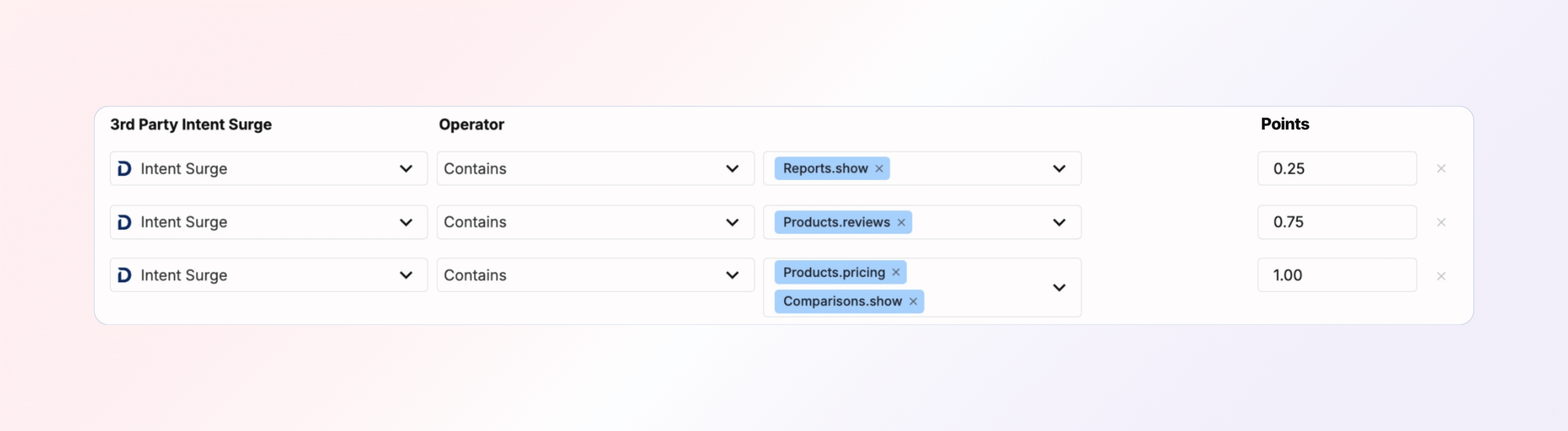
This model highlights the most actionable intent behaviors for your GTM teams.
Step 3: Score competitive G2 signals by geography
Scenario: You only want to track competitive signals (Comparisons and Competitors) in North America.
- Go to Intent Activities → Geo Intent Activity.
- Use operator “Contains” and select:
- Products.competitors — 0.50
- Comparisons.show — 1.00
- Under Geo location(s), choose NA (North America).
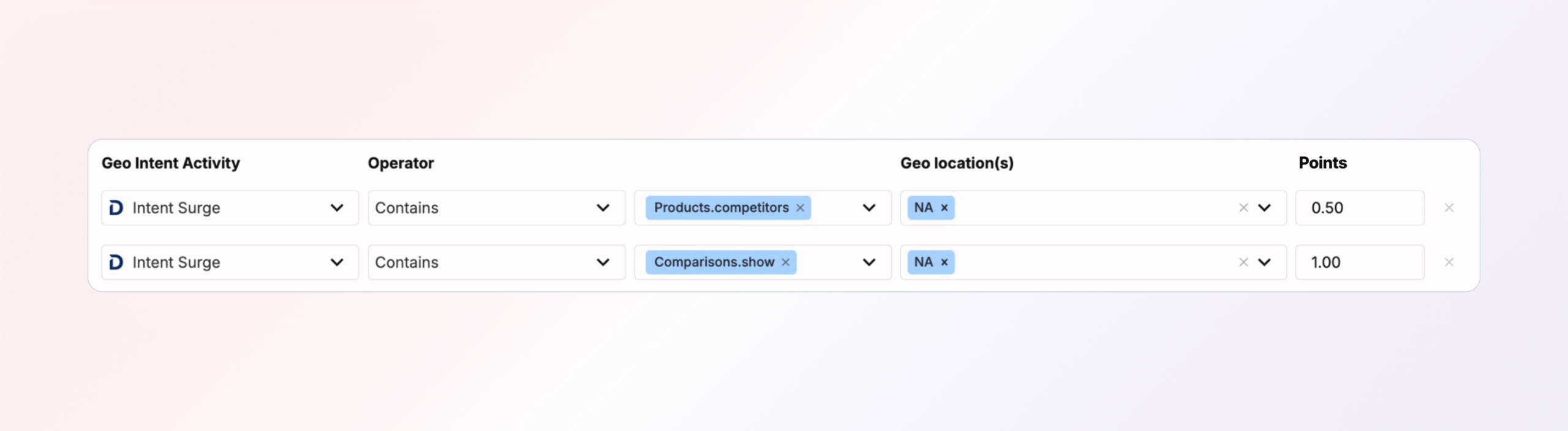
This setup narrows focus to competitive interest in your core selling region.
Step 4: Score high-value G2 signals and boost by location
Scenario: You want to score high-value signals globally, but slightly increase weight for North America.
- Under Intent Surge, score your global high-value signals as usual:
- Reports.show — 0.25
- Products.reviews — 0.75
- Products.pricing — 1.00
- Comparisons.show — 1.00
- Then, under Geo Intent Activity, repeat the same signal entries, select NA, and assign half the original score:
- Reports.show — 0.125
- Products.reviews — 0.375
- Products.pricing — 0.50
- Comparisons.show — 0.50
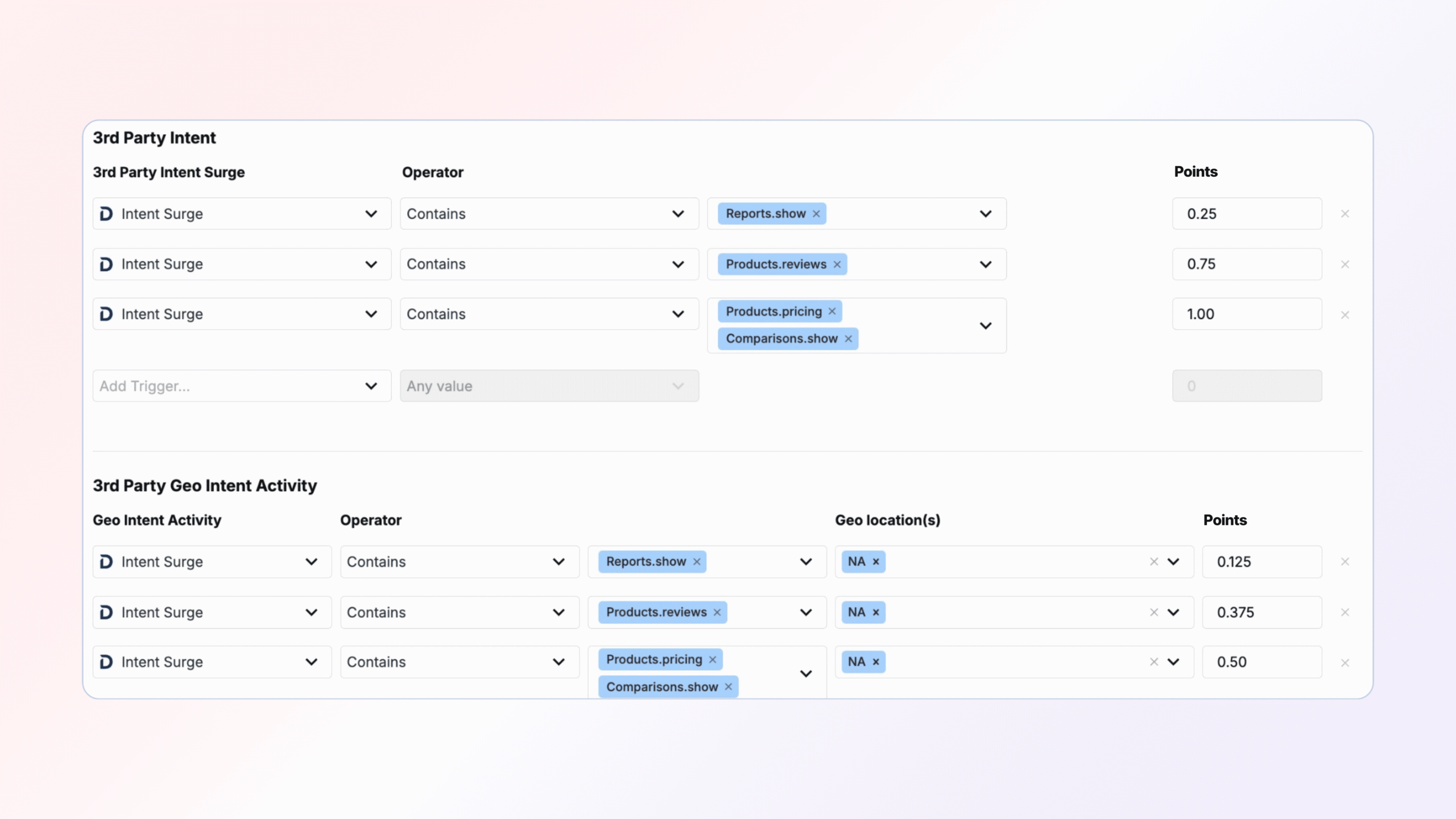
This effectively increases NA-based G2 intent by ~50%, signaling stronger importance for your primary market.
The results
When implemented, this playbook ensures that:
- High-value buyer activity (pricing views, comparisons, reviews) stands out clearly.
- Competitive intelligence from G2 is weighted accurately and regionally relevant.
- Marketing and Sales alignment improves through consistent scoring and signal interpretation.
- Engagement noise is reduced, keeping focus on meaningful interactions.
- Your GTM team gains a precise, prioritized picture of which accounts are actively researching your product—and which ones are deep in competitor evaluation.
Partner with Demandbase Experts
Get tailored strategies and insights to optimize your approach, drive engagement, and unlock new opportunities.
More Playbooks
How to identify the most visited web pages
Learn how to track and analyze your prospects' most visited web pages with Demandbase. This step-by-step guide helps GTM teams leverage website behavior data for personalized engagement.
Engagement points for TrustRadius intent
Learn how to score TrustRadius intent in Demandbase using engagement points. Follow proven grouping, signal, and geo-based best practices.
Build an order of operations
Optimize your sales efficiency with the 'Build an Order of Operations' playbook. Learn to create Salesforce workflows, align priorities, and drive impactful sales strategies today.
We have updated our Privacy Notice. Please click here for details.