
Engagement points for web visits

Principal GTM Expert, Marketing Operations
-
Journey Stage
All Stages
-
Team
Marketing, RevOps
-
Expertise Level
Beginner
Contents
Partner with Demandbase Experts
Get tailored strategies and insights to optimize your approach, drive engagement, and unlock new opportunities.
What you’ll learn
This playbook provides step-by-step guidance for setting up and optimizing Engagement Points for Web Visits in Demandbase. You’ll learn how to configure both Known and Anonymous Web Visits, score web pages effectively using appropriate methodologies, and avoid common pitfalls like double-scoring. By the end, you’ll have the tools to transform website visit data into actionable insights for your sales and marketing teams. Specific takeaways include:
- The difference between Known and Anonymous Web Visits and how to track each.
- Scoring methodologies to assess web visits, including Branch URL and Specific URL Scoring.
- Best practices for prioritizing and tiering URLs to maximize insights.
- Avoiding common errors, such as double-scoring, to ensure accurate engagement data.
Why is this important?
Understanding the intent and interests of your website visitors is crucial. Tracking and scoring both Known and Anonymous Web Visits allows you to gain a more comprehensive view of buyer behavior. Utilizing Engagement Points helps align marketing efforts with your sales team, boosts account-level insights, and drives efficiency in go-to-market strategies.
Key benefits include:
- Deeper visibility into what prospective customers care about, whether you know who they are or not.
- Improved scoring processes that fuel better outreach or lead prioritization.
- Enhanced collaboration across teams with shared, data-backed insights.
- The ability to act on both individual and account-level engagement signals with precision.
What you need to get started
Before you can configure Engagement Points, ensure you meet the following prerequisites.
Technology
- The Demandbase tag on your website to track Anonymous Web Visits
- A connected Marketing Automation Platform (MAP) such as Marketo, HubSpot, Eloqua, or Pardot. Ensure the MAP’s web tracking script is implemented on your website to track Known Web Visits
Data and resources
- A clear understanding of your website’s architecture (e.g., URLs and their branches).
- A basic tiered list of high-value, mid-value, and low-value web pages.
- An initial strategy for addressing Known vs. Anonymous Visitors.
Team alignment
- Cross-functional collaboration between marketing, sales, and customer success to ensure your web page tiering is agreed upon
- Process for identifying when new web pages are published to ensure you can continue updating your Engagement Points
Step-by-step playbook
Part 1: Configuration of Web Visit Activities
Step 1 – Tracking Known Web Visits
To track Known Web Visits, make sure your Marketing Automation Platform (MAP) is properly integrated with Demandbase and the MAP tracking script is deployed on your website.
MAP-supported activities will automatically associate Known Visitors with their People records.
Supported MAP integrations include Marketo (Visit Webpage Activity), HubSpot (Web Page Visit), Eloqua (Page View), and Pardot (Page View).
Step 2 – Tracking Anonymous Web Visits
To track Anonymous Web Visits, deploy the Demandbase Tracking Script onto your website. This is critical for de-anonymizing website traffic and associating it with Accounts in the Demandbase platform.
Once implemented, anonymous visitor activities will display within Demandbase as “Page Visits (Anonymous).”
Step 3 – Confirm Web Visit Data in Demandbase
Navigate to the Engagement Minute Model section in Demandbase. Ensure both Known Web Visits and Anonymous Web Visits are being tracked correctly based on their activity types.
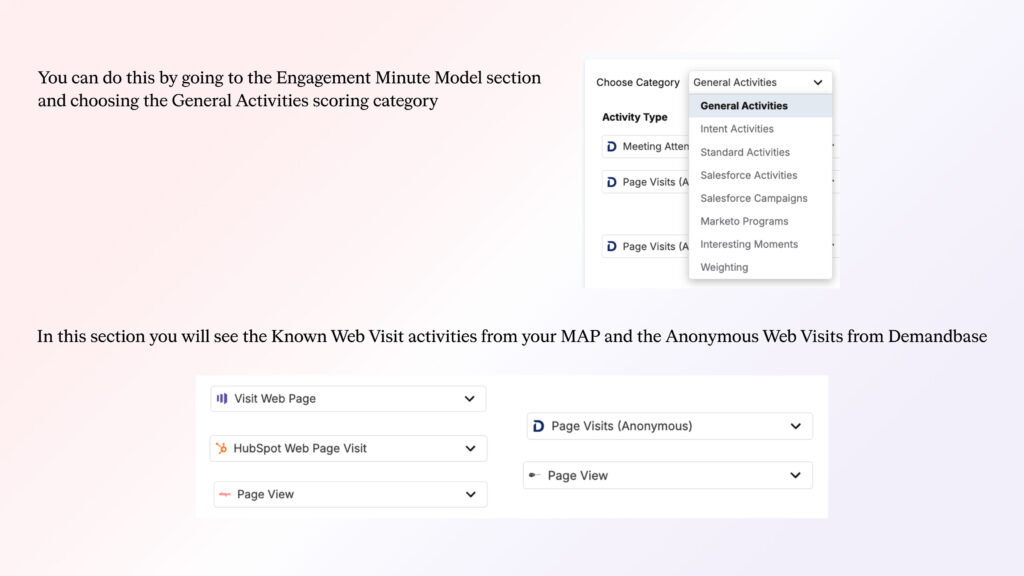
Part 2: Scoring Methodologies
Step 1 – Choose a Scoring Methodology
There are two primary methodologies for scoring website visits in Demandbase:
- Branch URL Scoring (Scalable Approach):
- Use this to apply the same score to all pages within a specific branch of your website.
- Example structure includes:
- /resources/ for all resources-related pages.
- /webinar/ for webinars under /resources/webinar/webinar-title.
- For this methodology to function properly, you need to ensure your website follows this branching logic to ensure all pages will be captured.
- Benefit: Simplifies ongoing scoring, as new pages in the branch are captured for scoring automatically
- Downside: All pages in the branch receive the same score, which may dilute precision.
- Specific URL Scoring (High Customization):
- Focus scoring on one specific URL, such as a demo or high-value content page.
- Example: Score visits to /demandbase.com/request-demo/ with higher Engagement Points compared to other pages.
- Benefit: Allows granular control over high-value pages.
- Downside: Less scalable and requires more effort to maintain.
- Focus scoring on one specific URL, such as a demo or high-value content page.
Step 2 – Define Tiers for Web Pages
- Organize your URLs into three scoring tiers based on business priorities.
- Tier 1: Highest-value pages (e.g., demo requests, pricing, product information).
- Tier 2: Mid-value pages (e.g., thought leadership eBooks, case studies).
- Tier 3: Low-value pages (e.g., generic blog posts or newsletter signups).
- Assign scores accordingly, with higher scores for Tier 1 pages.
Step 3 – Consider Scoring Known vs. Anonymous Visitors
- Begin by scoring Known and Anonymous Visits equally to simplify implementation.
- We have seen some customers choose to score Known Web Visits higher than Anonymous, since they will give sellers a specific person to follow up with
Part 3: Best Practices and Troubleshooting
Step 1 – Avoid Double-Scoring Pages
- The Engagement Minute Model operates cumulatively, meaning each row assigning Engagement Points is additive to the other. Ensure scoring for specific URLs doesn’t unintentionally add multiple layers of scoring for the same activity.
- Example: We want to assign 1 Engagement Minute to all known web visits to ebook pages, and we identified that all those pages live on the URL branch of /ebook/
- As you can see in the image below, we did this for Known Web Visits from Marketo for any web visit containing /ebook/

- As you can see in the image below, we did this for Known Web Visits from Marketo for any web visit containing /ebook/
- We also want to assign 3 Engagement Points for known web visits to a specific ebook page where the URL contains /ebook/clear-and-complete-guide/
- As you can see in the image below, we did this for Known Web Visits from Marketo for any web visit containing that URL

- As you can see in the image below, we did this for Known Web Visits from Marketo for any web visit containing that URL
- The issue that arises here is that a web visit that qualifies for the first row of containing /ebook/ also qualifies for the second line, since it also contains the same /ebook/ string.
- Be careful when scoring URL branches or specific URLs to ensure this type of double scoring does not occur.
Step 2 – Skip Scoring for UTMs or Query Parameters
- Engagement Minute scoring does not work for UTMs or query strings appended to URLs. Exclude these variations when defining scoring rules.
Step 3 – Weight Activities by People, Not Just Pages
- Use weighting to prioritize Known Visits from high-value personas (e.g., decision-makers) rather than just scoring the pages they visit.
The results
By following this playbook, you can expect the following outcomes for your Demandbase implementation:
- Precise, actionable insights into both Known and Anonymous visitor activity.
- A scoring system that boosts marketing efficiency and empowers sales teams with clear intent data.
- Scalable scoring methodologies tailored to your website structure and business priorities.
- Elimination of common errors like double-scoring, ensuring consistent data integrity.
- A collaborative framework that bridges gaps between sales, marketing, and web development teams.
- Whether you’re enhancing your current system or starting from scratch, this playbook equips you with the tools and strategies to maximize the value of your web engagement data in Demandbase.
Partner with Demandbase Experts
Get tailored strategies and insights to optimize your approach, drive engagement, and unlock new opportunities.
More Playbooks
Learn how to build, launch, and optimize B2B awareness campaigns with this step-by-step playbook from Demandbase. Drive engagement, warm up buying committees, and measure impact.
How to identify the most visited web pages
Learn how to track and analyze your prospects' most visited web pages with Demandbase. This step-by-step guide helps GTM teams leverage website behavior data for personalized engagement.
Build an order of operations
Optimize your sales efficiency with the 'Build an Order of Operations' playbook. Learn to create Salesforce workflows, align priorities, and drive impactful sales strategies today.
We have updated our Privacy Notice. Please click here for details.