
Marketing program engagement point setup best practices

Principal GTM Expert, Marketing Operations
-
Journey Stage
All Stages
-
Team
Marketing, RevOps
-
Expertise Level
Beginner
Contents
Partner with Demandbase Experts
Get tailored strategies and insights to optimize your approach, drive engagement, and unlock new opportunities.
What you’ll learn
This playbook provides a step-by-step guide to setting up Engagement Points for your marketing programs using Demandbase. By the end of this playbook, you will:
- Understand concepts like Assumed Time Spent and Implied Time to Spend.
- Apply scoring customized to various channels, such as webinars, content, gifting, and high-value forms.
- Structure data and logic for scoring progressional member statuses.
- Optimize engagement point assignments to reflect intent and drive better decision-making.
Why is this important?
By having optimized Engagement Point assignments, your marketing and sales teams will be able to:
- Identify impactful engagement activities and prioritize accounts more effectively.
- Drive alignment through transparent and consistent metrics.
- Enhance decision-making and ROI by tying engagement data to actionable insights.
- Improve campaign efficiency by ensuring every interaction drives growth.
What you need to get started
- Technical requirements:
- An integrated marketing automation platform (e.g., Marketo, Pardot) or CRM.
- Defined programs in Marketo or campaigns in either SFDC or Microsoft Dynamics
- Organizational preparation:
- Programs/Campaigns have standardized channels.
- Programs/Campaigns have standardized member statuses.
- Logical framework:
- Adjustable parameters, like scoring minimums, maximums, and progressional statuses.
Step-by-step playbook
Part 1: Engagement point assignment methodologies
1. Define core scoring methodologies
Before jumping into channel-specific examples, let’s quickly review the five scoring methodologies we’ll be using:
- Assumed Time Spent
- Implied Time to Spend
- Progressional Statuses
- Progressional Statuses – Minimum Activity Scoring
- Maximum Program Score
For a deeper explanation of each, please go read our playbook “Introduction to Engagement Points”.
Part 2: Detailed channel scoring examples
Channel: Learning programs & certifications
This channel tracks progress of participants through learning programs or certification paths your organization offers.
- Assignment methodologies used:
- Assumed Time Spent
- Progressional Statuses
- Progressional Statuses – Minimum Activity Scoring and Maximum Program Score
- Program/campaign member statuses:
- Registered
- In Progress
- Completed
This channel reflects the time people spend engaging in training or certification over time. You can use progressional statuses to assign scores as participants move from one milestone to the next.
Example: John Smith registers for Demandbase’s ABM Certification course on our website. The course usually takes 4–5 hours to complete.

In this example, we know the course on average takes 4-5 hrs to complete. However, we don’t assign 240–300 Engagement Points (i.e., the full course time) for the following reasons:
- It would skew the rest of our scoring model, since this is likely the most time someone will spend with a single program.
- While this course is crucial to John’s knowledge of Demandbase, it is not a high indicator of his readiness to speak with Sales.
- We’ve set a Maximum Program Score of 40 for other high-value actions like Demo Requests and Contact Us.
For these reasons, we will choose to score his course “Certified” status with 25 Engagement Points.
- Assignments by member status
- Registered: 5 Engagement Points
- In Progress: 10 Engagement Points
- Certified: 25 Engagement Points
Content
This channel tracks engagement with content such as blogs, ebooks, gated assets, and more.
- Assignment methodologies used:
- Assumed Time Spent
- Program/campaign member statuses:
- Viewed Content
- Assignment explanation:
- Defines time users spend consuming general vs. high-value content. Adjusted scoring ensures that premium content contributions are recognized.
Not all content is equal. Some pieces, like in-depth guides or high-value downloads, deserve more weight than lighter assets like blog posts. So we separate scoring for standard content vs. premium content.
Example: We want to assign different Engagement Points to two pieces of content because one is standard and the other is high-value.
The regular content is named “AllTime-CON-Targeting-Playbook” and the high value content is named “AllTime-CON-Clear-and-Complete-Guide”.
Since the high-value piece provides more depth and impact, it deserves a higher score.

To assign different scores, we’ll create two separate rules in the Engagement Point model:
- One rule assigns 15 Engagement Points for the high-value content.
- The other assigns 10 Engagement Points for all other content.
We use “is not high-value content” logic in the second rule so it automatically applies to everything that isn’t specifically flagged as high-value. No need to list each piece individually.
If you’re not tracking this interaction through Programs or Campaigns, you can also use Form Submissions or Web Page Visits to trigger scoring.
- Assignments by member status
- Standard content: AllTime-CON-Targeting-Playbook = 10 Engagement Points.
- High-value content: AllTime-CON-Clear-and-Complete-Guide = 15 Engagement Points.
Content syndication
This channel tracks engagement with content that’s hosted by third-party platforms (not on your own website or marketing programs).
- Assignment methodologies:
- Assumed Time Spent (adjusted for indirect engagements)
- Program/campaign member statuses:
- Viewed Content
Syndicated content usually shows lighter, less direct engagement with your brand, since it happens off-site. Because of that, we assign lower Engagement Point values compared to content hosted directly on your site.
Example: There are two pieces of syndicated content we wish to assign Engagement Points to separately, because one is a regular piece of content and the other is a high-value piece. The regular content is named “ConSynd-Targeting-Playbook” and the high value content is named “ConSynd-Clear-and-Complete-Guide”.

To apply unique scoring, we will create two separate lines in the Engagement Point model. One line will assign 10 Engagement Points to the high-value content.
The second line will assign 5 Engagement Points to any content that is not the high-value asset.
We use the “is not high-value content” logic so that this rule automatically applies to all other syndicated content that isn’t specifically named in the high-value scoring line.
- Assignments by member status
- Standard content – ConSynd-Targeting-Playbook = 10 Engagement Points.
- High-value content – ConSynd-Clear-and-Complete-Guide = 15 Engagement Points.
Direct mail/gifting
This channel tracks interactions with physical or digital gifts that encourage users to engage more deeply with your brand.
- Assignment methodologies:
- Assumed Time Spent
- Progressional Statuses
- Progressional Statuses – Minimum Activity Scoring
- Program/campaign member statuses:
- Delivered
Gifting shows direct engagement with your organization; whether someone confirms their address or receives and uses a gift. However, we want to avoid overestimating that engagement. For that reason, we’ll only assign Engagement Points after the gift has been delivered. The idea is that once the person receives the gift, they’re more likely to spend meaningful time with your brand.
Example: Your organization is sending gifts to various people and you wish to assign the same Engagement Points for all gifts that are received by their intended recipient. These gifting programs use progressional statuses; Processing, Shipped and Delivered.
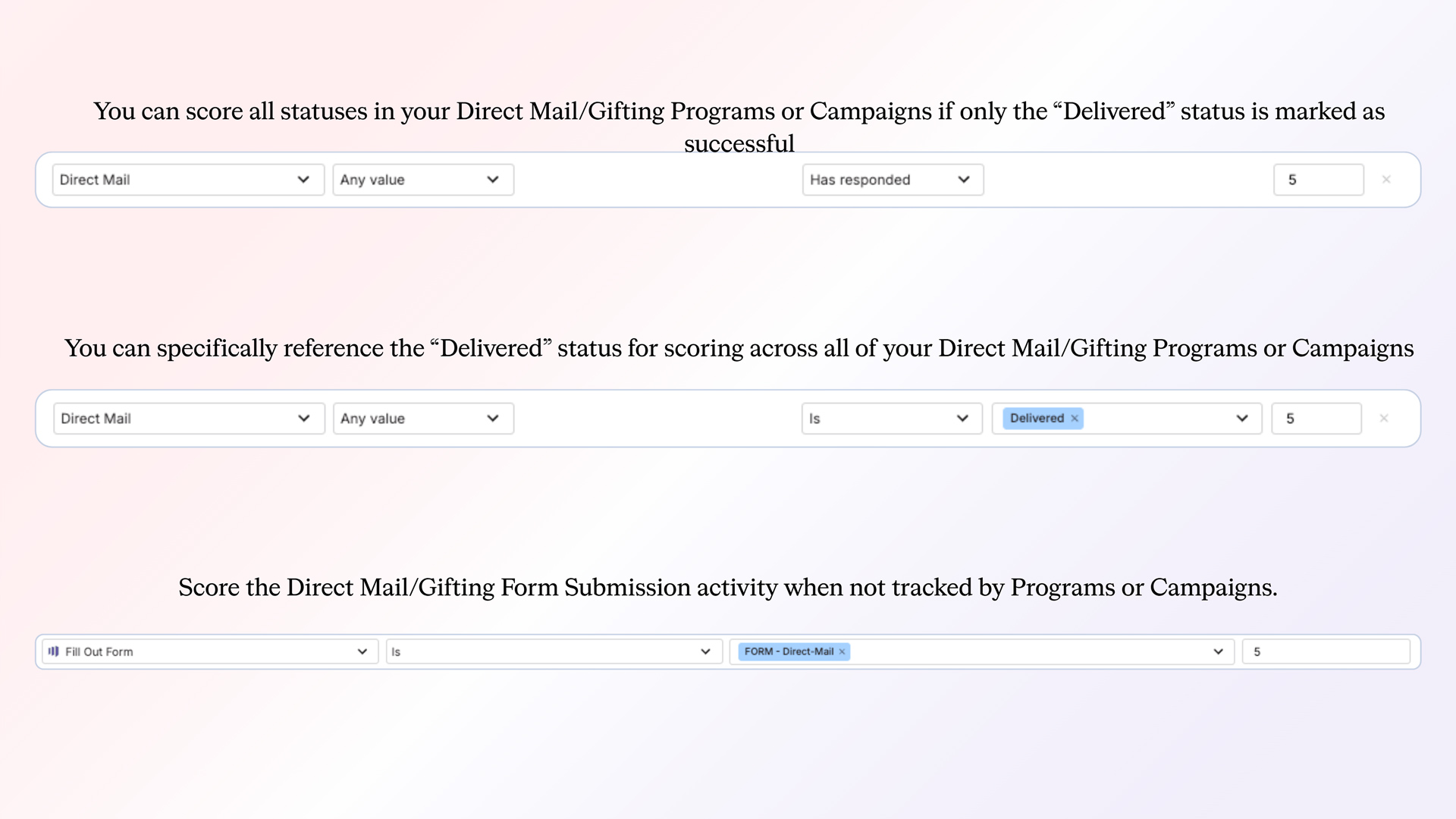
- First, reference the Progressional Status – Minimum Activity Scoring methodology, since a successful gifting interaction requires very little time or effort from the recipient.
- Next, create one line in the Engagement Point model. On this line, assign the Minimum Activity Scoring value of 5 Engagement Points to all gifting programs when the person’s status is marked as Delivered.
- Assignments by member status
- Delivered status = 5 Engagement Points
Events
Accounts for attendance and engagement related to hosted or external events.
- Assignment methodologies:
- Assumed Time Spent
- Progressional Statuses
- Progressional Statuses – Minimum Activity Scoring
- Program/campaign member statuses:
- Registered
- Attended
- No Show
Events are a very high value touchpoint since a person is spending physical time with your organization. While events vary in time spent, we are taking a simplified approach to this channel.
Example: Your organization tracks all the events you participate in within a single Events channel. These events are tracked with three statuses; Registered, Attended and No Show. While attendance is the ideal outcome, it’s still important to assign Engagement Points to ALL statuses—even those who don’t attend—because registering shows initial interest.
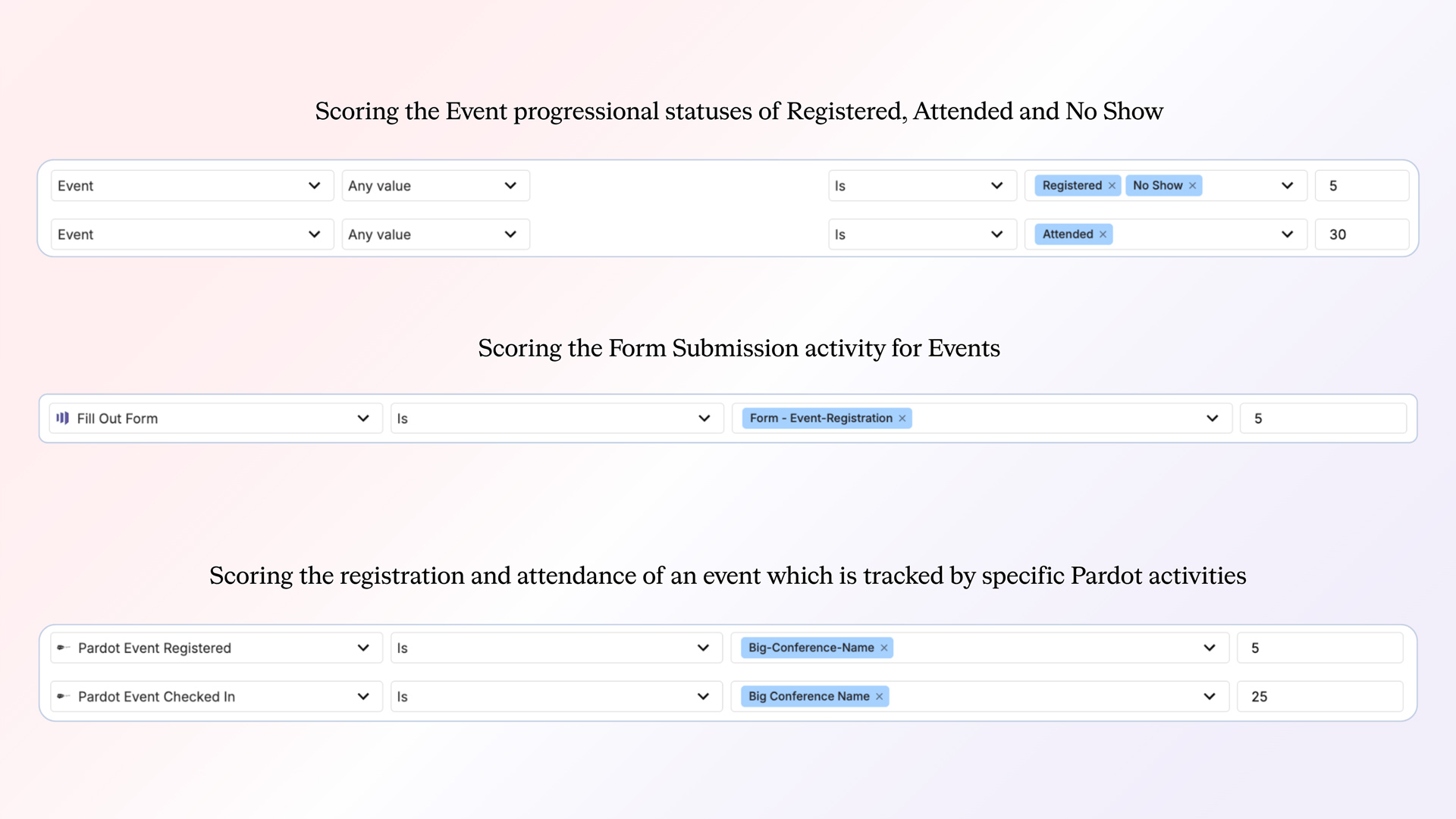
To assign Engagement Points correctly to these progressional statuses, you’ll need to add two lines to the Engagement Point model:
- First line: Group the non-successful statuses, Registered and No Show, together. Use the Minimum Activity Scoring value and assign 5 Engagement Points to reflect initial interest.
- Second line: Assign 30 Engagement Points to the Attended status, based on the assumption that participants typically spend 30 minutes or more engaging with your organization during the event.
If you’re not using Programs or Campaigns to track this interaction, you have the option of using a Form Submission or Pardot Event activities.
- Assignments by member status
- Registered = 5 Engagement Points
- No Show = 5 Engagement Points
- Attended = 30 Engagement Points
Paid content
Tracks content consumed through paid search, social, and similar outlets. This scoring reflects the time users spend engaging with content promoted through paid channels. Since paid content often faces more challenges converting users, we give it slightly higher weight to recognize that effort.
- Assignment methodologies:
- Assumed Time Spent.
- Program/campaign member statuses:
- Viewed Content.
Example: Your organization runs paid campaigns to promote various content assets across multiple channels. You want to score all user interactions with that content.
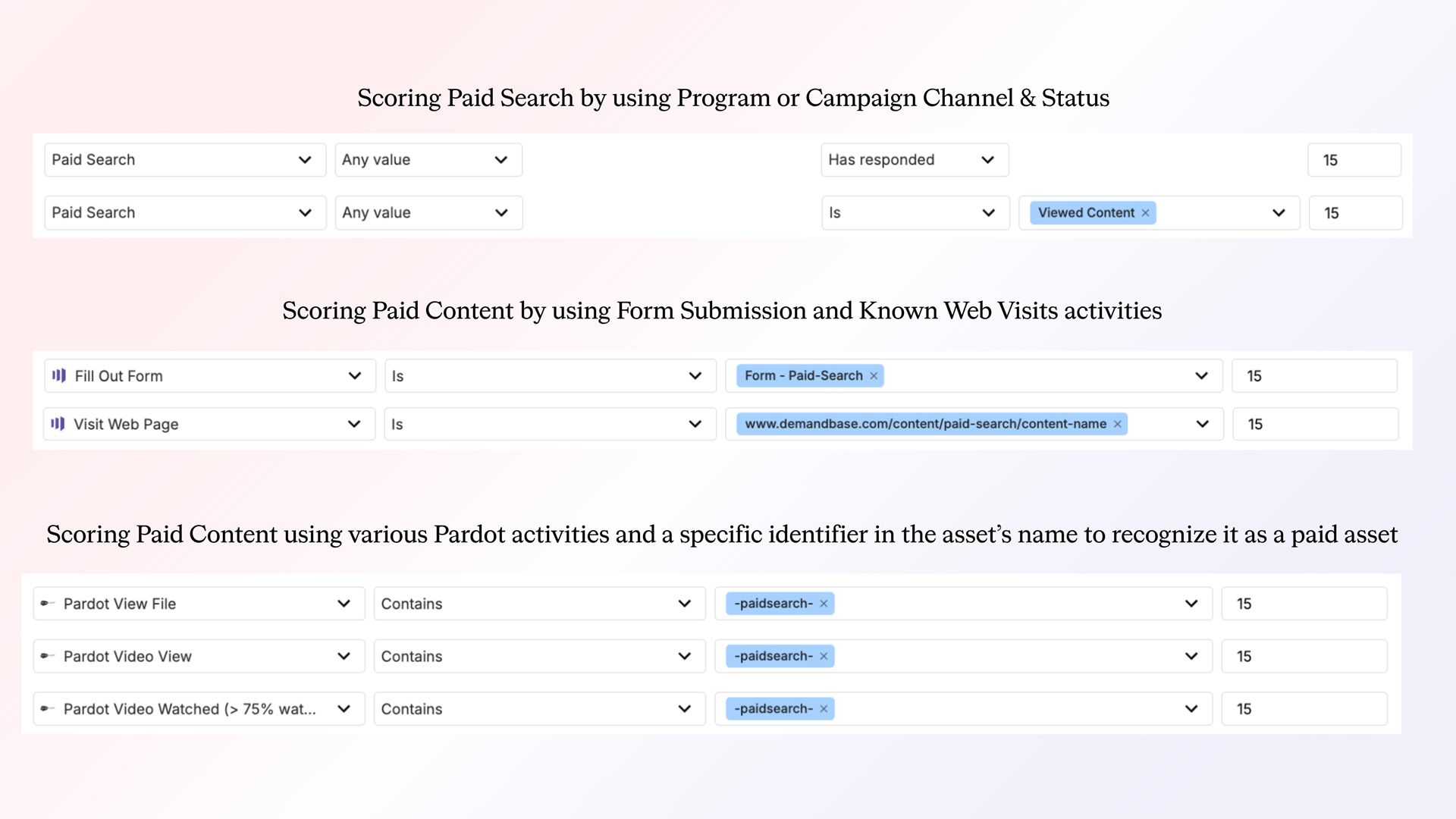
Since we are going to assign the same Engagement Point value to all content consumed in paid channels, we only need to add one row to the Engagement Point model.
- First, review how you score general (non-paid) content. In this example, general content is scored at 10 Engagement Points.
- Because paid content typically faces more conversion friction, we’ll assign it a higher value: 15 Engagement Points.
- To apply this, select your Paid Content channel in the Engagement Point model, choose the Viewed Content status, and assign 15 Engagement Points.
If you’re not using Programs or Campaigns to track this interaction, you can also use Form Submission activities instead.
- Assignments by member status
- Viewed Content = 15 Engagement Points.
Webinars
Tracks both live and on-demand engagement with webinar activities.
- Assignment methodologies:
- Assumed Time Spent
- Progressional Statuses
- Progressional Statuses – Minimum Activity Scoring
- Program/campaign member statuses:
- Registered
- Attended
- Attended On-Demand
- No Show
Webinars vary heavily in length typically ranging for 20 to 45 minutes of actual time and people might not stay for the entire event. We need to assign Engagement Points in a way that can cover these varying lengths as well as cover the non-successful progressional statuses; Registered and No Show.
Example: Your organization hosts webinars of varying length and must assign Engagement Points to all progressional statuses for all webinars.
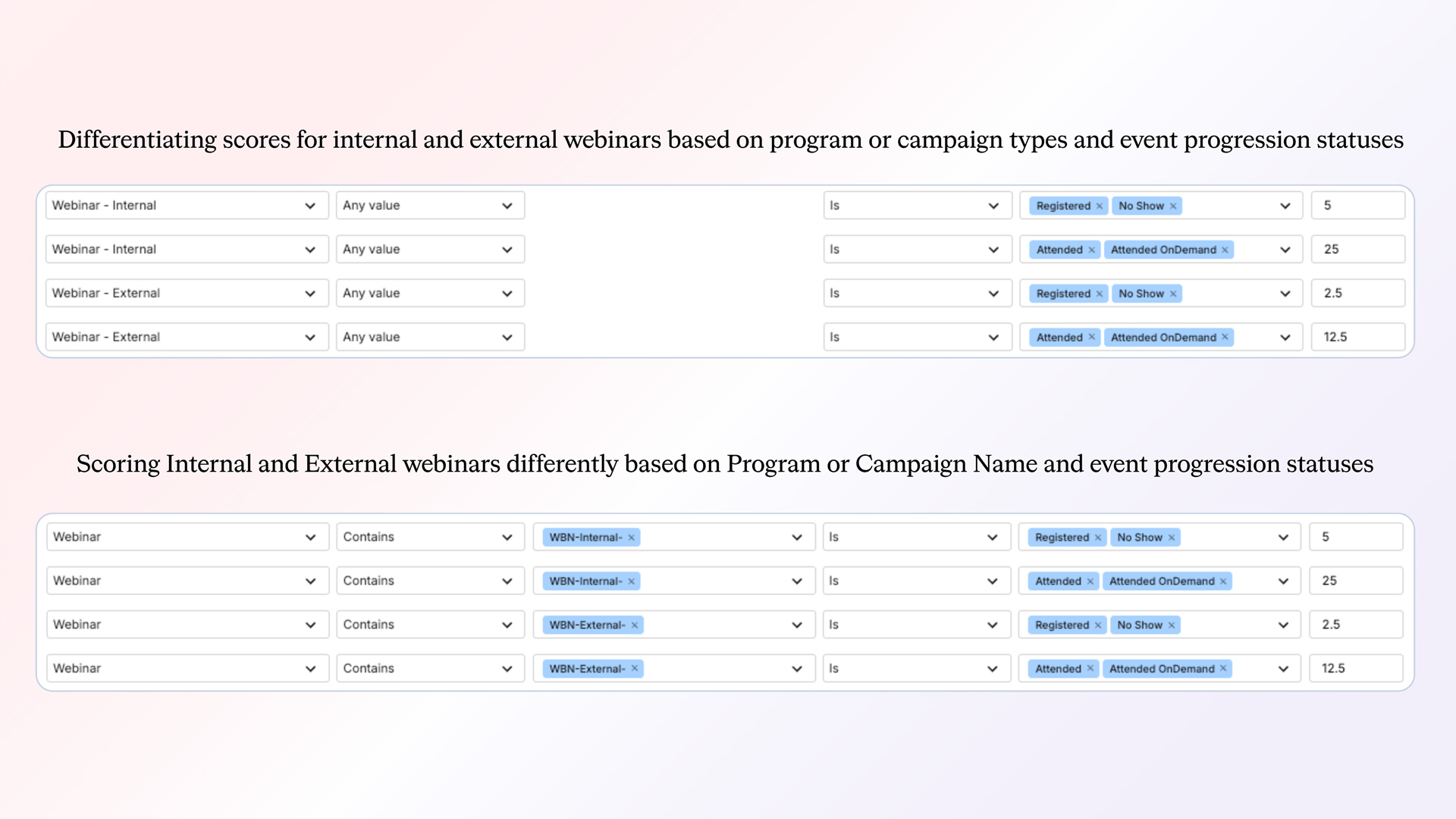
In order to assign Engagement Points to all the required statuses we will utilize two rows of the Engagement Points model.
- Row 1: Focus on the non-successful progressional statuses: Registered and No Show. Use your Minimum Activity Scoring, which in this example is 5 Engagement Points, to reflect initial interest without full participation.
- Row 2: Focus on the successful statuses—Attended and Attended OnDemand—since webinars can be viewed live or later. Because webinar length varies and attendees may not stay for the full duration, we’ll assign 25 Engagement Points. This provides a balanced estimate of time spent without over- or under-scoring the activity.
If you’re not using Programs or Campaigns to track webinar engagement, you can alternatively score based on Form Submissions or Web Page Visits.
- Assignments by member status
- Registered = 5 Engagement Points
- Attended = 25 Engagement Points
- Attended OnDemand = 25 Engagement Points
Web forms
Tracks submission of hand-raiser forms (Contact Us, Request Demo, etc.).
- Assignment methodologies:
- Implied Time to Spend.
- Program/campaign member statuses:
- Submitted Form.
These types of forms take very little time for a person to submit but they carry the implication that the person will spend anywhere from 30 to 60 minutes of actual time with your organization
Example: All of your organization’s hand raiser forms are captured in the Web Form channel. You need to assign Engagement Points to them that help show the heavy desire of the person to engage with your organization
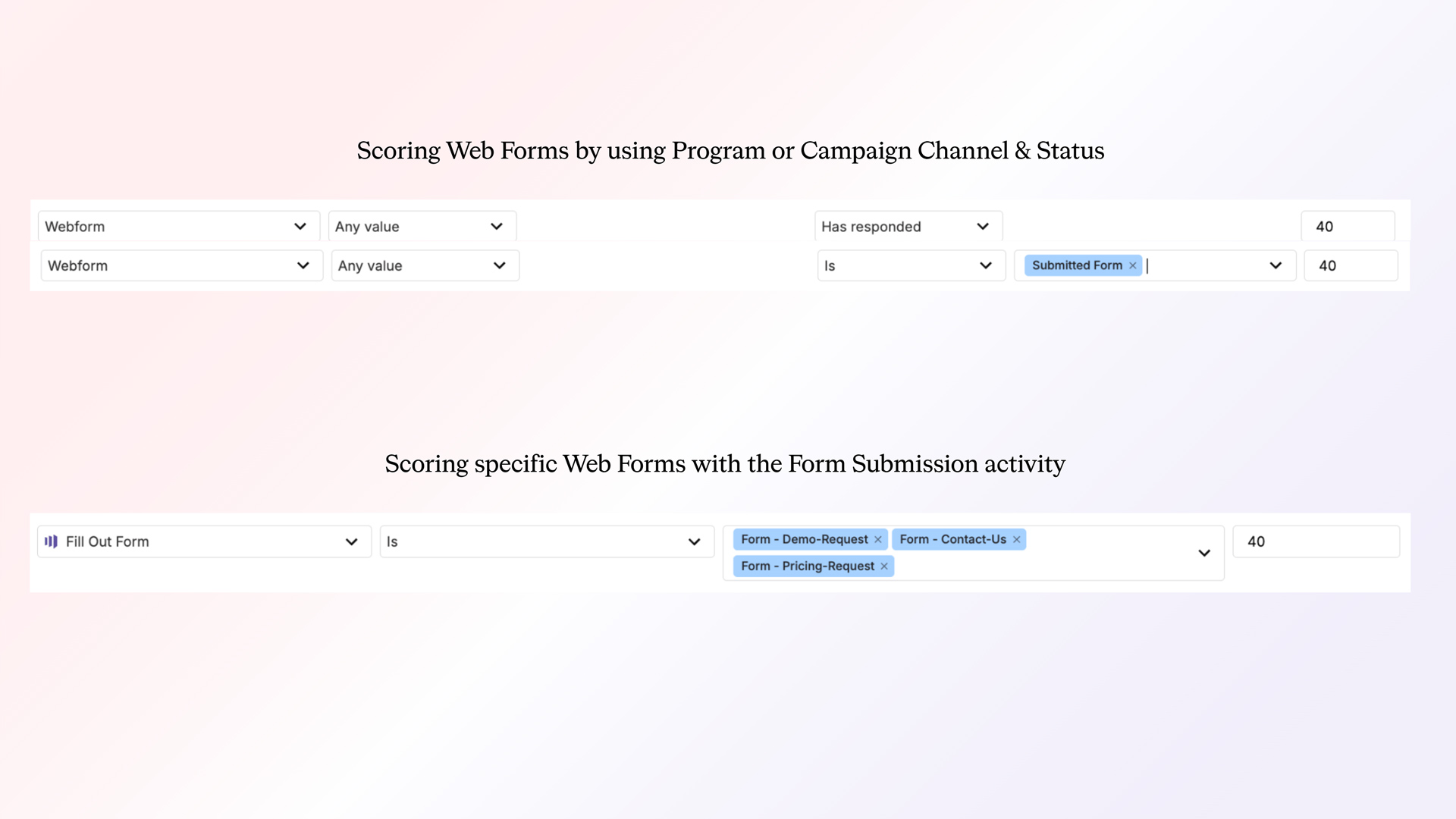
While each type of hand raiser form may vary in how much time the person will spend with your organization we will assume it is between 30 to 60 minutes of actual time
- Due to his assumption we can use the Implied Time to Spend methodology to assume the person will spend roughly 40 minutes with your organization
- Add a single row to the Engagement Points model, specify the web form channel; and the Submitted Form status, then assign 40 Engagement Points
- Assignments by member status
- Submitted Form = 40 Engagement Points
The results
By implementing these best practices, you’ll be able to:
- Optimize prioritization across teams by identifying impactful activities.
- Improve account journey accuracy with optimized Engagement Points assignments to determine which stage an Account belongs to
- Confidently fine-tune engagement strategies, building higher-performing campaigns.
This playbook equips your organization with the tools and methodologies to transform Engagement Points into a dynamic and reliable metric for driving growth.
Partner with Demandbase Experts
Get tailored strategies and insights to optimize your approach, drive engagement, and unlock new opportunities.
More Playbooks
Learn how to execute effective multitouch acquisition campaigns with this step-by-step Demandbase playbook. Target high-intent accounts, drive engagement, and deliver quality leads across multiple channels.
Learn multi-channel targeting, audience building, and pipeline optimization strategies using Demandbase tools.
How to create custom engagement point counts
Learn step-by-step how to create custom engagement point counts using DemandbaseOne Marketing. Discover how to track product interest, streamline sales efforts, and enhance GTM strategies with actionable insights.
We have updated our Privacy Notice. Please click here for details.