

What is data integrity, and how do you measure it in B2B CRMs?

Poor CRM data quality carries a bill most teams never see itemized. Gartner’s 2020 research puts the average cost of bad data at $12.9 million a year, and in a B2B go-to-market org, that number takes a specific shape:
- Leads route to the wrong rep or go unassigned altogether.
- Ad budget goes to accounts that have moved or never fit the profile.
- Attribution breaks when the same company exists under several spellings.
- Sales and marketing report different numbers and argue over which to trust.
This guide defines data integrity, draws the line between integrity and data quality, shows you how to measure it with metrics that map to GTM decisions, and explains how to keep your CRM clean.
TL;DR
- Data integrity is the accuracy, consistency, and completeness of your CRM data across its full lifecycle, held as records move between systems and age.
- Data quality and data integrity aren’t the same. Quality is the condition of a record right now, and integrity requires that quality plus the ability to move cleanly across systems (integrability) and take on outside enrichment (enrichability).
- Measure it across three groups of signals, whether records are correct (completeness, bounce rate, duplicate rate), whether they hold up across systems (lead-to-account match rate, sync errors), and whether they’re rich enough to act on (field fill rate, intent coverage).
- If leadership wants one KPI, combine the signals into a custom data-health score, then baseline it, watch the trend, and give it an owner.
- The highest-leverage fix is to stop bad data at the source. Validate fields at entry and automate enrichment and standardization, so hygiene runs continuously and keeps pace with decay.
What is data integrity in a CRM?
Data integrity is the accuracy, consistency, and completeness of your data across its whole lifecycle.
In a CRM, that lifecycle never holds still. A salesperson creates an account, a form drops in a lead, an enrichment tool fills in firmographics, and the record moves across your CRM, marketing platform, and sales tools.
Integrity means the record keeps its accuracy through all of that, even as the data decays over time. Contacts change jobs, companies get acquired, and a record that was clean last quarter falls out of date.
Integrity works on two levels. Physical integrity guards the infrastructure that stores your data, which mostly falls to IT. Logical integrity governs whether the records themselves make sense, and it comes down to four checks a RevOps team runs every day:
- Entity integrity: Every account and contact resolves to a single record, so one company can’t show up as three.
- Referential integrity: Related records keep their connections, so each contact ties to the correct account.
- Domain integrity: Each field respects its data type, so revenue is numeric and country comes from a preset list.
- User-defined integrity: Your own rules apply, like the fields a record must carry before it routes to an owner.
Each of these has more nuance than a single line can cover. Demandbase’s full guide to data integrity walks through all four in depth.
Data integrity vs. data quality: what’s the difference?
People treat these two terms as interchangeable, and they aren’t.
- Data quality describes the condition of your data at one moment. A quality record is complete, unique, valid, timely, consistent, and accurate.
- Data integrity requires all of that and two things more. The data has to move cleanly into your other systems (“integrability”) and take on enrichment from outside sources (“enrichability”), and it has to hold across its full lifecycle.
A record can pass every quality check today and still lose its integrity the moment it syncs to your marketing platform and drops half its fields.
Put simply → Data with integrity can be quality data, but not all quality data has integrity.
| Data quality | Data integrity | |
|---|---|---|
| What it describes | The condition of a dataset at a given moment | The condition of that data across its full lifecycle and every system it touches |
| Question it answers | Is this record clean right now? | Does this record hold up as it moves, syncs, and ages? |
| Scope | A single dataset in one place | Data quality plus integrability and enrichability, preserved end to end |
| Example in a CRM | A contact with a valid email, correct title, and no blank required fields | That same contact syncs to your marketing platform without losing fields, matches to the right account, and refreshes when the person changes jobs |
Data hygiene keeps both intact. Quality and integrity are states, and hygiene is the routine that maintains them while new records arrive and old ones decay. Deduplication, validation, enrichment, and standardization are the everyday tasks that keep a clean CRM from sliding back into a messy one.
The dimensions of CRM data quality (what “good” looks like)
Data quality breaks into six dimensions. Each checks a record from a different angle, and together they set the bar for “good.”
| Dimension | What it checks | CRM example | GTM consequence |
|---|---|---|---|
| Accuracy | Does the record match reality? | A contact still listed as VP after a promotion to CMO | Persona targeting misfires and your message reaches the wrong buyer |
| Completeness | Are the required fields filled in? | An account with no industry or employee count | You can’t segment, score, or route it |
| Consistency | Does the same value look the same everywhere? | “USA” in one record and “United States” in another, or “IBM” and “I.B.M.” | Reporting splits, and deduplication fails |
| Timeliness | How current is the record? | A contact who changed jobs two quarters ago | Emails bounce, and territories chase people who left |
| Validity | Does the value fit its format and rules? | A malformed email address or an impossible revenue figure | Sends fail and reports fill with junk |
| Uniqueness | Does each entity have one record? | The same account created three separate times | Duplicate records split the buying signal, so intent looks weaker than it is |
Keep in mind → In practice, one bad field rarely stays contained. A stale job title (accuracy) bounces an email (validity), and the duplicate account behind it (uniqueness) hides the problem from your reports. The dimensions fail together, which is why you measure them together.
How do you measure data integrity? (the metrics that matter)
Because integrity is quality plus integrability plus enrichability, you measure it in those three parts. Each part has its own signals, and the sections below walk through them one at a time.
Layer 1 — is the record correct? (quality signals)
This group measures data quality, the condition of a record before it moves anywhere. The signals tell you whether the data is clean at the source.
What to track →
- Completeness of GTM-critical fields: The share of records with the fields you route and score on filled in, like industry, employee count, and title.
- Validity and bounce rate: The share of values that fit their required format, shown most clearly in how many emails bounce on send.
- Duplicate rate: The share of records that repeat an entity already in the system.
- Accuracy against reality: How often a sample of records matches real-world truth, checked by hand or against a trusted source.
Decision it protects → Segmentation and lead scoring. A record that fails these checks gets grouped with the wrong accounts and scored on bad inputs, which sends it down the wrong path.
Layer 2 — does it hold up across systems? (integrability signals)
This group measures integrability, whether a record keeps its meaning as it moves between your CRM, marketing platform, and sales tools. A record can be clean in one system and still break the moment it syncs to the next.
What to track →
- Lead-to-account match rate: The share of inbound leads that connect to the right account record instead of floating unattached.
- CRM-to-MAP sync error rate: How often a record fails or mangles the sync between your CRM and marketing automation platform.
- Field standardization rate: The share of records where shared fields follow one format across systems, so “United States” and country codes don’t compete.
Decision it protects → Routing, territories, and attribution. When records don’t match across systems, leads reach the wrong rep, territories blur, and the wrong channel takes credit for the deal.
Layer 3 — is it rich enough to act on? (enrichability signals)
This group measures enrichability, how much usable context a record holds and how easily it takes on more from outside data. A record can be spotless and still useless if the fields you target are blank.
What to track →
- Fill rate on GTM-critical fields: The share of records with the attributes your targeting depends on, like industry, employee count, tech stack, and buying-group role.
- Firmographic coverage: The share of accounts carrying usable firmographic data, the baseline for any segment or territory.
- Intent and signal coverage: The share of accounts with active intent or engagement data attached, the input that separates a ready account from a cold one.
Decision it protects → Targeting and prioritization. An account with no intent or firmographic data reads as cold, so it drops down the queue even when it’s ready to buy.
Turning the metrics into a data-health score you can report on
The three groups above give you a set of signals, but a list of metrics can be hard to report on. Leadership may want one answer to the question of whether the data is getting healthier or not.
If your team wants a single executive KPI, you can create a custom data-health score. Combine quality, integrability, and enrichability into one number you can baseline, track each quarter, and share in a review.
And few teams even get this far. Gartner found that 59% of organizations don’t measure data quality at all, so a working score puts you ahead of most.
There are four moves that can get you there:
- Weight the three groups: Score quality, integrability, and enrichability separately, then weight each by what your GTM motion depends on most. A team that struggles with misrouting and attribution gives integrability a heavier weight.
- Set a baseline: Score the CRM as it stands today. This first number gives you a reference point to measure future progress against.
- Track the trend: Follow the score over time. A score that rises across quarters shows your hygiene is holding, and a falling score shows data decay is outpacing it.
- Name an owner: Give one person responsibility for the number, the report, and the review schedule, so the score gets consistent attention.
You don’t need a perfect model on day one. Pick reasonable weights, baseline the CRM, and tighten the formula as the trend gives you data to work with.
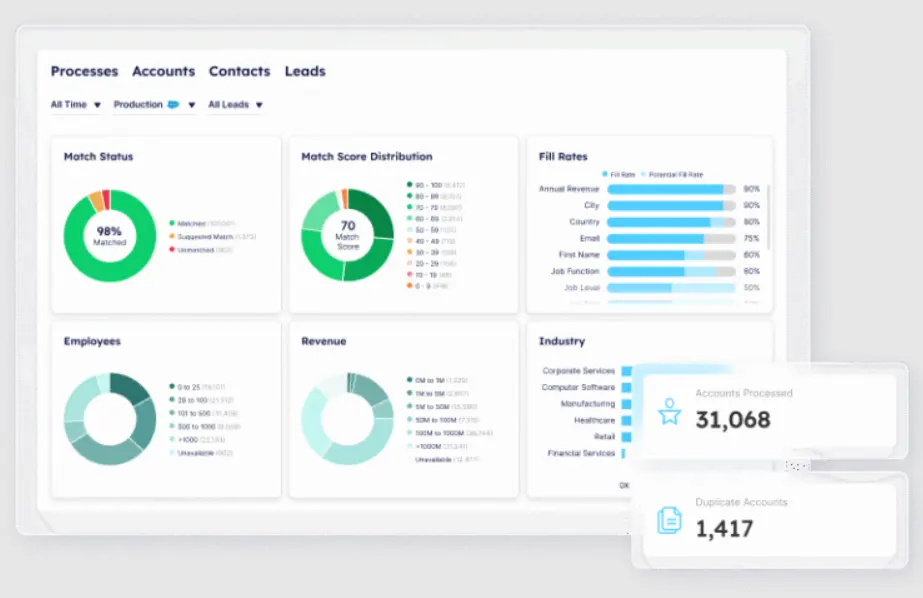
PRO TIP → Building this score by hand takes both time and effort, which is one reason so few teams keep it up. Demandbase’s Data Integrity tracks data health for you with trend graphs and at-a-glance comparisons, so you can see whether the CRM is improving quarter over quarter without assembling the numbers yourself.
What causes data integrity issues in B2B CRMs?
Most data integrity issues have ordinary causes. They come from routine activity in the CRM, not from any single event, and they add up over time.
Here are some of the most common causes:
- Manual entry errors: Every field entered by hand can introduce a wrong title, a misspelled company name, or a missing required value.
- Data decay: Contact and account data go out of date on their own as people change roles and companies restructure.
- Duplicate records: The same account or contact gets entered more than once, through web forms, imports, or a salesperson recreating a record that already exists.
- Disconnected systems: Separate systems that don’t sync properly end up holding different values for the same record.
- Migrations and M&A: CRM migrations and company mergers combine two data sets, and mismatched formats and duplicates come with them.
- Free-text fields: Fields without set formats or picklists produce varied entries for the same information, so the data becomes hard to standardize.
- No clear ownership: Without an assigned owner, there are no agreed rules for how data should be entered or maintained, and quality slips.
Each of these has a fix, and the next section walks through them.
How to ensure and maintain data integrity (best practices & CRM data hygiene)
Fixing data integrity takes more than one big cleanup. Because data decays continuously, the practices that maintain it have to run continuously too.
The seven below work together, some at the point of entry and others as ongoing maintenance, to keep a CRM clean over time:
Set a data governance policy and field standards
Data integrity starts with a shared set of rules. A governance policy defines who owns the data, what each field means, and which fields a record must carry before it moves forward.
How to do this →
- Assign clear ownership for data quality, so one person or team is accountable.
- Define each field and the format it should follow, from country names to revenue ranges.
- Mark which fields are required before a record can route or convert.
- Document the standards in one place every team can reach.
- Set picklists and allowed values for fields that need consistency.
- Review the standards on a schedule and update them as the GTM motion changes.
Example → A B2B team standardizes its ‘Country’ field to a fixed picklist and makes ‘Industry’ and ‘Employee Count’ required before a lead can route. New records now enter in one consistent format, and segmentation and routing work without manual cleanup later.
Validate at the point of entry
The point of entry is where bad data is easiest to stop. Validation checks each value against your standards as it’s typed or imported, which catches errors before they reach the CRM and spread.
How to do this →
- Make GTM-critical fields required, so a record can’t save without industry, title, or employee count.
- Replace free-text boxes with picklists wherever a field has a known set of values.
- Set format rules that reject malformed entries, like a revenue figure with letters in it.
- Validate email addresses on entry to catch typos and dead domains before they bounce.
- Apply the same checks to imports and form fills, not just manual entry.
Example → A team swaps its open ‘Industry’ text field for a picklist and requires a valid work email on every new contact. Duplicate spellings of the same industry stop appearing in reports, and email bounce rates drop because bad addresses never make it in.
Automate enrichment and standardization
Automated enrichment fills missing fields from a trusted external source, and automated standardization formats values the same way across every record. Together, they reduce blank fields and inconsistent entries without adding work for your team.
How to do this →
- Append missing GTM fields like industry, employee count, and technographics from a trusted data source.
- Normalize company names, country values, and other shared fields to one standard format.
- Run enrichment on new records at entry and backfill existing ones in the same pass.
- Refresh enriched data on a schedule so it keeps pace with decay.
Example → A CRM full of half-empty records connects to an enrichment source that fills industry, employee count, and technographics automatically. The blank fields populate on entry, and standardized company names replace the mix of “IBM” and “I.B.M.” that used to break reporting.
PRO TIP → Enrichment only helps when the source is accurate. Demandbase’s Data Integrity pulls from its own account intelligence to fill missing firmographics and standardize formats across Salesforce, Dynamics 365, Marketo, and HubSpot, so the fields populate correctly on the first pass. That makes enrichment a continuous process that runs on every new record.
Deduplicate and merge
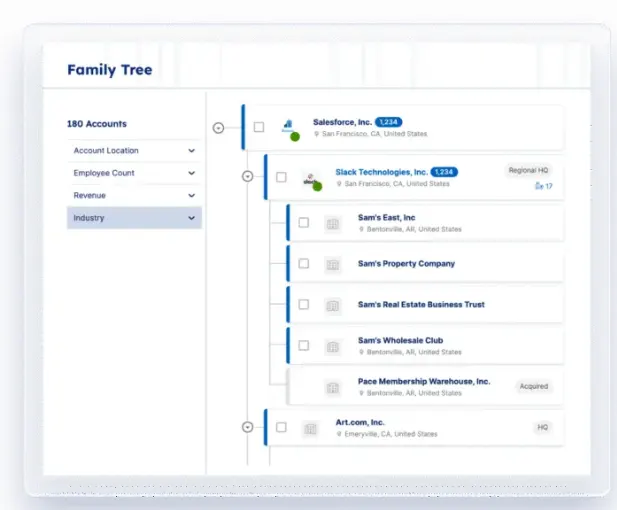
Duplicate records split one entity across several entries, which weakens the buying signal and skews every report built on it. Deduplication finds records that point to the same account or contact and merges them into one, and matching rules keep new duplicates from forming.
How to do this →
- Set matching rules that flag likely duplicates on fields like company domain, email, and account name.
- Merge duplicate records into one, keeping the most complete and recent values.
- Map leads to their parent account so inbound activity attaches to the right record.
- Run deduplication on the existing database and again on each new batch of records.
- Block obvious duplicates at entry, so a salesperson can’t create an account that already exists.
Example → A team runs deduplication and finds one target account entered three times, each with a piece of the activity. Merged into a single record, the account’s full engagement shows up in one place, and pipeline reports stop double-counting it.
Audit regularly and monitor continuously
A regular audit checks the database against your standards and reports where it currently stands. Continuous monitoring runs alongside it, watching the metrics most likely to slip so problems get caught between audits.
How to do this →
- Audit the database on a fixed cadence, monthly or quarterly, against your field standards.
- Track your data-health score over time so you can see the trend, not just a snapshot.
- Set alerts for the failures that matter most, like a spike in bounces or missing required fields.
- Sample records by hand now and then to catch issues automated checks miss.
Example → A monthly review covers the data-health score and logs the trend. An alert on email bounce rate runs in between, so a bad import comes up within days instead of waiting for the next scheduled check.
Keep data in sync across teams and systems
Data integrity depends on your systems agreeing about the same record. A sync setup keeps the CRM, marketing platform, and sales tools working from one source of truth, so an update in one reaches the others.
How to do this →
- Name one system as the source of truth for each type of record, so there’s no question which version is correct.
- Connect the CRM, marketing platform, and sales tools with integrations that pass updates both ways.
- Match records across systems on a shared key like email or company domain, so updates go to the right entity.
- Agree on shared field definitions across teams, so the same data means the same thing everywhere.
Example → Sales and marketing once kept separate versions of the same contacts, and the two drifted apart over time. After a two-way sync makes the CRM the single source of truth, an edit in one system reaches the other in minutes, so both teams read the same record.
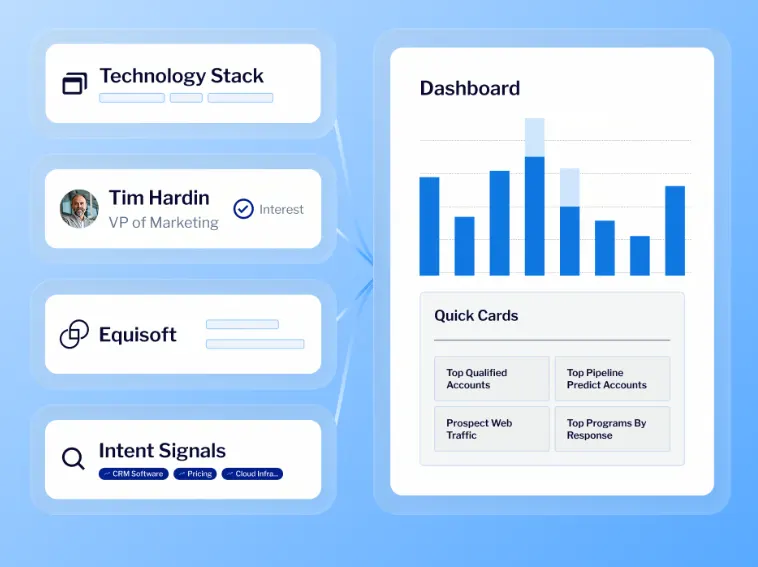
PRO TIP → A single source of truth is easier to hold when one data hub feeds every system the same records. Demandbase’s Data Hub unifies account, buying group, and signal data, then keeps it current across your CRM and marketing platform, so the systems agree by default and sync errors have less room to appear.
Build a culture of data quality
Rules and tools only hold when the people entering data follow them. A culture of data quality makes clean data a shared responsibility across sales, marketing, and ops, so records go in correctly the first time.
How to do this →
- Train every team that touches the CRM on the standards and the reason behind them.
- Show the cost of bad data in terms each team feels, like wasted spend or misrouted leads.
- Give data-quality ownership a name and a seat.
- Recognize the teams and individuals who keep their data clean.
Example → A monthly meeting puts bounce and duplicate rates on screen, broken out by department. Teams start to see their own numbers, entry habits tighten across sales and marketing, and data quality stops being something only ops thinks about.
Why data integrity matters for sales and marketing (GTM)
Every GTM motion runs on CRM data, so the quality of that data sets the ceiling on what sales and marketing can achieve. When integrity holds, these systems run smoothly, and when it slips, the whole motion feels it.
The effect is clearest in four parts of the GTM engine:
- Routing and territories: Leads reach the correct owner and territories split evenly only when account data is accurate. A wrong region or employee-count value routes a lead to the wrong person, and the account waits while its interest fades.
- Segmentation and ad targeting: ABM and paid programs spend against whatever accounts the data identifies. When that data is wrong or incomplete, the budget reaches companies that don’t fit, and the ones that do get left out.
- Attribution and ROI reporting: Attribution needs consistent, matched records to trace results correctly. Duplicate accounts and failed syncs point credit at the wrong channel and distort the reporting.
- Sales and marketing alignment: Alignment depends on both teams reading the same source of truth. Separate versions of an account lead to disputes over whose data is right and weaken trust in the CRM.
Demandbase’s own team puts this in GTM terms. Senior product marketing manager Kurt Gellert argues in a post on bad data that a strong campaign still generates weak pipeline when it targets the wrong titles or routes leads to the wrong owner.
And Demandbase Data Integrity works on that directly. It automates enrichment, cleaning, and standardization across supported CRM and marketing automation integrations, including Salesforce, Microsoft Dynamics 365, Marketo, and HubSpot. That helps keep firmographic and contact data current so segmentation, routing, and reporting have cleaner inputs.
Why this matters more in 2026 → GTM teams increasingly hand execution to AI and agentic tools that read CRM data directly and can act with less human review, which means a bad record can drive a bad action at machine speed. At the same time, tighter privacy controls, consent requirements, and limits on cross-site tracking are making reliable first-party data more important to targeting and measurement. That puts even more weight on the integrity of the data already inside your CRM.
How to validate and check data integrity: a practical audit + checklist
An audit shows you where your CRM stands against the standards covered above. The process below runs in four phases and works for a first check or a routine one.
- Set the standard: Define good before you measure. Pull field definitions, required fields, and formats from your governance policy, and set the benchmark each should meet, like a capped bounce rate or full firmographic coverage on target accounts. No standard means no way to read the results.
- Measure the current state: Check the data against those standards and record the results. The checklist below covers the ground here, from completeness and validity to duplicates, matching, and enrichment. The result is a baseline that shows how far each check falls from the standard.
- Find the root causes: For each gap, work out where the bad data comes from. A high duplicate rate traces back to entry rules or a broken sync, and thin firmographics trace back to missing enrichment. Fix the records but not the cause, and the same problems come back next quarter.
- Prioritize and fix: Rank the gaps by GTM impact. A handful of misrouted enterprise accounts can cost more than a big batch of incomplete records nobody ever works. Handle the high-impact issues first, and then push the recurring ones back into your validation rules and hygiene routine.
Phase 2 is where most of the work happens, and the checklist below is the tool for it. Each item is a single check you can score against your standard, grouped the same way you measure integrity.
The CRM data integrity checklist
Use this inside phase 2 to score the current state. Each item is a check you can pass or fail against the benchmark you set in phase 1.
Quality checks (is the record correct?) →
- Required GTM fields like industry, employee count, and title are populated on target accounts and contacts.
- Email addresses pass format validation, and bounce rates stay under your threshold.
- The duplicate rate for accounts and contacts stays below your set limit.
- Field values hold up against a manual spot-check with a trusted source.
- Formats follow your rules, so revenue reads as a number, dates are valid, and country uses one standard.
Integrability checks (does it hold up across systems?) →
- The lead-to-account match rate meets your benchmark.
- Syncs between the CRM and marketing platform complete without errors or dropped fields.
- Shared fields use one standard format across every system.
- Each record type has one named source of truth.
Enrichability checks (is it rich enough to act on?) →
- The fill rate on targeting fields like tech stack and buying-group role meets your benchmark.
- Target accounts carry usable firmographic data.
- Accounts have current intent or engagement data attached.
Governance and process checks →
- Field definitions and required fields are documented and current.
- One owner is accountable for the data-health score and the report.
- Validation rules and picklists are in place at the point of entry.
- The audit runs on a set cadence, with the score tracked over time.
Want to go deeper than a self-check? The Demandbase Data Playbook walks through the same ground in more detail, with step-by-step setup for a data-integrity process and a buyer’s checklist for evaluating data providers.
When should you automate vs. do it manually?
It comes down to matching the approach to the situation.
Automate when:
- The volume is too high to check by hand, like thousands of new records a month.
- The work repeats on a schedule, since data decays continuously and needs steady upkeep.
- A single error costs a lot, like a duplicate that misroutes a major account.
Keep a person on it when:
- Someone has to set the standards and define what each field means.
- A rule needs a judgment call the automation can’t make on its own.
- An edge case falls outside the model, like an account or merge the matching rules can’t resolve.
- Automation covers the volume, and people make the decisions. Each handles the part it does better.
Example → Say a new lead enters the CRM. Automation validates the email, fills in firmographics, and checks for duplicates in seconds, work no person could keep up with at volume. But when two records look like a match, and the rules aren’t sure, that one goes to a person to decide.
Fix your CRM data with Demandbase Data Integrity
By now the framework is clear. You know what data integrity is, how to measure it, and where it breaks. But keeping it that way by hand doesn’t scale, because the volume and pace of CRM data outrun any manual routine.
Demandbase’s Data Integrity is built for that work. It’s an automated data hygiene tool that enriches, cleans, and standardizes the accounts, contacts, and leads in your CRM and marketing platform, so the records remain accurate without anyone maintaining them by hand. Its core capabilities line up with the integrity checks you’d otherwise run yourself.
- AI enrichment and standardization: The tool fills missing fields and appends firmographics from Demandbase’s account intelligence, so completeness and enrichment no longer depend on manual entry. It also standardizes values across records, which holds consistency in place for reporting and deduplication. Together, these cover most of what a clean record needs.
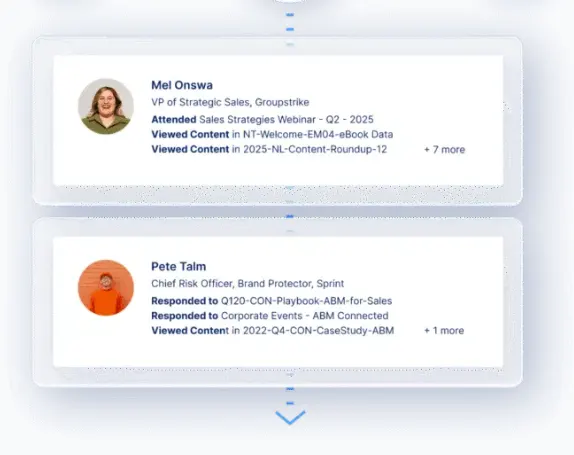
- Automated cleaning across your stack: Demandbase Data Integrity supports automated cleaning and enrichment workflows across supported CRM and marketing automation integrations, including Salesforce, Microsoft Dynamics 365, Marketo, and HubSpot. Keeping enrichment and standardization close to the systems teams already use reduces the chances that records drift or lose consistency as data moves between platforms.
- Duplicate detection and decay checks: The tool identifies duplicate and out-of-date records automatically, the two failures that distort reports and split the buying signal. It catches them before they reach a campaign or a routing rule. The result is one clean record per entity, kept current over time.
- Email validation: It validates every email address across your CRM and marketing platform and catches malformed or dead ones before a send. This protects your bounce rate and keeps deliverability from dragging down otherwise strong campaigns.
- Lead-to-account mapping and routing: Configurable lead-to-account mapping connects each inbound lead to the right account, and accurate territory data routes it to the right owner. Both depend on the cross-system matching this article named as an integrity check. When the match holds, routing and attribution hold with it.
- Data-health tracking: The tool tracks data health over time with interactive trend graphs and at-a-glance comparisons, so you can see whether CRM data is improving or slipping. These visualizations give teams an ongoing view of data hygiene performance and make it easier to spot changes between reviews.
You can measure data integrity by hand, but maintaining the underlying checks takes ongoing work. Demandbase Data Integrity automates data hygiene tasks and tracks data-health trends in dashboards, so teams can monitor changes over time instead of relying on periodic manual cleanups.
Book a meeting to see where your CRM stands today.



We have updated our Privacy Notice. Please click here for details.