

AI as a power tool: Agentic development in practice
Over the past year, AI-assisted development has become part of the normal engineering workflow at Demandbase. This isn’t about prompt tricks or chasing productivity metrics. It’s about how AI changes the shape of day-to-day development work when applied to real systems with real constraints.
We use what’s often called agentic development as a way to move faster from intent to working code, especially when validating ideas early. The speed is real – but so are the tradeoffs.
How we use agentic development in practice
Demandbase is not a greenfield environment. Most of our work happens inside mature systems with established architecture, long-lived contracts, and strong requirements around reliability and scalability. At the same time, we’re expected to explore new ideas, validate product directions, and iterate quickly.
Traditional development processes work well when requirements are stable and the solution is well understood. They are much less efficient when the primary goal is learning. Long planning cycles and detailed design documents are expensive if the outcome is still uncertain.
AI-assisted development helps shorten the learning loop by reducing the cost of implementation, not by avoiding design. We still do architectural design up front and define the approach deliberately. The mindset shift is not about skipping thinking, but about changing where time is spent.
With AI, we can move from an idea to running code much faster. Boilerplate disappears, familiar patterns get filled in automatically, and small features that once took days can often be explored in hours. More importantly, the end-to-end delivery loop shrinks: idea → prototype → reviewed change → shipped feature.
When used well, this speed doesn’t remove ownership. Engineers remain responsible for correctness, performance, security, and maintainability. AI removes friction from the mechanical parts of the job so more time can be spent on design, tradeoffs, and validation—the parts that actually matter.
Agentic development in the value acceleration project
The value acceleration project is a good example of how this works in practice. It started as a backend-focused initiative with an API surface. Using an agentic approach, we were able to generate a functional internal UI on top of that backend very early in the project.
What mattered wasn’t that the UI was generated quickly – it was that having a real interface changed the conversation. Internal users could walk through actual flows, point out friction, and suggest improvements long before we would normally invest in frontend work. Over time, this led to additional usability features that were never part of the original plan but had a measurable impact on how efficiently internal teams could do their work.
It’s now realistic to hear a requirement or product idea in a stakeholder meeting and come back with a working prototype before the next sync. Even complex ideas can be tested early, with real code and real UI, instead of slides or speculative designs.
Another area where AI has been consistently useful is in generating service adapters. These adapters tend to follow a common structure and implement a well-defined protocol, differing mainly in the specifics of external APIs.
When contracts are explicit and responsibilities are clear, AI performs well. It can generate large amounts of predictable, repetitive code quickly, leaving engineers to focus on correctness, edge cases, and integration details. This works precisely because the architecture is already doing most of the work.
In both cases, AI didn’t replace design or architecture—it reduced the cost of execution, making it possible to validate UI flows and protocol-driven implementations earlier and iterate on them with real feedback.
Speed comes at the cost of review
One tradeoff shows up almost immediately: writing code becomes faster, but reading and reviewing code becomes more expensive.
AI-assisted workflows tend to produce larger diffs and more frequent changes. Much of the generated code looks reasonable in isolation, which is exactly why it requires careful review.
AI-generated code needs more scrutiny, not less. The risks are real:
- duplicated logic that looks correct in isolation
- subtle abstraction leaks
- over-engineered helpers that don’t match our architecture
- patterns that work locally but fail at scale
These issues often don’t break anything immediately, but they quietly increase long-term maintenance cost.
LLMs are particularly weak at identifying architectural mismatches, abstraction leaks, and long-term design risks. Strong architecture acts as a set of guardrails that make these failures easier to detect. Clear boundaries, stable contracts, and consistent patterns significantly improve the quality and predictability of generated code. When those guardrails are missing or unclear, AI doesn’t compensate—it amplifies the problem.
Our baseline is simple: if we wouldn’t accept the change without discussion from a junior engineer, we don’t accept it from an LLM either.
Guiding AI
Guiding AI is not just about repository context; it’s about how we ask the model to do the work. In practice, we get the best results by combining structural guidance (like AGENTS.md) with very deliberate task shaping.
Two principles matter most:
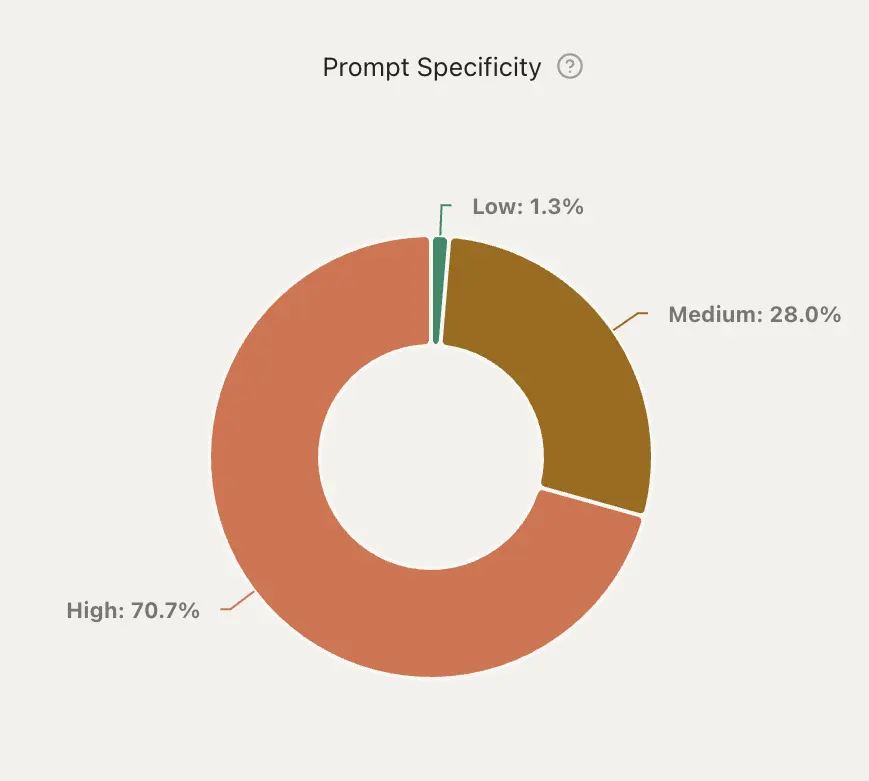
- Highly specific prompts
- Keep tasks intentionally small
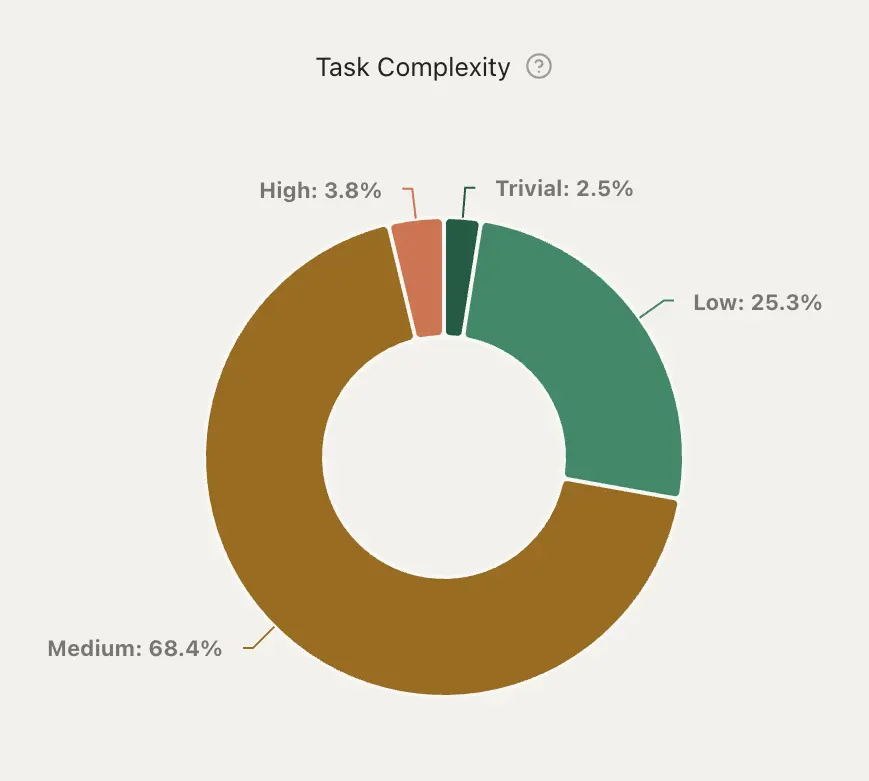
We deliberately avoid giving the model large or highly complex tasks in a single step. Smaller, well-scoped tasks are easier to reason about, easier to review, and produce more predictable results. When complexity grows, we decompose the work and guide the model incrementally rather than asking it to solve everything at once.This approach helps us maintain code quality while still benefiting from speed. Internally, we’ve observed that most successful interactions fall into the combination of high prompt specificity and low-to-medium task complexity.
AGENTS.md complements this by providing stable, repository-level constraints such as build commands, naming conventions, component structure, and testing approach. It gives the model concrete rules to follow, but it is not enforcement: context can be skipped and rules can be ignored. Its role is to align AI output with how the codebase actually works, not to replace understanding the system or reviewing the result.
Below is a simplified example of what an AGENTS.md file looks like in practice. The goal is to give the model concrete, opinionated constraints that match how the repository actually works:
# Agent Guidelines

## Build, Test & Lint Commands

- **Build**: `npm run build` (TypeScript check + Vite build)

- **Lint**: `npm run lint` (ESLint with TypeScript)

- **Test all**: `npm run test` (Vitest watch mode) or `npm test:run` (single run)

- **Test single file**: `npm run test -- path/to/file.test.tsx` or `vitest run path/to/file.test.tsx`

## Code Style & Conventions

### Imports

- Use absolute imports from `src`

- Prefer path aliases (`api`, `components`, `features`, `utils`, etc.)

- Group imports: external libraries → absolute imports → relative imports

### TypeScript

- Use TypeScript for all files (`.ts`, `.tsx`)

- Define interfaces for props, state, and API responses

- Prefer `interface` over `type` for object shapes

- Use RTK Query for API calls (extend `baseApi`)

### Naming Conventions

- Components: PascalCase (`PermissionSetPage.tsx`)

- Utilities and hooks: camelCase

- API slices: camelCase ending in `Api` (`permissionsApi`)

### Error Handling

- User-facing errors go through `AlertService`

- API errors handled via RTK Query hooks

## Project Structure

- Feature-based layout under `src/features/{feature}`

- Shared components and utilities under `src/components` and `src/utils`
This combination—clear prompts, constrained task size, and explicit repository guidance – significantly reduces duplicated patterns, inconsistent naming, and architectural drift in generated code.
AI as a power tool
AI delivers the most value when it operates inside a well-defined architecture with explicit contracts. It works best for repeatable patterns, mechanical refactors, small scoped changes, and UI iteration. Frontend work in particular benefits from tight feedback loops, where small visual or behavioral changes can be validated almost immediately against a concrete reference like a screenshot or a specific component.
AI is far less effective at architectural redesign, understanding historical context, or evaluating long-term tradeoffs. Proofs of concept can be built very quickly, but turning them into production-ready systems still requires deliberate design, validation, and engineering judgment.
In practice, this makes AI a power tool. Used with guardrails, it reduces friction and lowers the cost of early validation. Used carelessly, it introduces subtle debt that compounds over time. We treat AI-assisted development as an amplifier of good engineering practices, not a replacement for them. Speed only matters when it’s paired with strong architecture, careful review, and clear ownership.
Want to explore how Demandbase applies AI to pipeline growth?



We have updated our Privacy Notice. Please click here for details.