
How to build MQA dispositioning for revenue impact

Director of GTM Experts
-
Journey Stage
All Stages
-
Team
RevOps
-
Expertise Level
Intermediate
Contents
Partner with Demandbase Experts
Get tailored strategies and insights to optimize your approach, drive engagement, and unlock new opportunities.
What you’ll learn
This playbook is your comprehensive guide to implementing Marketing Qualified Account (MQA) Dispositioning using DemandbaseOne Marketing and your CRM. By following the step-by-step instructions, you will:
- Understand the importance of the MQA dispositioning process.
- Learn how to identify, categorize, and manage outcomes of MQAs for actionable feedback.
- Establish a feedback loop between Marketing and Sales to optimize criteria and align strategies.
- Build MQA Acceptance reporting to measure success and pipeline impact.
- Confidently move MQAs to the right stages within your Account Journey.
Why is this important
Marketing Qualified Accounts represent a critical handoff moment between Marketing and Sales. Without clear feedback processes, Marketing cannot determine whether they are delivering the right accounts to Sales. This leads to inefficiencies, disjointed pipelines, and lost opportunities.
MQA Dispositioning solves this by:
- Improving the quality of accounts Sales receives through data-driven optimization.
- Ensuring Sales works on high-potential accounts, leaving Marketing to focus resources where they matter most.
- Tracking acceptance and rejection of MQAs for greater alignment between teams.
- Enabling dynamic criteria adjustments based on real feedback, creating a closed-loop system.
- Contributing directly to pipeline and revenue by ensuring the smooth transition of accounts through the funnel.
The stakes are high: The right MQA Dispositioning framework ensures every account is addressed effectively, nurturing Sales-Marketing collaboration while avoiding stagnant or lost opportunities.
What you need to get started
Before beginning the MQA Dispositioning process, ensure you have the following tools and systems in place:
- Technology requirements:
- DemandbaseOne Marketing integrated with your CRM.
- Account Journey configured with a stage designated as MQA
- Pre-requisites for MQA dispositioning:
- Custom fields in the CRM:
- Fields to capture MQA Feedback, including Accepted, Neutral, or Disqualified reasons.
- Alignment between marketing and sales:
- Documented agreement on criteria for Success, Neutral, and Unsuccessful outcomes.
- Regular communication channels to ensure collaboration.
- Custom fields in the CRM:
- Internal collaboration:
- Engagement from SDRs, Sales Managers, and RevOps teams for building agreement on workflows.
- Support from CRM and Operations teams to implement necessary configurations.
Step-by-step playbook
This playbook divides the MQA Dispositioning process into three main parts to ensure clarity and organization.
Part 1: Identify what happens to an MQA
Understanding the possible outcomes of an MQA is the foundation of this process.
- Define MQA outcomes:
- Align with Marketing and Sales teams to define the potential outcomes for MQAs:
- Success:
- The account is ready to proceed in the sales cycle.
- Action Required:
- Move the account into a Meeting or Opportunity Stage.
- Neutral:
- The account is not yet ready and should be nurtured or recycled.
- Action Required:
- Assign to a specific Nurture or Recycle stage.
- Unsuccessful:
- The account is a poor fit and should be disqualified.
- Action Required:
- Archive it into a Disqualified stage to avoid further efforts.
- Success:
- Example Scenarios:
- Success → An Opportunity is logged by Sales in the CRM.
- Neutral → The account lacks budget or is under contract with a competitor.
- Unsuccessful → Mismatched company size, geography, or industry.
- Align with Marketing and Sales teams to define the potential outcomes for MQAs:
- Establish collaboration:
- Host a session between Operations, Marketing, and Sales teams to finalize these outcomes and set criteria for each disposition.
Part 2: Moving accounts out of the MQA stage
Once outcomes are identified, the next step is to operationalize the movement of accounts within the Account Journey.
- Managing successful accounts:
- For accounts ready to move forward:
- Ensure sellers log key actions such as setting a Meeting or creating an Opportunity.
- Update Account Journey:
- Ensure the desired Account Journey Stage for Accounts to move into captures the sellers key actions
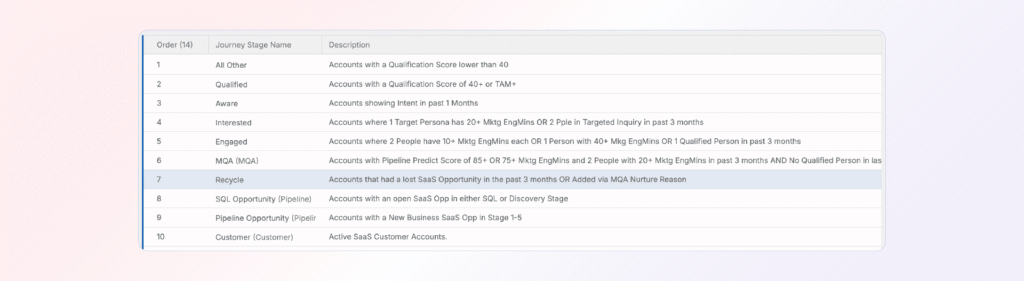
- Ensure the desired Account Journey Stage for Accounts to move into captures the sellers key actions
- For accounts ready to move forward:
- Handling neutral accounts:
- Capture Neutral outcomes by:
- Meeting with Sales to confirm all potential Neutral reasons, such as:
- No Response.
- Active Competitor Contract.
- Insufficient Resources.
- Build custom fields in your CRM on the Account:
- MQA Nurture Reason (picklist)
- This should be a list of all the neutral reasons
- MQA Nurture Date (Date)
- Work with your CRM team to build a workflow which datestamps this field when MQA Nurture Reason is selected
- MQA Nurture Reason (picklist)
- Meeting with Sales to confirm all potential Neutral reasons, such as:
- Update Account Journey:
- Create a Nurture Stage (if not yet available).
- Place this field right after MQA and before the stage successful MQAs move into such as Meeting or Opportunity
- Ensure it does not appear in analytics dashboards (e.g., do not track velocity/conversion).
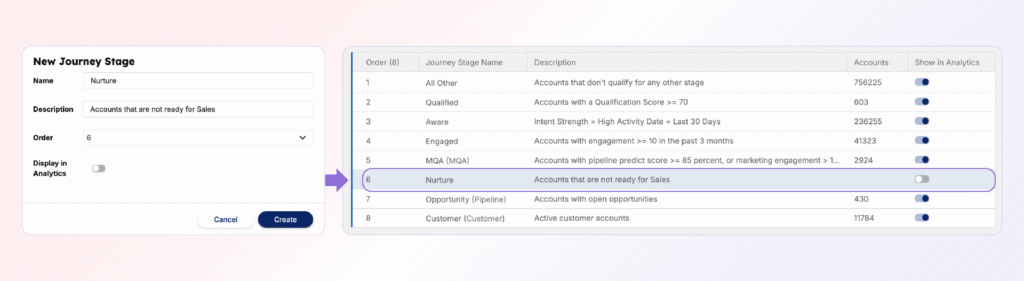
- Set a maximum time (e.g., three months) for accounts to stay in the Nurture Stage.
- Criteria:
- “MQA Nurture Reason exists”
- “MQA Nurture Date within the past 3 months.”
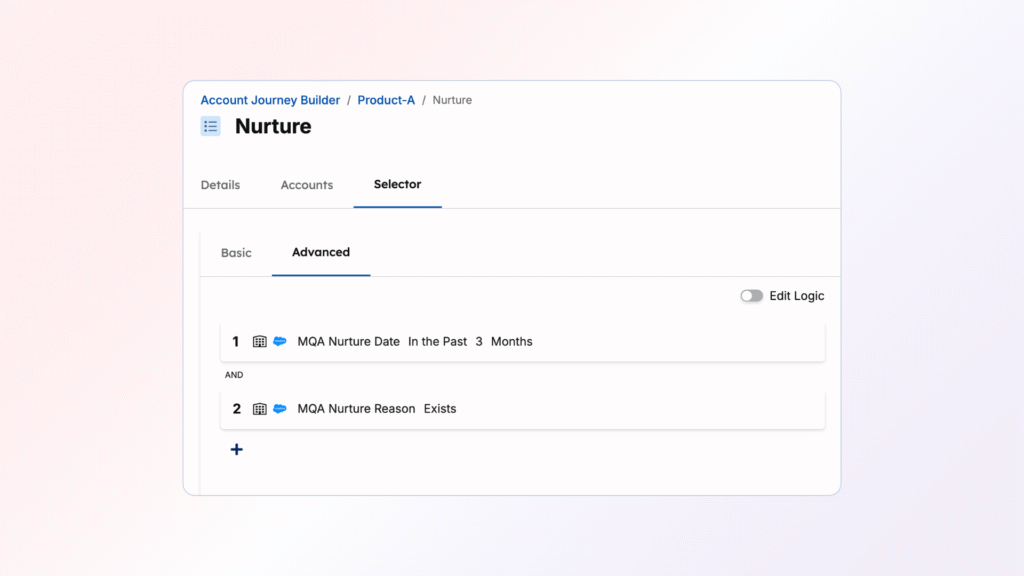
- By having a time component added to this stage it prevents the Account from reappearing in Sales until the proper time has passed.
- Criteria:
- Create a Nurture Stage (if not yet available).
- Capture Neutral outcomes by:
- Disqualifying accounts:
- Disqualified accounts must be archived systematically:
- Meet with Sales to confirm all potential Disqualification reasons, such as:
- Incorrect Industry
- Incorrect Geography
- Competitor Accounts
- Analyst Account
- Build a custom field in your CRM on the Account:
- Disqualified Reason (picklist)
- This should be a list of all the disqualified reasons
- Update Account Journey:
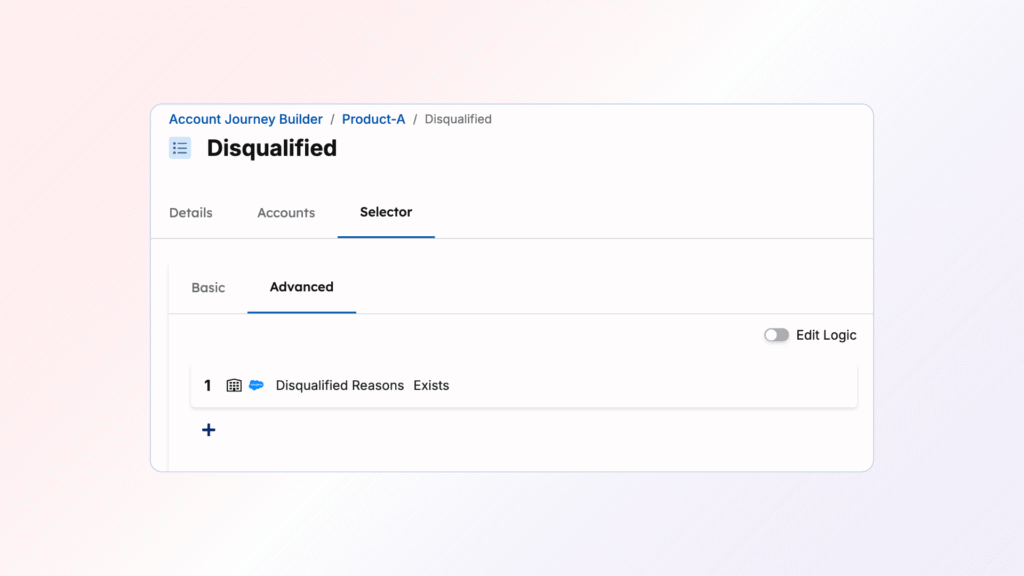
- Create a Disqualified Stage (if not yet available).
- Ensure it does not appear in analytics dashboards (e.g., do not track velocity/conversion).
- Criteria:
- Identify accounts via the CRM field “Disqualified Reason” with the logic of exists
- Place this stage at the very bottom of your Account Journey
- Regularly review accounts in this stage (1-2 times annually) to align with evolving GTM strategies.
- Create a Disqualified Stage (if not yet available).
- Disqualified Reason (picklist)
- Meet with Sales to confirm all potential Disqualification reasons, such as:
- Disqualified accounts must be archived systematically:
Part 3: Automate Data Removal
As Accounts move into your Nurture Stage, eventually they will need to leave to move to their new Account Journey Stage. Once their time in the Nurture stage ends, we will want to remove all the data in the MQA Nurture Reason and MQA Nurture Date fields. This will allow reports and analysis of that stage to stay accurate. There are two ways we recommend to implement this data hygiene practice
- Utilize a Demandbase Orchestration, if you have a bi-directional sync to your CRM with DemandbaseOne
- Build a CRM workflow
Using a Demandbase Orchestration
- First build a new Account Automation
- In the selectors find Accounts based on the following criteria
- Accounts in a Journey Stage that is not Nurture
- Accounts with a value in both our custom fields; MQA Nurture Date & MQA Nurture Reason
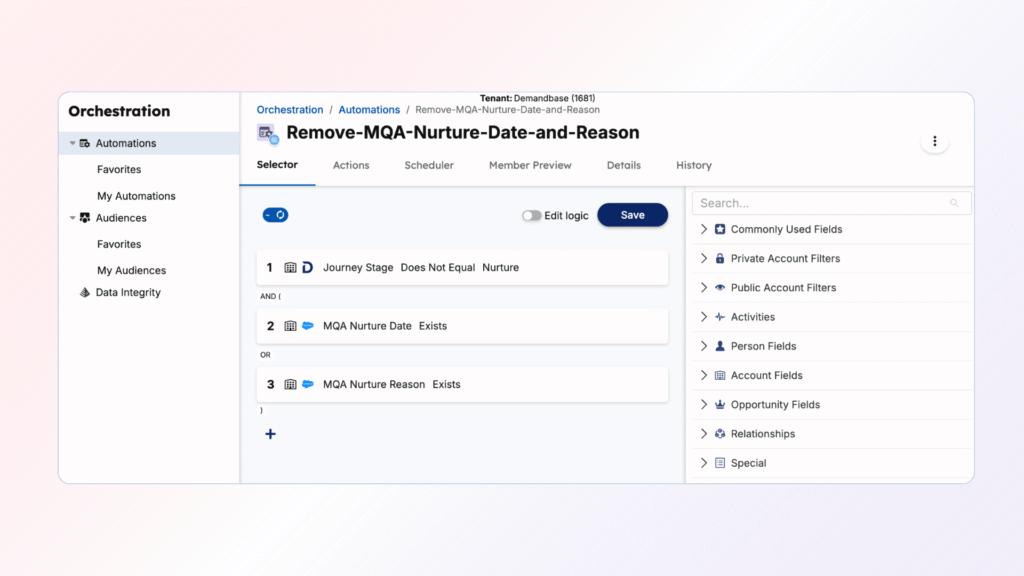
- In the action step select Change CRM Account Data and select one of the custom fields. Set the value to blank
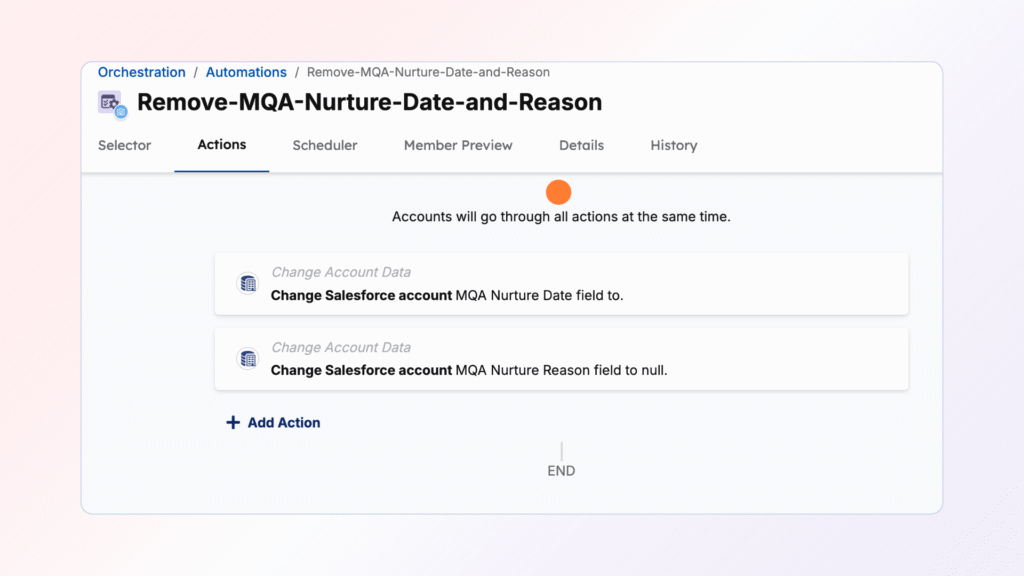
- Repeat this action step for the second custom account field
- Schedule this automation to run daily to ensure you have clean data
Using a CRM Workflow
- Create an automated process to clear the data in the custom fields
- Find Accounts with MQA Nurture Date greater than 3 months ago
- Remove the values in both the MQA Nurture Date and MQA Nurture Reason fields
The results
By implementing this MQA Dispositioning process, you will:
- Streamline feedback loops:
- Marketing gains timely insights into handoffs, optimizing strategies in real time.
- Optimize go-to-market criteria:
- Adjust targeting and thresholds based on actual Sales feedback.
- Improve conversion rates:
- By now having feedback from Sales you can start working on optimizing your conversion rates
- Enhance team collaboration:
- Unified workflows foster trust and alignment across teams, improving overall execution.
With this playbook, MQA Dispositioning becomes a repeatable, optimized process directly contributing to your GTM success.
Partner with Demandbase Experts
Get tailored strategies and insights to optimize your approach, drive engagement, and unlock new opportunities.
More Playbooks
Learn how to track sales touches by persona in Demandbase. Optimize sales outreach by targeting the right personas at the right time.
How to create custom engagement point counts
Learn step-by-step how to create custom engagement point counts using DemandbaseOne Marketing. Discover how to track product interest, streamline sales efforts, and enhance GTM strategies with actionable insights.
Complete playbook for setting up and optimizing Engagement Points in Demandbase marketing programs. Learn scoring methodologies, channel-specific assignments, and best practices for webinars, content, events, and forms.


We have updated our Privacy Notice. Please click here for details.