
How to sync Demandbase audiences to LinkedIn

Sr. Principle GTM Expert
-
Journey Stage
All Stages
-
Team
Marketing
-
Expertise Level
Beginner, Intermediate, Expert
Contents
Partner with Demandbase Experts
Get tailored strategies and insights to optimize your approach, drive engagement, and unlock new opportunities.
What you’ll learn
In this playbook, you’ll learn how to build audiences in Demandbase and sync them to LinkedIn Campaign Manager so you can run highly targeted advertising campaigns.
By the end of this playbook, you will know how to:
- Build account and person audiences in Demandbase
- Use account engagement signals to build optimized LinkedIn campaign audiences
- Sync those audiences into LinkedIn Campaign Manager
- Use synced audiences in LinkedIn campaigns
- Structure LinkedIn campaigns for lead generation and sales acceleration
Measure the impact of Demandbase targeting on LinkedIn performance
Why this is important
LinkedIn advertising becomes significantly more powerful when it is driven by account engagement and intent data from Demandbase.
Instead of targeting broad audiences, you can:
- Target accounts that are already researching your solution
- Target highly engaged accounts
- Exclude existing contacts when your goal is net-new leads
- Prioritize accounts with real buying intent
This allows marketing teams to:
- Improve campaign performance
- Reduce wasted ad spend
- Increase lead generation efficiency
- Accelerate pipeline from engaged accounts
When Demandbase audiences are synced into LinkedIn, your advertising becomes account-driven instead of demographic-driven.
What you need to get started
Before beginning this playbook, confirm you have the following:
- Demandbase platform access
- LinkedIn Campaign Manager access and account credentials
- Account and person data available in Demandbase
- Defined ICP lists or target account lists
- Web activity tracking enabled
You will also need the ability to:
- Create both account and person lists
- Sync Demandbase audiences to 3rd party destinations using Audiences (via Advertising or Orchestration)
Have your LinkedIn login credentials ready, as they are required when connecting the integration.
Who this playbook is for
This playbook is designed for:
- Marketing operations teams
- Demand generation teams
- Digital advertising teams
- Revenue operations teams
- ABM program managers
It is especially valuable for teams running:
- LinkedIn lead generation campaigns
- ABM advertising programs
- Sales acceleration campaigns
Part 1: Build an account list in the Demandbase database
The first step is building the account list that will serve as the highly optimized audience you will sync to LinkedIn.
This ensures that the LinkedIn campaign targets accounts showing real buying signals.
Be sure and set:
- List Type = Dynamic
- Visibility = Public
Dynamic lists ensure the audience updates automatically as engagement signals change.
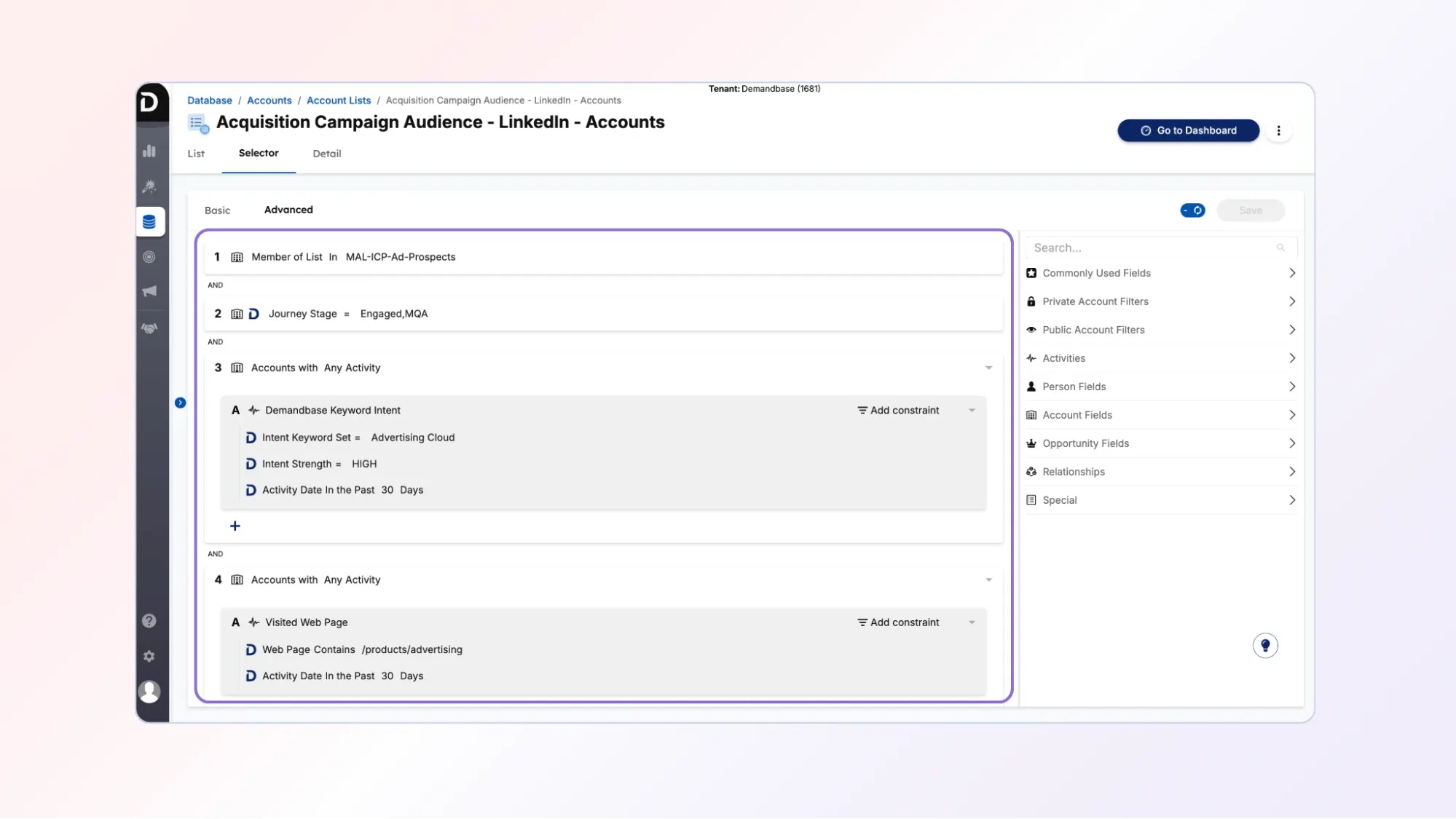
Step 1: Use the member of list selector to define the ICP
Start by using the Member of List selector to segment accounts by a list already created in your database.
This list should represent the solution-specific ICP for the campaign.
For example:
- solution-specific ICP
- target account segment
- named account list
This ensures the LinkedIn campaign targets only the accounts most relevant to your solution.
Step 2: Filter accounts by journey stage
Next, use the Journey Stage selector.
Segment accounts that are in either:
- Engaged
- MQA
Default definitions include:
Engaged
Accounts with an engagement score of 10 or more in the last 3 months
MQA
Accounts with:
- Pipeline Predict score of 85%+, or
- Marketing engagement score of 100+ in the last 3 months
This ensures campaigns focus on accounts already engaged/highly engaged with your website.
Step 3: Filter accounts by solution-specific intent
Next, add a selector for Accounts with Any Activity.
Use this selector to identify accounts showing high intent signals for the specific solution being promoted.
Example signals include:
- keyword intent
- engagement with solution content
- relevant research activity
These signals indicate that accounts are both researching a solution off your website and engaging with solution-specific content on your website.
Step 4: Filter by high-value website engagement
Finally, refine the audience using the Accounts with Any Activity selector again.
This time, segment by high-value web activity, such as visits to:
- product pages
- demo request pages
- contact us pages
- solution landing pages
Example filter:
- Web page contains product pages
- Activity occurred in the past 30 days
This ensures the audience contains accounts demonstrating strong purchase interest.
Part 2: Build the person list in the Demandbase database
Once the account list is built, the next step is creating the person list that will be synced to LinkedIn.
Be sure and set:
- List Type = Dynamic
- Visibility = Public
Dynamic lists ensure the audience updates automatically as engagement signals change
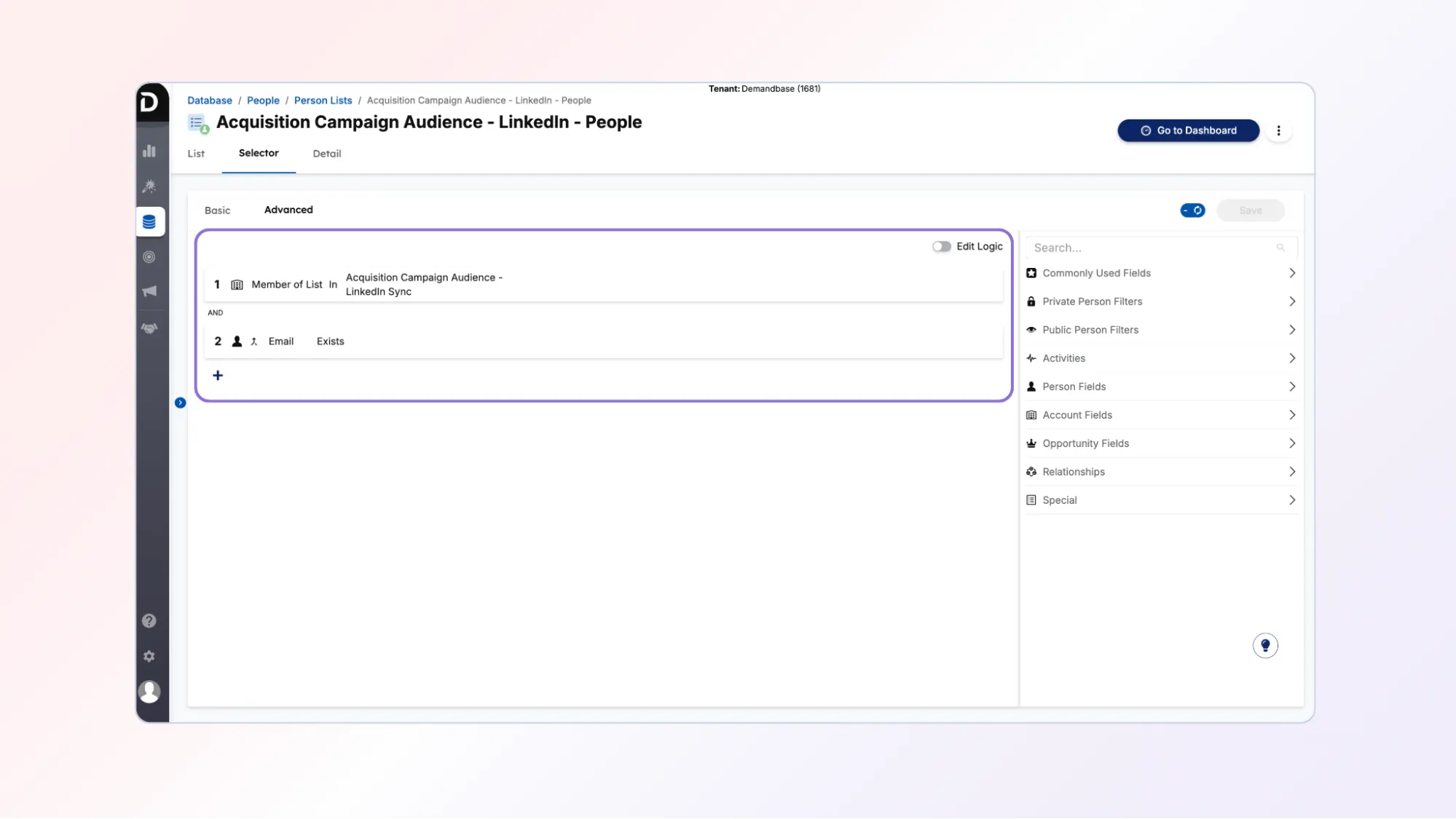
Step 1: Create a person list in the database
Navigate to:
Database → People → Person Lists
Use the Member of List selector to identify contacts that belong to the selected accounts in the account list you just built.
Include the selector:
Email exists
This ensures that only known contacts are included on the person list.
Part 3: Create and sync the account audience to LinkedIn
After building your account and person lists in the Demandbase database, you will create an audience sync in Demandbase.
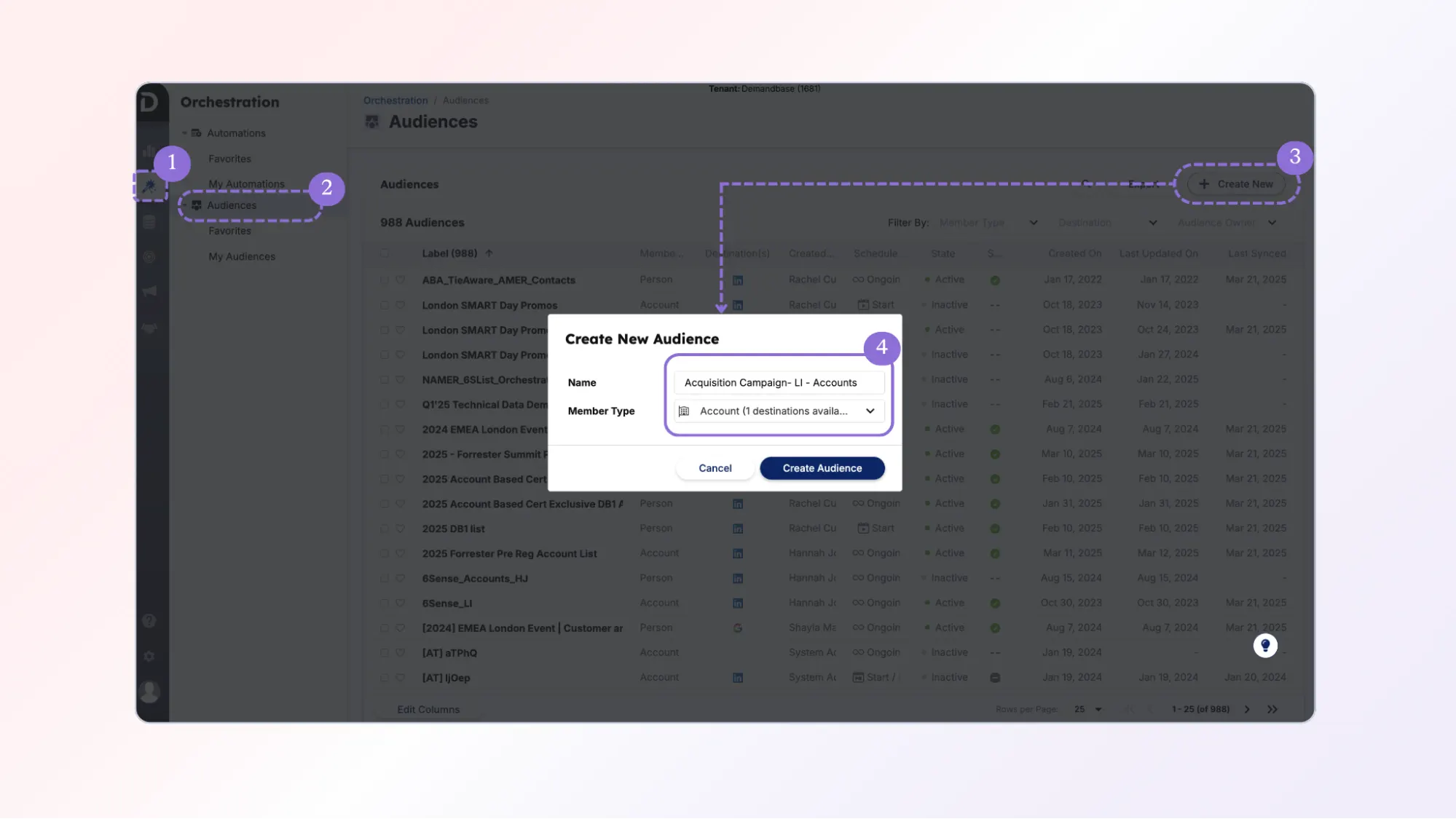
Step 1: Navigate to the Audiences section
Go to:
Orchestration → Audiences
Step 2: Create a new account audience
Click:
Create New Audience
Select:
Member Type = Account
Step 3: Select the account list
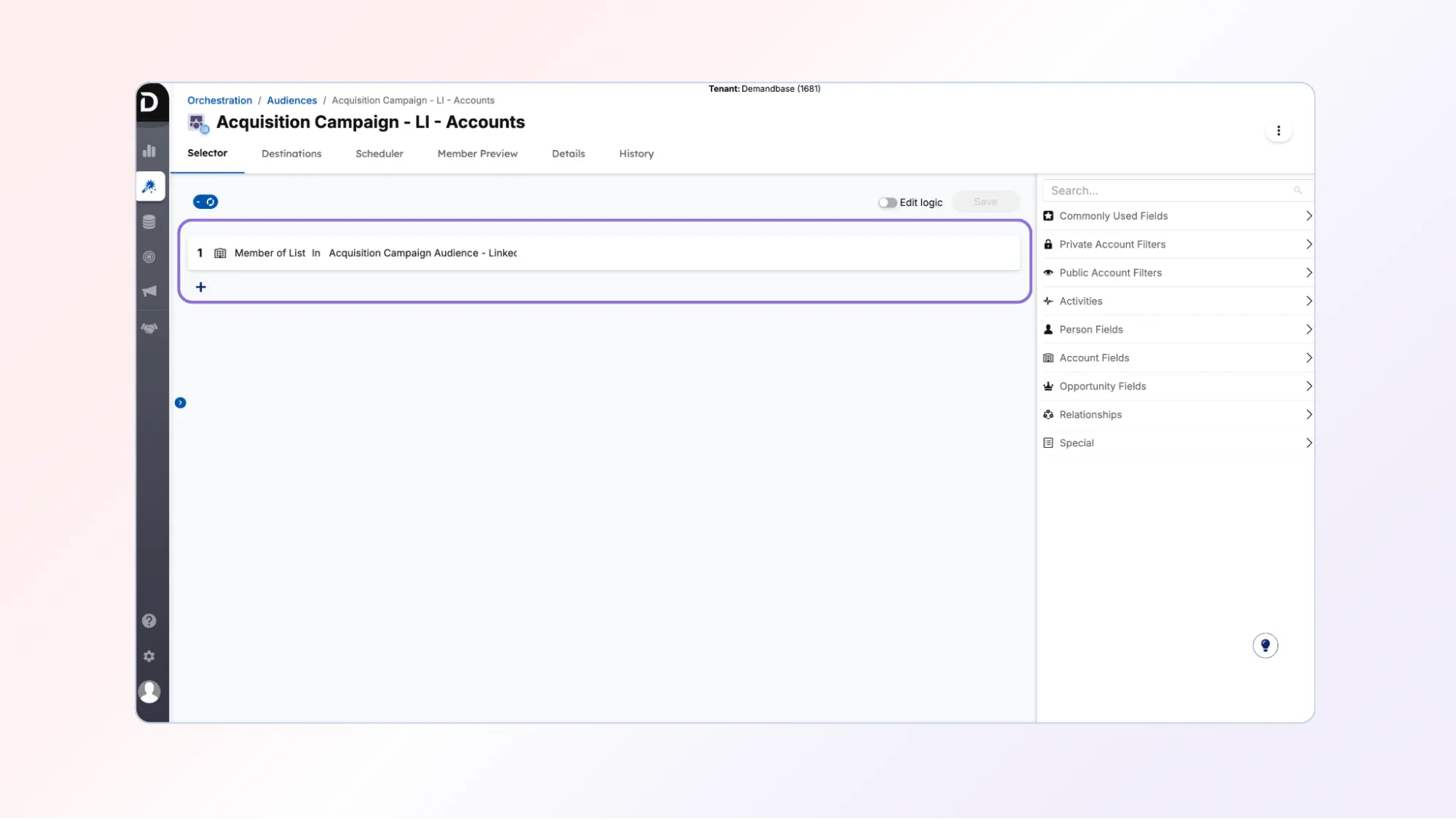
Use the Member of List selector.
Choose the account list created earlier.
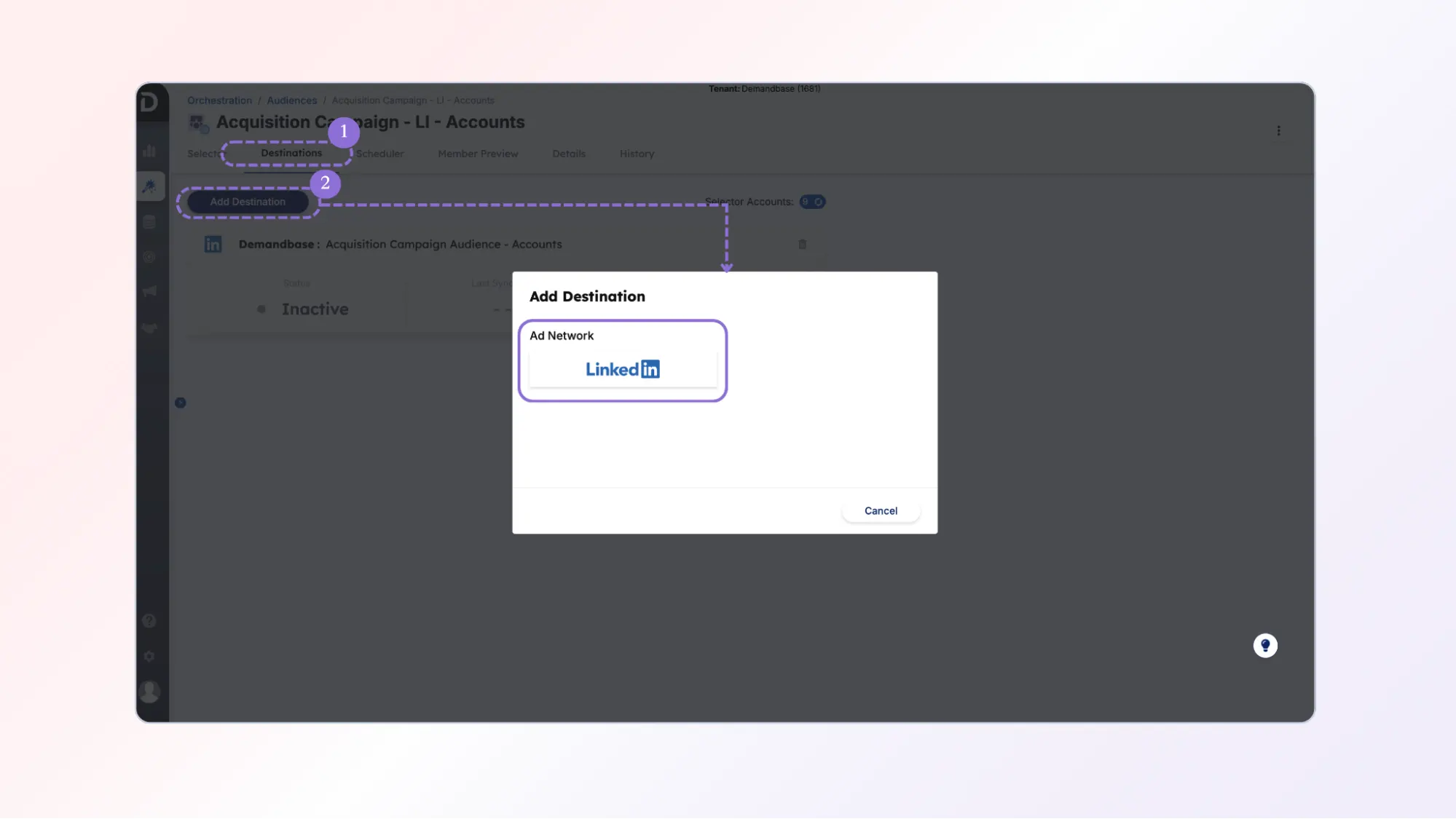
Step 4: Add LinkedIn as the destination
Add a destination for the audience.
Select:
This allows the audience to sync directly to LinkedIn Campaign Manager.
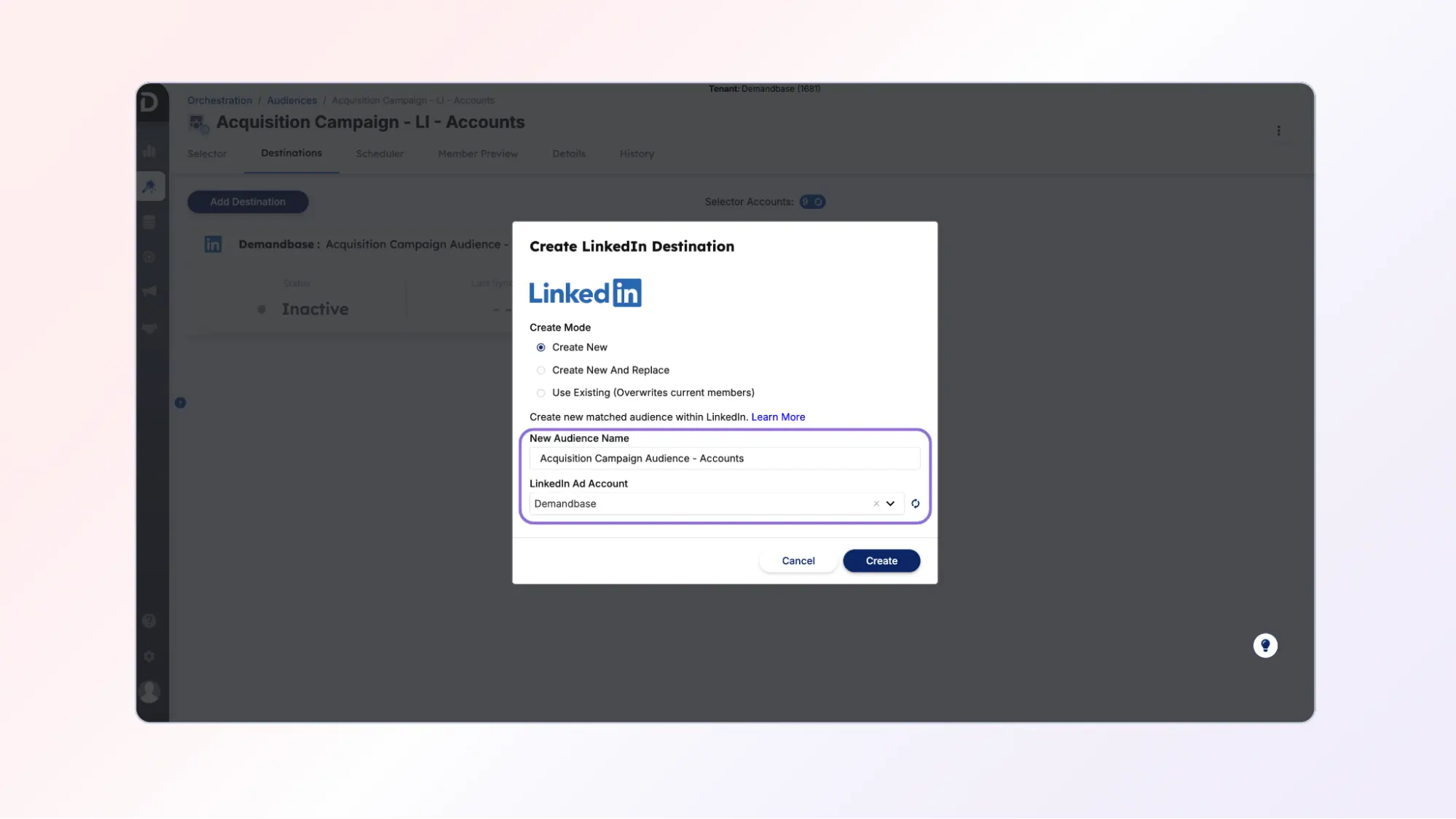
Step 5: Choose the LinkedIn audience name and ad account
Provide:
- Audience name
- LinkedIn ad account
This creates a matched audience in LinkedIn.
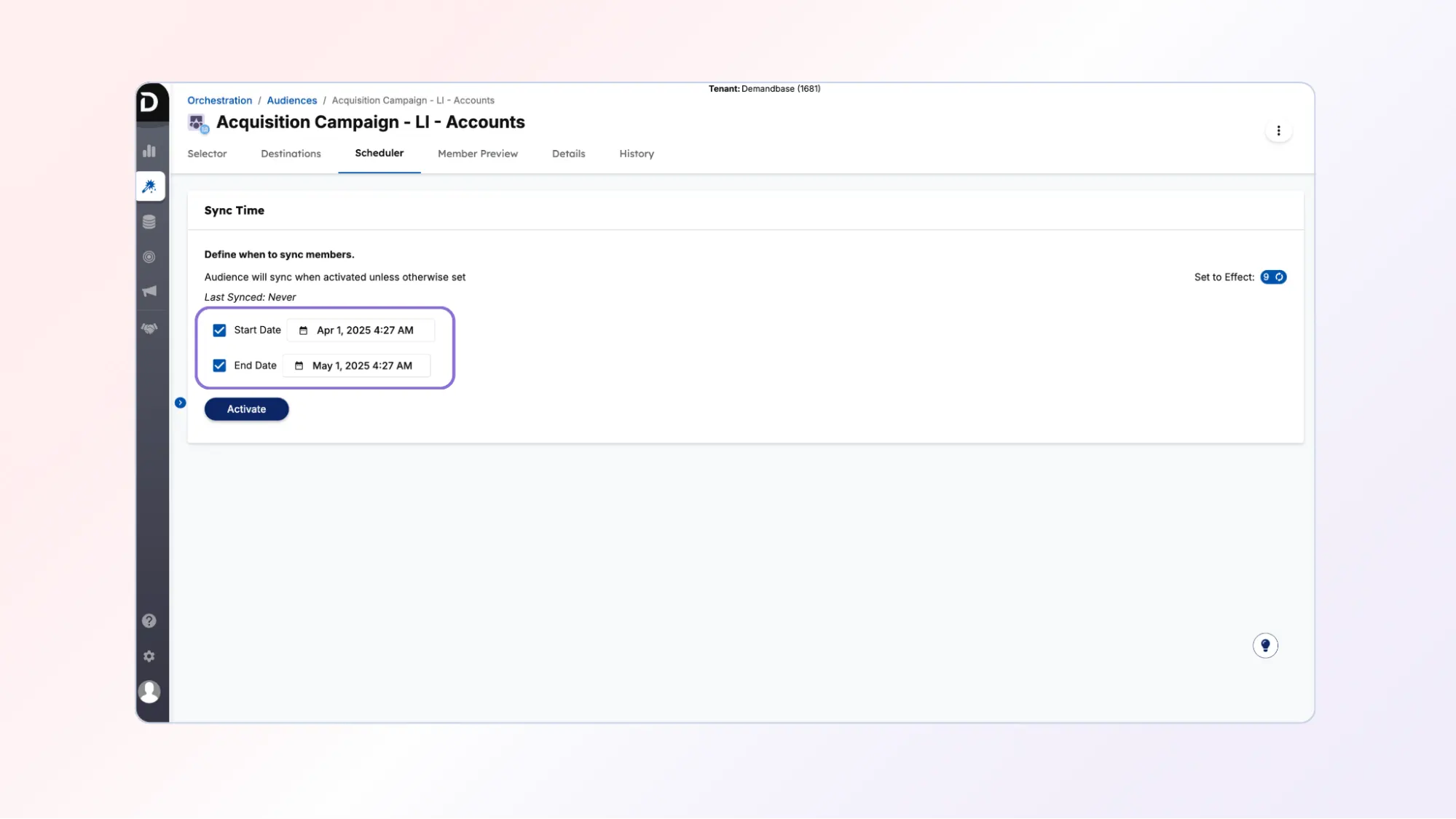
Step 6: Schedule the audience sync
Navigate to the Scheduler tab.
Set:
- Start date
- End date (optional)
The first sync may take a few days, but future syncs occur nightly.
Part 4: Create and sync the person audience to LinkedIn
Next, repeat the process for contacts.
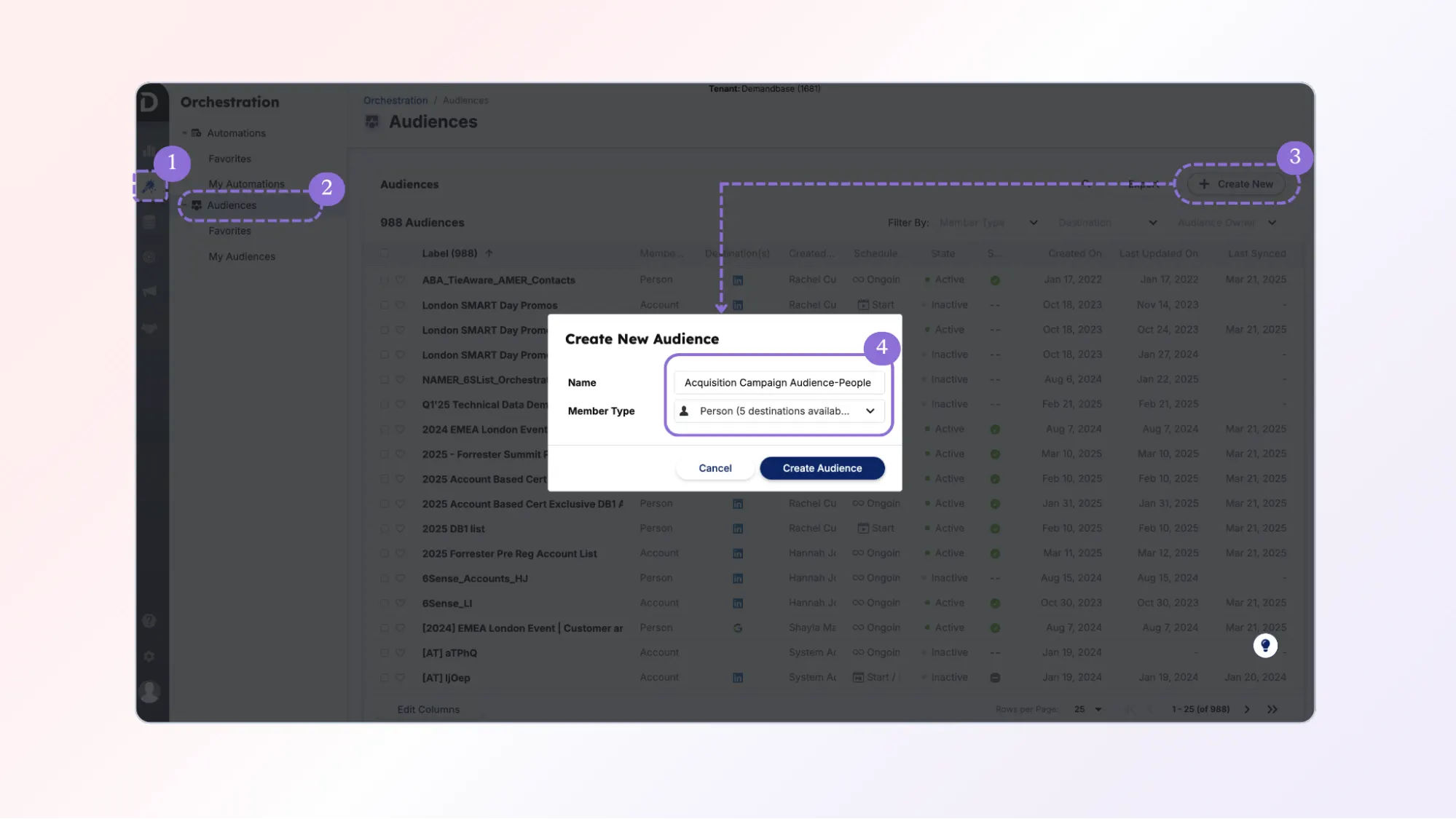
Step 1: Navigate to Audiences
Go to:
Orchestration → Audiences
Step 2: Create a new person audience
Click:
Create New Audience
Select:
Member Type = Person
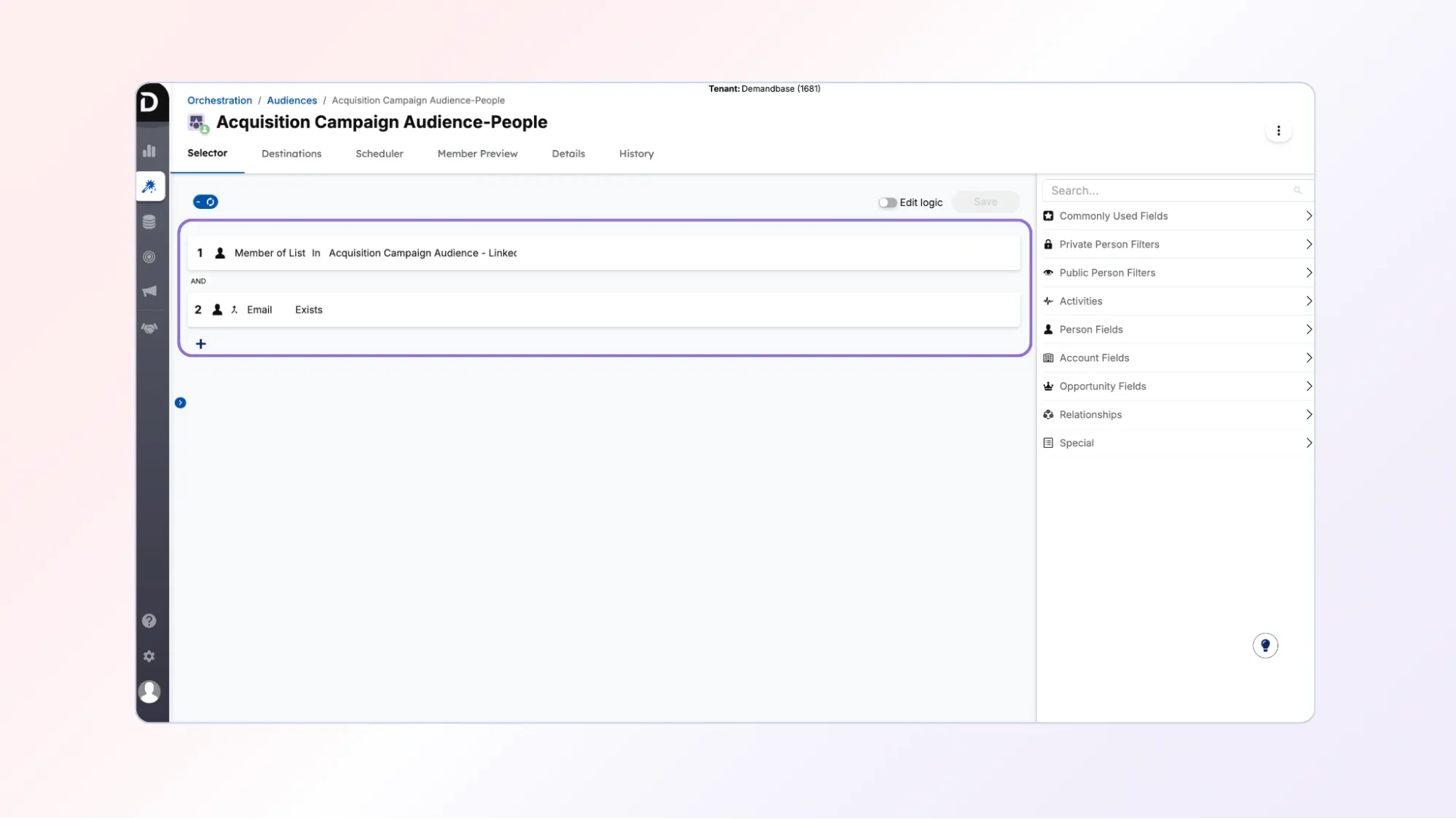
Step 3: Select the person list
Use the Member of List selector to select the person list built earlier.
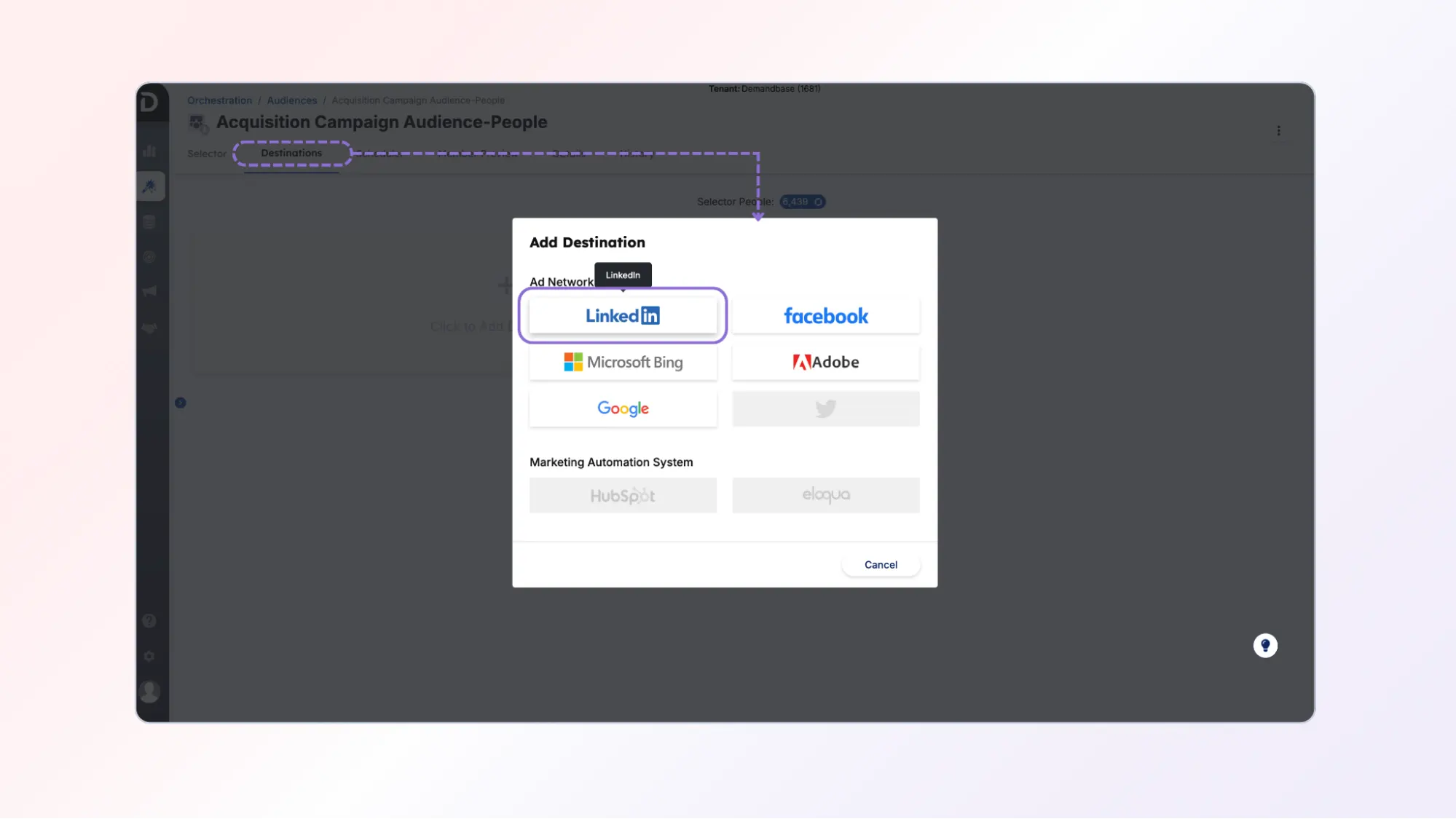
Step 4: Add LinkedIn as the destination
Add LinkedIn as the destination.
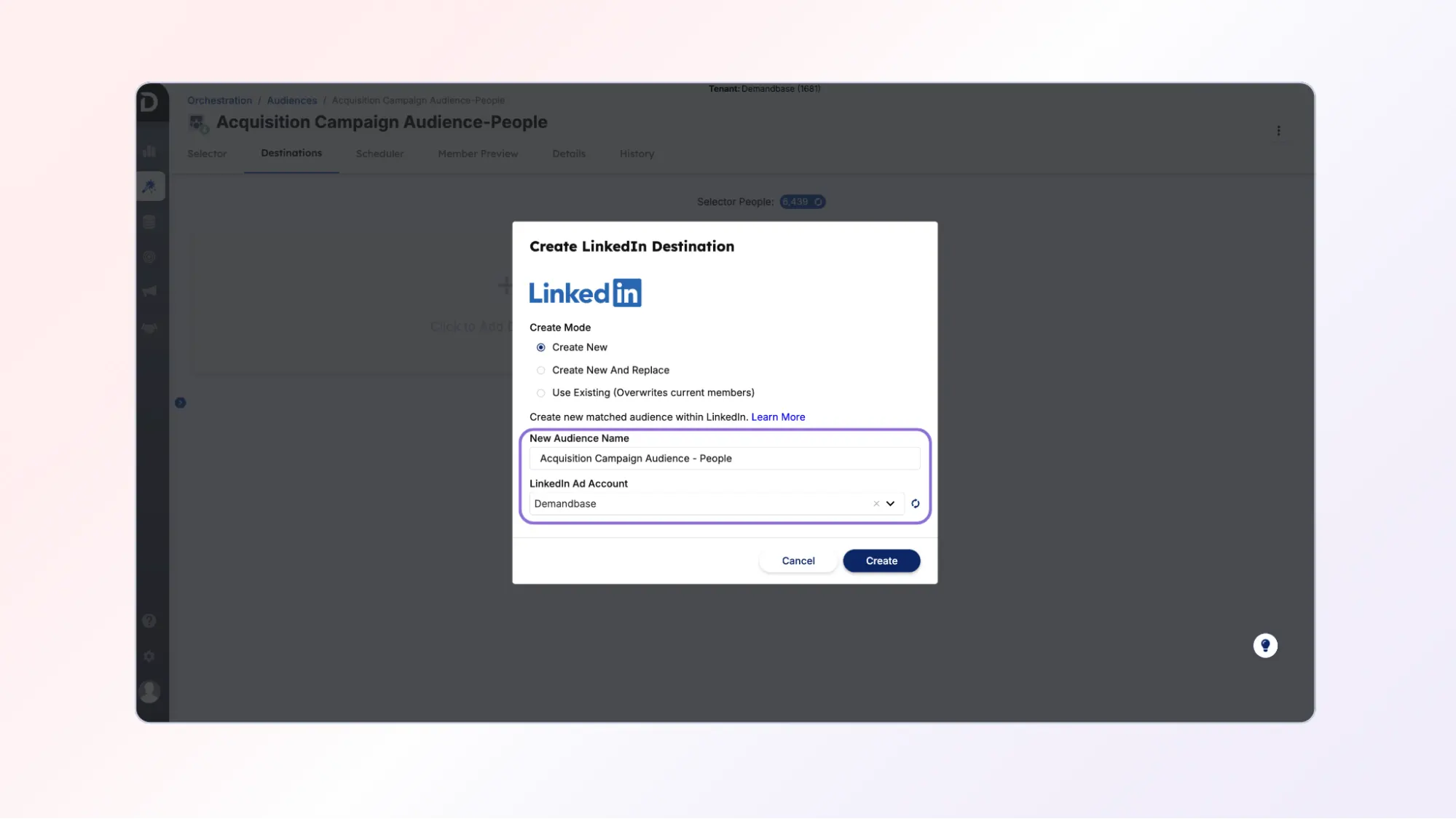
Step 5: Choose the audience name and LinkedIn account
Select the LinkedIn ad account.
Name the audience appropriately.
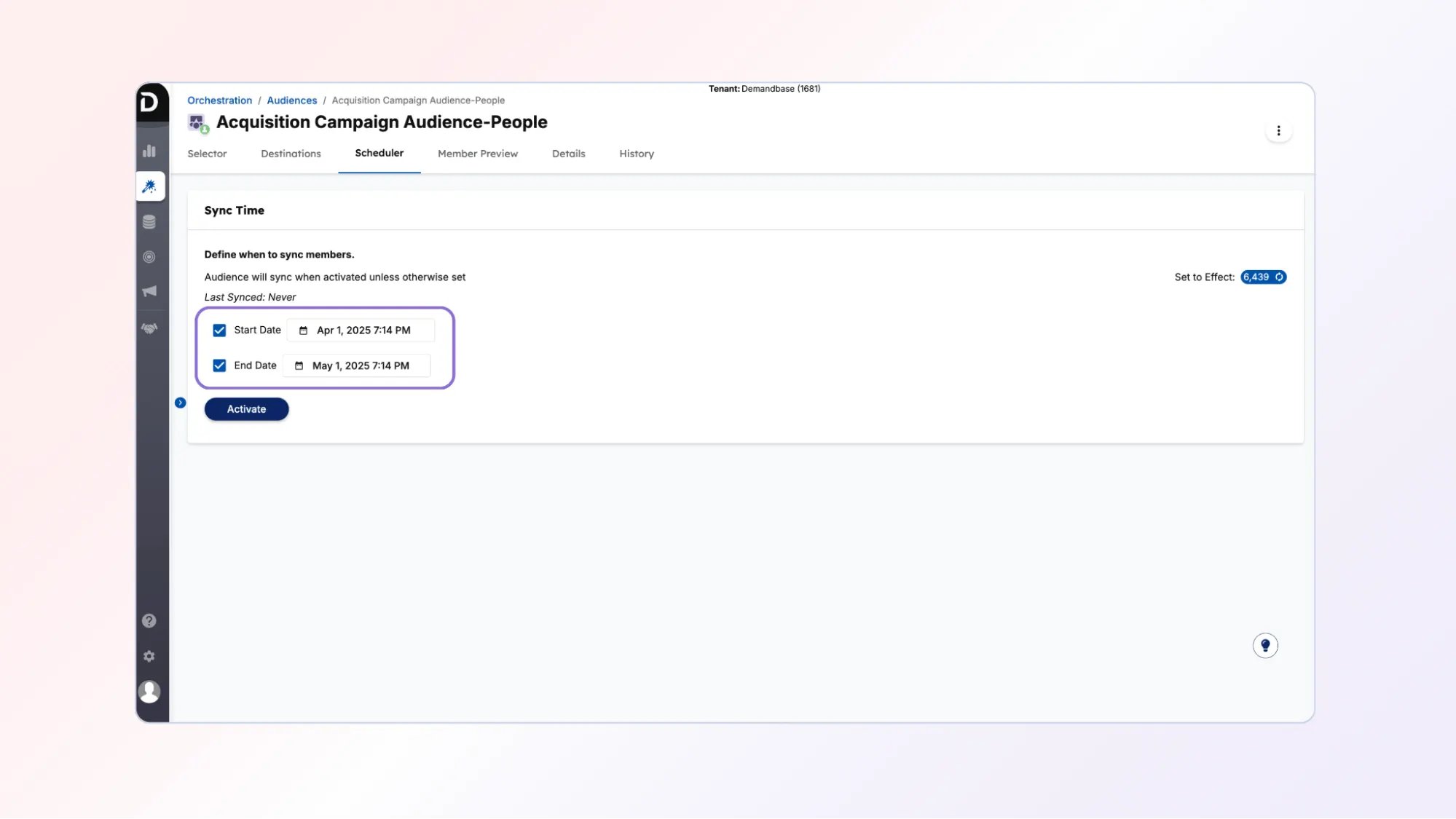
Step 6: Schedule the sync
Define the sync schedule using the Scheduler tab.
Activate the audience.
Part 5: Find synced audiences in LinkedIn Campaign Manager
After syncing the audiences, they become available in LinkedIn Campaign Manager.
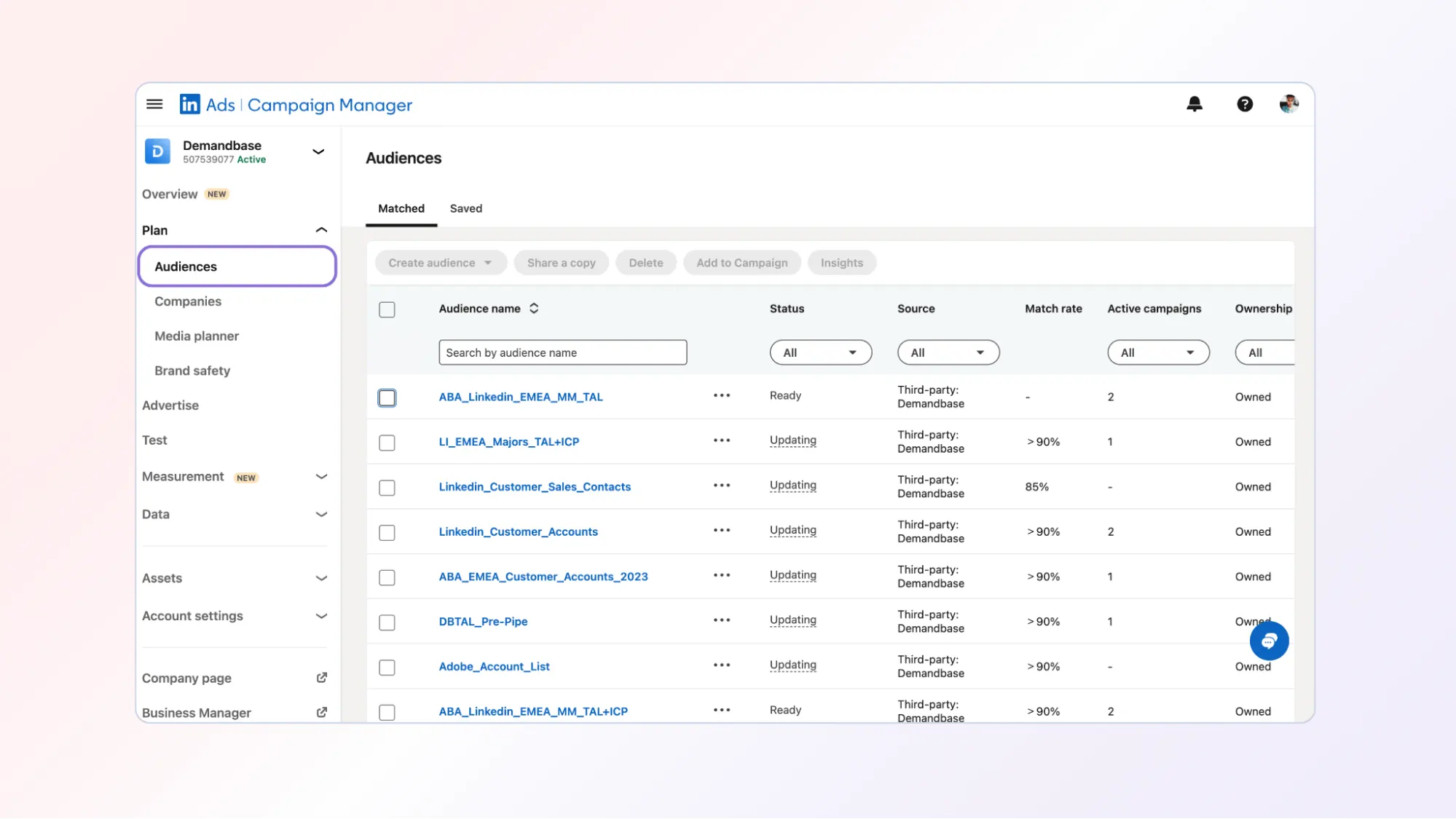
Step 1: Navigate to Audiences in Campaign Manager
In LinkedIn Campaign Manager:
Go to:
Plan → Audiences
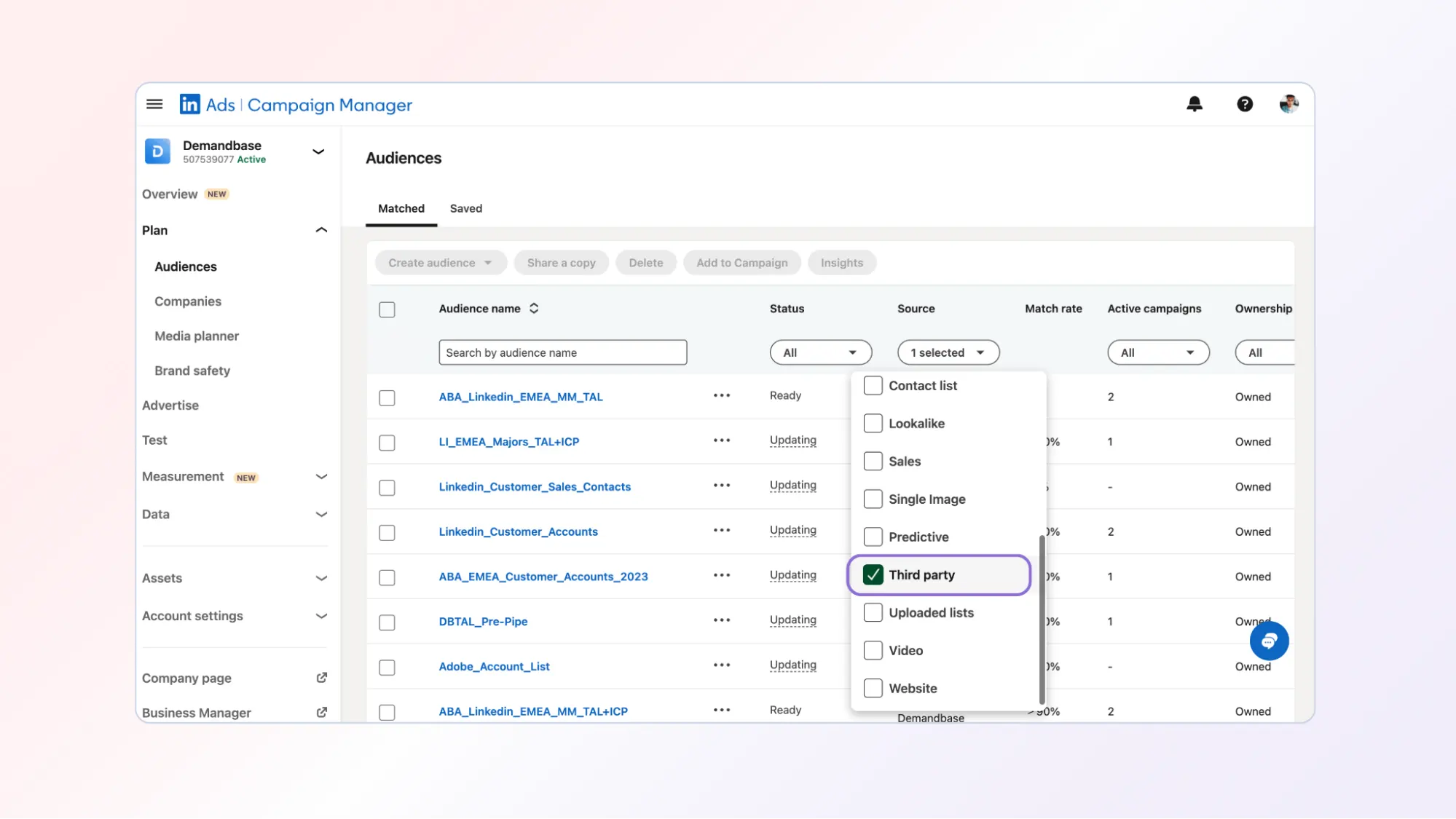
Step 2: Filter audiences by source
Use the Source filter.
Select:
Third Party
This will show audiences synced from Demandbase.
Part 6: Use synced audiences in LinkedIn campaigns
Once audiences are available, they can be used in LinkedIn campaigns.
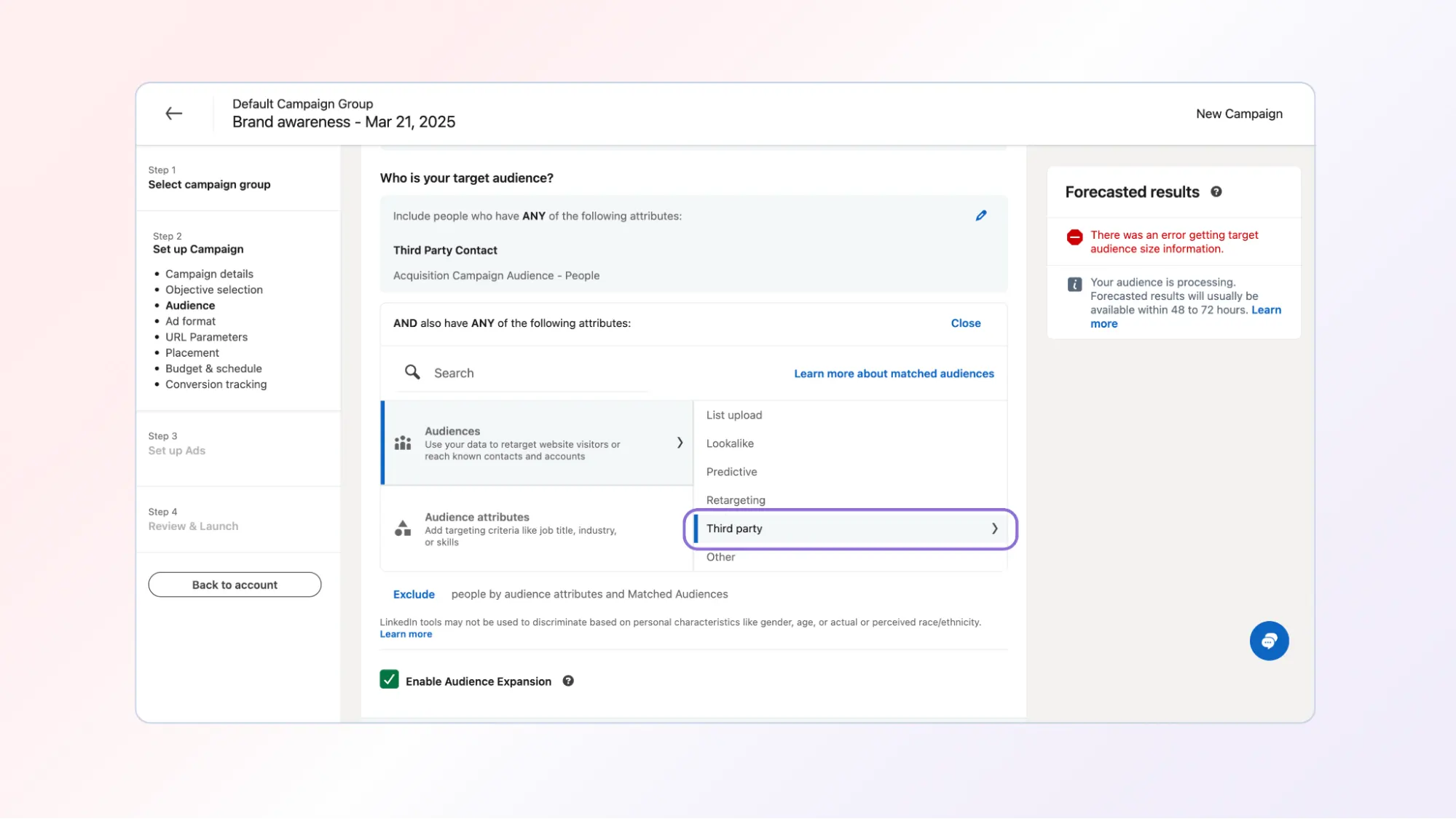
Step 1: Open the audience section of a campaign
When setting up a campaign in LinkedIn:
Go to the Audience section.
Switch to:
Third Party Audiences.
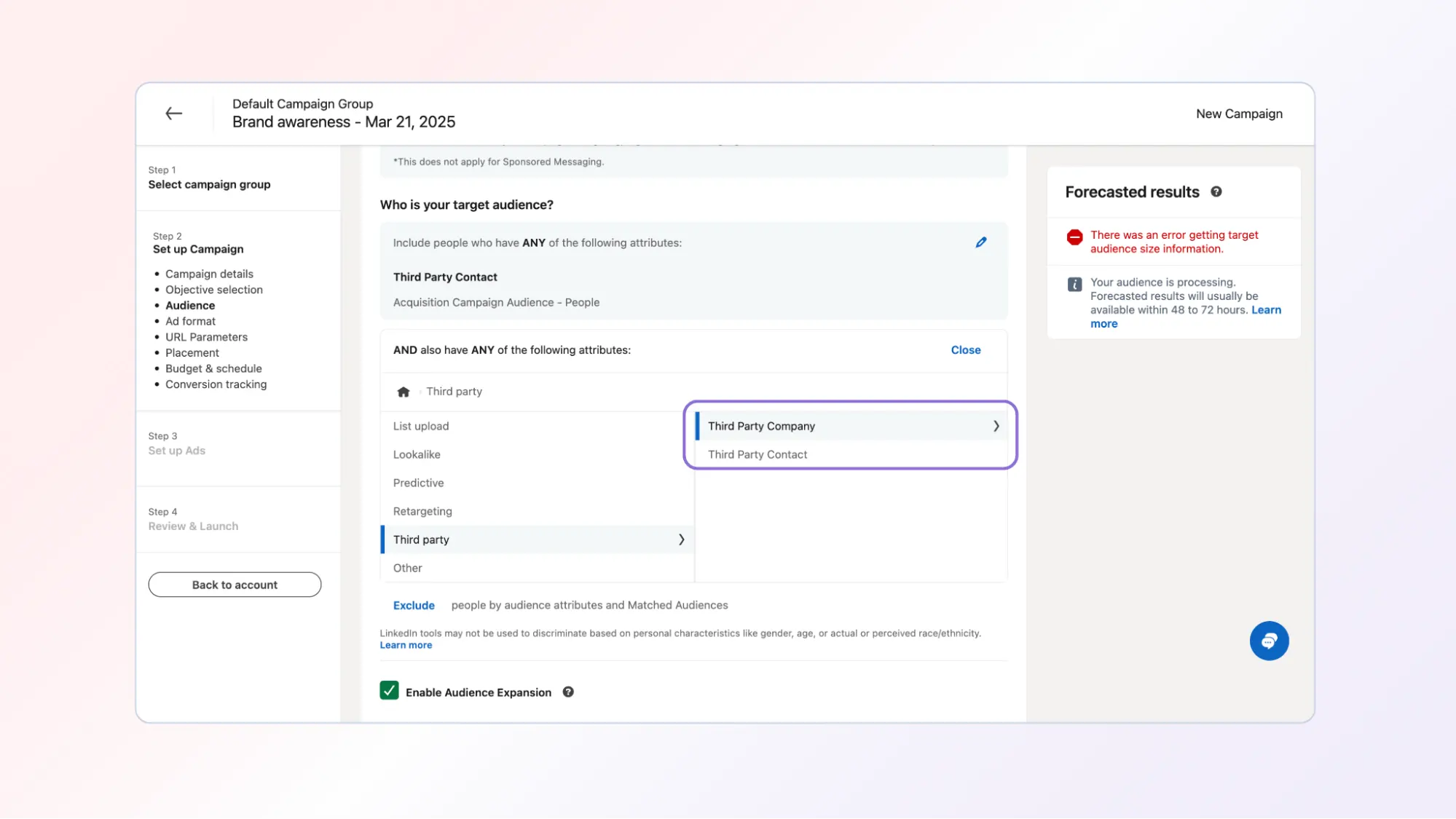
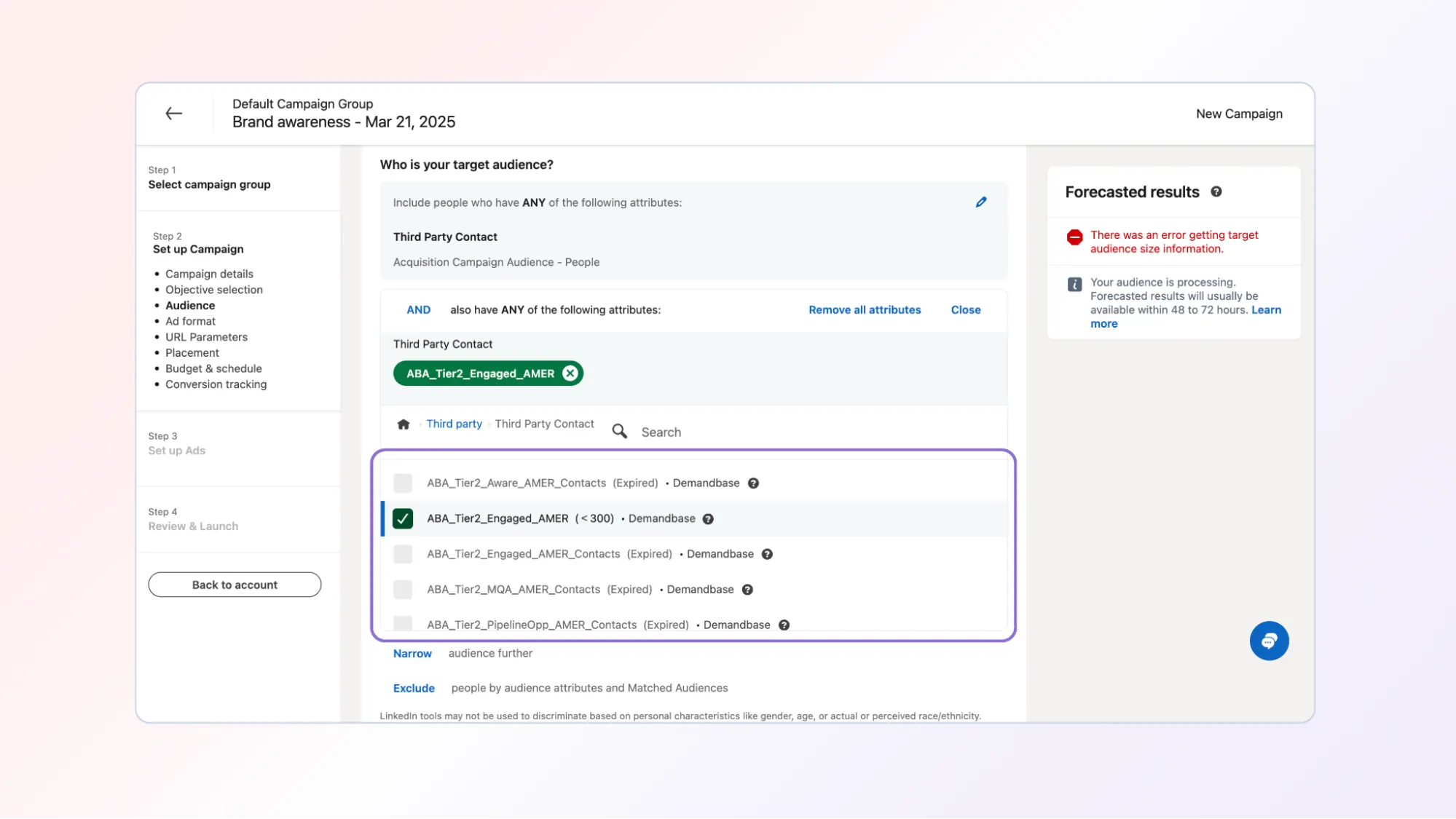
Step 2: Select the Demandbase audiences
Choose the relevant synced audiences.
Options include:
Third Party Company → account lists
Third Party Contact → person lists
You can:
- Combine multiple audiences
- Use audiences as suppression lists
- Use account and person audiences together
Part 7: Run LinkedIn acquisition campaigns for net-new leads
One major use case for synced audiences is lead generation from engaged accounts.
Step 1: Sync two audiences from Demandbase
Sync:
Account List → all target accounts
Person List → existing contacts
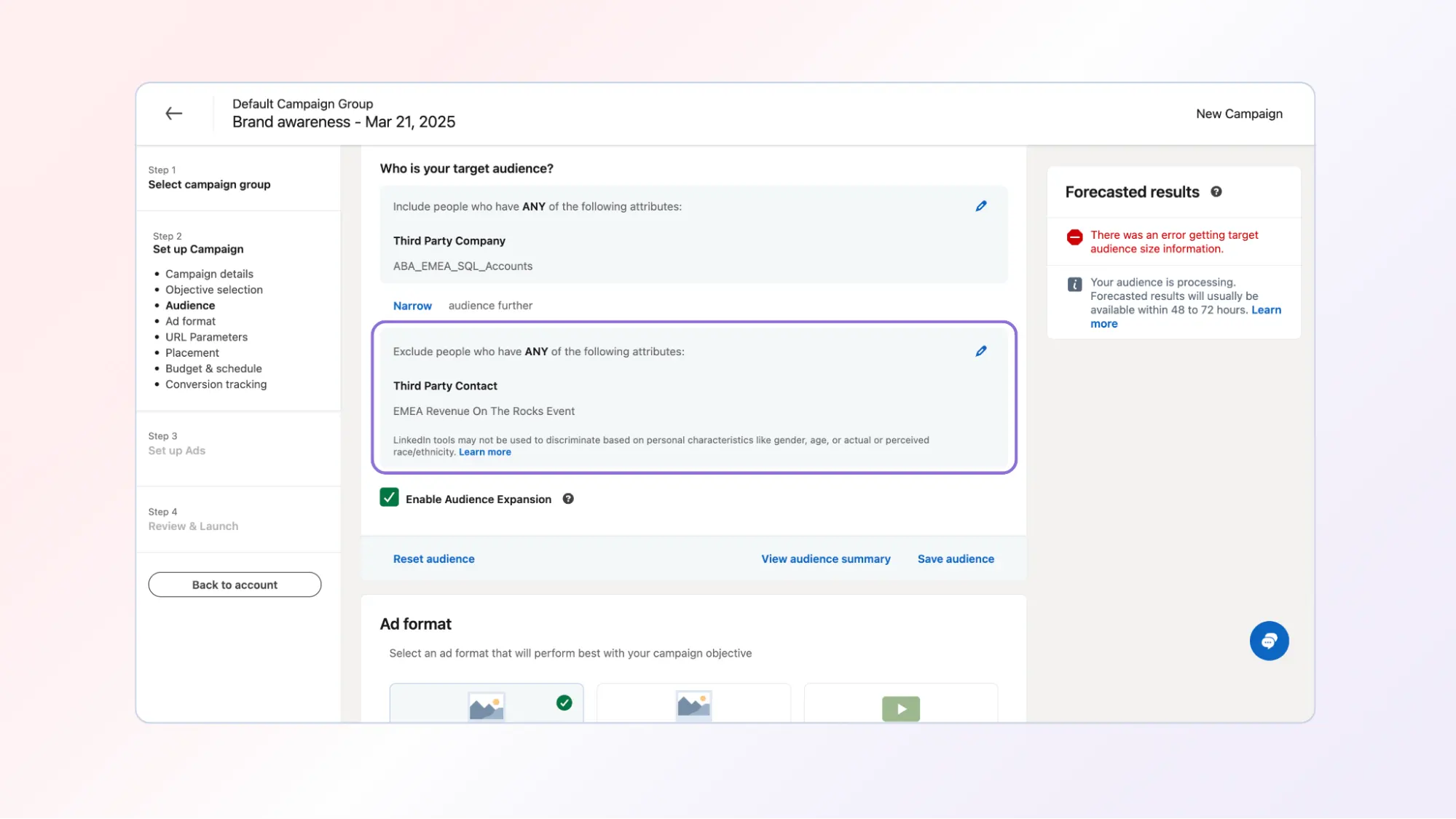
Step 2: Configure LinkedIn targeting
Inside LinkedIn Campaign Manager:
Target:
Account list
Exclude:
Person list
This ensures the campaign:
Targets the right accounts
But does not spend budget on existing contacts.
Part 8: Run LinkedIn campaigns for sales acceleration
Another use case is engaging current contacts within open opportunities.
Step 1: Sync audiences from Demandbase
Sync two lists:
Account list → accounts in an open opportunity
Person list → current contacts within those accounts
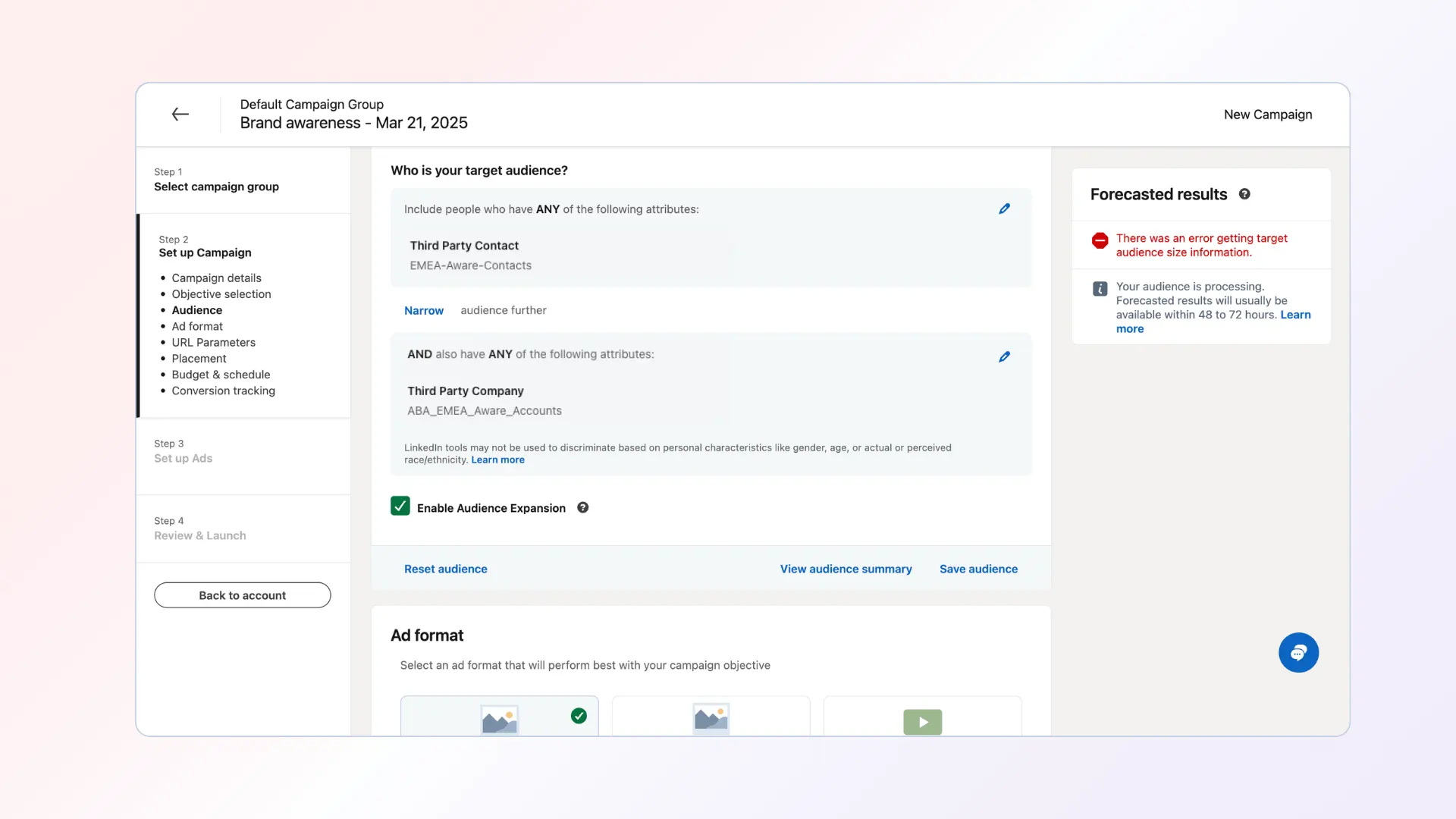
Step 2: Configure LinkedIn targeting
In LinkedIn:
Target:
Person list
AND require they belong to:
Account list
This ensures ads only reach contacts that belong to the targeted accounts, which prevents spending on contacts who have moved to other companies.
Part 9: Automate multichannel campaign flows
Demandbase and LinkedIn campaigns can also be combined into automated campaign flows.
Example flow:
- Identify accounts with solution-specific intent
- Run Demandbase display campaigns targeting those accounts
- Drive traffic to high-value pages
- Detect accounts visiting high-value pages without converting
- Add those accounts to LinkedIn lead generation campaigns
This creates a coordinated Demandbase display + LinkedIn advertising strategy.
Part 10: Measure campaign impact
Demandbase and LinkedIn allow teams to measure the impact of multichannel campaigns.
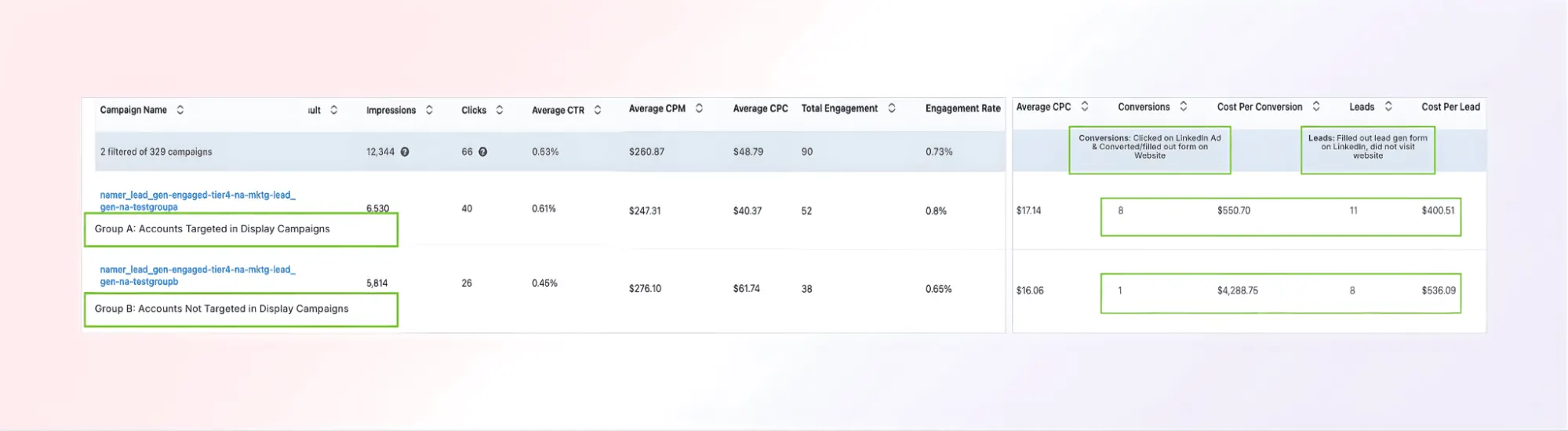
You can run an A/B test comparing:
Group A
Accounts targeted with Display + LinkedIn
Group B
Accounts targeted only with LinkedIn
Metrics to compare include:
LinkedIn metrics:
- CTR
- CPM
- CPC
- Overall engagement
- CPL
- Cost per conversion
Demandbase metrics:
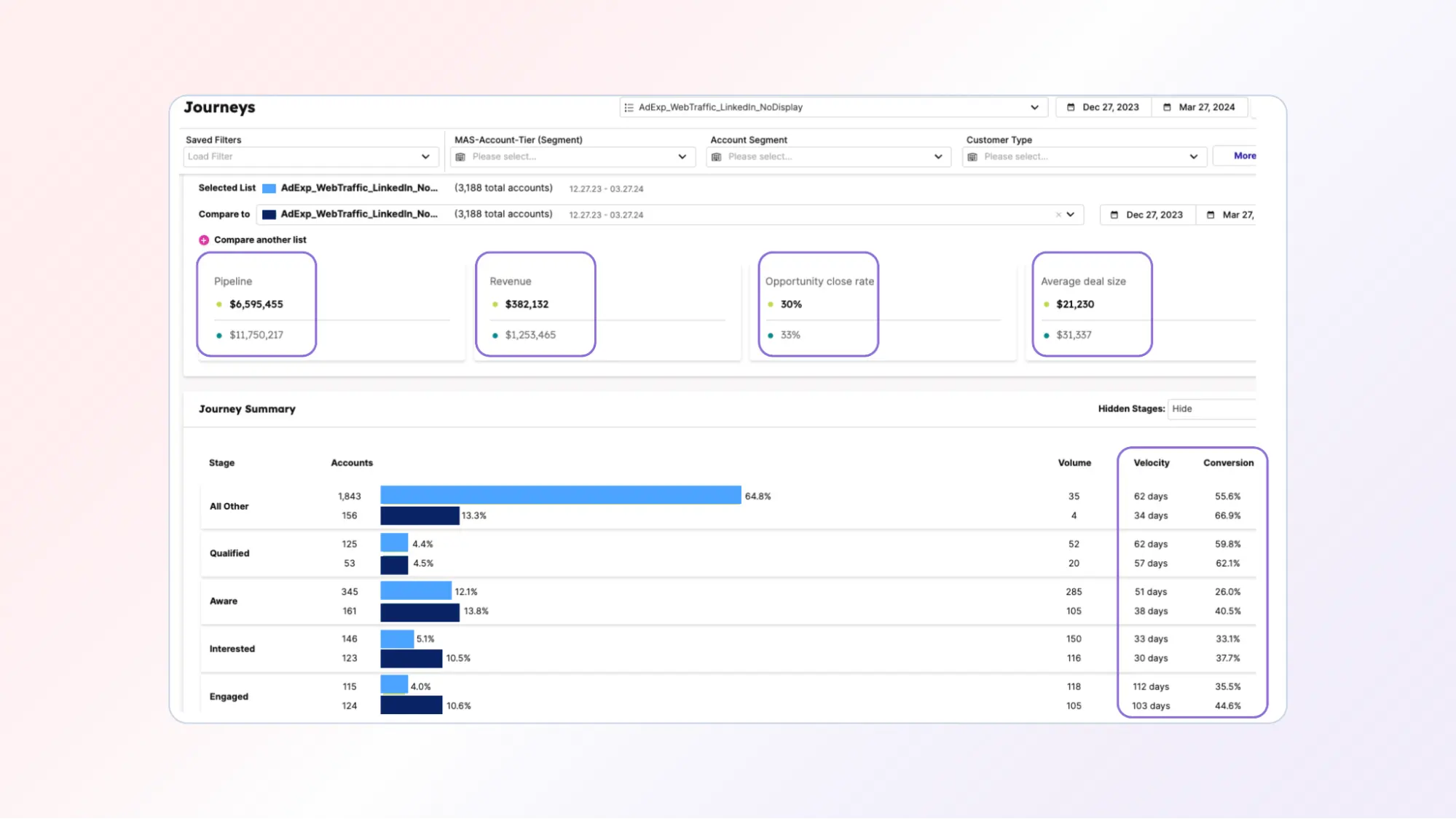
- Velocity
- Conversion
- Pipeline
- Revenue
The results
Organizations running coordinated Demandbase + LinkedIn campaigns see significant improvements in performance.
Examples include:
For accounts targeted with both Display and LinkedIn:
- 4x pipeline per account
- 7x revenue per account
LinkedIn performance improvements include:
- 54% more clicks
- 36% higher CTR
- 10% lower CPM
- 35% lower CPC
- 37% more engagement
- 23% higher engagement rate
- 8x more website form-fill conversions
- 29% lower cost per lead
- 87% lower cost per conversion
By syncing Demandbase audiences into LinkedIn, marketing teams can transform LinkedIn advertising into a data-driven ABM channel that prioritizes real buying signals and drives measurable pipeline impact.
Partner with Demandbase Experts
Get tailored strategies and insights to optimize your approach, drive engagement, and unlock new opportunities.
More Playbooks
Learn how to implement account tiering in B2B marketing with our step-by-step guide. Boost ROI, align sales & marketing teams, and optimize campaign spend.
Learn how to build, launch, and optimize B2B awareness campaigns with this step-by-step playbook from Demandbase. Drive engagement, warm up buying committees, and measure impact.
Learn how to map the right content and allocate optimal budget across different buyer journey stages with this comprehensive Demandbase playbook for B2B marketers.
We have updated our Privacy Notice. Please click here for details.