
How to set up Engagement Points for Bombora intent in Demandbase

Director of GTM Experts
-
Journey Stage
All Stages
-
Team
Marketing
-
Expertise Level
Beginner, Intermediate, Expert
Contents
Partner with Demandbase Experts
Get tailored strategies and insights to optimize your approach, drive engagement, and unlock new opportunities.
What you’ll learn
- How Bombora intent works and how it differs from other intent providers
- Why Bombora intent must be scored carefully to avoid noise
- The two recommended scoring methodologies for Bombora intent
- How to configure Bombora signals in the Engagement Point model
- How to ensure Bombora intent supports account prioritization rather than distorting engagement scoring
Why is this important?
Bombora intent can be an extremely valuable signal source, but only when it is scored intentionally.
Unlike other intent providers, Bombora identifies intent based on content consumption across a cooperative network of B2B websites. Bombora then groups multiple related keywords into topics, and only the topics you choose to track are passed into Demandbase once they reach a Bombora score of 70.
Because Bombora can generate a large volume of signals, scoring those signals too aggressively can inflate engagement and create noise for go-to-market teams.
A strong Bombora scoring framework helps you:
- Maintain accurate account engagement signals
- Prioritize topics that matter most to your business
- Provide clear and actionable insights to Sales and Marketing
What you need to get started
Before building this playbook in Demandbase, confirm you have the following:
- Bombora is connected to Demandbase and sending topics into DB1M
- Your Bombora instance already includes the topics you want to track
- Sales and Marketing are aligned on which topics are valuable to score
- You have decided whether to use:
- Generic vs Competitive scoring, or
- Topic Tier scoring
- You have access to edit your Engagement Points model
- You understand that Bombora engagement points should be kept intentionally low due to the high volume of the signals
Part 1: Understand how Bombora intent works in Demandbase
Step 1: Understand how Bombora identifies intent signals
Bombora collects intent data through a content co-operative of B2B websites.
When users across these sites consume content related to certain topics, Bombora detects increases in research behavior and assigns an intent surge score.
Bombora does not send individual keywords into Demandbase. Instead, it sends topics.
These topics are made up of multiple related keywords.
Step 2: Understand which Bombora signals reach Demandbase
Only Bombora topics that meet two criteria reach DB1M:
- The topic must be selected in Bombora
- The topic must reach a Bombora score of 70
This means Demandbase receives pre-filtered signals, but the volume can still be high.
Step 3: Understand why Bombora scoring must remain conservative
Because Bombora signals can occur frequently across many accounts, assigning large engagement point values can:
- Inflate total account engagement
- Reduce signal quality
- Create noise for Sales and Marketing
For this reason, Bombora engagement point values should remain low relative to other engagement signals.
Part 2: Define your Bombora scoring strategy
Step 1: Align internally on which topics should be scored
Before building the model, review the Bombora topics currently being tracked.
Work with:
- Sales leadership
- Marketing leadership
- Digital marketing teams
Identify which topics represent real buying interest and which topics represent broader market education.
Only score topics your teams believe are valuable enough to act on.
Step 2: Choose your scoring methodology
Demandbase recommends two scoring approaches.
Methodology 1: Generic vs competitive topics
In this model, topics are grouped into two categories:
Generic topics
These represent broad research within your solution category or problem space.
Examples include:
- Industry topics
- Category topics
- Pain point topics
Competitive topics
These represent research about competitors.
Competitive topics typically indicate stronger buying intent.
Methodology 2: Topic tiers
This model organizes Bombora topics into value-based tiers.
Common tier structures include:
- Tier 1
- Tier 2
- Tier 3
- Competitive
This allows scoring to reflect the relative importance of each topic.
Step 3: Map Bombora topics to the buying cycle
If you use the tiered model, categorize topics based on where they appear in the buyer journey.
Work with your digital marketing team to determine which topics align to:
- Early research
- Solution exploration
- Vendor comparison
- Competitive evaluation
Example structure:
| Tier | Description |
|---|---|
| Tier 1 | Strong purchase intent topics |
| Tier 2 | Meaningful research topics |
| Tier 3 | Broad educational topics |
| Competitive | Competitor research |
Part 3: Configure the Generic vs competitive scoring model
This is the simplest Bombora scoring framework.
It scores all Bombora signals but assigns different engagement point values depending on whether the topic is generic or competitive.
Step 1: Identify all Bombora topics currently being tracked
Export or list all Bombora topics configured in your Bombora platform.
This list will form the basis for your scoring model.
Step 2: Group topics into Generic and Competitive categories
Divide the topics into two groups:
Generic topics
- Category research
- Pain point research
- Industry research
Competitive topics
- Competitor brand names
- Competitor solutions
- Competitor comparisons
Step 3: Navigate to the Engagement Points model
In Demandbase:
Open your Engagement Points model.
Locate the section called:
3rd Party Intent Surge
This section is where Bombora intent signals are configured.
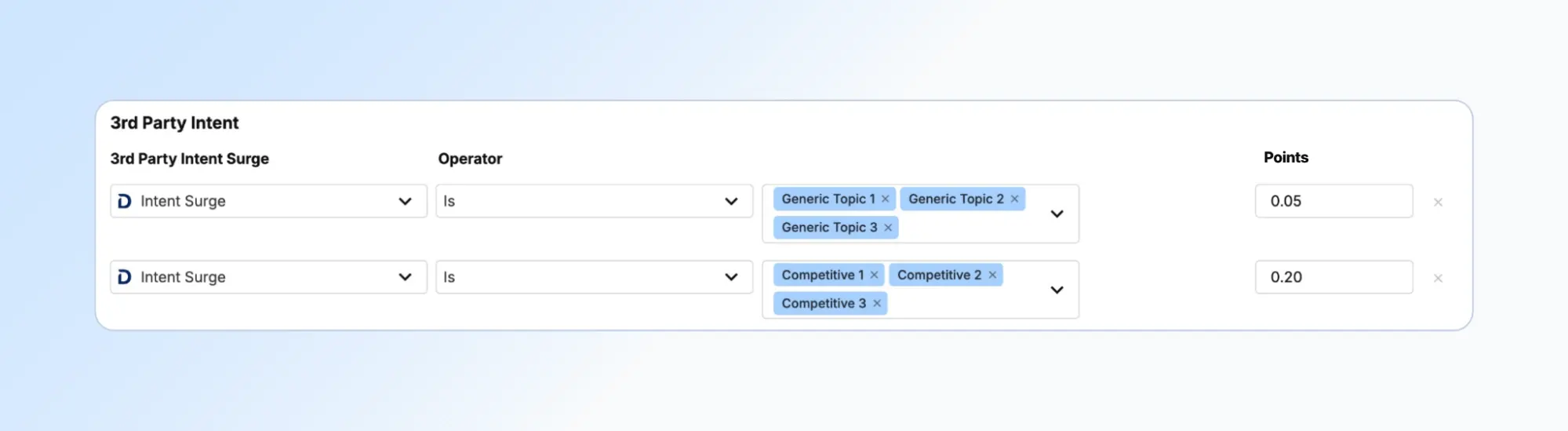
Step 4: Configure the Generic topic scoring row
Create a scoring row with the following configuration:
Category
3rd Party Intent
Activity Type
Intent Surge
Operator
Is
Values
All Generic topics
Points
0.05
Generic topics receive a lower engagement value because they represent broader interest.
Step 5: Configure the Competitive topic scoring row
Create a second scoring row with the following configuration:
Category
3rd Party Intent
Activity Type
Intent Surge
Operator
Is
Values
All Competitive topics
Points
0.20
Competitive topics receive higher engagement points because they often indicate active vendor evaluation.
Step 6: Validate the Generic vs Competitive configuration
Before saving your model, confirm:
- All Bombora topics are categorized
- Generic topics are included in the Generic row
- Competitive topics are included in the Competitive row
- Both rows use the Intent Surge activity
- Both rows use the Is operator
- Engagement points are set to 0.05 and 0.20
Part 4: Configure the topic tier scoring model
The Topic Tier model provides greater control over scoring precision.
Instead of two groups, Bombora topics are divided into tiers.
Step 1: Identify all Bombora topics currently being tracked
Start with the full list of Bombora topics from your Bombora platform.
Step 2: Assign topics to tiers
Divide topics into four groups:
Tier 1
High-value topics closely associated with buying decisions.
Tier 2
Moderately valuable topics indicating meaningful interest.
Tier 3
Lower-value topics representing early-stage research.
Competitive
Topics related to competitors.
Step 3: Navigate to the 3rd Party Intent Surge section
Open the Engagement Points model.
Go to:
3rd Party Intent Surge
You will create a separate scoring row for each tier.
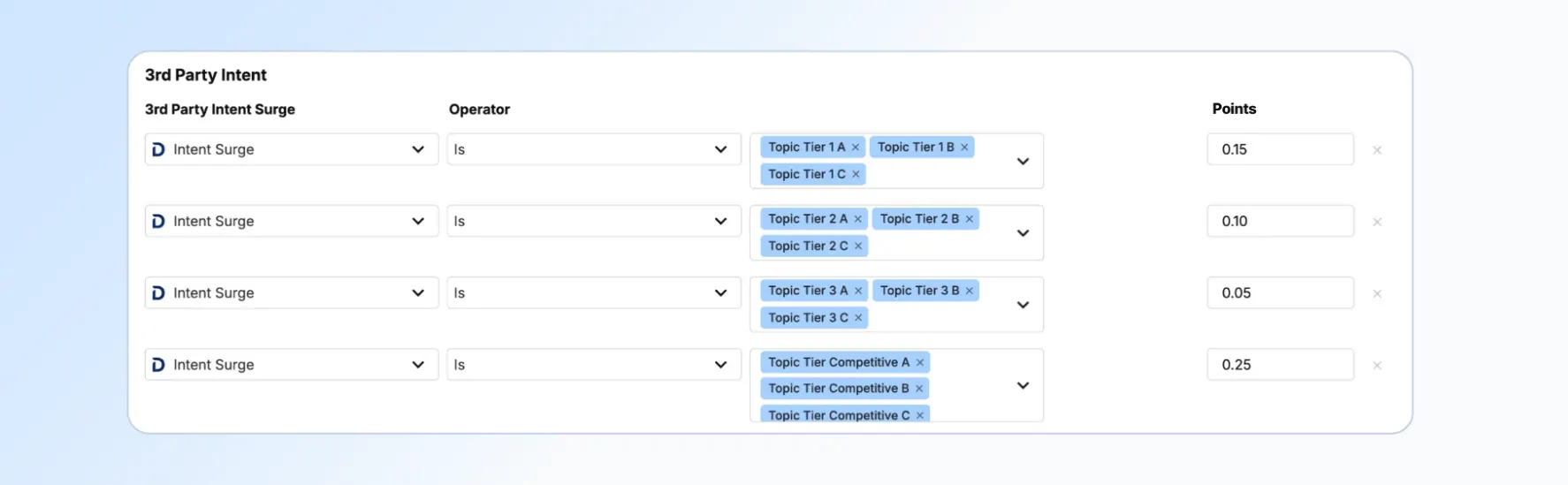
Step 4: Configure the Tier 1 scoring row
Activity Selection
Intent Surge
Operator
Is
Values
Tier 1 topics
Points
0.15
Step 5: Configure the Tier 2 scoring row
Activity Selection
Intent Surge
Operator
Is
Values
Tier 2 topics
Points
0.10
Step 6: Configure the Tier 3 scoring row
Activity Selection
Intent Surge
Operator
Is
Values
Tier 3 topics
Points
0.05
Step 7: Configure the Competitive scoring row
Activity Selection
Intent Surge
Operator
Is
Values
Competitive topics
Points
0.20
Competitive research is often the strongest buying signal, so it receives the highest engagement value in the tier model.
Step 8: Validate the topic tier configuration
Before saving your model, confirm:
- Every Bombora topic is assigned to a tier
- Each tier has its own scoring row
- All rows use Intent Surge
- All rows use the Is operator
Engagement Point values should be:
| Tier | Points |
|---|---|
| Tier 1 | 0.15 |
| Tier 2 | 0.10 |
| Tier 3 | 0.05 |
| Competitive | 0.25 |
The results
When implemented correctly, Bombora intent becomes a high-value signal within your engagement model rather than a source of noise.
This playbook helps you:
- Maintain accurate account engagement scoring
- Highlight competitive research behavior
- Prioritize high-value buying signals
- Provide clear intent insights to Sales and Marketing
- Improve account prioritization across your go-to-market teams
Whether you choose the Generic vs Competitive model or the Topic Tier model, this structure ensures Bombora intent signals support meaningful decision-making within Demandbase.
Partner with Demandbase Experts
Get tailored strategies and insights to optimize your approach, drive engagement, and unlock new opportunities.
More Playbooks
Engagement points for TrustRadius intent
Learn how to score TrustRadius intent in Demandbase using engagement points. Follow proven grouping, signal, and geo-based best practices.
Transform your B2B strategy with this comprehensive playbook on implementing account-based experiences (ABX). Learn how to align teams, optimize metrics, and drive sustainable revenue growth.
Introduction to Demandbase AI Chat
Learn how GTM teams use Demandbase AI Chat to write better prompts, prioritize accounts, analyze engagement, find buying groups, and verify AI results.
We have updated our Privacy Notice. Please click here for details.