

-
Journey Stage
All Stages
-
Team
Marketing
-
Expertise Level
Beginner, Expert, Intermediate
Contents
Partner with Demandbase Experts
Get tailored strategies and insights to optimize your approach, drive engagement, and unlock new opportunities.
What you’ll learn
- How to organize TrustRadius intent signals into three groupings and how that affects scoring
- The signal format you’ll see inside Demandbase
- Three proven ways to assign engagement points
- How and when to apply geo-based scoring
- Recommended engagement point values and step-by-step configuration examples
Why this is important
TrustRadius intent can be high-volume. Without structure, engagement scores can become inflated and noisy, making it harder for GTM teams to trust and act on the data. This playbook shows you how to score TrustRadius intent so high-value behaviors (pricing, reviews, comparisons) can be utilized by both your Marketing and Sales teams.
What you need to get started
Required
- TrustRadius integrated to Demandbase
- Access to your Demandbase Engagement Points scoring model
Recommended
- Alignment between Marketing and Sales on which TrustRadius behaviors are meaningful to each team
Part 1: Understand TrustRadius intent
Step 1: Learn the three TrustRadius intent groupings
TrustRadius assigns every intent signal to one grouping, using the following priority order:
- Licensed Product
- Competitor
- Category
Licensed Product
Signals associated with your listed product(s). This can include competitor activity when a buyer directly compares your product to a competitor.
Competitor
Signals related to competitor products you’ve assigned to your TrustRadius listing(s), excluding competitor signals already captured under Licensed Product.
Category
Broad research signals tied to your TrustRadius Primary or Secondary Categories that are not specific to your product or competitors.
Step 2: Understand the signal structure in Demandbase
All TrustRadius intent signals follow this structure:
Grouping: TrustRadius Category: Signal
Example: Licensed Product: Account-Based Marketing (ABM): Clicked on Reviews on the Demandbase product listing
Step 3: Know which signals exist in which groupings
Category-only signals
- Viewed CATEGORY products
- Viewed CATEGORY top rated
Signals available in Licensed Product and Competitor
- Clicked a paid CTA backlink for PRODUCT NAME
- Clicked on Comparisons on the PRODUCT NAME product listing
- Clicked on Overview on the PRODUCT NAME product listing
- Clicked on Pricing for the PRODUCT NAME product listing
- Clicked on Product Details on the PRODUCT NAME product listing
- Clicked on Reviews on the PRODUCT NAME product listing
- Viewed pricing information for PRODUCT NAME
- Viewed the PRODUCT NAME product listing
- Shared a product review about PRODUCT NAME
- Viewed a review for PRODUCT NAME
- Viewed the PRODUCT NAME reviews and rating
- Viewed PRODUCT NAME competitors and alternatives
- Viewed a comparison of PRODUCT NAME 1 vs PRODUCT NAME 2
Part 2: Choose how you’ll score TrustRadius intent
Step 1: Select a scoring approach
Option A: Intent Grouping scoring
Score all TrustRadius signals based only on their grouping (Licensed Product, Competitor, Category).
Best for: Simple setup and no missed signals
Option B: Intent Signal scoring
Score specific TrustRadius actions regardless of grouping.
- Basic signal scoring: Match generic signal patterns (no product context)
- Advanced signal scoring: Match signals using your product and competitor names
Option C: Intent Grouping + Signal scoring (recommended)
Score the grouping and the signal separately so both contribute to the final engagement score.
Rule of thumb: Use ~50% of your grouping-only values and ~50% of your signal-only values since they stack together.
Step 2: Decide whether to apply geo-based scoring
You can choose to filter or weight TrustRadius intent by location.
Supported geo types
- Global Region (NA, EMEA, APAC, LATAM)
- Country (e.g., United States, Canada)
- Census Division (e.g., Midwest, Northeast)
Not supported for TrustRadius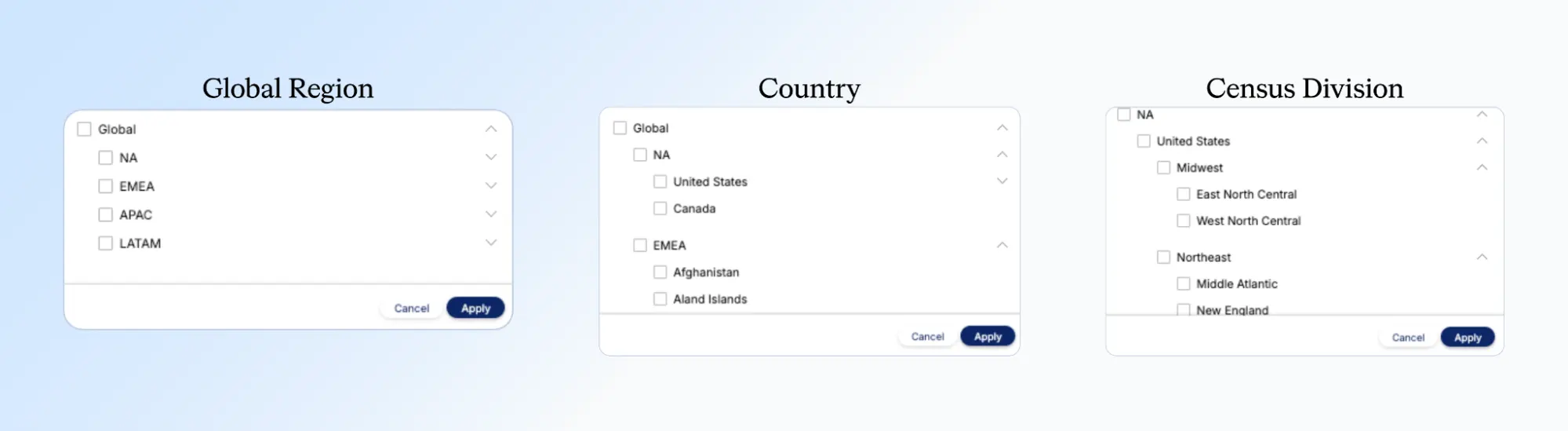
- Census Region (e.g., East North Central)
Part 3: Apply recommended engagement point values
Step 1: Intent Grouping scoring values
- Licensed Product: 0.25 engagement points
- Competitor: 0.75 engagement points
- Category: 0.05 engagement points
Step 2: Basic signal scoring values
Use conservative values because product and grouping context isn’t distinguished.
- Clicked a paid CTA backlink for PRODUCT NAME — 0.20
- Clicked a paid pricing backlink for PRODUCT NAME — 0.20
- Viewed the PRODUCT NAME product listing — 0.10
- Clicked on Comparisons — 0.10
- Clicked on Overview — 0.10
- Clicked on Pricing — 0.10
- Viewed pricing information — 0.10
- Clicked on Product Details — 0.10
- Clicked on Reviews — 0.15
- Shared a product review — 1.00
- Viewed a review — 0.50
Step 3: Advanced signal scoring values (example)
Your product (Zoogle)
- Viewed pricing information — 0.20
- Shared a product review — 1.00
- Viewed a review — 0.50
Competitor (Ding)
- Viewed pricing information — 0.25
- Shared a product review — 1.50
- Viewed a review — 0.75
Comparison signals
- Viewed a comparison of PRODUCT NAME 1 vs PRODUCT NAME 2 — 0.50 (score as a basic signal)
Part 4: Configure TrustRadius intent in Demandbase
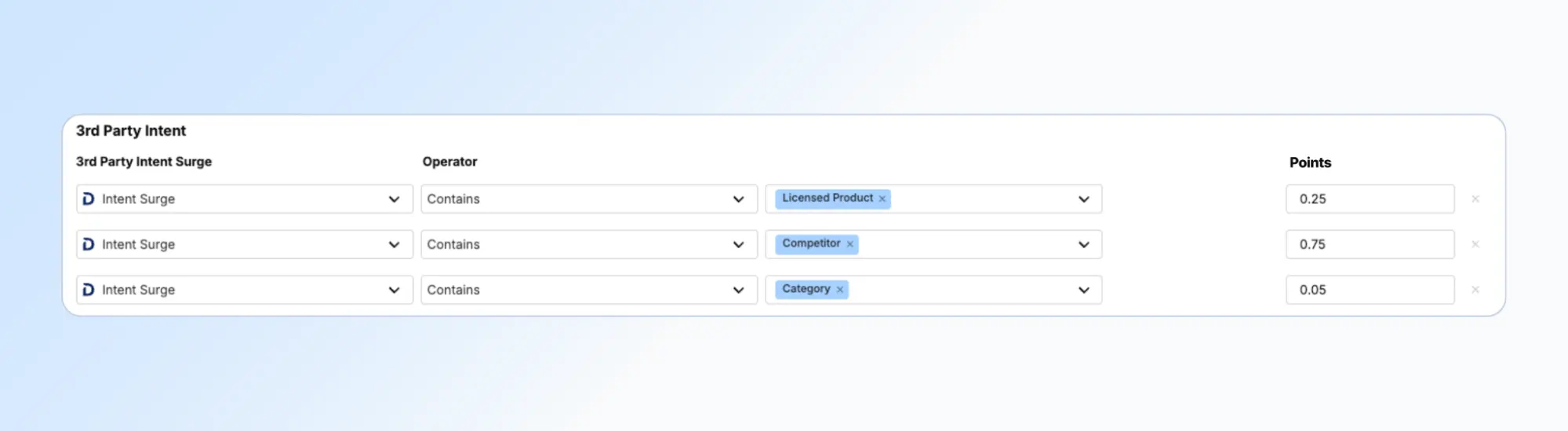
Example A: Grouping scoring (no location)
Goal: Score all TrustRadius intent based only on grouping.
Steps
- Open the Engagement Points scoring model
- Go to 3rd Party Intent
- Add three rows using:
- Activity: Intent Surge
- Operator: Contains
- Match values: Licensed Product, Competitor, Category
- Assign engagement points:
- Licensed Product: 0.25
- Competitor: 0.75
- Category: 0.05
- Save
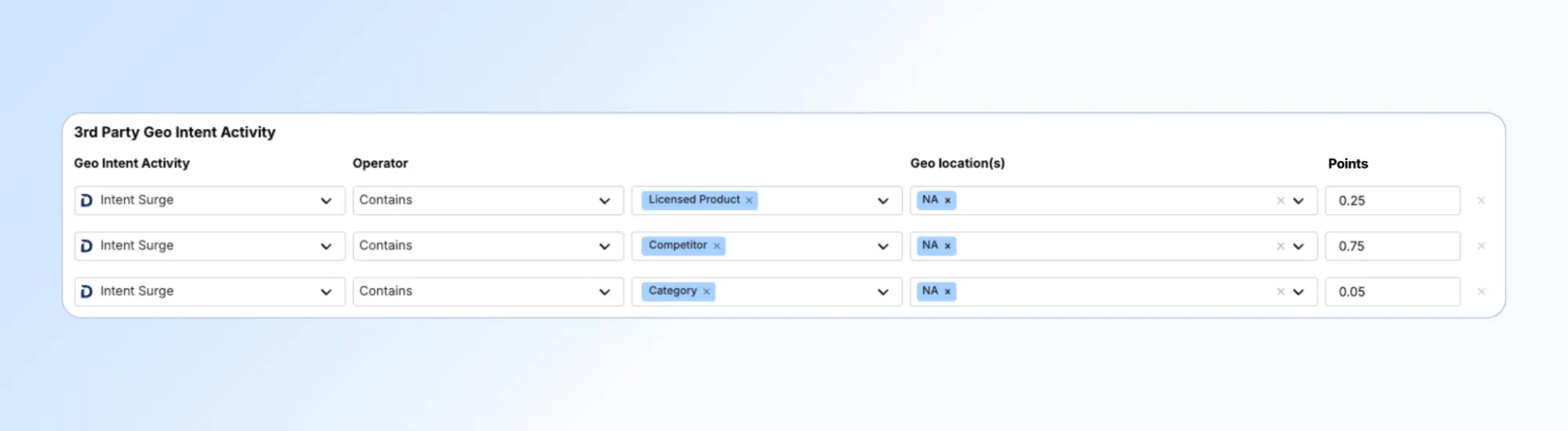
Example B: Grouping scoring + Location (United States and Canada)
Goal: Only score TrustRadius intent from the US and Canada.
Steps
- Open the Engagement Points scoring model
- Follow the steps above for Example A
- Under 3rd Party Geo Intent Activity, add grouping rows (Licensed Product, Competitor, Category)
- Set Geo Location(s): United States, Canada
- Assign grouping engagement points
- Save
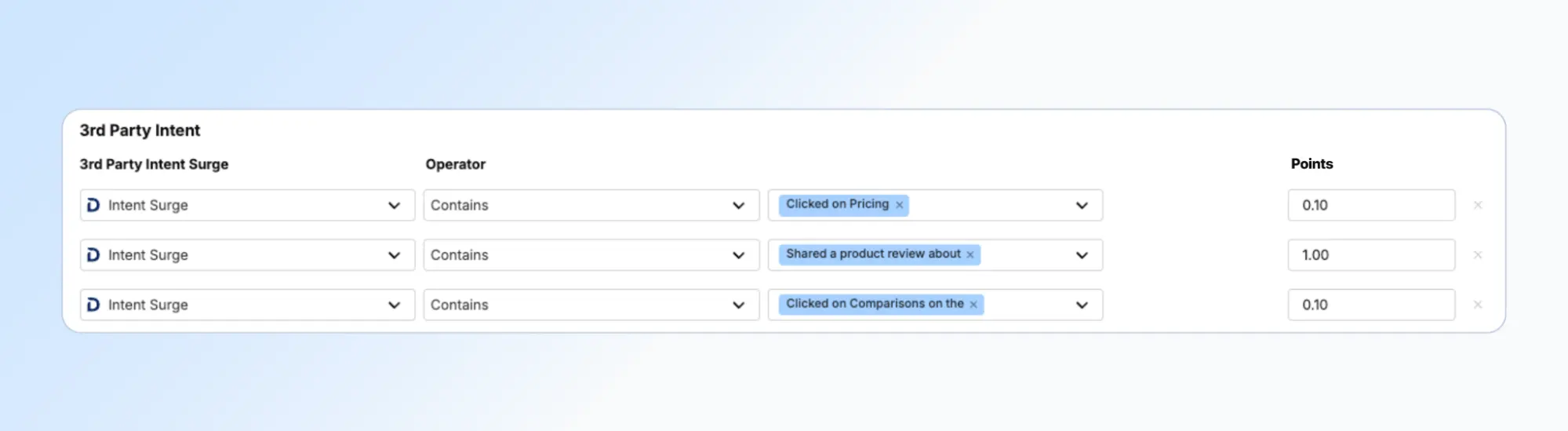
Example C: Basic signal scoring (no location)
Goal: Score specific TrustRadius signals regardless of grouping.
Steps
- Open the Engagement Points scoring model
- Go to 3rd Party Geo Intent Surge
- Add one row per signal pattern (e.g., Clicked on Pricing)
- Use Operator: Contains
- Assign basic signal engagement points
- Save
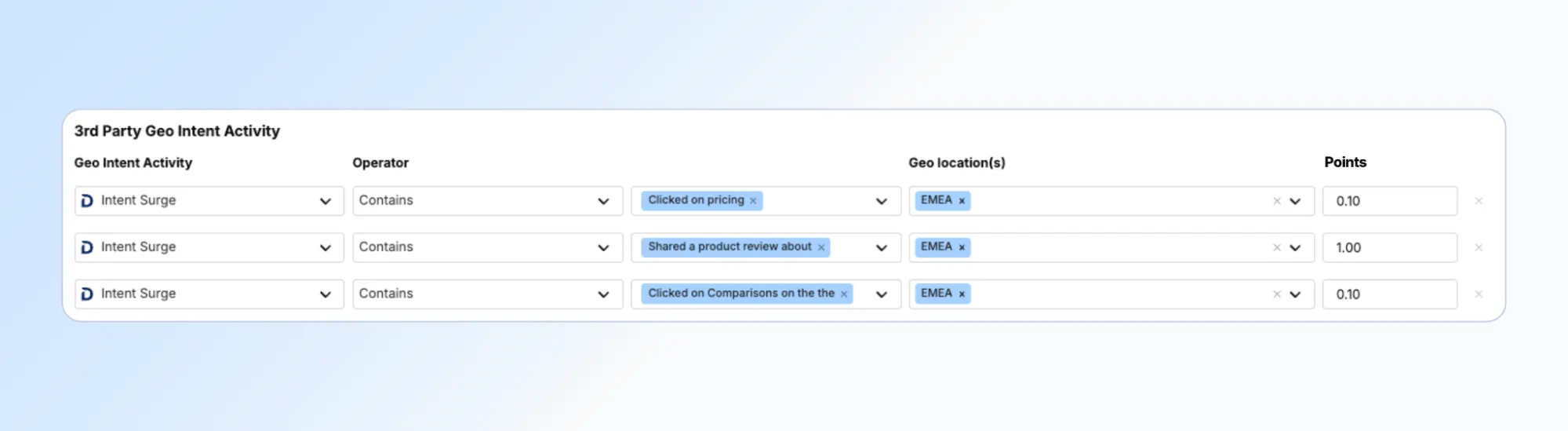
Example D: Basic signal scoring + Location (EMEA)
Goal: Score specific TrustRadius signals only when activity occurs in EMEA.
Steps
- Open the Engagement Points scoring model
- Go to 3rd Party Geo Intent Activity
- Add rows for desired signal patterns
- Set Geo Location(s): EMEA
- Assign basic signal engagement points
- Save
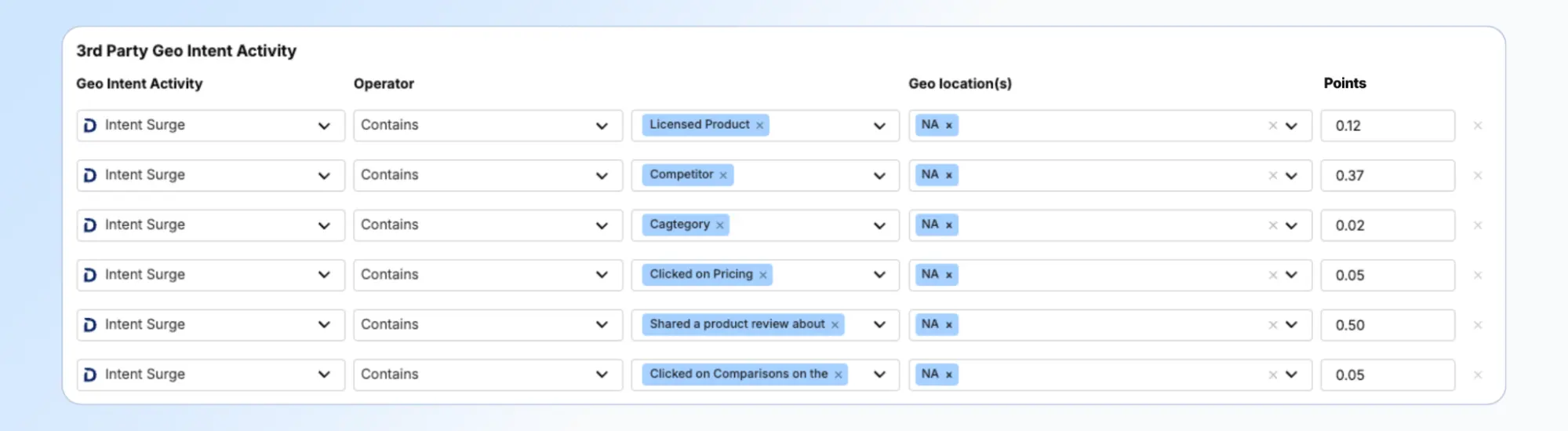
Example E: Grouping + Signal scoring (Basic + Location: US and Canada)
Goal: Score US/Canada TrustRadius intent using grouping and basic signal scoring.
Part A: Score groupings
- Go to 3rd Party Geo Intent
- Add grouping rows (Licensed Product, Competitor, Category)
- Set Geo Location(s): United States, Canada
- Assign 50% of grouping values:
- Licensed Product: 0.12
- Competitor: 0.37
- Category: 0.02
Part B: Score signals
- Add rows for basic signal patterns
- Keep Geo Location(s): United States, Canada
- Assign 50% of basic signal values
- Save
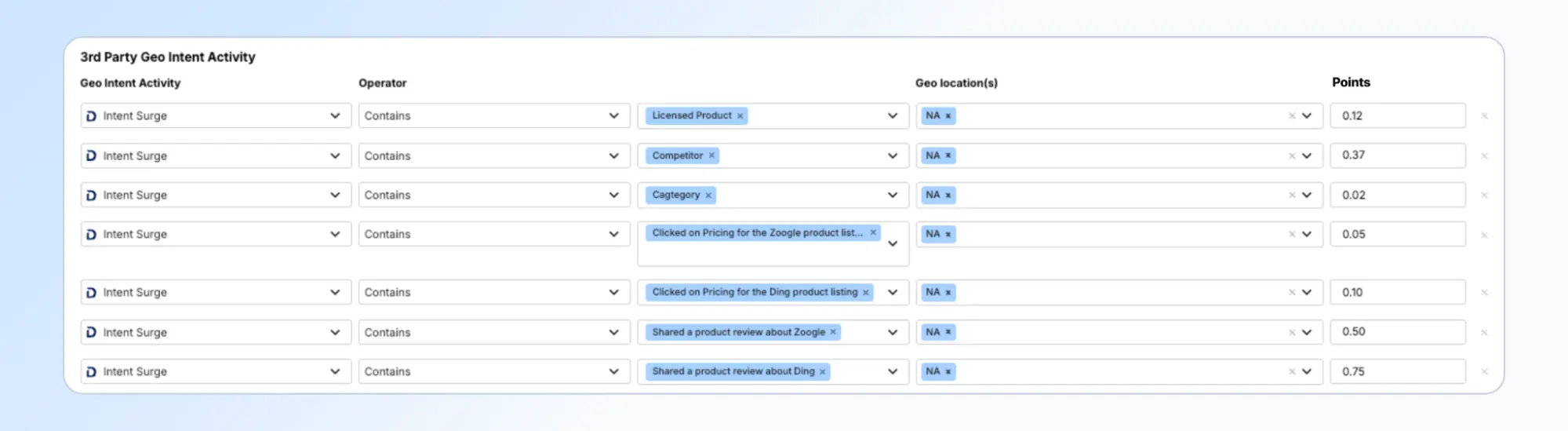
Example F: Grouping + Signal scoring (Advanced + Location: US and Canada)
Goal: Score US/Canada TrustRadius intent using grouping and advanced signal scoring.
Part A: Score groupings
- Add grouping rows in 3rd Party Geo Intent
- Set Geo Location(s): United States, Canada
- Assign 50% of grouping values
Part B: Score signals
- Confirm exact TrustRadius product and competitor names
- Add product-specific signal rows (Operator: Is)
- Set Geo Location(s): United States, Canada
- Assign 50% of advanced signal values
- Save
The results
By following this playbook, TrustRadius intent contributes to engagement in a way that is:
- Structured grouping-aware, signal-aware, or both
- Controlled prevents inflated engagement from high-volume research
- Actionable pricing, reviews, and comparisons stand out
- Aligned scoring reflects what GTM teams actually act on
Partner with Demandbase Experts
Get tailored strategies and insights to optimize your approach, drive engagement, and unlock new opportunities.
More Playbooks
Complete playbook for setting up and optimizing Engagement Points in Demandbase marketing programs. Learn scoring methodologies, channel-specific assignments, and best practices for webinars, content, events, and forms.
Transform your B2B strategy with this comprehensive playbook on implementing account-based experiences (ABX). Learn how to align teams, optimize metrics, and drive sustainable revenue growth.
Maximize additional advertising budget with four practical strategies for scaling campaigns, retargeting engaged accounts, and reaching high-intent buyers.
We have updated our Privacy Notice. Please click here for details.